Done these and tried to run the docker again, but still got the same result.
Can you run $ cat /etc/docker/daemon.json again?
If there is still empty, please vim it as below.
{
    "runtimes": {
        "nvidia": {
            "path": "/usr/bin/nvidia-container-runtime",
            "runtimeArgs": []
        }
    },
    "default-runtime": "nvidia"
}
Then, update the docker.
sudo pkill -SIGHUP dockerd
It worked and I entered the docker as a root.
What should I do next?
OK, please run below. Note that local-yourname should be modified.
$ sudo chown local-yourname:docker /var/run/docker.sock
$ sudo usermod -a -G docker local-yourname
Do you mean you can run below command successfully, right?
$ docker run --runtime=nvidia -it --rm --shm-size 32G nvcr.io/nvidia/tao/tao-toolkit:5.2.0-pyt2.1.0 /bin/bash
If yes, please run below command inside the docker. Note that there is not tao in the beginning.
# pointpillars dataset_convert xxx

OK, please run below to check if there is still memory issue.
# pointpillars dataset_convert xxx
- Does “yourname” refer to my account on the system?
- It seems that “sudo” doesn’t exist in this environment.
Yes.
Ignore doing this now. You already run inside the docker successfully now.
Could you share $nvidia-smi as well?

Please add -v in the command line to map your_local_path to docker path.
For example,
$ docker run --runtime=nvidia -it --rm --shm-size 32G -v /home/morganh/localfolder:/workspace/tao-experiments/
nvcr.io/nvidia/tao/tao-toolkit:5.2.0-pyt2.1.0 /bin/bash`

As for the virtual memory consumption, it’s around 11.2G and there’s no sign of it increasing till full consumption over time.

So it’s strange.
Running dataset_convert directly from terminal or docker looks fine, but memory consumption may increase over time if I do the same thing via .ipynb from firefox.
In the terminal, please let it continue to run. Please check if it can run successfully in the end.
Successfully, and the peak memory consumption is 11.7 GB.
OK, so can you share ~/.tao_mounts.json?
Please refer to TAO Toolkit Launcher - NVIDIA Docs to set shm_size as well in it.
Then run again to check if it is successful in notebook.
Currently the content is as shown below:
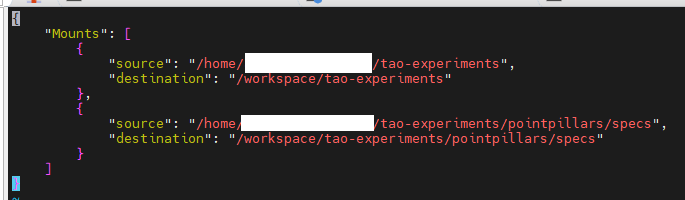
Refer to TAO Toolkit Launcher - NVIDIA Docs, you can add
    "DockerOptions": {
        "shm_size": "32G",
        "ulimits": {
            "memlock": -1,
            "stack": 67108864
        },
        "ports": {
            "8888": 8888
        }
}Added this part to the mount file and the port I used to run .ipynb on firefox was exactly 8888. I modified the port in the DockerOptions to some other port like 8890 so that dataset_convert could start running.
However, the mem consumption still acts like how it used to. Obviously increasing.
Is it successful or “crashed” ?
It’s still running, with memory consumption obviously increasing as well.
So far near 10K out of the 45K point cloud data have been processed in dataset_convert and the memory consumption has reached 26 GB so far. I’m expecting that the tab would just crash again when it reaches full memory consumption once again during the process.