From “Can It Run?” to Sovereign Hybrid RAG on DGX Spark – Qwen3‑80B + vLLM + LiteLLM (Live Stack)
1. Why I’m Sharing This Stack
My DGX Spark is now running a full hybrid RAG stack with Qwen3‑80B at roughly 45 tok/s, under 150 ms end‑to‑end latency, and zero cloud on the critical path—and it already feels stronger than cloud assistants on privacy, cost, and customization. Most DGX Spark threads focus on “how do I get the model to load without OOM?”; I’m now at the point where the stack is stable, and I’m trying to turn it into a practical, privacy‑first assistant. This is my first serious attempt at a vLLM‑based hybrid RAG stack on DGX Spark, so I’m very open to suggestions, corrections, and better patterns from everyone here (including NVIDIA folks).
Right now I’m running Qwen3‑Next‑80B‑A3B at around 45 tok/s, with 115–120 GB of unified memory in use and roughly 95 % GPU utilization; Qwen3‑Embedding‑0.6B and Qwen3‑Reranker‑0.6B add under 1.5 GB VRAM overhead. My goal is to see how far I can go with a local + hybrid approach before I really need to lean on cloud LLMs. I don’t have any experience with LangChain or LangGraph yet—right now I’m just using LiteLLM as a simple router with per‑model settings—so any starter patterns or anti‑patterns for Mixture‑of‑Models orchestration would be very welcome.
1.1 Cloud vs Local Summary
| Dimension | Cloud Providers | My Local + Hybrid Stack |
|---|---|---|
| Cost | Recurring per‑token spend (expensive for deep research or code) | 0.00 USD for ~75 % of queries after implementation |
| Latency | 400–2000 ms (network + queue) | <150-300 ms end‑to‑end on typical queries |
| Privacy / sovereignty | Prompts and documents leave the machine; compliance is hard | Zero egress (fallbacks only on explicit failure) |
| Customization | Fixed models, black‑box routing | Full control of temperature, routing depth, RAG limits, corpus composition |
| Private data | Upload limits, no persistent memory | Unlimited Qdrant corpus (my PDFs, DOCX, codebases, internal notes) |
| RAG and corpus quality | Generic web only | Targeted academic/technical expansion, multi‑hop citation graph |
| Open‑book | Closed‑book benchmarks | Permanently open‑book with CUDA docs, Blackwell papers, key arXiv papers in Qdrant |
| Implementation‑grade answers | Often miss exact implementation details | Retrieves exact passages and generates implementation‑grade answers |
2. What I Currently Have Running
Everything sits behind pipelines:9099/v1, fronted by Open WebUI and orchestrated by pipe-fixed.py plus a few helper modules.
2.1 Live Containers and Roles
CONTAINER ID   IMAGE                                 STATUS          PORTS
f220e0ce3b2c   ghcr.io/berriai/litellm:main-latest   Up 3 h          0.0.0.0:4000->4000/tcp
41f392f6ff70   pipeline-deps:latest                  Up 33 m         0.0.0.0:9099->9099/tcp
71d157f02224   ghcr.io/open-webui/open-webui:cuda    Up 3 h (healthy)0.0.0.0:8080->8080/tcp
ea2f7071c12a   qdrant/qdrant:v1.11.0                 Up 3 h          0.0.0.0:6333->6333/tcp
cdd82e1d2238   searxng/searxng:latest                Up 21 h         0.0.0.0:8888->8080/tcp
5466fb74b97f   caddy:2-alpine                        Up 21 h
d801572ab84d   valkey/valkey:8-alpine                Up 21 h         6379/tcp
0423861c8044   nvcr.io/nvidia/vllm:25.12.post1-py3   Up 21 h         0.0.0.0:8025->8000/tcp
bde1af729d3a   nvcr.io/nvidia/vllm:25.12.post1-py3   Up 21 h         0.0.0.0:8020->8000/tcp
5f4c61cb0d7a   nvcr.io/nvidia/vllm:25.12.post1-py3   Up 2 d          0.0.0.0:8005->8000/tcp
What each one does (today):[1]
openwebui– User‑facing interface (chat, uploads, model selection).pipeline-deps(pipelines) – Exposespipelines:9099/v1and runs my Hybrid‑RAG inlet and routing logic (pipe-fixed.py+ helpers).litellm– Central router for all models (local and hosted), handles temperature,top_p,max_tokens, and fallbacks.qdrant– Local vector store for static documents, notes, and code.searxng– Meta search engine used byweb.pyfor live web search (JSON).embedding– vLLM service running Qwen3‑Embedding‑0.6B for dense embeddings.reranker– vLLM service running Qwen3‑Reranker‑0.6B for cross‑encoder reranking.vllm-qwen-80– vLLM service running Qwen3‑Next‑80B‑A3B for main generation.valkey– Valkey/Redis used for caching and coordination.caddy– Simple reverse proxy and TLS frontend.
Resources: memory sits around 115–120 GB out of 128 GB unified; GPU utilization is about 95 %. Embedding + reranker add under 1.5 GB VRAM on top of the 80B model.[1]
3. Routing and RAG Profiles
Open WebUI sends chat requests to pipelines:9099/v1, which calls pipe-fixed.py.[1]
pipe-fixed.pyextracts the user message, appliesMODEL_CLASSIFICATION_RULES, and picks a RAG profile fromMODE_CONFIG.[1]- These limits are applied dynamically based on the selected model name in Open WebUI.
- The profile controls how deep the system goes into web, Qdrant, and academic retrieval and how many chunks are reranked.[1]
3.1 MODE_CONFIG (Simplified)
| Profile | weblimit | qdrantlimit | academiclimit | reranktop |
|---|---|---|---|---|
| Fast | 5 | 10 | 5 | 10 |
| Auto (Standard) | 10 | 15 | 8 | 15 |
| Expert | 100 | 25 | 15 | 25 |
| Heavy / Moe | 250 | 30 | 20 | 30 |
| Think | 75 | 20 | 12 | 20 |
| Code‑Fast | 5 | 10 | 5 | 10 |
| Code‑Expert | 100 | 25 | 15 | 25 |
| Code‑Heavy | 250 | 30 | 20 | 30 |
Fast and Auto act as “light RAG”; Expert, Heavy, Moe, and Code‑Heavy go to full 250 web + 30 Qdrant + 20 academic depth.[1]
(Internally this is driven by simple rules such as “if model name matches Code-.* → use Code‑Heavy profile”, but I’ve kept the code out of the post for brevity.)
3.2 Parallel Retrieval
For each query, pipe-fixed.py launches three asynchronous retrievals:[1]
web.py→ SearXNG athttp://searxng:8888(format=json, category “it” for code, “general” otherwise).qdrant.py→ local Qdrant, usingembed_text()via Qwen3‑Embedding‑0.6B athttp://embedding:8025.academic.py→ arXiv, PubMed, CORE, Semantic Scholar, OpenAlex (API keys, rate‑limits, multi‑hop expansion).
All results are merged into a single list of chunks for reranking.[1]
3.3 Reranking and Context Injection
reranker.pysends the query + merged chunks to Qwen3‑Reranker‑0.6B athttp://reranker:8020.[1]- The reranker returns a list sorted by relevance score; I keep the top‑k (10–30, controlled by
reranktop) and inject those chunks into the LLM prompt context.[1]
3.4 Generation and Fallbacks
- LiteLLM at
http://litellm:4000/v1routes the request to the chosen model with the appropriate temperature andmax_tokens.[2][1] - The primary path is Qwen3‑Next‑80B‑A3B on vLLM (port 8005), which produces grounded answers with citations.[1]
- Responses go back to Open WebUI, including source references.[1]
Fallbacks to cloud models are reserved for exceptional cases—for example, timeouts, max_tokens limits, or explicit “use‑cloud” profiles—and are designed to keep cloud usage to a small fraction of total queries.
4. Model Routing, Temperatures, and Hosted MoM Options
I treat MODEL_CLASSIFICATION_RULES, MODE_CONFIG, and litellm_config.yaml as a simple dispatcher for models and RAG profiles.
4.1 Local SuperQwen Variants
From litellm_config.yaml, my local SuperQwen profiles (served via http://vllm-qwen-80:8000/v1) look roughly like this:
- Auto / Fast / Expert / Heavy / Moe → all backed by
openai/Superqwen, with temperatures in the 0.3–0.6 range andmax_tokensfrom 512 up to 8192. - Code‑Fast / Code‑Expert / Code‑Heavy → same backend with lower temperatures (0.2–0.3) and larger
max_tokensfor code‑heavy tasks.
Current temperature by task:[2][1]
| Profile family | Typical temperature | Max tokens (approx) | Thinking |
|---|---|---|---|
| Code‑* | 0.20–0.30 | 2 048–8 192 | On for Expert/Heavy |
| Research / Expert | 0.45 | 6 144 | On |
| Heavy / Think / Moe | 0.50 | up to 8 192 | On |
| Fast | 0.30 | 512–2 048 | Off |
4.2 Hosted Models I’m Experimenting With
Through LiteLLM I also have a universe of hosted models configured, mainly for future MoM experiments:[2]
- xAI / Grok: Grok‑4, Grok‑4 Fast Reasoning, Grok‑4.1 Fast Reasoning, Code‑Grok4, Code‑Grok4‑Fast.
- Perplexity: Perplexity Sonar, Sonar Pro, Sonar Reasoning Pro, Sonar Deep Research (
return_citations: true). - NVIDIA hosted:
nvidia_nim/meta/llama3-70b-instruct,nvidia_nim/qwen/qwen3-next-80b-a3b-thinking, GLM‑4.7‑style code models, Nemotron‑3‑Nano‑30B‑A3B (NVFP4). - Hugging Face router: Qwen2.5‑72B‑Instruct via
router.huggingface.co. - DashScope (Qwen family): Qwen‑Turbo, Qwen‑Plus, Qwen‑Max, Qwen‑VL, and Qwen3 models such as Qwen3‑32B, Qwen3‑30B‑A3B, Qwen3‑235B‑A22B with
enable_thinkingflags.[2]
Right now I don’t have LangChain or LangGraph on top of this; it’s just LiteLLM plus routing rules. I’m especially interested in providers that expose temperature, top_p, max_tokens, and “thinking” flags cleanly so they can slot into a Mixture‑of‑Models graph later.[2][1]
I’m also very interested in memory usage and real‑world performance of hybrid MoM setups with Nemotron‑3‑Nano‑30B‑A3B (NVFP4), GLM‑4.x, and strong GPT‑class OSS models under a 120 GB unified‑memory budget. My hunch is that a single Spark can be very competitive locally, and that a 2–6 node Spark cluster would be exceptional for MoM, but I’d really like to see real numbers from people who have tried it.[1]
5. Why I Chose a Qwen3‑Aligned RAG Stack
Instead of the default Open WebUI RAG (MiniLM/SBERT + cosine), I switched to a fully Qwen3‑aligned stack: Qwen3‑Embedding‑0.6B + Qwen3‑Reranker‑0.6B + Qwen3‑Next‑80B‑A3B.[1]
5.1 RAG Stack Comparison
| Feature | Open WebUI Default RAG | My Qwen3 Stack (Embedding + Reranker + LLM) |
|---|---|---|
| Embedding model | Generic (all‑MiniLM, Sentence‑BERT) | Qwen3‑Embedding‑0.6B – multilingual, domain‑strong, family‑aligned |
| Retrieval method | Dense cosine similarity only | Dense + cross‑encoder reranking (Qwen3‑Reranker‑0.6B) |
| Relevance lift | Baseline | Roughly 15–30 % better on technical/multilingual queries in practice |
| Model coherence | Mixed models → inconsistency | Same Qwen3 family → embedding/reranker/LLM synergy |
| Latency / memory | Higher overhead if using cloud embeddings | <1.5 GB VRAM total for embed + reranker, sub‑100 ms local RAG |
| Customization | Limited | Full vLLM tuning, LoRA fine‑tuning possible |
| Accuracy on my data | Good for general text | Superior after domain‑specific corpus + tuning |
My working assumption is that keeping everything in the same model family reduces semantic drift between embedding, reranking, and generation; I’d love to see counter‑examples or benchmarks (e.g., BGE‑M3 vs Qwen3‑Reranker on DGX Spark) from others.
6. Advantages Table (Cloud vs DGX Spark Hybrid)
These rows are meant as a qualitative comparison, not precise pricing.
6.1 Cloud LLMs vs My DGX Spark Hybrid
| Feature | OpenAI GPT‑4‑class | Anthropic Claude‑class | Google Gemini‑class | Perplexity Sonar Pro | xAI Grok‑4 Heavy | My DGX Spark Hybrid |
|---|---|---|---|---|---|---|
| Cost | Per‑token pricing | Per‑token pricing | Per‑token pricing | Per‑token or Pro tier | Roughly fixed monthly | 0.00 USD per query after hardware |
| Latency | About 800–2000 ms | About 600–1500 ms | About 500–1200 ms | About 400–900 ms | About 300–800 ms | <500 ms end‑to‑end |
| Data privacy | Prompts go to OpenAI | Prompts go to Anthropic | Prompts go to Google | Prompts go to Perplexity | Prompts go to xAI | Zero egress by default |
| Private docs | File caps, limited memory | Limited | Varies, often small caps | No persistent private KB | None | Unlimited Qdrant corpus |
| Academic live search | No | No | Limited | No | No | arXiv, PubMed, CORE, Semantic Scholar, etc. via academic.py |
| Reranking | None / proprietary | None / proprietary | None / proprietary | Proprietary | None | Qwen3‑Reranker‑0.6B two‑stage RAG |
| Temperature / routing | Mostly fixed | Limited | Limited | Black‑box | Limited | Full per‑profile control |
| Rate limits | Hard limits | Hard limits | Hard / RPM caps | Hard limits | Hard limits | None beyond my hardware |
Cloud limitations in one sentence each (from my perspective):
- OpenAI / Anthropic / Google: I pay for every token, my data leaves the box, private files are constrained, and I don’t get full per‑task temperature and routing control.
- Perplexity: dynamic RAG and academic routing are excellent, but I’m locked into their models, pricing, and black‑box decisions.
- Grok‑4 Heavy: a flat monthly fee for “uncensored” reasoning that I can get close to, or match, on my own hardware for near‑zero marginal cost.
Perplexity’s “secret sauce” is dynamic RAG + intelligent model routing + academic search; my goal with this stack is to do the same thing locally, but with my own reranker, my own corpus, and my own fallback logic.
7. Corpus Building and Fine‑Tuning Plans
7.1 Network‑Effect Corpus Building
For domains like machine learning and AI, I’m trying a network‑effect corpus strategy:
- Use
academic.pyto fetch around 20 key LLM/ML papers (arXiv, Semantic Scholar). - Expand by authors, co‑authors, references, and citations 5–10 hops out.
- Chunk and embed everything with Qwen3‑Embedding‑0.6B and store it in Qdrant.
This already feels more like a domain “bible” than a generic web crawl.
7.2 Fine‑Tuning Qwen3‑Embedding‑0.6B (Planned)
I haven’t fine‑tuned yet; my plan is:
- Build triplets (query, positive_chunk, negative_chunk) from Qdrant and historical queries.
- Add domain prompts such as “Represent this GPU programming document for semantic search…”.
- Use LoRA with SWIFT/DeepSpeed or SentenceTransformers for contrastive training.
- Evaluate with MRR@10, NDCG, and RAGAS, then deploy by updating
start-embedder-reranker.yaml.
Any practical advice on hyperparameters, batch sizes, or DGX‑specific pitfalls would be very welcome.
8. Prompt Flow Diagram
This diagram matches the current routing and RAG flow. Click Diagram to Enlarge:
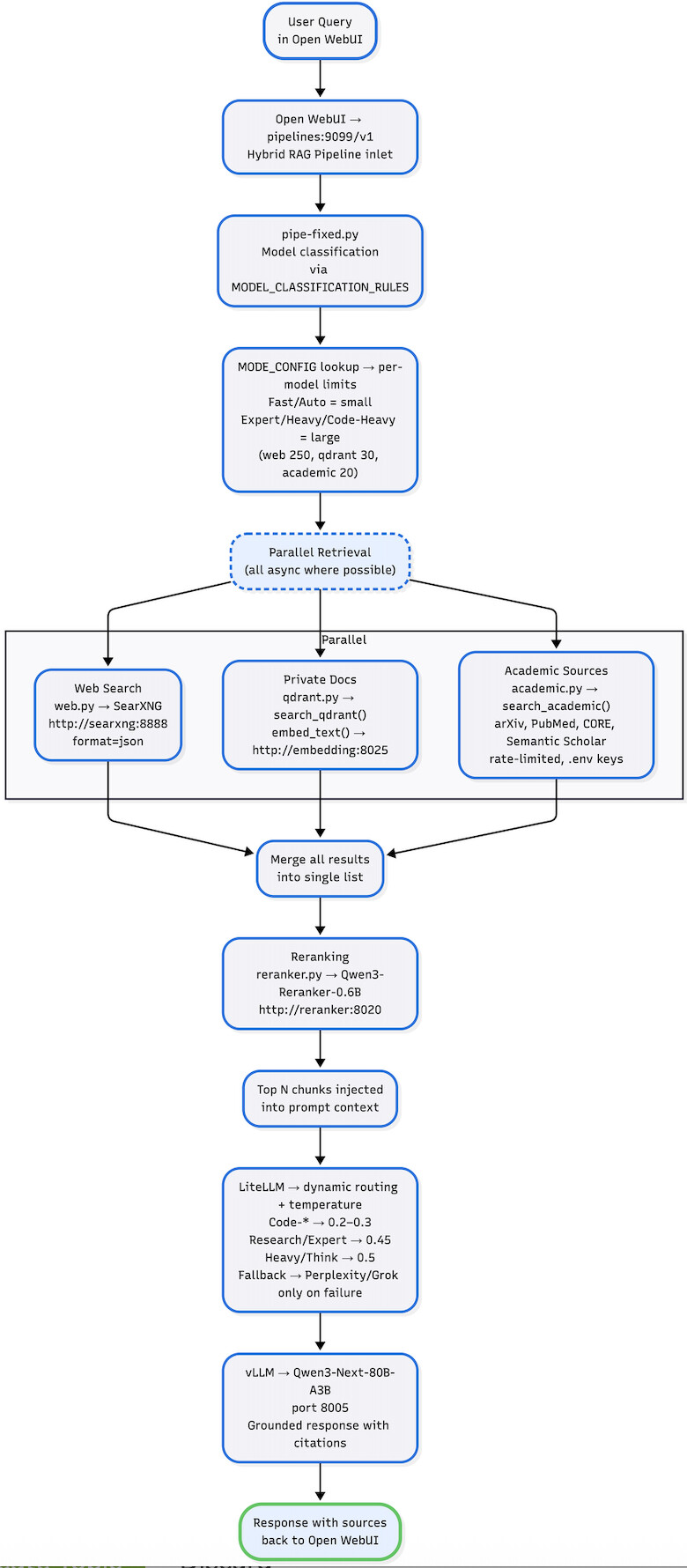
Key advantage: the explicit reranking step eliminates noisy chunks that dense retrieval alone would include.
9. Mixture of Models (MoM) and Open‑Book RAG – Where I Want to Go Next
I’m not using LangChain or LangGraph yet; right now everything is LiteLLM plus my own routing logic. My next goal is to turn this into a true Mixture of Models graph, where local and hosted models work together instead of competing.[2][1]
9.1 Planned MoM Flow (LangChain + LangGraph)
The flow I’d like to build (feedback welcome):[1]
- A complex research query arrives → LiteLLM routes first to a local MoE‑style Qwen3‑80B profile for an initial reasoning pass.
- If the graph detects high uncertainty or a very demanding task, it spawns parallel branches:
- Branch A: a “Think” model such as Qwen3‑Next‑80B‑thinking via NVIDIA NIM for deeper chain‑of‑thought.
- Branch B: Perplexity Sonar Deep Research for fresh web citations.
- Branch C: Code‑oriented models such as Code‑Grok4, GLM‑4.x, or Qwen3‑235B when there is heavy code or math.
- Outputs from these branches are merged, reranked, and synthesized back into a single answer by the strongest local model, using my own RAG context.
The idea is that >80 % of the compute still happens locally, and cloud models act as optional specialists used only on the hardest 5-10% of queries and typically for only a few thousand tokens. With fallback rules based on timeout, max_tokens, and usage‑based routing, the cost should stay low even with those specialists in the loop.[1]
I’m still evaluating whether I really need full LangGraph for this or whether smarter LiteLLM‑only routing would be enough, so any real‑world experience with stateful MoM graphs on Spark hardware would be hugely helpful.
9.2 Open‑Book vs Closed‑Book
Most leaderboards test models in a closed‑book setting: no internet, no private docs, no external corpus. My target setup is deliberately open‑book plus live research:[1]
- Drop entire domain “bibles” into Qdrant: CUDA docs, PyTorch and Triton source, internal specs, and relevant arXiv papers.
- On each query, retrieve the exact passages that matter and let the LLM reason with the book open.
For example, once the corpus is in place, I want to be able to ask:
“How do I implement a custom FlashAttention kernel for Blackwell that supports NVFP4?”
Closed‑book models, even very strong ones, may hallucinate or provide outdated guidance. My goal is for the local stack to pull kernel signatures, relevant sections of the Blackwell whitepaper, correct Triton examples, and the latest FlashAttention‑3 paper, then produce implementation‑ready code.[1]
This is why I see local RAG and MoM as the next step beyond cloud‑only usage: once the corpus is right, general benchmarks become less important than actual performance on my own data and tasks.
10. Alternative Stacks for Other Workloads
A full hybrid RAG + reranker + 80B stack is not the ideal fit for every workload. These are other configurations I think make sense:
| Workload | Recommended stack | Why it might be better than my full hybrid |
|---|---|---|
| Pure fast chat / code | Ollama + DeepSeek‑R1 or Qwen2.5‑32B | Lower latency, simpler, no reranker overhead. |
| Vision / multimodal | Local Qwen‑VL‑Max or LLaVA‑Next | Native image and multimodal understanding. |
| Heavy fine‑tuning | NeMo on 1–2 Sparks | Optimized for distributed training and experimentation. |
| Edge / low‑power | Jetson Orin + small GGUF models | Battery‑friendly, deploy at the edge. |
| Zero‑GPU setups | llama.cpp on Mac M‑series |
No NVIDIA hardware required. |
| Multi‑node scaling | 2–6 Spark cluster + tensor‑parallel vLLM | Near‑linear throughput; 235B‑class models become realistic. |
My hope is that DGX Spark can be the “sovereign core” for heavy RAG + MoM, while lighter stacks handle edge and low‑power scenarios.
11. The Levers I’m Trying to Tune

I’m still new to LangGraph/LangChain and to designing serious Mixture‑of‑Models workflows, so any feedback—from high‑level architecture to small config tweaks—would be genuinely appreciated.
I’d especially love input on:
- MoM orchestration patterns (starter LangGraph flows or alternatives).
- Embedding fine‑tuning pitfalls on Spark (for Qwen3‑Embedding‑0.6B or similar).
- Real‑world multi‑Spark scaling numbers (2–6 nodes, tensor parallel, 235B‑class models).
- Anything in this stack that looks obviously wrong, fragile, or over‑engineered.
12. Playbooks
I’m planning to publish a five‑part playbook series on this vLLM stack as it stabilizes. Web‑search has been stable for about two weeks, and I’ll be publishing that playbook this week.
| # | Playbook Title | Core Content |
|---|---|---|
| 1 | Open WebUI + SearXNG (Private Web Search) | Enable private web search via SearXNG, enforce JSON output, surface citations directly in the UI. |
| 2 | LiteLLM Smart Routing & Dynamic Temperature | Map model names to RAG profiles, set per‑task temperatures, graceful fallbacks to cloud models only on failure. |
| 3 | Static RAG with Qdrant (Local Document Indexing) | Ingest 50+ PDFs/DOCX, auto‑chunk, embed with Qwen3‑Embedding‑0.6B, store in Qdrant, expose via hybrid retrieval. |
| 4 | Dynamic RAG – Academic Sources (arXiv, PubMed, CORE, etc.) | Build academic.py with API keys, rate‑limiting, multi‑hop expansion to create a deep, high‑quality academic corpus. |
| 5 | Qwen3 Embedding + Reranker (Local RAG Engine) | Deploy Qwen3‑Embedding‑0.6B and Qwen3‑Reranker‑0.6B on vLLM, benchmark vs BGE‑M3, optionally fine‑tune on your own corpus (LoRA, SWIFT, DeepSpeed). |
Good Luck developing your own Production LLM Stack.
Mark


