DeepStream Pipeline Synchronization Issues & Conditional Inference Activation

• Hardware Platform (Jetson / GPU) : NVIDIA Jetson AGX Orin
• DeepStream Version : 7.1
• JetPack Version (valid for Jetson only) : 6.1
• TensorRT Version : 8.6.2.3
• Issue Type( questions, new requirements, bugs) : question
Hello,

I have a DeepStream pipeline structured as follows (refer to the attached diagram):

Brief overview:
Source: A camera feed.
File Recording Pipelines (Top 2 Pipelines):

  • First pipeline: Saves video files in H.264 format.
  • Second pipeline: Saves video files in H.265 format.

Inference Pipelines (Bottom 2 Pipelines):

  • These pipelines perform real-time inference on the camera stream.

Issues Encountered:

1. Delayed File Splitting in the H264 and H265 Pipeline

The pipeline is split into four different branches using tee element. H265 branch is connected to an appsink where a Python function handles file splitting every 1 second (similar to splitmuxsink but with custom logic). However, when inference pipelines are active, the expected 1-second interval for file splitting is disrupted, causing unexpected delays. If I disable both inference pipelines, the file splitting works correctly without any delay. Here are time logs in milliseconds.
No delay (no inference pipelines):
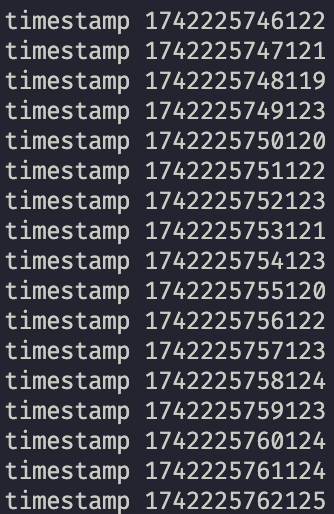
Delay with inference pipelines connected:

Questions:

  1. Pipeline Synchronization: Does DeepStream require all branches of a tee element to reach their respective sinks before proceeding to the next frame, or does the tee distribute frames independently to each branch? I would like each branch that goes from tee to run independently from any other branch that I add to pipeline.

  2. Avoiding Bottlenecks: How can I prevent the H264/H265 pipelines from waiting for inference pipelines to finish before continuing with the next frame?

2. Dynamically Enabling/Disabling Inference Pipelines

I need to dynamically enable or disable one of the inference pipelines at runtime. For example: at certain times, only the bottom inference pipeline should run. The second inference pipeline (called “arcing”) should be turned off, meaning no data should flow through it. To achieve this, I added a valve element at the start of each inference pipeline.

Problem: When drop=true is set for any valve, it unexpectedly disrupts the file-saving logic in the H.264/H.265 pipelines and other inference. It appears that the drop setting is affecting not just downstream but possibly upstream as well.

Question:

  • Why does the valve element seem to affect upstream elements? Does it affects them or no?

  • Is there an alternative element or method I can use at the beginning of each inference pipeline to enable/disable it dynamically without interfering with other parts of the pipeline?

Example use case: Every 10 minutes, the first inference pipeline is active while the second is disabled, then after another 10 minutes, the roles switch.

Can you provide the original image of the pipeline? It is too blur to be viewed.

Hello @Fiona.Chen,
After downloading the image it is indeed blurry. Here is the new image:
pipeline.png.zip (627.1 KB)

Edit1:
I cannot upload it so that it is not blurred. On my computer the image looks nice and sharp, however when i upload it here on the forum and download, the quality is so much worse that i cannot see anything.

Edit2:
I have put it in zip file so there is no quality compression.

I don’t understand this description. Can you explain what does the 1-second interval for file splitting is disrupted mean?

Your source is a live source. You need to set “live-source=1” with the nvstreammux plugins in your inferencing branches. And the “batched-push-timeout” value should be 1000000/framerate of your camera. E.G. If the camera frame rate is 25 fps, the “batched-push-timeout” value should be 40000.

1 Like

gst-valve is GStreamer plugin. Please refer to gstreamer.freedesktop.org for the details and usage.

@Fiona.Chen thank you for your response.
I’d like to clarify my question. In my file processing branches (let’s call them that), which are the top two branches of my pipeline, I aim to split the incoming file precisely every 1 second. To achieve this:

  • The H.264 branch has a splitmuxsink at the very end.
  • The H.265 branch uses a custom splitmuxsink that splits the incoming stream every 60 frames.

Observations:

  1. Without inference branches:

When my pipeline consists only of file processing branches (without inference), the files are split almost exactly at 1-second intervals (as seen in the first image with timestamp logger, timestamp are in ms at the difference between them is negligible).

  1. With inference branches:

After adding two inference branches, the pipeline no longer splits files consistently at 1-second intervals. Some files are significantly shorter , while others are significantly longer . This is visible on second image with timestamps logger, values there differ significantly every 1 second.

Question

Do file processing branches wait for inference branches?

My hypothesis is that the file processing branches are waiting until the inference branches fully process their frames. Is this true, or does each branch after a tee element operate independently?

  1. Live stream and batch inference:

My source is a live stream, and I noticed that when setting live-source=1, I can no longer perform inference in batches. Currently, inference runs with batch-size=8. Does setting live-source=1 still allow inference to run in batch mode? Previously, I was advised that live-source=1 disables batch inference - can you confirm this? I created recently a post with this here: Nvidia Post

  1. Valve element for dynamically disabling pipeline branches:

I want to periodically enable and disable specific branches in my pipeline. Would the valve element be a good choice for this? Is there a better DeepStream element that can temporarily stop data flow and prevent inference from being executed in those branches? In tee element i saw a property leaky, will this be a better choice than using valve?

Thanks for the batched-push-timeout hint - I’ll update that accordingly.

Does the timestamp come from GstBuffer which contains the NAL data?

It is possible since the tee only clone GstBuffers which mean the GstBuffers in the src pads share the same memory.

Please check valve usage by yourself. It is open source GStreamer plugin. The only tips we can tell you is that the valve plugin does not generate new buffers and it blocks both buffers and events, you need to use it very carefully. For more information, please google by yourself.

It is important to correct the nvstreammux settings with live source.

@Fiona.Chen thank you for your response.

No, it is Python timestamp in nanoseconds which is logged once the file is saved. Also what is NAL data, I cannot find it in documentation? Moreover, the timestamp that is logged is unix timestamp of current time, as far as I checked, there is no such timestamp in GstBuffer, there is only pts and dts which are timestamps relative to start of the pipeline.

In this case, can i split incoming stream in such a way, that GstBuffers are not shared? Is there a different element that will enable me to split incoming stream into different branches that are independent from each other?

I still do not understand why I am supposed to change nvstreammux element for live-source=1. I want to process inferences in batches and setting live-source will not allow me to do that.
Moreover,nvstreammux elements are NOT in file processing branches, they are only in inference branches. I would expect all branches to work independenty from each other. So that files can be saved at their own speed and inference can be processed at its own speed. I would like file processing branches not wait until inference is done processing. Each branch should work independently, is it possible to achieve?

If valve element blocks incoming buffers it means they will never end up in sink. Because of that file processing cannot proceed with another frame because it is currently dependent on other branches (from what I can observe) it waits for branch with valve element to finish processing and once its done it proceeds with next frame. This is something i would not expect my pipeline to do. I would expect it to generate each frame within specified FPS and if one branches needs more time for processing it does not affect other branches which work independently.

Observation

I have probe functions connected at the very end of each inference branch. Once i add return Gst.PadProbeReturn.DROP at the beginning of the probe function it affects the whole pipeline. No files are being saved and second inference is halted and does not perform any inference.

Example

Let’s assume one of the inference branches outgoing from tee element suddenly takes more time for postprocessing or model suddenly crushes, it will affect the whole pipeline even downstream from the element where error occured. I would expect the other branches work accordingly once one of the pipelines has hard time. I would not expect it to break or halt the whole pipeline downstream because of some error.

How can you guarantee the file is saved exactly at the moment you want?

If you don’t do that, the latency is not guaranteed.

No. They are not totally separated, they all work on the same “live” source and share the same memory after “tee”.

Then you may need huge “buffering space” to keep the asynchronized GstBuffers.
Most DeepStream plugins shares hardware buffers but not copy the buffers.

If you want them to be separated, you may run in four separated pipelines but not four branches in one piepline.

@Fiona.Chen thank you for your response

In appsink i am emitting a saving file signal once 60 frames is accumulated and the file is immediately saved and right after that the logger logs its timestamp. File is saved with the timestamp of 60th frame accumulated and this timestamp is logged.

I understand thank you, could you just confirm whether i can process inferences in batches once live-source is set to 1 or no?

How can i achieve that if i only have one live source camera? Running 2 separate pipelines is not feasible since camera daemon is occupied by the first pipeline that is being run. Second pipeline throws an error that Error generated. gstnvarguscamerasrc.cpp, execute:805 Failed to create CaptureSession which means that camera thread is occupied and cannot capture video for second pipeline.

The frames are always processed in batch. You have only one source while set the nvstreammux batch size to 8, the nvstreammux will wait for a long time to collect the 8 frames from the single source if you don’t set “live-source=1”. Then the other branches will also wait if the GstBuffer is not consume in time.

It is no meaning to handle 8 frames in one batch if you have only one camera. The pipeline involves long delay.

@Fiona.Chen thank you for your response. So in case of having only one camera, inference should be performed with live-source set to True of nvstreammux and batch-size=1? Is it advised to perform inference not in batch size mode when having only 1 camera and instead process one frame at a time? I will also add that both inference branches can perform inference with postprocessing below 16 ms, so inference can be done before next frame is created and delivered from camera.

If you concern about the performance and latency,the answer is “yes”.

I don’t understand this description.

Thank you @Fiona.Chen, I understand now.

Regarding my question, I was referring to my setup, where I have only one live camera as the source. In a previous message, you mentioned:

Given this, I wanted to clarify: When using a single camera, should inference be performed with live-source=True? This setting ensures that frames are processed one at a time rather than in batches. Essentially, my question is:

Would it be better to perform inference on each frame as soon as it arrives, rather than accumulating frames into a batch and introducing some delay?

“live-source=TRUE” guarantee the pipeline always process the batch at once no matter how many frames are collected in the batch. For your one camera case, the batch always contains only one frame no matter what the batch size value is.

“live-source=TRUE” guarantees the batch be processed right after at least one frame arrived.

1 Like

This topic was automatically closed 14 days after the last reply. New replies are no longer allowed.