Hi Marco,
As the API docs explain, currently running code may be forced to finish before the setting can be changed on the hardware. So changing frequently between kernels (flipping back and forth between max L1 and SMEM) could introduce significant pipeline bubbles depending on the running time of each kernel.
My advice is to not prematurely optimize for the size of L1 or SMEM: use the optimization when you know it is beneficial (i.e. if you know you aren't bottlenecked by memory it will have much lower benefit). Test the setting for performance benefit on each kernel on each GPU architecture.
Yes, thank you for the reply, I found it later on the doc that changing this settings might trigger a device sync. Currently the kind of work load we have does not leverage shared memory due to the kind of alg it deals with which would allow to easily set the option card wide to get an initial bench-marking. Thank you for getting back to me, as usual, thank you for the great article.
Hi Mark. A very interesting article. Very useful for learning. But I'd like to know how you would reorder an bigger array. For example, if my device has a maximum threads per block size of 1024, does it mean that I can only reorder an 1024-element array at most?
Many thanks.
Do not be misunderstood with LINUX shared memory ( quite useful way for managing data transfers to device ) in real-word already-made code accelerations. Theoretically it is joinable with java programming language, but I am not sure. Some trivial C++ example:
https://github.com/PiotrLen...
Post Scriptum:. quite useful in distributed manner computations in client-server application.
Hey did you figure out the answer?
Hi Mark. The weirdest thing is happening. I declared a shared array in a global kernel, set some values into it, and whenever I try to access it, it returns a value of zero. The only time it returns a value is if I access the shared array with the thread index. Is this common? My head's seriously spinning over this.
It's hard to debug code I can't see. If you are writing to the location with one thread and reading the same location from another, then you must synchronize between the accesses (__syncthreads()), or else you have a race condition which results in undefined behavior.
Thanks for answering. I did __synthreads() before and after, and I also did it in a "if(id ==0)" condition, to no avail. I suspected a bad installation on my end. But before reinstalling Visual Studio and CUDA, I changed the __shared__ array to a normal one stored in DRAM since it will only be accessed sqrt(n) times in total in an execution. Thank you for your time with me.
thank you Mr Harris, These Discussions Are Very Helpful...
but my question is what if I want to use of static reverse function in different streams?
how should I specify the size of shared memory?
I think it would be something like this:
<<<k,t,64*sizeof(int),s1>>>(...)
after specifying the size of shared memory It seems I'm using of dynamic reverse version! is it true?
Hi Mark, I tried your dynamic allocation approach for multiple arrays. But the complier says nC and nF are undefined. Should I define them before calling the kernel?
Are bank conflicts still something to look out for in the newest architectures (Turing, Pascal etc.)?
Yes, although in the grand scheme of things they are a micro-optimization in most kernels.
No, you can launch a LOT of blocks. And loops also work just fine in CUDA C/C++. So your problem size is not limited.
Hello Mark
This is quite informative.
Could you please specify which metrics I can use from the profiler tools which can hint at shared memory bank conflicts?
Also, I have been trying to figure out the metrics which could signify cache misses in a CUDA application. It would be really helpful if you could tell which ones would help me!
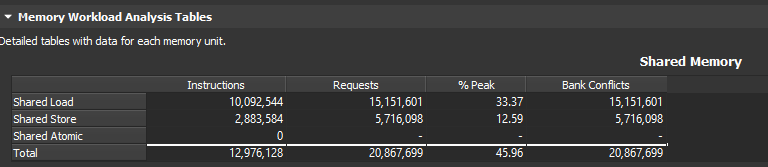
In NSight Compute, you can collect e.g. the `Memory Workload Analysis Tables` section, which includes detailed information on shared memory usage. https://uploads.disquscdn.c...
The Raw page will show you which exact metrics are collected as part of this `group:memory__shared_table`. The exact metrics can change depending on which GPU is targeted. e.g.
```
l1tex__data_bank_conflicts_pipe_lsu_mem_shared_op_ld.sum
l1tex__data_bank_conflicts_pipe_lsu_mem_shared_op_st.sum
l1tex__data_pipe_lsu_wavefronts_mem_shared_cmd_read.sum
l1tex__data_pipe_lsu_wavefronts_mem_shared_cmd_read.sum.pct_of_peak_sustained_active
l1tex__data_pipe_lsu_wavefronts_mem_shared_cmd_write.sum
l1tex__data_pipe_lsu_wavefronts_mem_shared_cmd_write.sum.pct_of_peak_sustained_active
sass__inst_executed_shared_loads
sass__inst_executed_shared_stores
smsp__inst_executed_op_shared_atom.sum
```
From my understanding, there are 4 warp schedulers per SM and means 4 warps can execute concurrently in a single SM, if possible. If you use 32-bit mode as in [1] on a device that supports 64-bit transactions, it says that no bank conflict is created when two 32-bit addresses are accessed in the same 64-bit word as it maps to one memory bank and can be multicasted to the two threads in the same warp. This means in total only 16 banks need to be accessed by one warp.
My question is thus: is it possible for another warp to access the latter 16 banks concurrently? I.e. will using 32-bit floats double my throughput from shared memory when compared to using 64-bit floats? (in case it makes a difference I’m using a C.C. 7.5 device)
[1] Programming Guide :: CUDA Toolkit Documentation
Upon further reading, I discovered that 64-bit mode is only supported for C.C. 3.0 and was changed in C.C. 5.0 and newer to only support 32-bit mode. So in my case (C.C. 7.5), using doubles will result in bank conflicts and 2 transactions from shared memory will be required.
[1] Best Practices Guide :: CUDA Toolkit Documentation