I’m using Roo Code and I want it to interact fully and correctly with gpt-oss 120B on DGX Spark, including tools/function calling and strict (structured outputs / valid JSON without extra text).
Current issues:
SGLang: tools support is unstable.
vLLM: problems with tools and strict.
Question: what runtime/server can I use to run gpt-oss 120B so that Tools + Strict work properly and consistently with Roo Code (OpenAI-compatible API / structured outputs)?
I was able to get Roo Code + gpt-oss-120B on DGX Spark working reliably (at least for Tools / function calling) using a vLLM container build from:
https://github.com/eugr/spark-vllm-docker
What works
OpenAI-compatible /v1/chat/completions
Tools / function calling works consistently (model returns tool_calls correctly).
Roo Code can drive tool calls as long as it uses tool_choice: "auto" (gpt-oss behavior).
What does not (yet) work “fully”
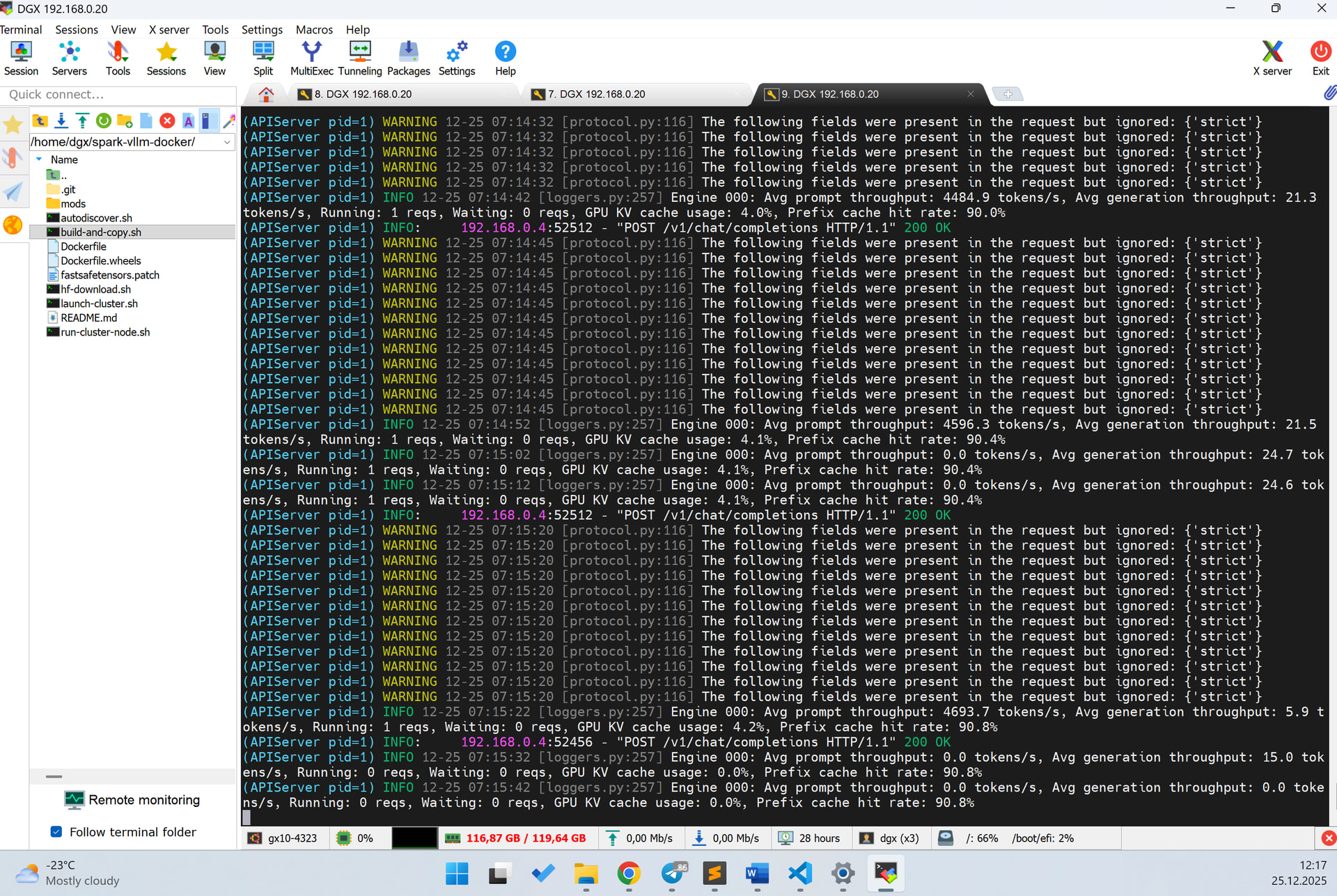
Strict / structured outputs in the OpenAI sense is not fully supported in this path. If the client sends strict, vLLM logs that it is ignored. For my use case this wasn’t critical—the key point was having stable tool calling.
Why I didn’t use NIM
I tested the NIM gpt-oss-120B container on DGX Spark, but it does not work on GB10 in my environment (looks like GB10 / CC 12.1 support is not enabled in that container build yet). So I couldn’t get a working NIM runtime for gpt-oss-120B on this hardware.
Minimal working launch (vLLM via spark-vllm-docker)
This is the command I’m running (weights already downloaded locally; no re-download):
If your priority is Roo Code + stable Tools/function calling on DGX Spark + gpt-oss-120B, the vLLM runtime from spark-vllm-docker is currently the most practical path I’ve found.
If someone has a NIM image/tag that truly enables GB10 for gpt-oss-120B, I’d be interested to test it, but right now I can’t get NIM working on DGX Spark for this model.
Thanks a lot for sharing the working setup and the repo — very helpful.
Quick question: does gpt-oss-120B work reliably for you with a “terminal/shell” tool (i.e., when Roo Code calls something like a terminal/exec tool and then reads stdout/stderr)? Specifically, is the model stable at:
actually producing tool_calls when it should, and
then correctly consuming the tool output (terminal stdout/stderr) and using it in the next steps?
I’m asking because in my case Roo Code occasionally reports that “gpt-oss didn’t call any tools” (as if no tool_calls happened at all). The conversation flow doesn’t crash — Roo Code keeps trying to continue the project — but the agent logic becomes unreliable because expected tool usage gets skipped.
P.S. I spent a lot of time trying to get both stable tool calling and OpenAI-style strict/structured outputs (valid JSON, no extra text) working “properly”, but I couldn’t make it work reliably — not with SGLang, and not with the NIM prebuilt containers I tested.
Do you think it’s realistically possible on DGX Spark (GB10 / SM12.1) to get both Tools + Strict working consistently without hacks? My impression is that when people say they have “everything working”, they may be running the models on different servers/hardware rather than DGX Spark (SM12.1).
Any practical pointers (exact vLLM version/build, client-side Roo Code settings, flags, or known limitations) would be much appreciated.
My experience with Roo has been spotty - at some point it didn’t work well at all. So I used Cline more, although when Roo works, it produces better results. I don’t know if it uses native tool calling or not, but Cline (that Roo was forked from) has it as a separate toggle - and native tool calling improves reliability a lot - haven’t had any problems with tool calling lately. So if there is an option to turn on native tool calling, turn it on. Also make sure the context size is set properly in Roo/Cline.
Anyway, I just tried the latest Roo, and it seems to work fine with command line output too.
Having said that, I’ve just switched to Insiders preview of VS Code - Copilot is now able to talk to any OpenAI compatible endpoint, and I like it the most so far.
In Roo Code, I already switched to native tools - and actually they’re enabled by default for the OpenAI API. In general, they work well. The only thing that’s a bit inconvenient is that you need to set the model’s reasoning level in the system prompt; otherwise it tends to reason poorly and sometimes produces nonsense.
I also tried the VS Code Insiders preview, and it’s definitely good - but it feels more suitable for editing an existing project. If you want to build an MVP from scratch, you have to “push” it constantly.
With Roo Code, I can just give a clear technical spec where I ask it to deploy the project at the end, run the tests, and only say it’s finished once all tests pass successfully. Then it drives the terminal on its own and keeps fixing things until it gets the final working result.
That said, in the VS Code Insiders preview they somehow managed to avoid stuffing the entire prompt with the full conversation history, and it feels faster. It’s like it sends a concrete task to the model instead of the whole dialogue context. I don’t yet understand how they did it, but what I noticed right away is this: a project that Roo Code built over several hours on a single DGX Spark, VS Code built faster - maybe in about an hour - and subjectively the output quality seemed better. However, I didn’t fully verify it: I didn’t run the project, and I’m basing that impression only on my Python experience.
You need to turn on “Prompt Caching” checkbox in Roo to achieve this. I feed my models through LiteLLM and have this (and context size) properly reported in the model metadata, so Roo automatically sets this, but when you connect to vLLM directly, you need to set it up by hand.
But VS Code Insiders preview goes a little bit further and sends only relevant parts of long source code files for editing. Speeds up things considerably and avoids LLM “forgetting” some of the existing code.