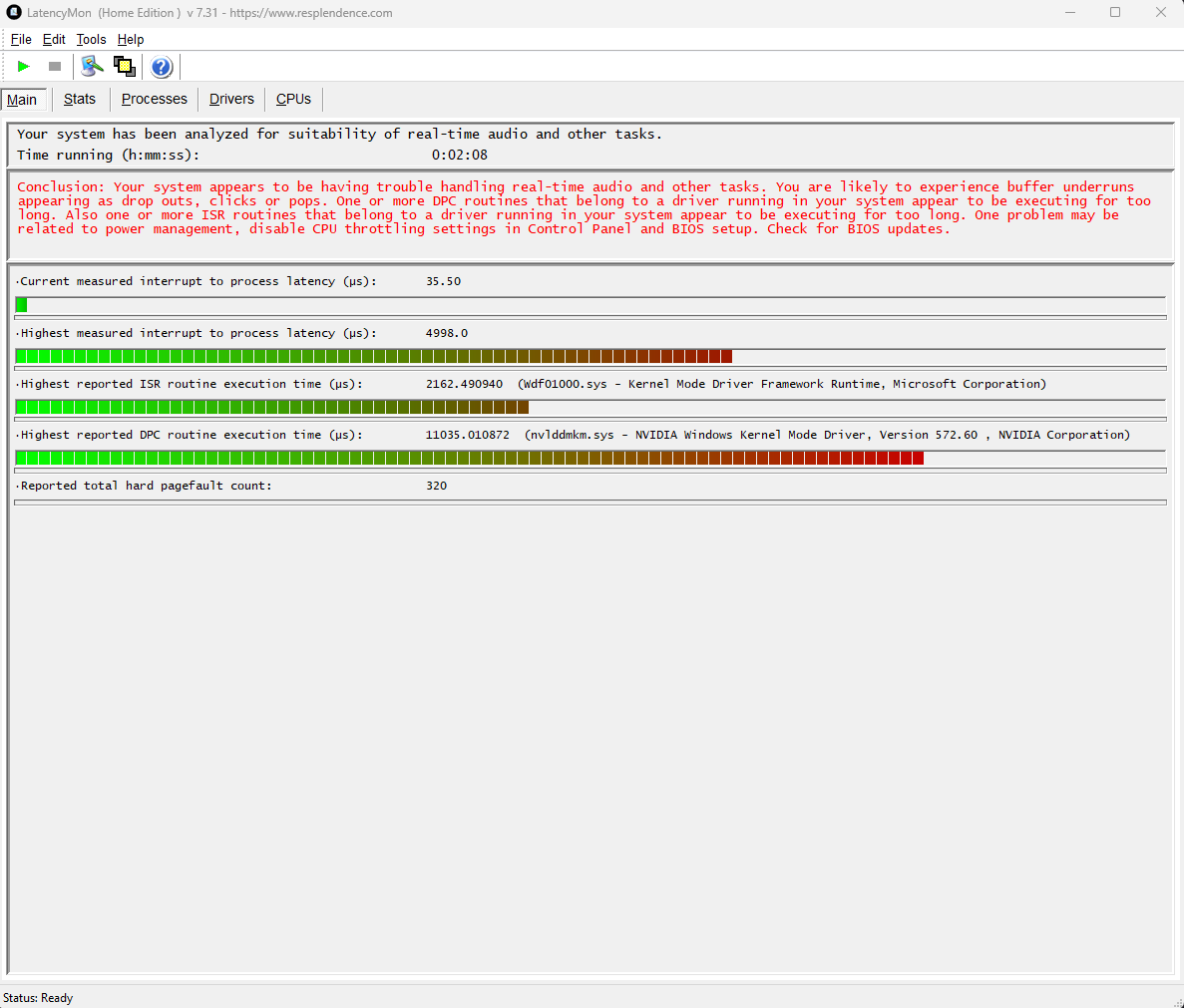
I realized that there are some anti cheats hooking the windows kernel and modifying the way some things work internally to protect memory and the integrity of the processes, these detours are lightweight but can cause stalls in cases where there are many context swaps (these detours lock a region of memory and perform few lookups to see whether the “new” context thread has access to protected regions).
Even if there are no games running, these hooks are still injected, they are essentially a “NOP” in the sense that decryption routines aren’t executed but these hooks still need to read the cr3 and see whether the anti cheats has it listed on an allowlist array.
There’s obviously many parameters that can still cause crackling and issues but this might be something that nvidia and users can verify.
I don’t want to mention the anti cheats name as I could be calling them out for no reason but, my personal experience shows good audio performance on any driver version as soon as those anti cheats aren’t present on the computer.
It makes no difference which driver I’m using. Since Windows 11 22h2 the Nvidia driver-package is going rubbish. I can’t watch any Youtube video or other videos on different streaming-protals without any interrupts. This behaviour was present also on Windows 10 more than a year ago and from all what I can read, the issue is based on the power-management of Windows 11 and also inside Nvidia drivers. This DPC latency is not acceptable, when you are using a simple usb-soundcard beside an Nvidia grahpic card. From all what I know, some guys are struggeling with the same issue on the AMD graphic card driver… @2024a please fix it!
I updated my Nvidia drivers half a year or more ago and all my games quit working on Steam. I dropped back to an earlier one and all was fine again. NOT the same the past few days after I got the newest driver.
This time Steam would start fine, until I tried to start a game. Then Steam and in kind, whatever game I was trying to play would crash. After 4 days, two hospital visits for the health issues due to the stress this put me under. (I have Crohn’s Disease and I’m testing 3 games for Devs and that’s hard to do if they can’t run. No stress there.)
Dropping back to the previous driver didn’t work. Removing all of Nvidia and reinstalling didn’t work. Today, not wanting to get any sicker, I did what I dreaded … I deleted Steam and my 900 games on it. I deleted Nvidia again and reinstalled the latest driver once again. Then I reinstalled steam and the 40 games I figure I’ll be playing over the next week or two to get me started again.
Hi @lcomeno, welcome to the NVIDIA developer forums.
I am sorry to hear that you have PC issues, I hope things work out for you.
It seems the problems you describe are slightly off-topic to the audio latency issues of this thread. I recommend for things like that you check out our end-user related GeForce forums.
Man i wanna thank you from the bottom of my heart-
Thanks to you my crackling stopped. I did as you say change the settings in control panel and downgrade my driver.
Im a music producer and it was SOOOOOOOOOOOOOOO ANNOYING…
Now finnally after MONTHS of trying thanks to you its working… THANK YOU SOO much man!!! <3
I confirm that with Drivers 535.98 the problem persists. I use Ableton Live in ASIO mode with an Audient ID14 MK2 interface and if I don’t activate the Maximum Performance option in the control panel, I suffer from audio crackling. Maximizing the idle performance of the gpu can be a temporary solution, but being forced to consume 65 watts (RTX 4090) while doing tasks that have little to do with the gpu does not seem convenient. Please NVIDIA fix this. Thank you.
Just wanted to follow-up on this; it’s been nearly a month and I had 0 cracks/pops in my audio, a few days back I installed the anti cheat(s) on my computer again and, boom. Audio problems were back in town.
If anybody has EAC or Vanguard installed, please compare your DPC latency before and after uninstalling the services (you need to do a reboot after uninstalling them).
I own a ProjectLead laptop with Intel I9 and RTX4050.
I experienced DPC issues with Cubase and Live!
I followed your suggestions after upgrading to the latest version of the driver for my 4050, the 536.67.
Everything great!
Latencymon with real time audio confirmed and low latency in my DAWS.
Thanks a lot!!
Issue is still happening on my GeForce RTX 4070 Latpop GPU with driver version 546.33. The ultra low latency + max performance power management mode settings did help quite a bit. However intermittently I still get > 2ms DPC calls.
I’m a music producer and some days ago I bought a laptop with an rtx 4070. Today I sadly realized that I’m forced to use integrated graphic card in order to work in semi-realtime processing.
This is a big limitation for me cose cannot use an external monitor anymore, as the hdmi out is only driven by the NVidia card.
Just meditating to return the laptop and approach Apple system for the first time in 41 years.
Is there anything new about the solution of this latency issues?
This issue still exists on at least the two most recent studio drivers. Downgraded to 536.67 and audio is working again.
After spending 3 days on this issue, including buying another audio interface, I’m both relieved and pissed off to find a 1 year old thread with the same issue still open. The guy above me hasn’t even received a response in two months, seriously?
Glad my already tight commercial deadline has been shortened by 3 days.
Recently made a purchase of an Asus ROG Strix 17 (2023) with RTX4080, intending to use this very capable 16 core gaming laptop primarily as a music workhorse. Was understandably rather disappointed to diagnose this nvidia driver problem with LatencyMon.
Thanks to the tips provided by NetAndifNG on this thread, particularly about tuning the Control Panel for Ultra and max performance settings, I’m pleased to report stability with the newest 555.99 driver on win11.
Has there really been no movement on this issue since Dec 2022? I can’t use basic zoom/teams video/audio functionality because the latency is so awful?
Issue persists in 572.60 . Have enabled ultra low latency and prefer max performance. Have tried uninstalling - DDU - clean install. Still persists. Very frustrating.
I really wonder that even with the NVIDIA settings maxed out for low latency and static high performance, you still face these problems. Since I have personally gone through every possible optimization task besides that, and finally refrained from using Windows for music production anyways, I can only advice you to switch to Apple hardware.
You won’t regret it. Cheers :)
You don’t need an Apple computer to work with low latency audio without problems. My i7 12700k with Nvidia 4090 runs smooth and without audio glitches, but you have to know how to configure it.
I use a program called Process Lasso to enable turbo mode to the processor preventing unused threads from being parked.
With Nvidia Profile Inspector I created a profile for Ableton where it auto-activates the maximum performance mode of the gpu when starting Ableton.
With those two simple instructions it should work perfectly for you.
That’s amazing and I second you that a Windows computer is able to provide low latency audio production capabilities.
The only difference is that Apple hardware provides this without any intervention.
If the previous poster is willing to follow your advice with success, everything is great.
Hi John, I hope you’re doing well.
I just wanted to ask if you managed to solve the problem?
I have the exact same issue, and even after applying all the settings, it’s still not fixed.
I’m honestly really frustrated — please, if anyone knows how to help, let me know.
I’ve built a very powerful system for recording and producing music, and I honestly don’t know what to do anymore because I can’t record properly.
Hi I hope you’re doing well.
I just wanted to ask if you managed to solve the problem?
I have the exact same issue, and even after applying all the settings, it’s still not fixed.
I’m honestly really frustrated — please, if anyone knows how to help, let me know.
I’ve built a very powerful system for recording and producing music, and I honestly don’t know what to do anymore because I can’t record properly.
Hello, i tried almost everything in this reddit thread:
im still seeing high dpc routine spikes especially in the newest nvidia driver as of october 2025. i reverted to version 576.88 and i had less frequent spikes (every 30min instead of every 5 minutes), but it is annoying while gaming. i also used guitar rig 5 and experience some cpu spikes there as well but less frequent. I would think nvidia would have found a fix for a recurring issue like this already? im running out of options now ive been an nvidia consumer for 16 years , so ill get an amd radeon gfx card i guess