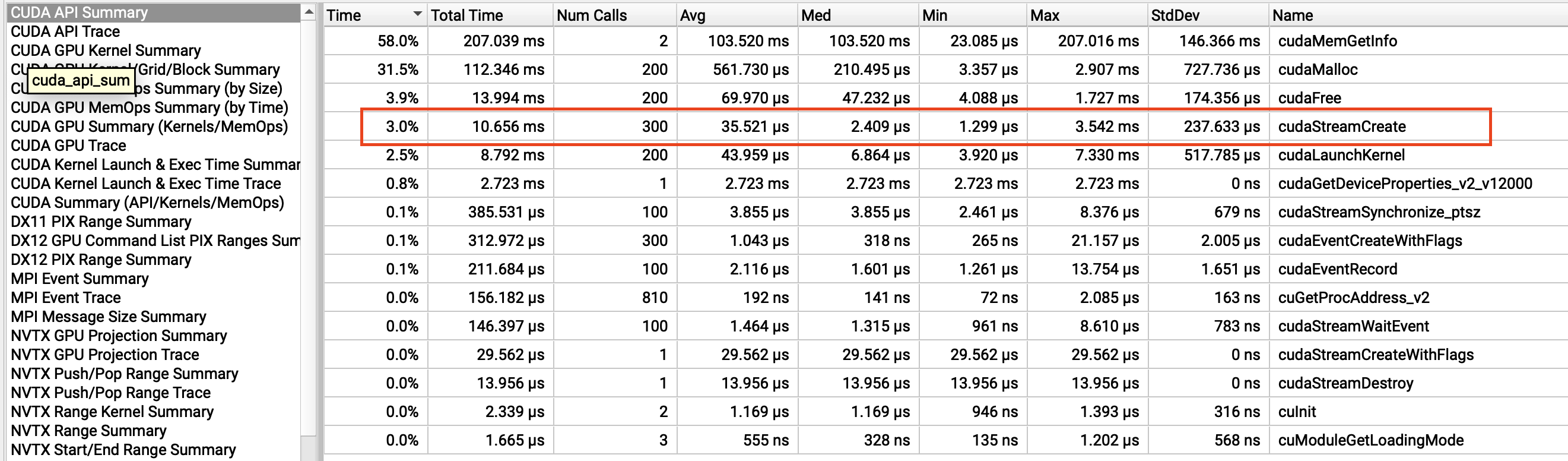
Our team is experiencing a continuous increase in GPU memory usage in an image processing application that uses the NPP library. After investigation, we identified nppiConvert_8u32f_C1R_Ctx as the root cause.
Through testing, I confirmed that a memory leak occurs when all of the following conditions are met:
-
Using
cudaStreamDefaultas the CUDA stream -
Input parameters where
width % 16 != 0 && stride % 16 == 0 -
Calling the function from multiple threads
When examining the CUDA API call history with Nsight, I observed that in the problematic case, a new stream is being created internally, which does not occur in normal cases. It appears that the internal behavior differs depending on the input parameter sizes.
Could you please explain this behavior? Any insights would be greatly appreciated.
Environment:
- CUDA: 12.3
- Driver: 550.163.01
- OS: Rocky Linux 9.3
- Compiler: gcc 11.5.0
Reproduction test code:
#include <cuda_runtime.h>
#include <npp.h>
#include <nppi.h>
#include <iostream>
#include <thread>

void initNppContext(cudaStream_t stream, NppStreamContext& nppCtx) {
    nppCtx.hStream = stream;
    cudaGetDevice(&nppCtx.nCudaDeviceId);

    cudaDeviceProp deviceProp;
    cudaGetDeviceProperties(&deviceProp, nppCtx.nCudaDeviceId);
    nppCtx.nMultiProcessorCount = deviceProp.multiProcessorCount;
    nppCtx.nMaxThreadsPerMultiProcessor = deviceProp.maxThreadsPerMultiProcessor;
    nppCtx.nMaxThreadsPerBlock = deviceProp.maxThreadsPerBlock;
    nppCtx.nSharedMemPerBlock = deviceProp.sharedMemPerBlock;

    cudaStreamGetFlags(stream, &nppCtx.nStreamFlags);
}

void printMemoryResult(const char* testName, int width, int stride, size_t initialMem, size_t finalMem) {
    double increase = (finalMem - initialMem) / 1024.0 / 1024.0;
    std::cout << testName << " (width=" << width << ", stride=" << stride << ")" << std::endl;
    std::cout << "  Initial: " << (initialMem / 1024.0 / 1024.0) << " MB" << std::endl;
    std::cout << "  Final: " << (finalMem / 1024.0 / 1024.0) << " MB" << std::endl;
    std::cout << "  Increase: " << increase << " MB "
              << (increase > 5.0 ? "❌" : "✓") << std::endl << std::endl;
}

void testCaseWithoutThread(int width, int height, int stride, int iterations) {
    size_t free, total;
    cudaMemGetInfo(&free, &total);
    size_t initialMem = total - free;

    cudaStream_t stream;
    cudaStreamCreateWithFlags(&stream, cudaStreamDefault);

    NppStreamContext nppCtx;
    initNppContext(stream, nppCtx);

    for (int i = 0; i < iterations; i++) {
        uint8_t* d_src;
        Npp32f* d_dst;
        cudaMalloc(&d_src, stride * height);
        cudaMalloc(&d_dst, stride * sizeof(Npp32f) * height);

        NppiSize imgSize = {width, height};
        nppiConvert_8u32f_C1R_Ctx(d_src, stride, d_dst, stride * sizeof(Npp32f), imgSize, nppCtx);
        cudaStreamSynchronize(stream);

        cudaFree(d_src);
        cudaFree(d_dst);
    }

    cudaStreamDestroy(stream);

    cudaMemGetInfo(&free, &total);
    printMemoryResult("Without thread", width, stride, initialMem, total - free);
}

void testCaseWithThread(int width, int height, int stride, int iterations) {
    size_t free, total;
    cudaMemGetInfo(&free, &total);
    size_t initialMem = total - free;

    cudaStream_t stream;
    cudaStreamCreateWithFlags(&stream, cudaStreamDefault);

    NppStreamContext nppCtx;
    initNppContext(stream, nppCtx);

    for (int i = 0; i < iterations; i++) {
        std::thread t([&]() {
            uint8_t* d_src;
            Npp32f* d_dst;
            cudaMalloc(&d_src, stride * height);
            cudaMalloc(&d_dst, stride * sizeof(Npp32f) * height);

            NppiSize imgSize = {width, height};
            nppiConvert_8u32f_C1R_Ctx(d_src, stride, d_dst, stride * sizeof(Npp32f), imgSize, nppCtx);
            cudaStreamSynchronize(stream);

            cudaFree(d_src);
            cudaFree(d_dst);
        });
        t.join();
    }

    cudaStreamDestroy(stream);

    cudaMemGetInfo(&free, &total);
    printMemoryResult("Thread per call", width, stride, initialMem, total - free);
}

int main() {
    const int iterations = 100;

    // No leak: stride % 16 != 0
    std::cout << "=== Case 1: width=32, height=35, stride=36 ===" << std::endl;
    testCaseWithoutThread(32, 35, 36, iterations);
    testCaseWithThread(32, 35, 36, iterations);

    // Leak in thread test: width % 16 != 0 && stride % 16 == 0
    std::cout << "=== Case 2: width=31, height=31, stride=32 ===" << std::endl;
    testCaseWithoutThread(31, 31, 32, iterations);
    testCaseWithThread(31, 31, 32, iterations);

    return 0;
}
=== Case 1: width=32, height=35, stride=36 ===
Without thread (width=32, stride=36)
  Initial: 192.188 MB
  Final: 192.188 MB
  Increase: 0 MB ✓

Thread per call (width=32, stride=36)
  Initial: 192.188 MB
  Final: 192.188 MB
  Increase: 0 MB ✓

=== Case 2: width=31, height=31, stride=32 ===
Without thread (width=31, stride=32)
  Initial: 192.188 MB
  Final: 192.188 MB
  Increase: 0 MB ✓

Thread per call (width=31, stride=32)
  Initial: 192.188 MB
  Final: 238.188 MB
  Increase: 46 MB ❌
Thread per call (width=32, stride=36)
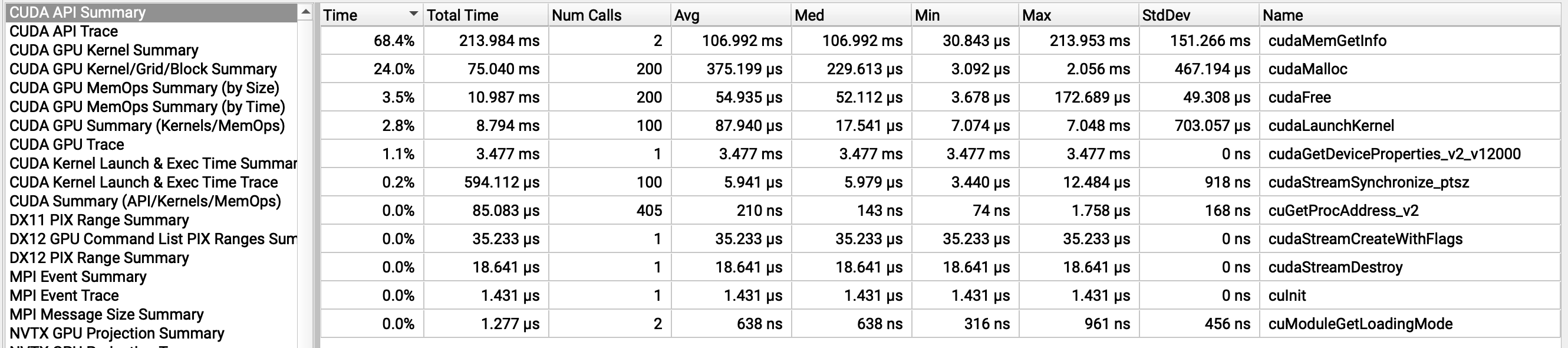
Thread per call (width=31, stride=32)