Hi,I am trying to enlarge cma size on orin, but after I changed the cma size in the dtb, after i recompiled and replaced the dtb, it doesn’t work, it seem like the cma size is limited to 512M.
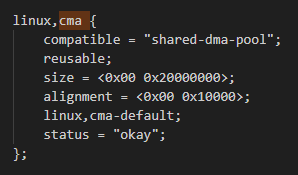
The cma node in dtb:
I change the size property like this:
size =<0x00 0x80000000>;
or
size =<0x00 0x40000000>;
even I change the size from 512M to 2GB or other size,
when I use command ‘dmesg’,the kernel message shows the same result that the cma is 512M:
[.000000 ]Reserved memory: created CMA memory pool at 0x00oo000df6800000,size 512 MiB
[0.000000] OF: reserved mem: initialized node linux,cma,compatible id shared-dma-pool
Hi,
If the device cannot be flashed/booted, please refer to the page to get uart log from the device: Jetson/General debug - eLinux.org
And get logs of host PC and Jetson device for reference. If you are using custom board, you can compare uart log of developer kit and custom board to get more information.
Also please check FAQs: Jetson AGX Orin FAQ
If possible, we would suggest follow quick start in developer guide to re-flash the system: Quick Start — NVIDIA Jetson Linux Developer Guide 1 documentation
And see if the issue still persists on a clean-flashed system.
Thanks!