New DGX Spark: fans barely speed up at high temps and can't be adjusted. Critical. Please open fan control

Hi NVIDIA team,

I have a brand new NVIDIA DGX Spark (the original NVIDIA Founders Edition, bought October 23, 2026). Under normal AI workloads the fans stay far too slow, and there is no way to change them.

What we see

  • Idle: fans ~2,000 rpm, chip 40-46 °C. Fine.
  • Under AI load without throttling: the chip goes past 95 °C, while the fans barely speed up (~2,500 rpm, far below their 4,350 rpm max).
  • With our own GPU clock limit (about 13% slower) we hold it at 78-81 °C, and even then the fans stay at ~2,500 rpm.

What we run for now
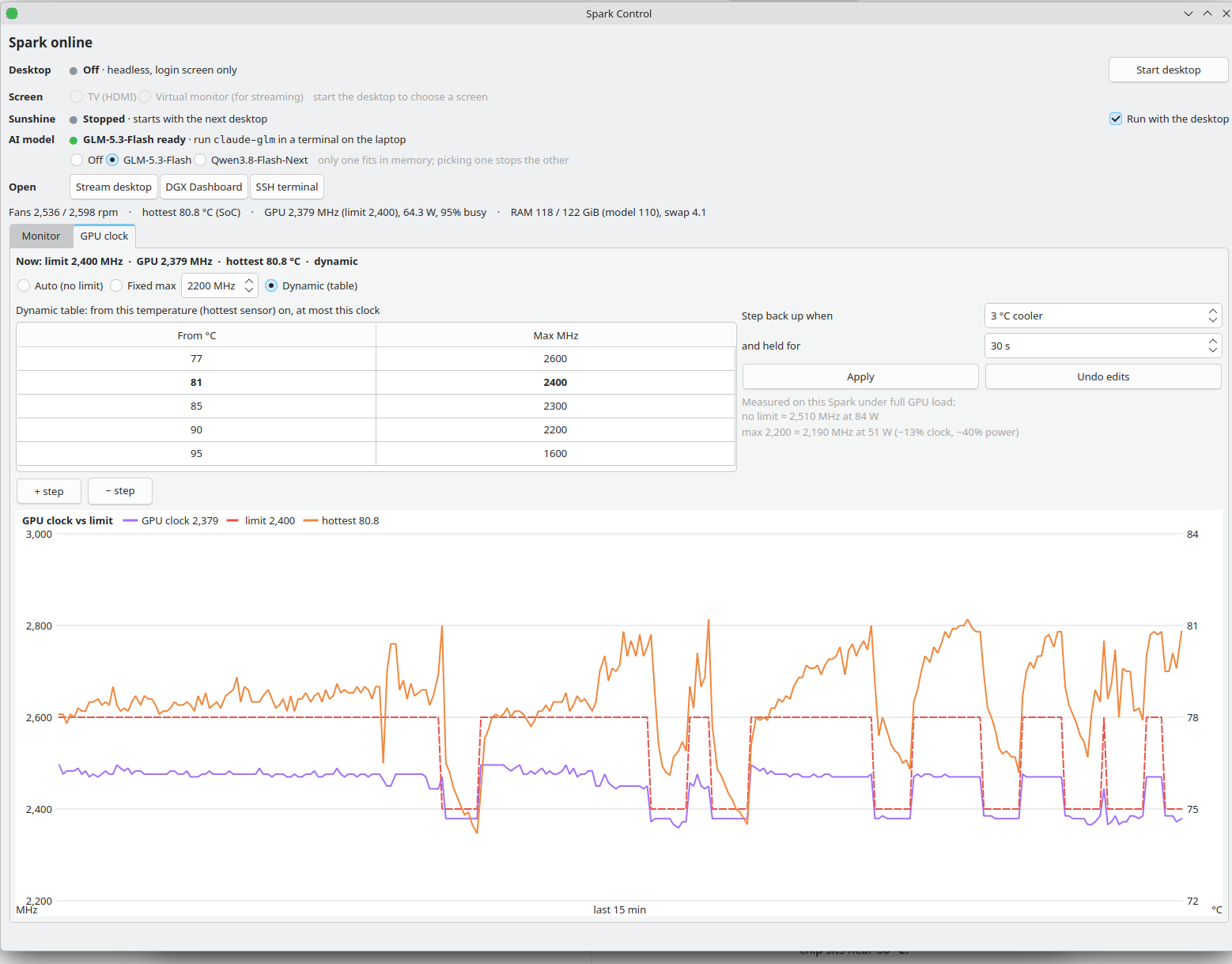
To protect the chip we built our own GPU clock limit that slows the GPU down as it heats up. The screenshot shows 15 minutes of a real workload: the chip still swings between 76 and 81 °C, the clock has to drop again and again, and the fans stay at ~2,550 rpm.
What we’d kindly ask for
Any of these would solve it, ideally as soon as possible:

  1. An urgent EC firmware update (through the normal OTA/fwupd channel) with a fan curve that ramps up properly under sustained load, so the chip stays well below 85 °C at full clocks without throttling.
  2. Making the existing fan knob work. The ACPI fan devices already advertise fine-grained speed control (_FSL, 0-100%) and Linux exposes it, but the EC ignores it. Honouring it would give owners control right away.
  3. Or bringing back the EC fan override (minimum fan speed) that EC 0x03000508 had, working with the current SoC firmware.
  4. A user setting: a fan profile (quiet / balanced / performance) or an adjustable fan curve, in UEFI and/or nvidia-smi / DGX Dashboard. Quiet can stay the default.
  5. A public answer: is the current behaviour intended or a bug, and is there an ETA for a fix?

This is not the first thread about it: many owners report the same thing (for example DGX Spark fan control and fans stop when the screen goes dark). Most owners care about longevity and sustained performance more than silence. Until this is clarified, whether running this hot is intended or a bug, I would advise anyone thinking of buying a DGX Spark to wait. The fix looks simple: let the fans spin faster.

Technical details (for the firmware team)

  • System: DGX OS 7.6.0, kernel 7.0.0-1019-nvidia, driver 580.178.04, BIOS 5.36_0ACUM028, SoC firmware 0x02009e0f, EC firmware 0x03000d07, USB-C PD 0x00000519 (all current per fwupd/LVFS). Room temperature 25 °C.
  • No fan setting exists in the UEFI setup, nvidia-smi or DGX Dashboard.
  • ACPI fan knob: \_SB.FAN0 / \_SB.FAN1 advertise fine-grained control (_FIF, _FSL), and Linux exposes them as /sys/class/thermal/cooling_device0 and cooling_device1 (max_state 100). Writing 100 to cur_state is accepted (it reads back 100), but the fans stay at exactly the same speed (2,014 / 2,056 rpm before and after). The EC reports a fan range of 975-4,350 rpm.
  • EC override: in EC 0x03000508 the EC thermal mailbox accepted a minimum fan speed override (the community nvfancontrol module uses it, through the FF-A eSPI service). In EC 0x03000d07 those override commands are answered as unsupported. EC 0x03000508 together with SoC firmware 0x02009e0f does not work either (the eSPI requests time out), so downgrading the EC is not an option.
  • Clock vs power under full GPU load: no limit about 2,510 MHz at 84 W; capped with nvidia-smi -lgc 300,2200 about 2,190 MHz at 51 W.
  • Happy to provide logs or test beta firmware.

Thanks!

Follow-up: the community fan override can’t help either

We also tried the community fan override (dgx-spark-fan-override, the nvfancontrol module), sending exactly the same requests it uses:

  • On the current EC 0x03000d07 its fan command is answered as unsupported, so it can’t work.
  • We then flashed the older EC 0x03000508 the official way (fwupd/LVFS), where that override used to work. But together with the updated SoC firmware 0x02009e0f the requests time out, so it doesn’t work there either. We’ve gone back to EC 0x03000d07.

So with today’s firmware there is no way at all for owners to raise the fan speed. The only options left are letting a brand new machine run hot, or permanently slowing it down. That is not acceptable.

NVIDIA team, please treat this as urgent: ship a firmware fix (a fan curve that ramps up properly, or user fan control) as soon as possible, and let us know the ETA.

I made this when I had issues: GitHub - christopherowen/dgx-spark-fan-control: Userland fan control for NVIDIA DGX Spark, with additive RPM floors, a temperature-based curve, Secure Boot signing, and DKMS support. · GitHub

also consider:

  • put the unit on it’s side (nvidia logo down, facing forward)
  • leave 40 cm of space behind the unit for airflow
  • try to manage the wires so they’re not blocking exhaust as much as possible

Thanks a lot for sharing this!

We tried the same approach as your driver on our Spark: raising the fans’ minimum speed through NVIDIA’s firmware service (with our own small signed module, not your exact code). Here’s what we found:

  • Current EC 0x03000d07 (SoC firmware 0x02009e0f): the fan controller answers the minimum-fan-speed request with “not supported”, so nothing changes. The fans stay at about 2,000 rpm at idle and about 2,500 rpm under load, whatever we ask for.
  • The system’s own fan control (the ACPI fan device, 0-100%) is no help either: it accepts a 100% request, but the fan speed doesn’t move at all (2,014 / 2,056 rpm before and after).
  • Older EC 0x03000508 (3.5.8, the version you tested): we flashed it through fwupd and the flash itself worked, but with the newer SoC firmware every request to the fan controller timed out without an answer. That leads us to believe the newer SoC firmware (the part that passes messages between Linux and the fan controller) was changed together with the new EC, so the old EC and the new SoC firmware no longer work together. Downgrading the EC alone is therefore not a way out, and downgrading the SoC firmware as well is a risky BIOS flash. We flashed back to 0x03000d07.

So on the current firmware your driver would most likely hit the same wall, and anyone who has installed the latest updates seems to be stuck, with no way to raise the fan speed.

Could you share which EC and SoC firmware your Sparks are on now? And do you have any ideas on how we can push NVIDIA to bring fan control back? Maybe one clear, combined report from several owners would get more attention.

Update: I’ve also opened an official NVIDIA support case for this, reference 261025-000301, asking for it to be escalated to the DGX Spark firmware team. I’ll post here when I hear back.

Affected too? Please open your own case. One ticket is easy to submit. It takes about 3 minutes:

  1. Go to https://nvidia.custhelp.com/app/ask and sign in with your NVIDIA account
  2. Choose product DGX Spark, topic Troubleshooting.
  3. Serial number: on the bottom of the unit or the box, or run sudo cat /sys/class/dmi/id/product_serial
  4. Your firmware versions: fwupdmgr get-devices | grep -A3 -E 'Embedded Controller:|UEFI Device Firmware:' | grep -E 'Controller|Firmware:|Current'
  5. Paste something like this, plus your own temperatures:

My DGX Spark fans barely speed up under sustained load, and there is no way to adjust them on EC firmware 0x03000d07. Same issue as case 261025-000301 and this forum thread: New DGX Spark: fans barely speed up at high temps and can't be adjusted. Critical. Please open fan control
Please escalate to the DGX Spark firmware team and ship a fix: a fan curve that ramps up properly under load, or user fan control.

Then reply here with your case number and firmware versions, so NVIDIA can see how many owners this hits.

Hello maxeffort,

Have you tried limiting the maximum clock on the CPU in addition to the GPU ? Dropping the P core max clock should result in a SOC temperature drop.

There is also a busy spin poll loop in vLLM (busy_loop_s) that causes excess CPU cycles.

I’ve settled on adjusting only the CPU profiles by applying a custom frequency ceiling and changing the governor to schedutil when performing inference on a cluster of two DGX Sparks. This completely resolves the overheating issues for me without changing the default fan curves or touching the GPU profile. The inference speed is not affected.

Here is a script that performs the required adjustments and also supports reverting back to the defaults (note – the changes do not survive a reboot):

#!/bin/bash

# ==============================================================================
# CONFIGURATION VARIABLES
# ==============================================================================
# PROFILE OPTIONS:
#   "vllm"    -> Applies custom target frequency limit & sets governor to schedutil
#   "default" -> Reverts all cores to their native cpuinfo_max_freq & performance governor
PROFILE="vllm"

# Custom frequency ceiling in kHz (used when PROFILE="vllm")
# Examples: 2300000 (2.3 GHz), 2000000 (2.0 GHz)
CUSTOM_FREQ_KHZ=2300000

# Governor used when PROFILE="vllm"
CUSTOM_GOVERNOR="schedutil"

# ==============================================================================
# EXECUTION SCRIPT
# ==============================================================================

# Ensure script is executed as root
if [ "$EUID" -ne 0 ]; then
    echo "Error: Please run as root (e.g., sudo ./set-cpu-profile.sh)"
    exit 1
fi

echo "=================================================="
echo "Applying CPU Profile: [ $PROFILE ]"
echo "=================================================="

for cpu_dir in /sys/devices/system/cpu/cpu[0-9]*/cpufreq; do
    [ -d "$cpu_dir" ] || continue

    if [ "$PROFILE" = "vllm" ]; then
        # 1. Disable auto_select if available to allow full OS governor control
        if [ -f "$cpu_dir/auto_select" ]; then
            echo 0 > "$cpu_dir/auto_select"
        fi

        # 2. Set governor and target frequency cap
        echo "$CUSTOM_GOVERNOR" > "$cpu_dir/scaling_governor"
        echo "$CUSTOM_FREQ_KHZ" > "$cpu_dir/scaling_max_freq"

    elif [ "$PROFILE" = "default" ]; then
        # 1. Re-enable firmware auto_select if available
        if [ -f "$cpu_dir/auto_select" ]; then
            echo 1 > "$cpu_dir/auto_select"
        fi

        # 2. Reset governor to performance
        echo "performance" > "$cpu_dir/scaling_governor"

        # 3. Read and restore each core's individual hardware maximum limit
        if [ -f "$cpu_dir/cpuinfo_max_freq" ]; then
            HW_MAX=$(cat "$cpu_dir/cpuinfo_max_freq")
            echo "$HW_MAX" > "$cpu_dir/scaling_max_freq"
        fi
    else
        echo "Error: Unknown PROFILE '$PROFILE'. Must be 'vllm' or 'default'."
        exit 1
    fi
done

echo "Done! Summary of applied configuration:"
echo "--------------------------------------------------"
echo "Governor:       $(cat /sys/devices/system/cpu/cpu0/cpufreq/scaling_governor)"
if [ -f "/sys/devices/system/cpu/cpu0/cpufreq/auto_select" ]; then
    echo "Auto Select:    $(cat /sys/devices/system/cpu/cpu0/cpufreq/auto_select)"
fi
echo "--------------------------------------------------"

if [ "$PROFILE" = "default" ]; then
    echo "Restored Max Frequencies across ALL CPU Cores:"
    echo "--------------------------------------------------"
    for cpu_dir in /sys/devices/system/cpu/cpu[0-9]*/cpufreq; do
        [ -d "$cpu_dir" ] || continue
        core_id=$(basename "$(dirname "$cpu_dir")")
        freq_mhz=$(( $(cat "$cpu_dir/scaling_max_freq") / 1000 ))
        printf "%-8s : %4d MHz\n" "$core_id" "$freq_mhz"
    done
else
    echo "Uniform Max Limit across ALL CPU Cores:"
    echo "--------------------------------------------------"
    freq_mhz=$(( $(cat /sys/devices/system/cpu/cpu0/cpufreq/scaling_max_freq) / 1000 ))
    echo "All Cores : $freq_mhz MHz"
fi

echo "=================================================="

Just going to jump in here that I too am suffering from this, and have been for ages. NVIDIA needs to step up and fix this. You don’t buy a $5k+ computer only to have it kneecapped by a $5 fan not spinning fast enough.

Imagine buying a new expensive car and it overheats every time you take it on the highway.

Exactly. At this stage it looks like an oversight: a rushed EC firmware release. The fans have plenty of headroom (4,350 rpm), but the current EC barely uses it until the chip is already at 80-90 °C.

Please open your own support case too. The steps are in my post above (#5), and feel free to quote this thread and my case number 261025-000301. The more owners reach out, the higher the priority this gets and the more seriously it’s taken. It also helps everyone who doesn’t know yet why their Spark runs so hot. Cooking these SoCs at 90+ °C has to stop, and a simple firmware fix would do it.

P.S. You’re not alone: a few friends of mine have the exact same issue on the current firmware (EC 0x03000d07, SoC 0x02009e0f).

Thanks for reporting the fan issue. I haven’t been able to reproduce this yet on the newer firmware. Can you also report your CPU temperatures while under the same workload?

@aniculescu Thanks for testing. We don’t have per-sensor logs from the original AI workload, so today we ran a controlled test on the same unit that anyone can repeat. Below are the CPU temperatures and all other sensors. The full log is attached (one sample per second: both fans, all 7 thermal zones, GPU power/clock/utilisation, CPU load), and the same data is in support case 261025-000301.

Our unit: EC 0x03000d07, SoC 0x02009e0f, USB-C PD 0x00000519, BIOS 5.36_0ACUM028, DGX OS 7.6.0, driver 580.178.04. Room 25 °C.

Highest reading per sensor (°C), and both fan speeds (rpm):

Load Hottest (TSOC) GPU zone (TGPU) P-cores 0 / 1 (TS0P / TS1P) E-cores 0 / 1 (TS0E / TS1E) Uncore (TUNC) Fan 0 / fan 1
Idle 43.0 42.2 43.0 / 42.9 40.7 / 40.7 41.7 2,030 / 2,075
GPU busy, steady ~72 W, 4 min 84.3, still rising 84.3 75.0 / 64.1 65.6 / 64.2 66.7 2,030 / 2,075 until 80 °C, then 2,520 / 2,590
CPU busy, all 20 cores, 67 s (we stopped it at 92 °C) 92.0 59.8 83.7 / 92.0 79.7 / 79.7 75.7 2,520 / 2,580 after 80 °C, then 3,080 / 3,160 after 90 °C

In the GPU run, nvidia-smi showed at most 74 °C for the GPU, about 10 °C below TGPU.

What this shows:

  • The fans follow the hottest zone (TSOC), not the load: about 90 seconds of steady GPU load left the fan speed unchanged, until TSOC reached 80 °C.
  • Up to 92 °C, the hottest we let it go, the fans stepped up only twice: about +500 rpm at 80 °C and +550 rpm at 90 °C.
  • At 92 °C the fans were still at only ~3,100 and ~3,170 rpm, while the fan controller itself reports a maximum of 4,350 rpm. So even at 92 °C, more than a quarter of the fan speed is left unused.

About throttling: our own clock limits made almost no difference in this test, so these are unthrottled temperatures and the stock fan behaviour. Our GPU limit allowed 2,600 MHz from 77 °C and 2,400 MHz from 81 °C, while the GPU ran at 2,385-2,411 MHz on this load anyway (under 1% difference), and the CPU had no limit at all. In daily use, though, we have to keep GPU and CPU clock limits on as an emergency measure to protect the SoC, until NVIDIA releases a firmware that gives owners fan control and a stronger curve that actually uses the fans’ full 4,350 rpm.

To compare with your test, please share for your unit:

  1. The exact firmware: the EC, SoC (UEFI) and USB-C PD versions from fwupdmgr get-devices, plus BIOS and driver. You mention newer firmware: if it is newer than EC 0x03000d07 / SoC 0x02009e0f (the latest on LVFS), when will it ship, and can we test it?
  2. Your fan speeds in rpm (/sys/class/hwmon/hwmon*/fan1_input) at idle, at 80 °C and at 90 °C on thermal_zone0.
  3. Your workload and its power, the room temperature, and the peak of thermal_zone0 (not nvidia-smi, which reads about 10 °C lower).

How to reproduce it in 2 minutes, with nothing to install:

  1. In one terminal, print the hottest sensor and both fans once per second:
while sleep 1; do t=$(cat /sys/class/thermal/thermal_zone0/temp); f=$(for h in /sys/class/hwmon/hwmon*; do [ "$(cat $h/name)" = acpi_fan ] && cat $h/fan1_input; done | paste -sd/); echo "$(date +%T)  thermal_zone0 $((t/1000)) C  fans $f rpm"; done
  1. In a second terminal, keep all 20 CPU cores busy for 60 seconds:
for i in $(seq 20); do timeout 60 sh -c 'while :; do :; done' & done

On our unit the fans stay at their idle speed (~2,030 rpm, still spinning) until thermal_zone0 passes 80 °C, then step to ~2,520 rpm, and at 90 °C to ~3,080 rpm. They never went higher. A steady ~70 W GPU load gives the same steps, just more slowly (80 °C after about 90 seconds).

dgx-spark-fan-test-EC0x03000d07.txt (79.1 KB)

The problem is a bit bigger when it comes to unit cooling. For sure fixing EC curve will bring value because currently without dgx-fan-control situation is really bad. Cooling no longer silent without load and eating ~10w (before is was silent and 5w). Since latest EC fw updates raised minimal rpm .. and now it’s only back to silent mode when reaches less than 20C ~= effectively never.

If you look at graphs first shows NVIDIA default EC curve.. even at 90C+ cpu temperature its stays conservative ..

second graph shows dgx-fan-control in action .. "Dad I'm trying.." .. but even with maximum speed on both FANs .. situation is kinda sad as expected ..

Over the last few weeks using dgx-fan-control .. it actually helps a bit and during load keeps FANs busy and overall temperature and GPU clocks are slightly better..

Another picture tool-eval-bench with fan-control on and just NVIDIA defaults ..

I diffed the two Founders Edition EC images from LVFS to see what actually changed — the June build (0x3000508, where the override works) against the September build (0x3000d07, where it doesn’t). The images are 519 KB and only differ in the first ~78 KB; the rest is byte-identical. After pulling them apart (Microchip MEC, Cortex-M, signed PHCM image at load base 0xC0000), there’s exactly one fan-relevant change.

It’s not the override opcodes. The FF-A/eSPI thermal handlers (inner 0x03 SET_LOW / 0x05 SET_HIGH, outer 0x07) and the dispatch table are byte-for-byte identical between versions — nothing was removed. They return the -5 “unsupported” / -116 timeout you’re all seeing when an enable bit isn’t set.

What changed is EC host command 0xEB (“write EC register”). Old firmware wrote the target register unconditionally. New firmware (handler at 0xc1b94) first calls a permission lookup and skips the write if the register is marked read-only:

ldrb r0,[r4,1]   ; register index
bl   <perm>      ; perm_table[index]
cmp  r0,0
beq  skip        ; perm==0 -> no write
strb r1,[r2,r3]

The permission table itself is byte-identical between versions and marks the fan/thermal register block read-only. The old firmware already applied this table to command 0x81 but not to 0xEB; the new one closes that gap. So the override enable bits in that block can no longer be set from the host.

In other words: this is a deliberate access-control change, not a flaky EC or a thermal bug. That has two consequences worth raising with NVIDIA: a later EC won’t “fix” it back, and downgrading is unlikely to be a real escape (version pairing causes the SoC mailbox timeouts some of you hit, and there’s probably rollback protection). The only clean path is an official setting — the fan curve/floor knob being asked for here.

One caveat so I’m not overstating it: the exact mapping from a given override opcode to a specific read-only register index is inferred, not proven — the leaf handlers reach the enable bits through a context struct, so closing that last hop would need the SoC-side FF-A image or a live trace. Everything on the EC side above is from the disassembly.

(Separately, for anyone stuck in the meantime: on current MSI EdgeXpert firmware the override still works, and a GPU clock cap — nvidia-smi -lgc — plus airflow does more for sustained temps than the fan delta anyway. Happy to share specifics.)

The best way to measure fan speed is by reading directly from the sensors using the lm-sensors package. I recommend installing it and running sensors to see if you get the same readings.

OMG, we now have fan readings available. That’s great news.

I have one Asus GX10 unit which gets firmware updates from testing - just noticed that it’s available there. The other unit gets updates from the regular channel and doesn’t have it yet.

Quick update, plus a finding that may explain why results differ in this thread.

I’ve added all of the above to support case 261025-000301, including the sensor log, so NVIDIA has it in both places.

The finding: the EC firmware does not contain one fan curve, it contains two, and each unit uses one of them.

Curve 1: fans start stepping up around 40 °C and reach full speed by 85 °C.

Curve 2: fans hold their idle speed all the way to 80 °C, step to about 2,520 rpm there, about 3,080 rpm at 90 °C, and only ask for full speed above 101 °C.

Both are present in the current EC image on LVFS (0x03000d07), and which one a unit uses is fixed once, at boot.

Our unit is on Curve 2. That is exactly the behaviour I measured, flat until 80 °C, then two steps, never reaching the 4,350 rpm the controller reports.

So one potential explanation for your unit looking fine: it may be running Curve 1. That would give normal fan response at every temperature, on the same firmware, with less overheating.

It is worth checking, and it takes two minutes. If your fans are already climbing by 40–50 °C, you are on Curve 1. If they sit at idle speed until 80 °C, you are on Curve 2, and the fault should reproduce with the script I posted above.

If you could post your fan rpm at 80 °C and at 90 °C, that would confirm it and it would be useful if anyone else in the thread could do the same. If units really are split across two curves, that is worth NVIDIA knowing about, and it would explain why some owners see this and others do not.

I am not claiming to know what decides which curve a unit gets. I only know both curves exist in the firmware NVIDIA publishes on LVFS, that the choice is made at power-on, and that our unit matches Curve 2 exactly.

Full logs and the same three questions are in case 261025-000301.

The fix is small, and it is two things: use the faster curve instead of the one that holds the fans back until 101 °C, and restore the user fan override that EC 0x03000508 had. Both in the next EC update, please.

that’s a welcome improvement. Previously I had to use a kernel mod to allow this.

I would like three things from user-land fan control:

  • a default fan curve that’s quiet.
  • a ‘performance’ fan curve that ramps up quicker and ramps down slower.
  • the ability to set the fans on high - for removing heat soak between timed runs.

This is what I built the kernel mod - that was disabled by the latest firmware - for.

Any identificed way to switch profile/force curve 1?

After multiple reboot mine seems to always be on curve 2.

using the previous firmware release and dgx-spark-fan-control