Nvargus samples + IMX568 over GMSL using undefined Sensor Modes

Hi everyone,

I am working with the LI IMX568 GMSL2 camera connected to the LI-JXAV-MAX96712-ADP-8CAM - Leopard Imaging Inc. carrier board for the AGX Orin 64GB.

There is no driver yet for this particular combination of sensor and carrier board on 36.x and I am trying to get a first version running.
I am somewhat following the approach mentioned in Jetson Linux Release Notes for r36.4.4 of using the Jetson-IO tool to add my DTBO to the device tree.

As far as my DTBO file is concerned, I am only defining one imx568_a@1b with a single mode0 with an active image resolution of 2476px x 2064px:

imx568_a@1b {
	status = "okay";
	/* serializer I2C address taken from the IMX490 setup */
	def-addr = <0x1b>;
	/* EXTPERIPH1 (36) + PLLP_OUT0 (102) */
	clocks = <&bpmp 36>, <&bpmp 102>; 
	clock-names = "extperiph1", "pllp_grtba";
	mclk = "extperiph1";
	channel = "a";
	camera-index = "a";
	/* GPIO_ACTIVE_HIGH -> 1 */
	/* CAM0_RST_L -> TEGRA234_MAIN_GPIO(H, 3) -> 59 */
	reset-gpios = <&gpio 0x3B 1>;
	/* CAM1_PWDN -> TEGRA234_MAIN_GPIO(AC, 0) -> 224 */
	pwdn-gpios = <&gpio 0x3E 1>;
	/* PWR_EN -> TEGRA234_MAIN_GPIO(AC, 7) -> 231 */
	pwr-gpios = <&gpio 0xA1 1>;


	compatible = "sony,imx568";
	reg = <0x1b>;
	devnode = "video0";
	physical_w = "15.0";
	physical_h = "12.5";
	sensor_model ="imx568";
	post_crop_frame_drop = "0";
	use_decibel_gain = "true";
	use_sensor_mode_id = "true";
	mode0 {/*mode imx568_MODE_2472x640_CROP1352_20FPS*/
	    mclk_khz = "37125";
	    num_lanes = "2";
	    tegra_sinterface = "serial_e";
	    discontinuous_clk = "no";
	    vc_id = "0";
	    dpcm_enable = "false";
	    cil_settletime = "0";

	    dynamic_pixel_bit_depth = "12";
	    csi_pixel_bit_depth = "12";
	    mode_type = "bayer";
	    pixel_phase = "rggb";

	    active_w = "2472";
	    active_h = "2064";
	    readout_orientation = "0";
	    line_length = "4876";
	    inherent_gain = "1";
	    pix_clk_hz = "200000000";
	    serdes_pix_clk_hz = "200000000";

	    gain_factor = "10";
	    min_gain_val = "1"; /* dB */
	    max_gain_val = "480"; /* 240dB */
	    step_gain_val = "1"; /* 0.3 */
	    default_gain = "1";
	    min_hdr_ratio = "1";
	    max_hdr_ratio = "1";
	    framerate_factor = "1000000";
	    min_framerate = "20000000";
	    max_framerate = "20000000";
	    step_framerate = "1";
	    default_framerate = "20000000";
	    exposure_factor = "1000000";
	    min_exp_time = "44"; /*us, 2 lines*/
	    max_exp_time = "50000";
	    step_exp_time = "1";
	    default_exp_time = "3333";/* us */
	    embedded_metadata_height = "0";
	};
	ports {
	    #address-cells = <1>;
	    #size-cells = <0>;
	    port@0 {
		reg = <0>;
		imx568_out0: endpoint {
		    status = "okay";
		    vc-id = <0>;
		    port-index = <4>;
		    bus-width = <2>;
		    remote-endpoint = <&imx568_csi_in0>;
		};
	};
};

I perform the other steps for GMSL camera via argus (nvcsi, tegra-capture-vi, tegra-camera-platform).

At this point I can see a v4l2 device that seems to relate to my IMX568 camera:

$ v4l2-ctl --list-devices
NVIDIA Tegra Video Input Device (platform:tegra-camrtc-ca):
	/dev/media0

vi-output, imx568 9-001b (platform:tegra-capture-vi:4):
	/dev/video0

$ media-ctl -p
Media controller API version 5.15.148

Media device information
------------------------
driver          tegra-camrtc-ca
model           NVIDIA Tegra Video Input Device
serial          
bus info        
hw revision     0x3
driver version  5.15.148

Device topology
- entity 1: 13e00000.host1x:nvcsi@15a00000- (2 pads, 2 links)
            type V4L2 subdev subtype Unknown flags 0
            device node name /dev/v4l-subdev0
	pad0: Sink
		<- "imx568 9-001b":0 [ENABLED]
	pad1: Source
		-> "vi-output, imx568 9-001b":0 [ENABLED]

- entity 4: imx568 9-001b (1 pad, 1 link)
            type V4L2 subdev subtype Sensor flags 0
            device node name /dev/v4l-subdev1
	pad0: Source
		[fmt:SRGGB12_1X12/2472x2064@1/20 field:none colorspace:srgb]
		-> "13e00000.host1x:nvcsi@15a00000-":0 [ENABLED]

- entity 6: vi-output, imx568 9-001b (1 pad, 1 link)
            type Node subtype V4L flags 0
            device node name /dev/video0
	pad0: Sink
		<- "13e00000.host1x:nvcsi@15a00000-":1 [ENABLED]

But for some reason when I run the oneShot sample from /usr/src/jetson_multimedia_api/argus, I get a list that contains a Camera Device 0 with a resolution up to 3840px x 2160px and 4 different SensorMode entries that aren’t close to what I defined in my device tree:

~/git/argus_build/samples/oneShot/argus_oneshot --listdevices
Executing Argus Sample: argus_oneshot
1 Available CameraDevices:

  ==== CameraDevice 0: =========================================
    UUID:                      adca2c00,0f01,11e5,0001,00,00,00,00,00,00
    MaxAeRegions:              64
    MaxAwbRegions:             64
    FocusPositionRange:        [0, 0]
    LensApertureRange:
     2.400000
    IspDigitalGainRange:       [1.000000, 256.000000]
    ExposureCompensationRange: [-2.000000, 2.000000]
    NumSensorModes:            4
    SensorMode 0:
        Resolution:         3840x2160
        HdrRatioRange:  [1.000000, 1.000000]
        ExposureTimeRange:  [44000, 478696000]
        FrameDurationRange: [16666667, 666667072]
                            (1.50 to 60.00 fps)
        AnalogGainRange:    [1.000000, 44.400002]
        InputBitDepth:      10
        OutputBitDepth:     10
        SensorModeType:     SENSOR_MODE_TYPE_BAYER
        IS WDR Mode: No
    SensorMode 1:
        Resolution:         1920x1080
        HdrRatioRange:  [1.000000, 1.000000]
        ExposureTimeRange:  [58000, 184611000]
        FrameDurationRange: [16666667, 666667072]
                            (1.50 to 60.00 fps)
        AnalogGainRange:    [1.000000, 177.000000]
        InputBitDepth:      10
        OutputBitDepth:     10
        SensorModeType:     SENSOR_MODE_TYPE_BAYER
        IS WDR Mode: No
    SensorMode 2:
        Resolution:         3840x2160
        HdrRatioRange:  [32.000000, 32.000000]
        ExposureTimeRange for long exposure::  [864000, 20480000]
        ExposureTimeRange for short exposure: [27000, 640000]
        FrameDurationRange: [33333334, 666667072]
                            (1.50 to 30.00 fps)
        AnalogGainRange:    [1.000000, 30.000000]
        InputBitDepth:      10
        OutputBitDepth:     10
        SensorModeType:     SENSOR_MODE_TYPE_BAYER_DOL
        DOL WDR Mode Properties:
          ExposureCount:        2
          OpticalBlackRowCount: 14
          VBPRowCounts:         [50]
          LineInfoMarkerWidth:  4
          LeftMarginWidth:      12
          RightMarginWidth:     0
          PhysicalResolution:   3856x4448
    SensorMode 3:
        Resolution:         1920x1080
        HdrRatioRange:  [32.000000, 32.000000]
        ExposureTimeRange for long exposure::  [859000, 15649000]
        ExposureTimeRange for short exposure: [26843, 489031]
        FrameDurationRange: [16666667, 666667072]
                            (1.50 to 60.00 fps)
        AnalogGainRange:    [1.000000, 177.000000]
        InputBitDepth:      10
        OutputBitDepth:     10
        SensorModeType:     SENSOR_MODE_TYPE_BAYER_DOL
        DOL WDR Mode Properties:
          ExposureCount:        2
          OpticalBlackRowCount: 14
          VBPRowCounts:         [38]
          LineInfoMarkerWidth:  4
          LeftMarginWidth:      6
          RightMarginWidth:     6
          PhysicalResolution:   1936x2264

Where are these entries coming from?

I could not find any other enabled sensor devices or enabled modules on the tegra-camera-platform within the /proc/device-tree/ entries.

I checked my imx568_mode_tbls.h file and here I only define one sensor mode:

static const struct camera_common_frmfmt imx568_frmfmt[] = {
	{{2472, 2064}, imx568_20fps, 1, 0, IMX568_MODE_2472X2064_20FPS},
};

Where is Argus getting these sensor modes from?

I read forum posts on changing the use_sensor_mode_id entry in the device tree, but this didn’t change the bug regardless of enabling or disabling this entry.

Find attached my full dts file as txt.

tegra234-imx568-test-overlay.txt (10.1 KB)

Looking forward to your help!

Thank you and best regards,
Peter
hello pemo-ml,

let’s narrow down the issue,
please refer to developer guide, Applications Using V4L2 IOCTL Directly.
please test with V4L2 IOCTL to verify basic camera functionality.
for instance,
$ v4l2-ctl -d /dev/video0 --set-fmt-video=width=1920,height=1080,pixelformat=RG10 --set-ctrl bypass_mode=0 --stream-mmap --stream-count=100

Thank you for the response @JerryChang!

I will look into the developer guide regarding the V4L2 IOCTL.

Regarding your question of testing the basic camera functionality, I get the following error when running the v4l2-ctl command you mentioned:

v4l2-ctl -d /dev/video0 --set-fmt-video=width=1920,height=1080,pixelformat=RG10 --set-ctrl bypass_mode=0 --stream-mmap --stream-count=100
The pixelformat 'RG10' is invalid
		VIDIOC_STREAMON returned -1 (Operation not permitted)

When I check the ioctl formats my IMX568 camera setups, I get the following:

v4l2-ctl -DT --list-formats-ext --device=/dev/video0
Driver Info:
	Driver name      : tegra-video
	Card type        : vi-output, imx568 9-001b
	Bus info         : platform:tegra-capture-vi:4
	Driver version   : 5.15.148
	Capabilities     : 0x84200001
		Video Capture
		Streaming
		Extended Pix Format
		Device Capabilities
	Device Caps      : 0x04200001
		Video Capture
		Streaming
		Extended Pix Format
Media Driver Info:
	Driver name      : tegra-camrtc-ca
	Model            : NVIDIA Tegra Video Input Device
	Serial           : 
	Bus info         : 
	Media version    : 5.15.148
	Hardware revision: 0x00000003 (3)
	Driver version   : 5.15.148
Interface Info:
	ID               : 0x03000008
	Type             : V4L Video
Entity Info:
	ID               : 0x00000006 (6)
	Name             : vi-output, imx568 9-001b
	Function         : V4L2 I/O
	Pad 0x01000007   : 0: Sink
	  Link 0x0200000c: from remote pad 0x1000003 of entity '13e00000.host1x:nvcsi@15a00000-' (Unknown sub-device (0002000a)): Data, Enabled
VIDIOC_G_TUNER: failed: Inappropriate ioctl for device
ioctl: VIDIOC_ENUM_FMT
	Type: Video Capture

	[0]: 'RG12' (12-bit Bayer RGRG/GBGB)
		Size: Discrete 2472x2064
			Interval: Discrete 0.050s (20.000 fps)

So the pixel format is 12-bit bayer and not the 10-bit RG10 you mentioned in your code.
The resolution is also 2472x2064 instead of the --set-fmt-video=width=1920,height=1080 your command used.

But even if I adjust these settings for my v4l2 ioctl settings, I get the following error:

v4l2-ctl -d /dev/video0 --set-fmt-video=width=2472,height=2064,pixelformat=RG12 --set-ctrl bypass_mode=0 --stream-mmap --stream-count=100
		VIDIOC_STREAMON returned -1 (Operation not permitted)

I checked some sources on the web, that said that I should check the access rights to /dev/video0 , but that did not change anything. I still got this error message.

I hope you have some further tips on how to proceed.

Thank you and best regards,

Peter

hello pemo-ml,

this might due to permissions or configuration issue with the V4L2 device.

BTW,
please see-also Tutorial page for the training video, [Develop a V4L2 Sensor Driver]

Hi @pemo-ml

When getting the STREAMON error, did you checked the “dmesg” command output?

If something is failing on the sensor driver side maybe it’s showing logs of the errors. Also, you could try adding more logging messages to the sensor driver to see if for example start_streaming and set_mode functions are being called.

Enrique Ramirez
Embedded SW Engineer at RidgeRun
Contact us: support@ridgerun.com
Developers wiki: https://developer.ridgerun.com
Website: www.ridgerun.com

Hi @JerryChang,

I tried resolving this for a bit by checking if my user is in the access group to open video devices:

ls -l /dev/video0                      
crw-rw----+ 1 root video 81, 0 Dec  5 10:02 /dev/video0

, which seems to be group with the name video, but my user seems to be a member of video:

groups
tas adm cdrom sudo audio dip video plugdev render i2c lpadmin gdm sambashare weston-launch gpio jtop

But even after running the command with sudo, I still get the permission error:

sudo v4l2-ctl -d /dev/video0 --set-fmt-video=width=2472,height=2064,pixelformat=RG12 --set-ctrl bypass_mode=0 --stream-mmap --stream-count=100
		VIDIOC_STREAMON returned -1 (Operation not permitted)

I will follow down the suggested path from @enrique.ramirez and look into the error messages from the image sensor and serdes drivers.

Thank you for the link to the slides and the tutorial page!
They are both valuable to understand all required components for a nvargus driver.
Maybe also having some notes on what changed in the driver structure from Jetson Linux 35.x to 36.x would also be useful for developers who are porting old drivers.

hello pemo-ml,

you may see-also developer guide, Camera Sensor Drivers Porting,
and also Topic 310858 for some known changes when porting DTS from JP-5 to JP-6.

Hi @enrique.ramirez,

thank you for responding to this forum post!

I am getting the following messages from the kernel (pre-filtered for relevant kernel modules):

sudo dmesg -T | grep -i -E "929|i2c|argus|imx568"
[Mon Dec  8 07:42:42 2025] i2c_dev: i2c /dev entries driver
[Mon Dec  8 07:42:46 2025] tegra-i2c 3160000.i2c: Adding to iommu group 1
[Mon Dec  8 07:42:46 2025] tegra-i2c 3180000.i2c: Adding to iommu group 1
[Mon Dec  8 07:42:46 2025] i2c i2c-2: Added multiplexed i2c bus 9
[Mon Dec  8 07:42:46 2025] i2c i2c-2: Added multiplexed i2c bus 10
[Mon Dec  8 07:42:46 2025] i2c i2c-2: Added multiplexed i2c bus 11
[Mon Dec  8 07:42:46 2025] i2c i2c-2: Added multiplexed i2c bus 12
[Mon Dec  8 07:42:46 2025] i2c i2c-2: Added multiplexed i2c bus 13
[Mon Dec  8 07:42:46 2025] i2c i2c-2: Added multiplexed i2c bus 14
[Mon Dec  8 07:42:46 2025] i2c i2c-2: Added multiplexed i2c bus 15
[Mon Dec  8 07:42:46 2025] i2c i2c-2: Added multiplexed i2c bus 16
[Mon Dec  8 07:42:46 2025] pca954x 2-0077: registered 8 multiplexed busses for I2C switch pca9548
[Mon Dec  8 07:42:46 2025] tegra-i2c 3190000.i2c: Adding to iommu group 1
[Mon Dec  8 07:42:46 2025] tegra-i2c 31b0000.i2c: Adding to iommu group 1
[Mon Dec  8 07:42:46 2025] tegra-i2c 31c0000.i2c: Adding to iommu group 1
[Mon Dec  8 07:42:46 2025] tegra-i2c 31e0000.i2c: Adding to iommu group 1
[Mon Dec  8 07:42:46 2025] tegra-i2c c240000.i2c: Adding to iommu group 1
[Mon Dec  8 07:42:46 2025] tegra-i2c c250000.i2c: Adding to iommu group 1
[Mon Dec  8 07:42:50 2025] systemd[1]: /etc/systemd/system/nvargus-daemon.service:42: Standard output type syslog is obsolete, automatically updating to journal. Please update your unit file, and consider removing the setting altogether.
[Mon Dec  8 07:42:51 2025] nvmap_heap_create: created heap vpr base 0x0000001049800000 size (892928KiB)
[Mon Dec  8 07:42:52 2025] max929x: module verification failed: signature and/or required key missing - tainting kernel
[Mon Dec  8 07:42:52 2025] max929x 9-0062: max929x_detect_serializer: failed to find serializer at 0x62 or 0x40
[Mon Dec  8 07:42:52 2025] max929x 9-0062: serializer not detected now; camera driver may take over later
[Mon Dec  8 07:42:52 2025] max929x 9-0062: max929x ready: channel=a, ser_addr=0x00, pwdn_gpio=397
[Mon Dec  8 07:42:52 2025] imx568 9-001b: probing v4l2 sensor.
[Mon Dec  8 07:42:52 2025] imx568 9-001b: imx568_probe: channel 0
[Mon Dec  8 07:42:52 2025] imx568 9-001b: tegracam sensor driver:video0_v2.0.6
[Mon Dec  8 07:42:52 2025] tegra-camrtc-capture-vi tegra-capture-vi: subdev imx568 9-001b bound
[Mon Dec  8 07:42:52 2025] imx568 9-001b: Detected IMX568 sensor
[Mon Dec  8 07:42:52 2025] imx568 9-001b: imx568_open:
[Mon Dec  8 07:43:06 2025] imx568 9-001b: imx568_open:

The max929x kernel module tries to find the serializer of the camera I have connected on the multiplexed I²C bus. I wrote up an overlay file that adds the following fragments to the base device tree of a AGX Orin devkit and connected it using the jetson-io tools:

This should be the I²C mux:

fragment@1 {
        target-path = "/bus@0/i2c@3180000";

        __overlay__ {

            tca9548@77 {
                status = "okay";
                compatible = "nxp,pca9548";
                reg = <0x77>;
                skip_mux_detect = "yes";
                vcc-supply = <&vdd_1v8_sys>;
                vcc-pullup-supply = <&vdd_1v8_sys>;
                force_bus_start = <30>;  /* CAMERA_I2C_MUX_BUS(0) → 0x1E → 30 */

                #address-cells = <1>;
                #size-cells = <0>;

                /* Channel 0 */
                i2c@0 {
                    reg = <0>;
                    i2c-mux,deselect-on-exit;
                    #address-cells = <1>;
                    #size-cells = <0>;
                    status = "okay";
                };
                 ...
        };
    };
};

Here’s the deserializer:

  /* MAX929X DESERIALIZER */
  fragment@3 {
      target-path = "/bus@0/i2c@3180000/tca9548@77/i2c@0";

      __overlay__ {
          single_max929x_a@62 {
              compatible = "nvidia,max929x";
              status = "okay";
              reg = <0x62>;
              channel = "a";

              /* Added this, not in Leopard Imaging overlay */
              reset-gpios = <&gpio 0x3B 1>;
              pwdn-gpios  = <&gpio 0x3E 1>;
              pwr-gpios   = <&gpio 0xA1 1>;
              };
      };
  };

Here’s the image sensor:

/* IMX568 SENSOR */
  fragment@4 {
      target-path = "/bus@0/i2c@3180000/tca9548@77/i2c@0";

      __overlay__ {
          imx568_a@1b {
              status = "okay";
              /* serializer I2C address taken from the IMX490 setup */
              def-addr = <0x1b>;
              /* EXTPERIPH1 (36) + PLLP_OUT0 (102) */
              clocks = <&bpmp 36>, <&bpmp 102>; 
              clock-names = "extperiph1", "pllp_grtba";
              mclk = "extperiph1";
              channel = "a";
              camera-index = "a";
              /* GPIO_ACTIVE_HIGH -> 1 */
              /* CAM0_RST_L -> TEGRA234_MAIN_GPIO(H, 3) -> 59 */
              reset-gpios = <&gpio 0x3B 1>;
              /* CAM1_PWDN -> TEGRA234_MAIN_GPIO(AC, 0) -> 224 */
              pwdn-gpios = <&gpio 0x3E 1>;
              /* PWR_EN -> TEGRA234_MAIN_GPIO(AC, 7) -> 231 */
              pwr-gpios = <&gpio 0xA1 1>;


              compatible = "sony,imx568";
              reg = <0x1b>;
              devnode = "video0";
              physical_w = "15.0";
              physical_h = "12.5";
              sensor_model ="imx568";
              post_crop_frame_drop = "0";
              use_decibel_gain = "true";
              use_sensor_mode_id = "true";
              mode0 {/*mode imx568_MODE_2472x640_CROP1352_20FPS*/
                  mclk_khz = "37125";
                  num_lanes = "2";
                  tegra_sinterface = "serial_e";
                  discontinuous_clk = "no";
                  vc_id = "0";
                  dpcm_enable = "false";
                  cil_settletime = "0";

                  dynamic_pixel_bit_depth = "12";
                  csi_pixel_bit_depth = "12";
                  mode_type = "bayer";
                  pixel_phase = "rggb";

                  active_w = "2472";
                  active_h = "2064";
                  readout_orientation = "0";
                  line_length = "4876";
                  inherent_gain = "1";
                  pix_clk_hz = "200000000";
                  serdes_pix_clk_hz = "200000000";

                  gain_factor = "10";
                  min_gain_val = "1"; /* dB */
                  max_gain_val = "480"; /* 240dB */
                  step_gain_val = "1"; /* 0.3 */
                  default_gain = "1";
                  min_hdr_ratio = "1";
                  max_hdr_ratio = "1";
                  framerate_factor = "1000000";
                  min_framerate = "20000000";
                  max_framerate = "20000000";
                  step_framerate = "1";
                  default_framerate = "20000000";
                  exposure_factor = "1000000";
                  min_exp_time = "44"; /*us, 2 lines*/
                  max_exp_time = "50000";
                  step_exp_time = "1";
                  default_exp_time = "3333";/* us */
                  embedded_metadata_height = "0";
              };
              ports {
                  #address-cells = <1>;
                  #size-cells = <0>;
                  port@0 {
                      reg = <0>;
                      imx568_out0: endpoint {
                          status = "okay";
                          vc-id = <0>;
                          port-index = <4>;
                          bus-width = <2>;
                          remote-endpoint = <&imx568_csi_in0>;
                      };
                  };
              };
          };
      };
  };

Let me know if you see anything suspicious in my overlay definitions, I am struggling to understand which entries are important and which ones aren’t.
These are based on driver code made available by the camera manufacturer, but their driver is only available for Jetson Linux 35.x

Currently I am focused on understanding this error message:

[Mon Dec  8 07:42:52 2025] max929x: module verification failed: signature and/or required key missing - tainting kernel
[Mon Dec  8 07:42:52 2025] max929x 9-0062: max929x_detect_serializer: failed to find serializer at 0x62 or 0x40
[Mon Dec  8 07:42:52 2025] max929x 9-0062: serializer not detected now; camera driver may take over later

The max929x_detect_seerializer function in max929x.ko does the following:


...

#define SER_SLAVE1            0x40   /* common 7-bit: 0x20 (write), use raw 8-bit here for parity with LI */
#define SER_SLAVE2            0x62
#define MAX9295_DEV_ADDR      0x0000 /* Device Address register offset */

...

/* Try 0x62 and 0x40; write device address register with its own 8-bit addr */
static int max929x_detect_serializer(struct max929x *priv)
{
	struct i2c_client *client = priv->i2c_client;

	/* Note: we use 7-bit in client->addr when issuing regmap writes. */
	client->addr = (SER_SLAVE2 >> 1) & 0x7F;
	if (!regmap_write(priv->regmap, MAX9295_DEV_ADDR, SER_SLAVE2)) {
		priv->ser_addr = SER_SLAVE2;
		goto ok;
	}

	client->addr = (SER_SLAVE1 >> 1) & 0x7F;
	if (!regmap_write(priv->regmap, MAX9295_DEV_ADDR, SER_SLAVE1)) {
		priv->ser_addr = SER_SLAVE1;
		goto ok;
	}

	dev_err(&client->dev, "%s: failed to find serializer at 0x%02x or 0x%02x\n",
		__func__, SER_SLAVE2, SER_SLAVE1);
	return -ENODEV;

ok:
	dev_dbg(&client->dev, "Serializer detected at 0x%02x (8-bit)\n", priv->ser_addr);
	return 0;
}

So I expected that I might be able to find the serializer via the command line myself.
I expected to find these devices on bus 9 and when I check the addresses on bus 9 I get the following:

     0  1  2  3  4  5  6  7  8  9  a  b  c  d  e  f
00:                         -- -- -- -- -- -- -- -- 
10: -- -- -- -- -- -- -- -- -- -- 1a UU -- -- -- -- 
20: UU -- -- -- -- -- -- -- -- 29 -- -- -- -- -- -- 
30: -- -- -- -- -- -- -- -- -- -- -- -- -- 3d -- -- 
40: -- -- -- -- -- -- -- -- -- -- -- -- -- -- -- -- 
50: -- -- -- -- 54 -- -- -- -- -- -- -- 5c -- -- -- 
60: -- -- 62 -- -- -- -- -- -- -- -- -- -- -- -- -- 
70: -- -- -- -- -- -- -- UU                        

So there is a device at address 0x62, but I am unsure how to check if its actually the serializer I expect.
I read about certain registers like 0x00 returning a ID that I can use to confirm its a serializer of type MAX9295A/B as specified in the datasheet of the camera.
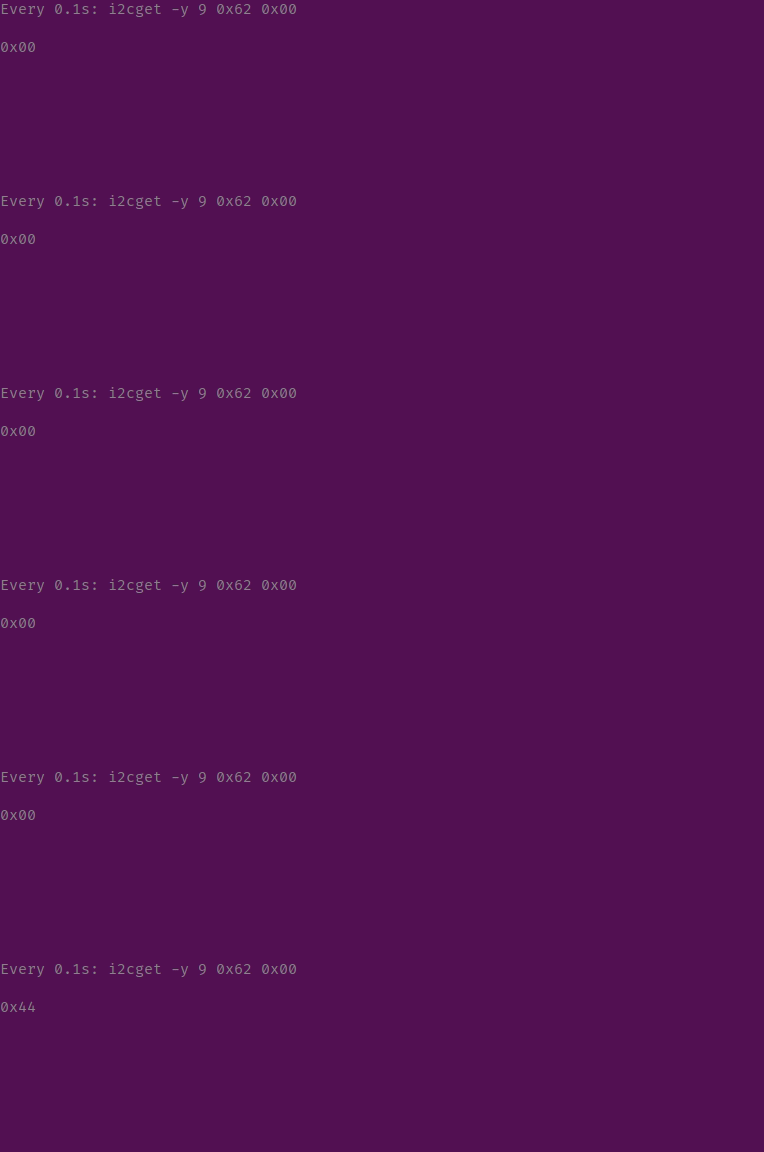
But for this device on register 0x00 the return values changes over time:

i2cget_returns

Do you have an idea what this device is and how I can check which of the addresses actually correspond to the serializer and image sensor on the I²C bus?

Sorry for the long response, but I think most of this context is required to understand what is going here.

Thank you and best regards,
Peter

Yes, it looks like serializer device is not found at the time the driver is loading. That’s the first thing to check otherwise serializer configuration will not be applied correctly and will affect the whole chain.

It seems that you are finding the 0x62 address at bus 9, but the values from register 0x00 are changing during the time. Could you try using i2ctransfer instead and reading 0x0D register? This one will show the DEV_ID. You could confirm the value in the datasheet.

i2ctransfer -y -f 9 w2@0x62 0x00 0x0d r1

If this matches the serializer expected value, you could try inspecting the “max929x_detect_serializer” and adding logging to see why is this part failing. You could also try a adding a delay to see if the serializer needs some time to appear on the bus.

Enrique Ramirez
Embedded SW Engineer at RidgeRun
Contact us: support@ridgerun.com
Developers wiki: https://developer.ridgerun.com
Website: www.ridgerun.com