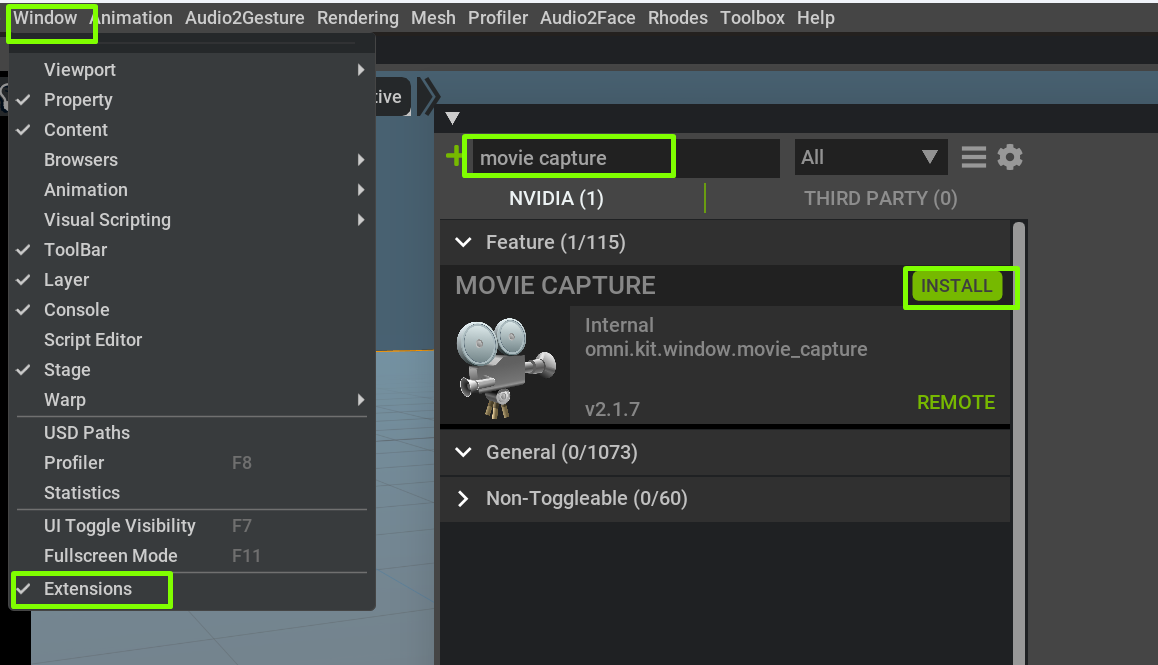
There’s an extension for rendering image sequences or video files called “Movie Capture” which can be activated from “Window → Extensions”. You can install and enable it. Then you can access the movie capture UI from Rendering menu.
Related topics
| Topic | Replies | Views | Activity | |
|---|---|---|---|---|
| How to export an audio2face as a video file? | 2 | 1914 | February 14, 2023 | |
| How to use Kit Image and Video Capture to make a video from viewport | 8 | 788 | November 18, 2023 | |
| Movie Capture generates only still images (no animation or audio) | 8 | 1369 | January 18, 2022 | |
| Is there any alternative for Movie Capture in A2F? | 2 | 866 | August 18, 2022 | |
| Audio2face Movie Capture or screen capture Not available | 2 | 473 | October 12, 2023 | |
| Export lip sync animation as a video file in pythonic way(automation) to use the service on demand | 12 | 1532 | August 24, 2023 | |
| Movie Capture Extension not available inside Audi2face? | 3 | 544 | August 12, 2022 | |
| How can I render a sequence of frames from an audio2face USD file? | 2 | 460 | May 29, 2023 | |
| What's the easiest way to render out my audio2face anim? | 14 | 1712 | September 30, 2022 | |
| Public audio2face Python API for audio -> animation | 2 | 1478 | July 5, 2023 |