I would rather see the issue fixed than use some ghetto workaround, it benefits no one to promote the behaviour of neglecting these issues…
If you want to ask for a more proper fix then fine, but a solution has been provided until they do. Clearly, TosidelasKozy has not tried it.
What is considered a “normal” power draw with 3090?
I have 4x1080p screens and it draws 50W on Linux with Xorg but without any windows open and without a window manager or compositor active (plain Xorg). I have seen people report 16W on Windows, that sounds much more “normal” to me than 50W. When I use CTRL+ALT+F2 to switch from Xorg to framebuffer console, the power draw goes to 31W.
G-Sync makes no difference, neither the Java hack to force power states.
50W is what my entire previous PC used when idling, including 4x monitors and GPU, multiple hard drives and so on. And the monitors only use 60W … so this kind of power draw is clearly not very proportionate and not economical for everyday use. I mean it is 40W more than what other cards use to do the exact same thing. One would expect a more expensive powerful card to consume less power, like a faster more expensive CPU would, due to being much more efficient at computations.
The issues aren’t being neglected. This bug is solved and has been for months. And this isnt the only correspondence regarding this issue, as i had several email exchanges with Nvidia devs about it. The bug i reported is solved. You guys are complaining of something practically an order of magnitude less severe, and is therefore a different bug and should have its own thread instead of hijacking this one.
My bug was 2 1440p165Hz monitors idling at 100-125 Watts. It was open for months, and then i was emailed saying the new driver coming up should fix it. It did. Ive now seen power draw on those same two monitors as low as 25-30W, but yes I often see 50W. But that is NOT the same bug. My draw before was NEVER, not one time, below 100W. And I had GWE open on my second monitor at all times and so I know it for a fact. That hasn’t happened since the driver release that fixed it, and no one here is reporting anything even half as high as what i reported.
So this is by EVERY definition a DIFFERENT bug. Just like the amdgpu kernel module gitlab issue threads have multiple posts about ring gfx driver crashes forcing a hard reboot, because none of them are the same bug, they are all different bugs, they just all cause a hard driver crash with ring gfx errors in the journal logs.
Most people here are effectively doing the same thing as posting a single bug for every Xid error causing a game to crash when they are not all the same bug. Even Xid 109 crashes are different, as the latest release fixed them in like 4 or 5 games but they are still there in some others.
Take it to a new thread, because this is a different issue and honestly it probably isnt even an Nvidia bug but a Linux/X11 one, because I’ve seen a ton of AMD users report idle power draw that is almost IDENTICAL to what yall are saying, while it’s normal on Windows.
…is this a serious statement? The 14900K regularly draws over 200 or evem 250W WITHOUT any extreme overclocking, while the i5 14600K is rather power efficient, and EXTREMELY efficient compared to the 14900K. The new KS draws up to 400+ Watts!
So idk where you got the idea that flagship CPUs are more efficient than their lower end bretheren because thats false. Its false for AMD, too, just nowhere near to the same extreme.
Also read the original comments here, your draw isnt astronomical. Its high. Astronomical is 100-130W at idle with 2 1440p 165Hz monitors at idle on the desktop with never a single drop under 100W. That is the bug reported in this thread, and it was solved over a year ago.
Given that another issue (4043860) was filed internally at nvidia from this thread, and the only public reference to it is in this thread together with some documentation of the issue I think its fair to keep this thread alive.
Im sure a moderator will take action if this thread spirals out of topic, I don’t really care either way a new thread or not I just want the power usage to be optimized, and you can just disable notifications if you want to opt out.
Please @gardotd426 … let’s just concentrate on the facts:
If you check hardware tests, the 3090 is often listed with 14-18W idle from a running Windows installation with Windows Aero graphical UI running, etc. Now 16W is 3x less than 50W, which is what the card consumes on Linux without any window manager / composer, just from bare Xorg. Many people in this thread have reported about 50W idle on Linux with Xorg running. However one person reported 8-10W for headless (for me it is 32W without Xorg and monitor connected, others reported the same also).
A 3x increase in idle power is not really “dramatically less buggy” than a 6x increase (i.e. 100W idle). Neither is it “an order of magnitude less”, as you have claimed and phrased it precisely, to your original problem of ~112.5W (which is 7x over 16W). An order of magnitude less to that would be a 1.7x increase, which is 27W idle, which would indeed be negligible.
50W idle power consumption on the other hand is the exact same problem, just half as bad.
I have disabled all but one monitor (all 1080p) and each monitor results in about 1.6W more power draw, no matter if set to 165Hz or 60Hz and no matter of G-Sync and no matter of forced lower power state via Java hack tool solution and no matter if I do other things suggested, such as disabling “Accel” option via Xorg config (and of course power mode is on Auto, etc.). So it is not like monitor count or anything else for this matter is really relevant here.
A few years ago a 6W or 9W power draw for a high-end GPU was normal with multiple monitors, even if their peak consumption was very high. A modern PC (e.g. Ryzen 5 5600G, including motherboard, SSD, PSU, APU, etc.) consumes as little as 25W at the wall outlet when idle. I realize the 3090 is a high-performance model and some CPUs/GPUs have changed recently in power consumption. But it is not like we are running the Ti version either, or overclocked BIOS, which could justify/explain like a 30W-ish idle consumption, yet alone 50W.
Having a PC consume 25+17 = 42W versus having it consume 25 + 50 = 75W, i.e. having the GPU consume twice the power of the rest of the system when idle) is almost a doubling in total power consumption, and as mentioned a tripling in GPU consumption to 3090 reference value. We don’t play games all day with those PCs, >90% of the time it is just internet browsing, office work and idling.
I think in a day and age of global warming etc. it is unacceptable to waste this kind of power (120kWh/year) to thin air, just because of some driver issue. Evident by the fact that the problem does not exist on Windows. That’s more power than a fridge consumes, and it costs €40 a year in my country.
As to whether or not this is an Xorg bug: I have just disabled hardware acceleration in Xorg (confirmed to work via absence of Xorg in nvidia-smi) and it made no difference at all. As power draw without Xorg is already 32W (which also seems to be triple of the 8-10W reported for headless), it rather looks like an issue related to just the driver.
A 3x increase in idle power is not really “dramatically less buggy” than a 6x increase
Only, it’s not. It’s a 3X increase to a 10X increase, as I said my power draw was 100W MINIMUM, but often closer to 140/150. That’s a 10X increase, literally an order of magnitude. 14W to 140W is LITERALLY one order of magnitude.
An order of magnitude less would be a 1.6x increase, which is 25W idle, which would indeed be negligible.
An order of magnitude less would be a 1.6x increase? Do you know what you’re even saying? No. First of all, an order of magnitude is 10X. Flat out. Google it if you don’t believe me. Also, you can’t combine an order of magnitude LESS with an INCREASE. They’re opposites. There’s also no such thing as 10X less. When you are decreasing, you do fractions/percentages. 1/10th the number, 5% less, etc. Not 10X less, that’s a mathematical impossibility.
50W idle power consumption on the other hand is the exact same problem, just half as bad.
It’s actually not. Again, I spoke directly with Nvidia developers and was told what one of the bugs specifically was, and was told that there was another one they were tracking, and then I was told it was to be fixed in an upcoming driver. It was.
it rather looks like an issue related to just the driver.
Then no one would see any difference with a headless session, yet many do. Also, you wouldn’t see anyone using AMD complaining of the same thing, yet there are constant complaints from AMD users of high idle power draw. Coincidentally, I’ve seen 40-50W mentioned numerous times.
A constant +100 and usually +130W power draw with NOTHING but the desktop running vs a full Plasma desktop with 7 GPU accelerated terminals, GPU accelerated Steam, and a GPU accelerated browser open drawing only 48W with compositing enabled (which is literally my exact current state) is a COMPLETE change of circumstances. If you think it’s the same bug, you don’t know what a bug is.
I think you need some remedial math lessons, because this is literally 100% wrong.
Your “another issue,” 4043860? You apparently didn’t even read it.
Here’s what he says:
This ENTIRE thread is predicated on the fact that none of these users can reproduce this in Windows, and that in Windows power draw is under 20W at idle.
Then, you’ll see that back last year before this bug (as in this ORIGINAL bug, that I filed, was not just me:
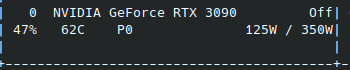
Note: 125W power draw.
Im sure a moderator will take action if this thread spirals out of topic
Well for one, I’ve rarely seen that happen, actually I’ve never seen it. But more importantly, “a moderator will step in if this thread with constant comments about a different bug than the original keeps getting those comments” is the most “I’m sure the authorities will take care of this problem” logic I’ve ever heard. Just create a new thread for the correct bug.
Oh, and that internally tracked bug was for MY bug, the 150W idle power draw bug with nothing on the desktop, not a full KDE X11 compositing-enabled desktop with 8 GPU accelerated windows open and only 48W power draw. Those are objectively by every definition two completely different things.
Your issue was filed under bug 3137202 stated in the very first reply, and what I assume to be a similar but slightly different issue was filed under bug 4043860, the comment stating this is a reply to my comment with info regarding the “other” issue, so im not sure what you mean that I didnt read it.
Team will check the possibility of improvement and will keep you posted on the same.
I assume this will happen in this thread when its ready.
Ok, so … I just went through a lot installing Windows and flashing different OEM BIOSes for comparison.
The results are very similar to Linux, but power draw is about 5W less.
The card draws 25W with 1 monitor connected and 42W with any number of additional monitors.
It doesn’t matter what settings you use or if you undervolt or use different BIOS.
The excessive power draw seems to come from the design of the card, with my particular model just being on the higher end of the spectrum between manufacturers. The low figures you find online are probably simply a result of only connecting a single monitor for testing purposes. And in this special and unusual case, it cuts power draw almost in half. So the test results are deceiving for normal everyday use.
I personally use 4 screens. Virtually no one uses only one screen nowadays (esp. not people who can afford a 3090). So I think it is totally irrelevant that the power draw is 43W in Linux with one screen, but 25W on Windows. When it is almost identical with any other number of screens that people commonly use.
I have observed though in the ASUS tool on Windows, that power draw and voltage would sometimes plummet from 43W to 28W, as if the Windows Aero UI was just a tad too expensive to make it consume this lower amount instead. But maybe that’s just a measuring error.
Please, even if the 3090 is of such eco-unfriendly design … if it was somehow possible to get from 48W to 33W, this would already be a substantial improvement! Or some other sort of eco-BIOS or eco setting, make nvidia-smi support undervolting at idle, anything please!*
50W idle power draw is just ridiculously high, no matter how you view it.
Update! I was able to achieve a 5W drop with the following Xorg option, effectively making it draw the same power as on Windows. This option is also beneficial to screen stuttering and generally recommended.
Option "UseNvKmsCompositionPipeline" "false"
I now sometimes rarely see the same micro-drops to 36W as I have described on Windows as well (but this is already without WM etc). Maybe some other thing can be done.
A solution was provided. Learn to read people.
Edit: ignore 0115, he’s a troll.
Your solution is bad and hardly a solution at all. Forcing the powerstate is not ideal for several reasons, most notably it causes artifacts and undesired graphical bugs.
Edit: Lol. Clearly @BlueGoliath is the troll, or then he doesn’t have enough screens with high enough refresh rate to push the screens to do artifacts at low the lower powerstates. I dont know why you think this caveman solution is worth anything as if anyone wants to sit and manually switch between powerstates.
@mev:
Wasn’t the power state bug actually fixed some time ago by Nvidia?
I use 545.29.06-20 from Archlinux, and never experienced any of the power state bugs.
I have also read online that UseNvKmsCompositionPipeline = false fixes high power consumption for some people if they use ForceCompositionPipeline. However for me it only results in the same 5W reduction, no matter what xorg config I use, it just always does. People have also said that setting the first option to false and the second to true elminnates stuttering, and such. Maybe it can work for you as well? Also try ForceFullCompositionPipeline = true.
The java hack tool by @BlueGoliath works great. I use it to reduce power consumption when I put neural network training in sleep mode.
It’s been a few versions since I did this test, so I did it again just now on version 545.29.06 on ubuntu, iirc it was possible to change the pstate without these hacks by using nvidia-settings or nvidia-smi, perhaps someone knows the magic commands. Anyway I made a simple c program instead of the java stuff, it does the exact same thing: https://pastebin.com/raw/GgbiZ7Sq
My idle power usage is ~54W with a window manager (dwm fork), setting the pstate to the highest brings it down to ~33W idle, it semi works but eventually something happens and artifacts, rapid blinking and refresh rates go haywire, undoing the pstate changes does not help and it does not go away until I reboot or restart the window manager entirely.
Idle power usage without window manager and highest pstate is ~29W. I’ve seen it lower towards 10W without anything running but I cba figuring that out right now.
Edit: Just noticed another issue with using this method of forcing the pstate. Somehow the core clock rate get stuck, for me it ended up at 855mhz, and the only way to fix it is to reboot or find another hacky way to restore these values probably through manually setting min/max clock rates.
@mev Have you tried flashing other BIOS version? It is actually very easy, just download BIOS from a similar-ish card from Techpowerup (e.g. HP or Dell) and then use nvflash -6 BIOS.rom. Run nvflash -b old_backup.rom to backup beforehand. If the new BIOS malfunctions, flip the BIOS switch on the card, then boot and flip again, then flash the old backup file to malfunctioning slot. It is only bad if you somehow have no BIOS switch, or for me it would kill one of the displayports (since I have an additional useless HDMI port that enumerates lower).
Do you have any special options set that could explain such low power consumption in lowest P state?
I have switched back and forth between 15 and 16 and I have observed no ill effects. But I never left it long on 15 while actually using the PC. When I scroll around in Firefox and such it seems fine (165Hz). Is there some sort of test I can do to reproduce the artifacts? LOL I even ran Cyberpunk at 15 FPS in Wine and then only noticed because of the low power draw.
10W with Xorg would be a phenomenal value. Almost like a normal card.
I have not done any BIOS flashing on this card, I would think it seems a little far fetched without any official mentions that it could improve power efficiency without tinkering with general performance.
There is nothing special about my card or its settings, it should all be default, if I had to guess what matters it is the resolution + refresh rate and however many screens you have, but im a little surprised that you are seeing even worse results when you have 4x 1920x1080 @ 165hz which should be less resource intensive than my 3x 2560x1440 @ 144hz perhaps its an indication that more displays use more power in general, have you tried testing with 3 instead of 4?
I have no idea how to replicate the artifacts, it is seemingly random but I suspect it happens when the card wants to do something e.g. decoding video streams or w/e, I really have no idea lol.
Edit: P State 16 is actually not a thing, its labeled as undefined and 15 is the highest you can go that will yield the lowest power usage, here is a recording of what I am talking about: Watch artifacts | Streamable
@mev Check my previous posts and you will see my extensive testing, which revealed that the card switches from 25W power draw to 43W power draw, if you connect more than one screen in Windows (any sort of number draws the same power). In Linux it is always 43W and the increase from each screen is tiny. Settings like refresh rate and G-Sync have absolutely no impact on both operating systems, at least not with more than one screen, which is what I tested. This all has been true to different BIOS versions as well. My card is ASUS TUF.
In the Java tool you can set 0-15 (high to low power), whereas 16 is auto.
Wow that looks really broken in the video. Maybe your resolution + Hz are too high for the card to keep up … but I wonder, I even ran Cyberpunk at 15 FPS in that mode. So the kind of power the card provides in that mode is quite beefy.
Yeah idk, just from my testing I noticed that having all displays at the same refresh rate and resolution triggers some extra power usage for unknown reasons, and if I lowered the refresh rate or resolution on one screen then the power usage became more reasonable, I put some picture with a chart mixing settings that illustrates how it chooses performance levels on various combinations of refresh rates with 3 screens while idling

Ah, so in fact the power state bug was not fixed in your case. Which more or less only happens when you connect a third screen and two of those screens are 1440p@144Hz.
I have 1x165Hz + 3x60Hz @1080p. I suppose this is still within the realms of some 4k bandwidth limit of a single screen as far as the chipset is internally concerned. So there is no good reason for this to consume much power. But for you this does not hold true … it shouldn’t result in your problem either way though.
I mean, just look at how the card draws the same excessive power for 2 screens, 3 screens and 4 screens all the same way. It really looks like some engineer was lazy, and simply made two different modes in the chip. First it tries to detect if no more than one screen is present, and then if this is not true, it skips the check and just activates all the resources for the max amount of screens possible. I can imagine the same is true if the bandwidth required reaches a certain threshold, let’s say more than a single 8k screen. Then by design of the chip, it has to just go full on out as well, and activate all resources, and draws like 100W idle. If this is really just bad cheapo engineering at it’s finest, then there may be no way to fix your problem. But who knows.