Installed NVDIA sync on my Mac and set up DGX yesterday. Everything worked fine. This morning I tried to connect and get daemon not running error in NVDIA sync app. Tried rebooting Mac and DGX multiple times…no luck in connecting.
Can you provide us with the logs, found in /Users/<username>/Library/Application Support/NVIDIA/Sync/config/ssh_config
You can attach them to this topic or send to me directly
Before rebooting log into Spark and check dxg-dashboard and dgx-dashboard-admin services. If they are in failed states use journalctl to see why.
The unit will not power on and boot up now. I tried to attach a local monitor and there is no display present.
The unit appears bricked now. Will not power on and boot up…tried to attach local monitor and I get nothing.
Worked fine for 1 day.
How are you connecting through monitor? We recommend using the HDMI port directly with no hub for the best compatibility
Yes…direct connection via HDMI cable
If you cannot power the unit on at all please reach out to customer support for return/replacement NVIDIA DGX Spark Support
Please also let them know your warranty status

after numerous reboots, I’ve been able to connect via a local monitor and keyboard…can also ssh to DGX Spark from my Mac. Nvidia Sync will not connect. I uninstalled, re-installed and tried to add back DGX in settings but get the above error. SSH works however.
I finally got it to boot up…I still cannot use NVDIA Sync…I shared a screenshot of the error. It wouldn’t connect so I re installed the Sync app on my Mac and tried to add back my DGX but get the error re knownhosts file, byte 140…
But ssh works into the DGX from the same Mac.
1 Like
It looks like the public key you are trying to use is invalid or of an unsupported type. Please try to make a new key pair and see if that helps
this was generated by the Nvidia sync install. I can use SSH with this key. The Sync app stopped connecting…I re-installed and now get the above key error.
Hmm, you may need to delete the ssh_config file to reset the connection NV Sync has, as well as delete the corresponding NV Sync entry in the known_hosts file on your Spark.
Our FAQ has instructions on how to find the ssh_config file: DGX Spark / GB10 FAQ - #7
I’m having the same issue.. and not yet able to solve it
1 Like
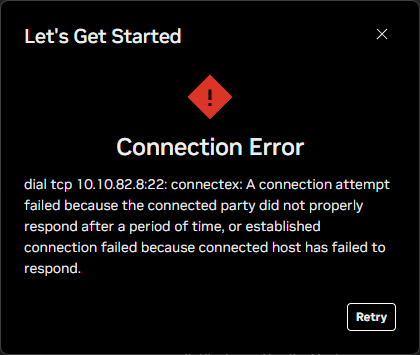
I’m having the same issue and haven’t been able to solve it yet.
When I try to log in via Terminal, the connection aborts right after entering the password — no login.
Interestingly, if I disconnect the LAN cable and use Wi-Fi only, it works fine.
Could this be related to having two IP addresses active at the same time?
@leucir, you continue to get this error after deleting the known_hosts file on your local machine?
I was able to fix it after reboot (not gracefully) the Spark box.
I haven’t had a similar issue again
Thanks.