I’d like to ask about the port configuration of the ConnectX-7 NIC in DGX Spark.
On our DGX Spark, the onboard ConnectX-7 NIC appears as four ports when checking with ip -br a and lspci:
roceP2p1s0f0 port 1  ==> enP2p1s0f0np0 (Down)
roceP2p1s0f1 port 1  ==> enP2p1s0f1np1 (Up)
rocep1s0f0   port 1  ==> enp1s0f0np0    (Down)
rocep1s0f1   port 1  ==> enp1s0f1np1    (Up)
However, the chassis only has two physical ports.
If anyone is familiar with this behavior, could you help explain how the NIC port mapping/logical configuration works for ConnectX-7 on DGX Spark, or point me to any official documentation or technical references that describe this layout?
This is the expected behaviour due to a limitation in the GB10 chip.
The SoC can’t provide more than x4-wide PCIe per device, so, in order to achieve the 200gbps speed, we had to use the Cx7’s multi-host mode, aggregating 2 separate x4-wide PCIe links, which combined can deliver the 200gbps speed.
As a consequence, the interfaces show 4 times, because each root port has to access both interface ports through a x4 link. For maximum speed, you can aggregate all ports, or for a single cable, aggregate enp1s0f0np0 with enP2p1s0f0np0 for instance, using balance-XOR (mode2).
Has anyone been able to get it to work
I’ve gone through the automatic, manual and I’m not connected and still getting errors.
This might be one for a video walk through
If we’re wasting this much time on basics using the Sparks for training becomes an inefficient time drain
If you started with option 1 (auto connect) make sure you disable the address if it happens to be a different one from the manual set up. After that manual set up or the second step-by-step works.
Hi everyone, my “two spark” kit with it’s just arrived from our partner, and I start to play with it.
ethtools confirms that links with DAC is 200G, despite i’m getting just 98.2G max when running iperf3.
Since iperf it’s a kind powerfull tool, but comes with tons of parameter and tuning option, probably I’m just missing something, so I move over.
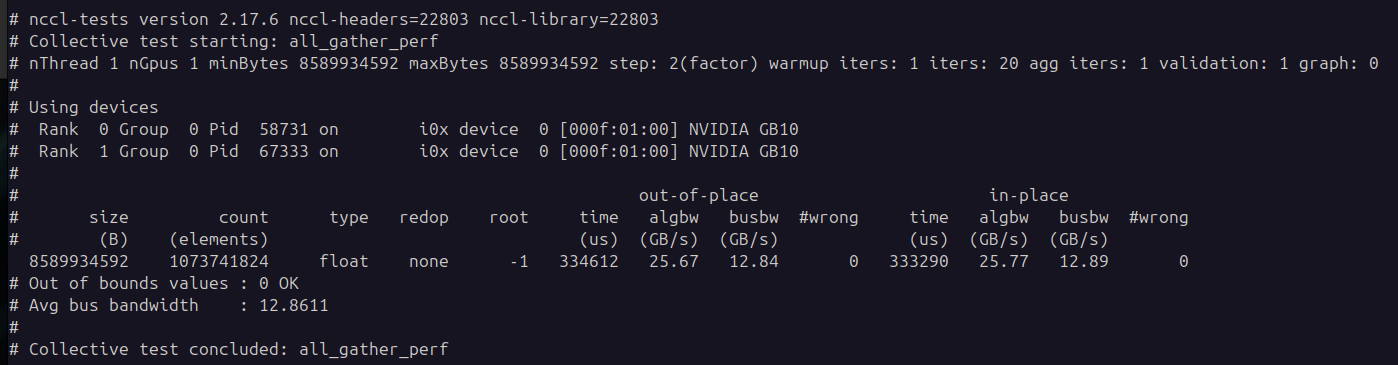
But when I try the “NCCL for Two Sparks“ example, I got this results:
Can we get some more clarification on this? Is 200Gbps achievable via a single port/single cable connection? If so, based on your post, we have to aggregate enp1s0f0np0 with enP2p1s0f0np0, even though it’s one physical port?
It would be good if you updated documentation and this playbook for clarity, because it says 200 Gbps everywhere without mentioning aggregate or addressing the port/PCIe mapping.
Which interface is the “root port”, enP2p1s0f0np0? If it accesses “both interface ports”, and there are only two inteface ports, why the existence of enP2p1s0f1np1? Just one en2P… should suffice.
“aggregate all ports” means creating, say, bond0, with all 4 interfaces, or just the two enP2…ones? Because XOR mode including two interface/physical ports says transmission is in XOR fashion (one port or the other, not both) and should not be different from using a single cable with one physical port on each Spark.
Appears aggregated by default. Sampling with mlnx_perf on both enp1s0f0np0 and enP2p1s0f0np0 should show activity on both paths, even if enP2p1s0f0np0 has no IP.
@mnagy009 there are only two NICs attached to the Spark, thus the two sockets. Each NIC is attached to a different PCIe root complex. Here’s lspci -t output:
First NIC is attached to domain 0000 and the second NIC to domain 0002. When you plugin in the cable both ports of each NIC will show link UP but you set IP on one port only for networking.
The first NIC is the left socket, the one next to the 10G port. And both NICs share the 200G bandwidth.
The PCIe mapping might be overwhelming if you’re used to the notebook/desktop settings only.
Has anyone connected the two Sparks with 2 cables and are there any pros cons from that set up? My second cable just arrived from Naddod and I’m debating whether there’s any value setting two cables up.
Edit:
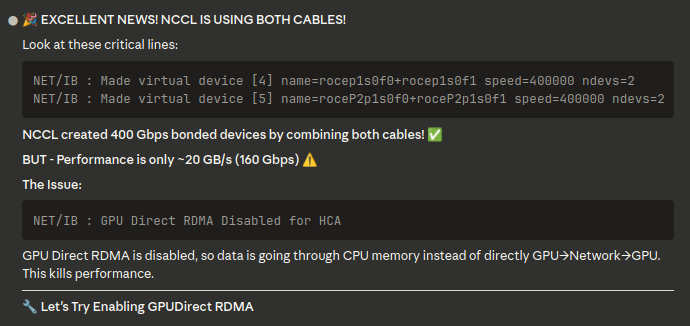
Following this rabbit hole to see if 400G is actually feasible with 2 cables
Actually, you are getting 100 GBps using both cables - you need to look at busbw. To get 200 GBps with two cables you would likely need to create a bond first.
Despite your optimistic LLM telling you what you want to hear, you won’t be able to achieve 400G using two ports - when both ports are active, each will get 100G. DGX Spark doesn’t have enough PCI lanes to achieve 400G, and even to achieve 200G on a single port, they had to do some voodoo with dual NIC and bonding due to PCIe limitations on this arch.
Oh, and GPU Direct RDMA is not implemented on Spark according to NVIDIA - there were some posts from NVIDIA explaining why, and I believe it is buried somewhere in the documentation too.
I guess, my point is that DGX Spark is a very new platform, so LLMs will not know much about it => risk of hallucinations is super high.