Hello,
This message has been translated using an online tool. Please excuse any awkward phrasing.
I am currently trying to use a CSI camera on my system. I was able to display the video feed by executing GStreamer via subprocess and reading the raw data from stdout into NumPy.
(The colors are correct with both BGRx and I420 pipelines.)
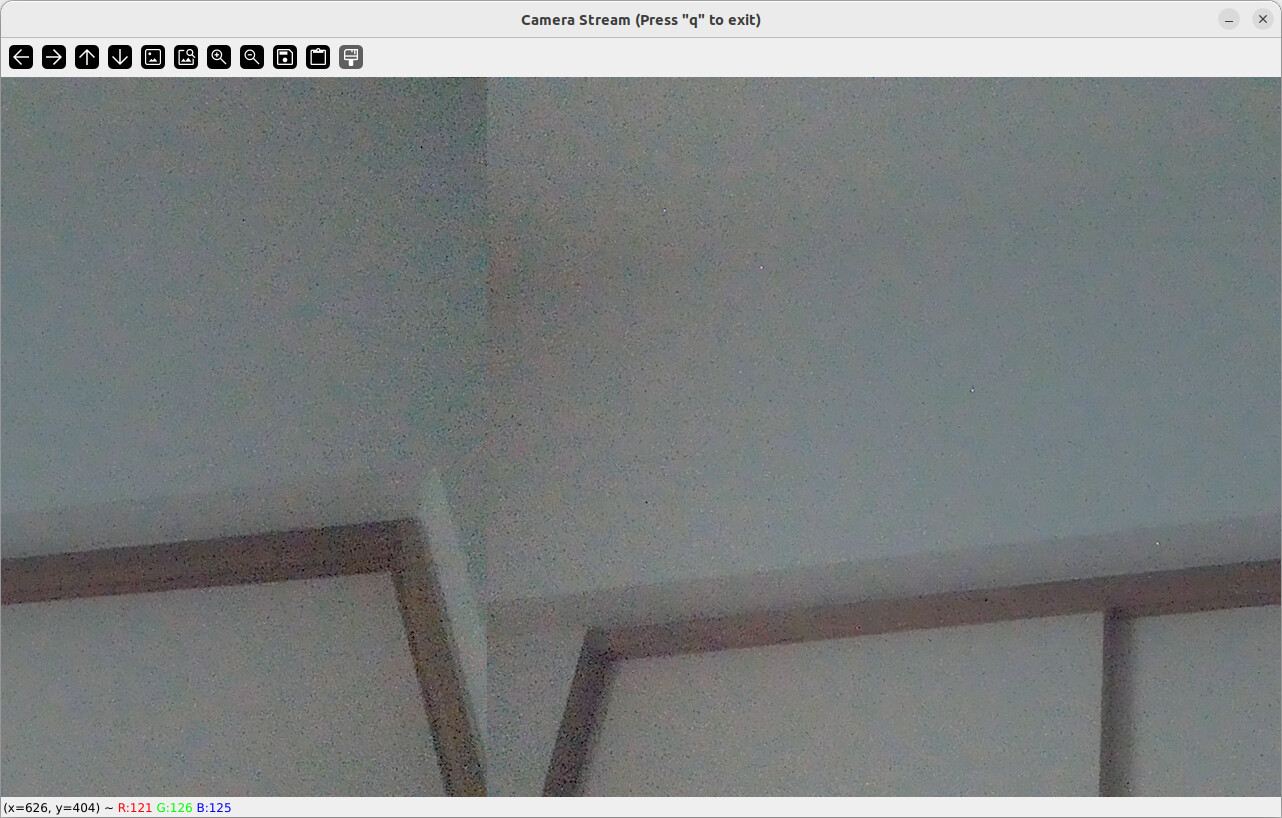
However, the video output is spatially shifted and appears split into two halves, as shown in the attached screenshot.
I suspect this spatial shift is caused by a padding issue (extra bytes at the end of each line). To resolve this, what would be the most effective solution (a workaround or specific setting) on either the GStreamer pipeline side (e.g., in caps or filesink settings) or the NumPy reading side?
I apologize for the intrusion on your busy schedule, but I would be grateful for any advice you can offer.
Thank you very much.
HW: NVIDIA Jetson Orin Nano Super Developer Kit
Camera: Raspberry Pi Camera Module 2
OS: Ubuntu 22.04.5 LTS
SW: OpenCV 4.12.0
[Attached Image of the Spatially Shifted Output]
[Attached Code]
import cv2
import subprocess as sp
import numpy as np

GSTREAMER_COMMAND = [
    "gst-launch-1.0",
    "nvarguscamerasrc",
    "sensor-mode=4",
    "!",
    "video/x-raw(memory:NVMM),width=1280,height=720,framerate=60/1,format=NV12",
    "!",
    "nvvidconv",
    "!",
    "video/x-raw,format=BGRx",
    "!",
    "videoconvert",
    "!",
    "video/x-raw,format=BGR",
    "!",
    "filesink",
    "location=/dev/stdout"
]

WIDTH, HEIGHT = 1280, 720
CHANNELS = 3
# GStreamerプロセスをPythonから起動する
try:
    pipe = sp.Popen(GSTREAMER_COMMAND, stdout=sp.PIPE, bufsize=WIDTH*HEIGHT*CHANNELS)
except Exception as e:
    print(f"エラー:GStreamerプロセスの起動に失敗しました。{e}")
    exit()

print(f"カメラを開きました。映像が表示されたら、ウィンドウをクリックして 'q' で終了できます。")

while True:
    raw_frame_size = WIDTH * HEIGHT * CHANNELS

    # 標準出力から必要なバイト数だけを正確に読み込む
    raw_image = pipe.stdout.read(raw_frame_size)

    if not raw_image or len(raw_image) < raw_frame_size: # フレームサイズが足りない場合もエラーにする
        print("エラー:フレームの取得に失敗しました。GStreamerパイプラインが停止しました。")
        break

    # バイトデータをNumPyの配列に変換する
    frame = np.frombuffer(raw_image, dtype=np.uint8).reshape((HEIGHT, WIDTH, CHANNELS))

    cv2.imshow('Camera Stream (Press "q" to exit)', frame)

    if cv2.waitKey(1) & 0xFF == ord('q'):
        break

pipe.terminate()
cv2.destroyAllWindows()
────────────────────────────────
こんにちは。
この文章は翻訳ツールを介しています。読みづらい点があればご容赦ください。
私は現在CSIカメラを使用しようとしています。
GStreamerをsubprocessで実行し、標準出力からNumPyで読み取る方法で映像は表示できました。
(BGRxとI420どちらのパイプラインでも色は正常です)
しかし、映像が添付画像のように左右にずれて二分割された状態になってしまいます。
この空間的なズレ(パディングに起因すると推測)を解消するには、GStreamerパイプライン(capsやfilesinkの設定)側、またはNumPy読み込み側で、どのような設定(裏技)が最も効果的でしょうか?
お忙しいところ恐縮ですが、ご助言をいただけると幸いです。
よろしくお願いいたします。
HW NVIDIA Jetson Orin Nano Super Developer Kit
Cam Raspberry Pi Camera Module 2
OS Ubuntu 22.04.5 LTS
SW OpenCV 4.12.0