TLDR;
- USB ports: ~= USB 3.2 Gen 2x2 20Gbps
- Max R/W: 2GB/s from USB 4/3 40Gbps enclosures with NVMe PCIe 4
- Spec: USB 3.2 Gen 2 (10Gbps) <> USB 3.2 Gen 2x2 (20Gbps)
- Enclosure Chips: JHL 7440 bad, ASM2464 good.
- Real R/W: <40MB/s because of the heat.
Long answer:
- NVIDIA’s own spec of DGX SPARK don’t show USB spec. But ASUS Ascent GX10’s datasheet does. It’s USB 3.2 Gen 2x2 20Gbps. Yes, it’s disappointing that this is a state-of-art and what a beautiful art it is!, then they put USB 3.2 not USB 4 NOT Thunderbolt 4 or 5 :( But also I can understand this could be a heat management issue. DGX Spark do get hot as is already. I can’t imagine how hot it would be if there are USB 4 and Thunderbolt 4+ chips in them.
- Any USB 4/3 enclosure with ASM2464 chip with any decent NVMe 2TB delivered R/W 2GB/s. But not the ones with JHL 7440 chip, even though it says 40Gbps. It delivered R 980MB/s, W 650MB/s only.
- Be very careful of the spec of the cases. To get maximum speed possible, it must say USB 3.2 Gen 2x2. If it say USB 3.2 Gen 2 only NO. If it say USB 4 only, NO.
- Because I only tested on one case with JHL 7440, I can’t say for sure, but its R/W speed was less than half of all other cases with ASM2464 chip. One thing though, that case did no other case did: it stayed cool when it wasn’t being accessed actively. And never went down to 40MB/s throttled speed. Someone please verify if you will.
- Sooo… none of above almost don’t matter because the thermal throttling meaning almost immediately within just few minutes from the DGX is turned on, it switched from the read speed of 2GB/s to the miserable <40MB/s. My cheap USB drive run 10x faster than that and never goes down to that low. It’s disgrace. The passive heat management case make no sense here either. But even all the cases with fan, the fans were too small. I am guessing because it has to be powered by the USB-C it can’t afford to draw too much amps.
So I came to the conclusion that what @maiia is trying to do using the external fans might be the only way, but go a step further. Have a brilliantly elegant way to manage the heat from USB enclosure that complements this beautiful DGX Spark’s design.
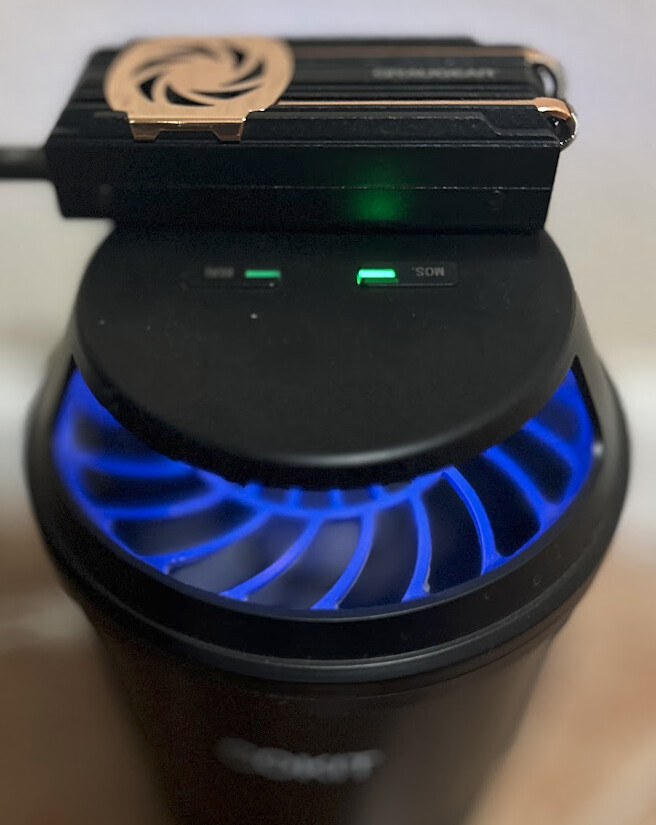

That’s an indoor bug trap in case anyone wondering. Killing two birds with… two bugs??, yea whatever. So far after hours being up and few GBs being copied, and it HASN’T fall down from the grace to <40MB/s hell.
- GRAUGEAR USB 4.0 PCIe Gen4x4 40Gbps: they have two versions: one with JHL 7440 and another ASM2464. Guess what I got.
- Crucial T500 1TB PCIe Gen4 NVMe M.2 SSD. I chose this over WD_BLACK and Samsungbecause of its cache helps in AI use-cases compared to gaming. In short, few big file copy vs lots of small files. Also 1TB generates less heat than bigger ones and I figured I will not have to deal with files larger than 100GB most of time. So instead of paying for 2TB one, just get few 1TBs with other cases.
- Indoor Insect Trap with quite (relatively speaking) fan.
BEST PART: You might get a whip of smell, see a tiny smoke, or even occasionally hear a scream of a little bug. You are welcome! I know, It’s a perfect revenge for all that itches from their bites while keeping your precious NVMe cool.
===== FYI
