Please provide complete information as applicable to your setup.
• Hardware Platform (Jetson / GPU) GPU • DeepStream Version 6.1.1 • JetPack Version (valid for Jetson only) • TensorRT Version 8.4 • NVIDIA GPU Driver Version (valid for GPU only) 525 • Issue Type( questions, new requirements, bugs) questions • How to reproduce the issue ? (This is for bugs. Including which sample app is using, the configuration files content, the command line used and other details for reproducing) • Requirement details( This is for new requirement. Including the module name-for which plugin or for which sample application, the function description)
Hello:
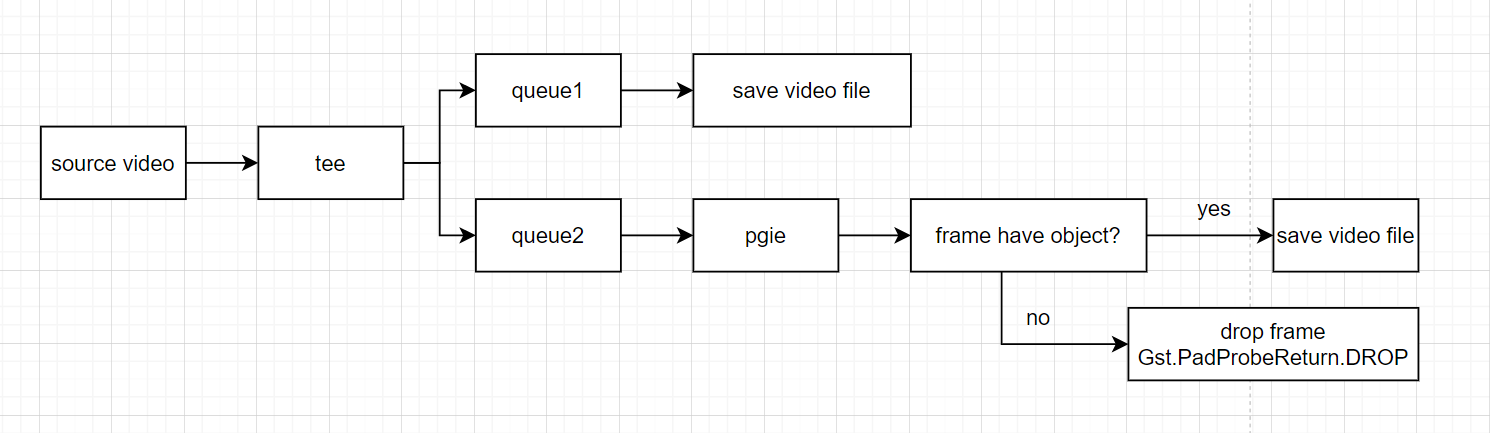
I want to develop a feature in my project like this. This is a mp4/rtsp input and I need to save the full origin video and the other is to infer the frame ,judge whether the frame has object and save frame or drop frame.
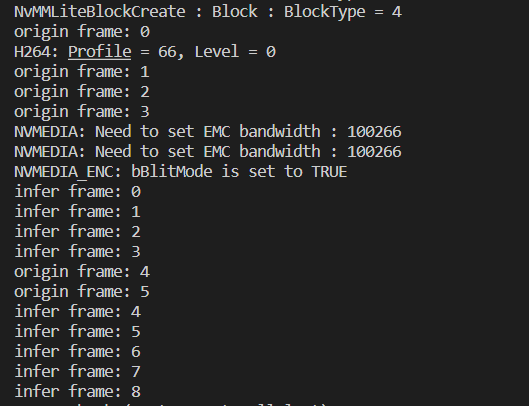
In your output image, what is origin frame? the actual frame?
Infer frame means that it had atleast one object?
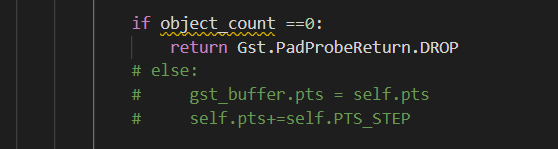
May I ask you to share the snippet of your probe function (not entire code) so that I can understand why it would stop after 8 frames.
I cannot really tell by looking at an if statement and this output log.
Ah, so basically you are probably saving the images as a video using filesink then?
You are trying to use Gst.PadProbeReturn.DROP with the intention of skipping this frame thus it won’t be passed onto the filesink or am I mistaken in my understanding?
If this is the case, I have not tried this method tbh, I did have a similar situation in my case so I chose to do it in different ways. (Yes for different situation, I had to save videos in different ways)
Can I ask something, do you have to use filesink if you are using it?
yes, I’m using nvv4l2h264enc and filesink to save video in both queue1 and queue2 .
It works well if I only have queue2 this pipeline , nothing go wrong . But after add queue1 this pipeline to save origin full frame video. The program stop after 8frame look like some data hang and I dont know why
Of course I have pige → nvvideoconvert → capsfilter → nvv4l2h264enc → h264parse → qtmux → filesink
GST_DEBUG show nothing and I think the problem is Gst.PadProbeReturn.DROP cause something I dont know . If I delete return Gst.PadProbeReturn.DROP It can work but I want to drop frame because I need to do this feature
Yes, I tried it on my end too, someone with really good knowledge of gst-pipeline may help you out, i am sorry.
Gst.PadProbeReturn.DROP is indeed the cause because of how gstreamer works and handles the frames.
Unless you are very stict about only using filesink, might I suggest you to append those frames in a list and then after the videoends i.e, EOS (using try except), you write a snippet in the end to convert those frames into a video?
The moment your images stop coming and pipeline reached EOS, the video will be created.
There is no update from you for a period, assuming this is not an issue anymore.
Hence we are closing this topic. If need further support, please open a new one.
Thanks
Let’s narrow down the issue by connecting the fakesink plugin. You can try to link the fakesink after the nvinfer or queue1 to check which plugin hangs the pipeline.