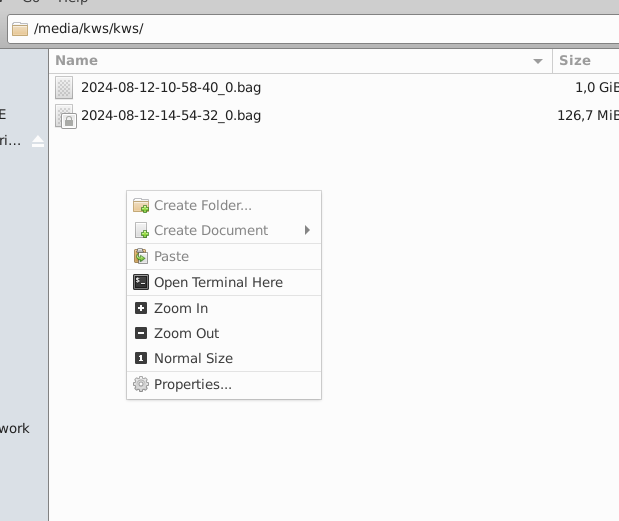
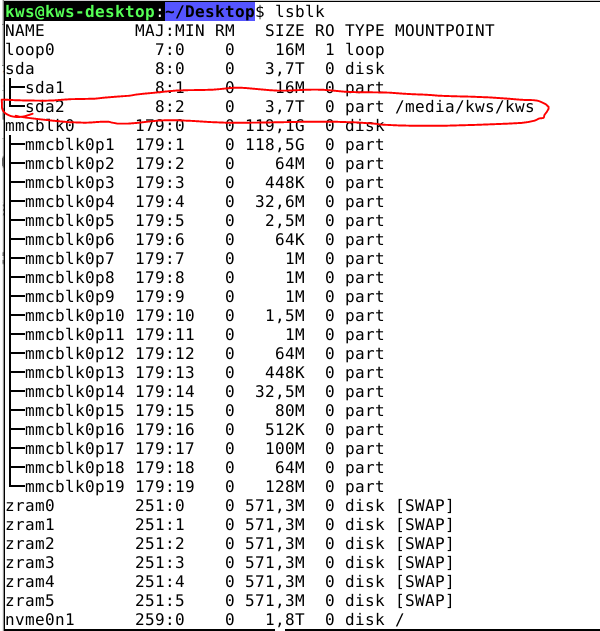
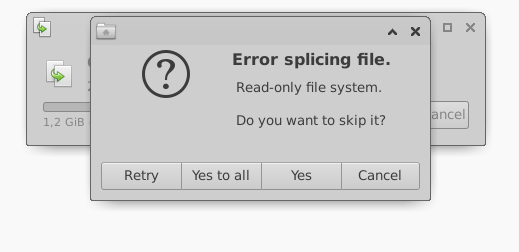
Hi, yes, my problem is the: USB-SSD become read-only.
Reboot will recover it and become read/write available again, but if I copy data again it will be read-only again.
The result of mount before transferring data:
proc on /proc type proc (rw,relatime)
sysfs on /sys type sysfs (rw,relatime)
none on /dev type devtmpfs (rw,relatime,size=3470968k,nr_inodes=867742,mode=755)
selinuxfs on /sys/fs/selinux type selinuxfs (rw,relatime)
tmpfs on /dev/shm type tmpfs (rw,nosuid,nodev)
devpts on /dev/pts type devpts (rw,nosuid,noexec,relatime,gid=5,mode=620,ptmxmode=000)
tmpfs on /run type tmpfs (rw,nosuid,nodev,size=701964k,mode=755)
tmpfs on /run/lock type tmpfs (rw,nosuid,nodev,noexec,relatime,size=5120k)
tmpfs on /sys/fs/cgroup type tmpfs (ro,nosuid,nodev,noexec,mode=755)
cgroup2 on /sys/fs/cgroup/unified type cgroup2 (rw,nosuid,nodev,noexec,relatime,nsdelegate)
cgroup on /sys/fs/cgroup/systemd type cgroup (rw,nosuid,nodev,noexec,relatime,xattr,name=systemd)
pstore on /sys/fs/pstore type pstore (rw,nosuid,nodev,noexec,relatime)
efivarfs on /sys/firmware/efi/efivars type efivarfs (rw,nosuid,nodev,noexec,relatime)
none on /sys/fs/bpf type bpf (rw,nosuid,nodev,noexec,relatime,mode=700)
cgroup on /sys/fs/cgroup/cpuset type cgroup (rw,nosuid,nodev,noexec,relatime,cpuset)
cgroup on /sys/fs/cgroup/devices type cgroup (rw,nosuid,nodev,noexec,relatime,devices)
cgroup on /sys/fs/cgroup/blkio type cgroup (rw,nosuid,nodev,noexec,relatime,blkio)
cgroup on /sys/fs/cgroup/cpu,cpuacct type cgroup (rw,nosuid,nodev,noexec,relatime,cpu,cpuacct)
cgroup on /sys/fs/cgroup/net_cls,net_prio type cgroup (rw,nosuid,nodev,noexec,relatime,net_cls,net_prio)
cgroup on /sys/fs/cgroup/hugetlb type cgroup (rw,nosuid,nodev,noexec,relatime,hugetlb)
cgroup on /sys/fs/cgroup/perf_event type cgroup (rw,nosuid,nodev,noexec,relatime,perf_event)
cgroup on /sys/fs/cgroup/pids type cgroup (rw,nosuid,nodev,noexec,relatime,pids)
cgroup on /sys/fs/cgroup/memory type cgroup (rw,nosuid,nodev,noexec,relatime,memory)
cgroup on /sys/fs/cgroup/freezer type cgroup (rw,nosuid,nodev,noexec,relatime,freezer)
debugfs on /sys/kernel/debug type debugfs (rw,nosuid,nodev,noexec,relatime)
mqueue on /dev/mqueue type mqueue (rw,nosuid,nodev,noexec,relatime)
sunrpc on /run/rpc_pipefs type rpc_pipefs (rw,relatime)
tracefs on /sys/kernel/tracing type tracefs (rw,nosuid,nodev,noexec,relatime)
hugetlbfs on /dev/hugepages type hugetlbfs (rw,relatime,pagesize=2M)
/dev/nvme0n1 on / type ext4 (rw,relatime,discard,errors=remount-ro)
configfs on /sys/kernel/config type configfs (rw,nosuid,nodev,noexec,relatime)
binfmt_misc on /proc/sys/fs/binfmt_misc type binfmt_misc (rw,nosuid,nodev,noexec,relatime)
tmpfs on /run/user/124 type tmpfs (rw,nosuid,nodev,relatime,size=701960k,mode=700,uid=124,gid=130)
tmpfs on /run/user/1000 type tmpfs (rw,nosuid,nodev,relatime,size=701960k,mode=700,uid=1000,gid=1000)
xrdp-chansrv on /home/kws/thinclient_drives type fuse.xrdp-chansrv (rw,nosuid,nodev,relatime,user_id=1000,group_id=1000)
fusectl on /sys/fs/fuse/connections type fusectl (rw,nosuid,nodev,noexec,relatime)
gvfsd-fuse on /run/user/1000/gvfs type fuse.gvfsd-fuse (rw,nosuid,nodev,relatime,user_id=1000,group_id=1000)
This is the output of mount after transferring the data:
proc on /proc type proc (rw,relatime)
sysfs on /sys type sysfs (rw,relatime)
none on /dev type devtmpfs (rw,relatime,size=3470968k,nr_inodes=867742,mode=755)
selinuxfs on /sys/fs/selinux type selinuxfs (rw,relatime)
tmpfs on /dev/shm type tmpfs (rw,nosuid,nodev)
devpts on /dev/pts type devpts (rw,nosuid,noexec,relatime,gid=5,mode=620,ptmxmode=000)
tmpfs on /run type tmpfs (rw,nosuid,nodev,size=701964k,mode=755)
tmpfs on /run/lock type tmpfs (rw,nosuid,nodev,noexec,relatime,size=5120k)
tmpfs on /sys/fs/cgroup type tmpfs (ro,nosuid,nodev,noexec,mode=755)
cgroup2 on /sys/fs/cgroup/unified type cgroup2 (rw,nosuid,nodev,noexec,relatime,nsdelegate)
cgroup on /sys/fs/cgroup/systemd type cgroup (rw,nosuid,nodev,noexec,relatime,xattr,name=systemd)
pstore on /sys/fs/pstore type pstore (rw,nosuid,nodev,noexec,relatime)
efivarfs on /sys/firmware/efi/efivars type efivarfs (rw,nosuid,nodev,noexec,relatime)
none on /sys/fs/bpf type bpf (rw,nosuid,nodev,noexec,relatime,mode=700)
cgroup on /sys/fs/cgroup/cpuset type cgroup (rw,nosuid,nodev,noexec,relatime,cpuset)
cgroup on /sys/fs/cgroup/devices type cgroup (rw,nosuid,nodev,noexec,relatime,devices)
cgroup on /sys/fs/cgroup/blkio type cgroup (rw,nosuid,nodev,noexec,relatime,blkio)
cgroup on /sys/fs/cgroup/cpu,cpuacct type cgroup (rw,nosuid,nodev,noexec,relatime,cpu,cpuacct)
cgroup on /sys/fs/cgroup/net_cls,net_prio type cgroup (rw,nosuid,nodev,noexec,relatime,net_cls,net_prio)
cgroup on /sys/fs/cgroup/hugetlb type cgroup (rw,nosuid,nodev,noexec,relatime,hugetlb)
cgroup on /sys/fs/cgroup/perf_event type cgroup (rw,nosuid,nodev,noexec,relatime,perf_event)
cgroup on /sys/fs/cgroup/pids type cgroup (rw,nosuid,nodev,noexec,relatime,pids)
cgroup on /sys/fs/cgroup/memory type cgroup (rw,nosuid,nodev,noexec,relatime,memory)
cgroup on /sys/fs/cgroup/freezer type cgroup (rw,nosuid,nodev,noexec,relatime,freezer)
debugfs on /sys/kernel/debug type debugfs (rw,nosuid,nodev,noexec,relatime)
mqueue on /dev/mqueue type mqueue (rw,nosuid,nodev,noexec,relatime)
sunrpc on /run/rpc_pipefs type rpc_pipefs (rw,relatime)
tracefs on /sys/kernel/tracing type tracefs (rw,nosuid,nodev,noexec,relatime)
hugetlbfs on /dev/hugepages type hugetlbfs (rw,relatime,pagesize=2M)
/dev/nvme0n1 on / type ext4 (rw,relatime,discard,errors=remount-ro)
configfs on /sys/kernel/config type configfs (rw,nosuid,nodev,noexec,relatime)
binfmt_misc on /proc/sys/fs/binfmt_misc type binfmt_misc (rw,nosuid,nodev,noexec,relatime)
tmpfs on /run/user/124 type tmpfs (rw,nosuid,nodev,relatime,size=701960k,mode=700,uid=124,gid=130)
tmpfs on /run/user/1000 type tmpfs (rw,nosuid,nodev,relatime,size=701960k,mode=700,uid=1000,gid=1000)
xrdp-chansrv on /home/kws/thinclient_drives type fuse.xrdp-chansrv (rw,nosuid,nodev,relatime,user_id=1000,group_id=1000)
fusectl on /sys/fs/fuse/connections type fusectl (rw,nosuid,nodev,noexec,relatime)
gvfsd-fuse on /run/user/1000/gvfs type fuse.gvfsd-fuse (rw,nosuid,nodev,relatime,user_id=1000,group_id=1000)
/dev/sda2 on /media/kws/kws type ext4 (ro,nosuid,nodev,relatime,stripe=8191,uhelper=udisks2)
I used another USB-SSD but it has same problem. Do you have any idea for this? Thx