I am trying to implement GPUDirect RDMA (GDR) on a setup involving two identical machines, but I am hitting a hard bandwidth bottleneck of around 32-38 Gbps, despite the hardware theoretically supporting 100 Gbps. Hardware Setup (Per Node):
Motherboard: ASUS WS X299 SAGE/10G
CPU: Intel(R) Core™ i9-10980XE CPU @ 3.00GHz
GPU: NVIDIA Tesla T4
NIC/DPU: NVIDIA BlueField-2 (configured as Ethernet/RoCE)
OS: Ubuntu 22.04 LTS
Driver: NVIDIA Driver 550 (Production Branch)
CUDA: 12.3
Mellanox OFED Driver: OFED-internal-25.07-0.9.7
The Issue: When running ib_write_bw with GPUDirect enabled, the bandwidth is capped at ~38 Gbps. However, checking individual components confirms they are capable of full speed:
PCIe Link Status: Both the GPU and DPU are negotiated at Gen3 x16 (8GT/s) via lspci.
Pure NIC Performance: Standard RDMA test (ib_write_bw without CUDA) reaches ~96 Gbps, confirming the network link is healthy.
Host-to-Device Bandwidth: CUDA bandwidthTest (pinned memory) shows ~12 GB/s, confirming the GPU PCIe lane is operating at x16 speed.
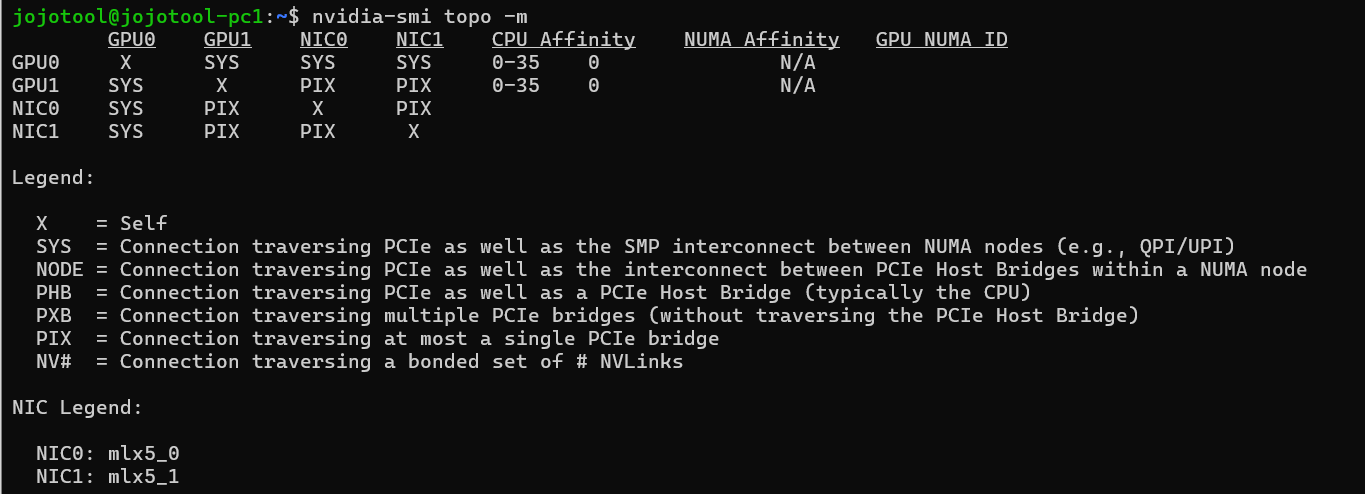
Topology:nvidia-smi topo -m shows PIX, indicating both devices are under the same PCIe root complex/switch.
Troubleshooting Steps Taken:
Enabled Above 4G Decoding and disabled Secure Boot in BIOS.
Enabled ACS Override in Grub: pcie_acs_override=downstream,multifunction.
Set MTU to 9000 (Jumbo Frames) on both interfaces.
Verified that the issue persists in both Loopback and Node-to-Node tests.
Hypothesis: Given the ASUS X299 SAGE uses PLX switches to expand PCIe lanes, I suspect the bottleneck lies in the P2P routing path through the PLX chips or a DMI limitation (limiting throughput to ~PCIe Gen3 x4 speeds), even though the link width reports x16.
Has anyone experienced similar P2P performance issues on X299 platforms with PLX chips? Are there specific BIOS settings or slot configurations recommended for this motherboard to enable full P2P throughput(~100 Gbps)?
I completely understand why it looks like I might be using the wrong GPU—the device indexing between these tools can be quite confusing.
I noticed that ib_write_bw (CUDA-based) and nvidia-smi seem to sort the devices differently on my system:
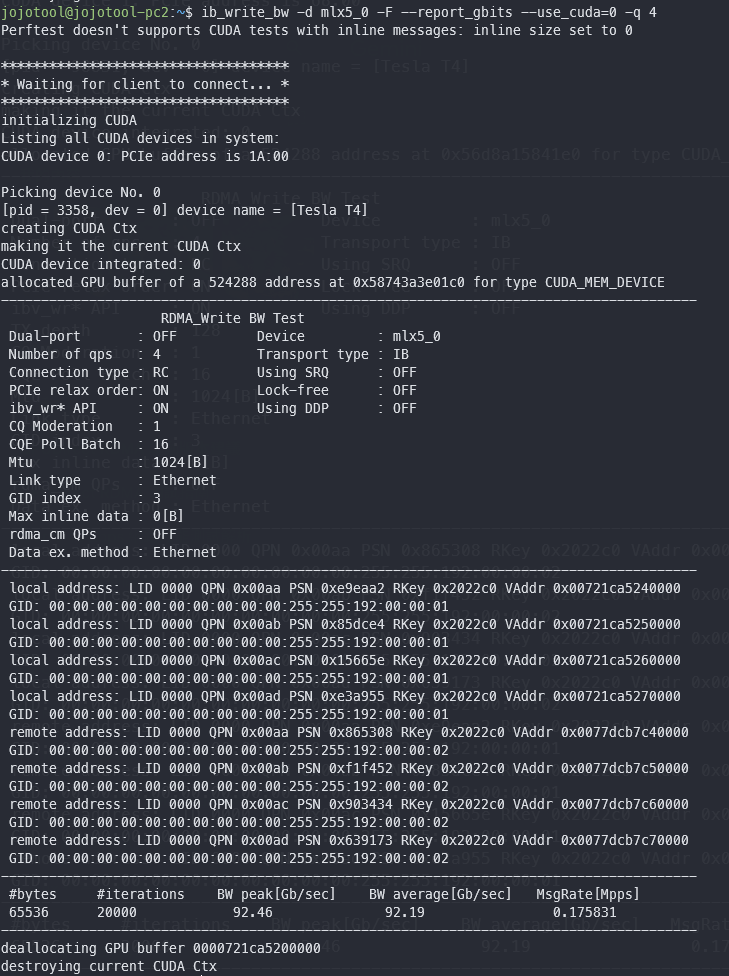
In the ib_write_bw log: It selects Device 0, which it explicitly names [Tesla T4]. I believe CUDA defaults to sorting by compute capability.
In nvidia-smi: It lists the T4 as GPU 1 (based on the PCIe bus ID), while the Quadro K620 (Display GPU) is GPU 0.
So, if we look at the topology matrix again, I think we should be focusing on the row for GPU 1 (the T4). It shows a PIX connection to NIC 0, which suggests they are under the same PCIe switch.
Since the topology appears to be correct (PIX) and link speeds are fine, I’m puzzled by the ~38 Gbps cap. Do you think this specific number (which aligns closely with the DMI bandwidth) points to a routing issue within the PLX chips on this motherboard?
Sorry, I’ve no experience with your scenario, just the observation on the data as presented.
Looking at the manual for your motherboard, Appendix A1, 48 lane, it seems PCI slot 1 is the only true x16 one. All other slots only have x8 back to the switches.
Edit: I see now some slots have two connections. Maybe if you haven’t tried already, experimentation with slot placement of both cards could be worthwhile.
Slot 1 and Slot 3 or Slot 5 and Slot 7. If using 1 and 3, make sure 2 is empty. For 5 and 7, make sure 4 and 6 are empty. Full x16 mode on both wanted slots may not occur otherwise.
I have fantastic news! The issue is finally resolved, and I’ve managed to break the 38 Gbps barrier.
The Root Cause: It turned out to be the ACS (Access Control Services) configuration on the onboard PLX PEX8747 switches. Even though the T4 and BlueField-2 were physically connected to the same PLX chip (Slot 1 and Slot 3), I discovered via lspci that the BIOS enables ACS (SrcValid+ and UpstreamFwd+) on the PLX downstream ports by default.
This configuration was effectively blocking internal P2P routing within the PLX chip and forcing all traffic to be redirected up to the CPU Root Complex. This caused the data to traverse the DMI link, which explains exactly why I was capped at ~38-40 Gbps (the DMI 3.0 bandwidth limit).
The Solution: I used setpci to manually disable the ACS bits on all PLX bridges. As soon as I did this, the “detour” to the CPU was removed.
The Result: After running the script, ib_write_bw instantly jumped from 38 Gbps to ~92.19 Gbps! (Screenshot attached)
Thank you so much for your help regarding the slot topology logic—that was the crucial first step that led me to investigate why the “correct” topology wasn’t behaving as expected. Hopefully, this solution helps others struggling with GPUDirect RDMA on X299 workstations!