GTX480 to C2050 hack or unlocking TCC-mode on GeForce

Check out http://www.techpowerup.com if you haven’t already.

_____________________________________________________

Ok, I read this whole thread, and a number of others. Googling the error i’m getting when I implement the --straps option gets no hits. I receive “ERROR: Strap values out of range” - I tried both 0x6FFC03FF (Pictured Below) and 0x7FFC27FF after I recalculated:

I have an EVGA GTX 465 and i’m trying to convert it into a Quadro 4000, or really any other of that generation. Here are my AND OR 0 / 1 Straps:

root@XUbuntu:~/Downloads$   od -tx -Ax 465STK.ROM  | grep -E '^0000(5|6)0'
000050 002a72e9 14673842 <b>6ffc03ff 00005000</b>
000060 <b>7ff1ffff 80020000 </b>95a538e1 e9445ee9

Above I used the ROM I pulled off my card, though this ROM from TechPowerUp is identical as far as I can tell:

Here are the MASKS for my GTX 465 and Quadro 4000:

Card     DevID   AND mask 0   OR mask 0    AND mask 1   OR mask 1
EVGA265  06C4    0x6FFC03FF   0x00005000   0x7FF1FFFF   0x80020000
Quadro4K 06DD    0x7FFC3FFF   0x00004000   0x7FF1FFFF   0x80020000

Here is my conversion based on the Device ID:

GTX465        06C4  0000 0110 1100 0100
Quadro 4000  06DD   0000 0110 1101 1101
Change              xxxx xxxx xxx1 1xx1
                    xxxx xxxx xxx4 3210
ID Bit:   4                  32 10
Strap: -xxA xxxx xxxx xxxx xxAx xAxx xxxx xxxx
Old Strap:
AND-0: 6F        FC        03        FF
       0110 1111 1111 1100 0000 0011 1111 1111
OR-0:  00        00        50        00
       0000 0000 0000 0000 0101 0000 0000 0000
[s]New Strap:
AND-0: 7F        FC        27        FF
       0111 1111 1111 1100 0010 0111 1111 1111
OR-0:  10        00        74        00
       0001 0000 0000 0000 0111 0100 0000 0000
[/s]
New Strap:
AND-0: 6F        FC        03        FF
       0110 1111 1111 1100 0000 0011 1111 1111
OR-0:  10        00        74        00
       000<b>1</b> 0000 0000 0000 01<b>1</b>1 0<b>1</b>00 0000 0000

With the above work, I’ve come away with these two potential combinations, but both error out:

[s]Calculated AND 0 and OR 0:
nvflash --straps 0x7FFC27FF 0x10007400 0x7FF1FFFF 0x80020000[/s]

With original AND 0: 
nvflash --straps 0x6FFC03FF 0x10007400 0x7FF1FFFF 0x80020000

Can anyone help me here? Am I correct with ‘OR mask 0’? Reading this thread, I am unsure how to calculate the ‘AND mask 0’ - which is why both attempts are listed above.

As far as I can tell 0x7FFC27FF + 0x10007400 = 8FFC 9BFF, which is too large? Though this may be the incorrect calculation. I couldn’t understand the Equations mentioned before in this thread.

[b]

  1. Edited - for clarification after I figured out the solution, see next post too

[/b]

Well I got it figured out - the strap that worked for me was:

nvflash --straps 0x6FFC03FF 0x10007400 0x7FF1FFFF 0x80020000

I had talked with one of my coworkers and he refreshed my on bitmasking with the AND/OR. Once I got home, I recalculated the AND mask 0, which stayed the same after the BINARY conversion of the Device ID.

Another part, which the other threads I’ve read didn’t cover in detail, is the point that a person has to actually edit the ROM in a hex editor, and add the device IDs and other attributes as well. This was covered in Post 7 of this thread:

I went through the above locations, minus the ones I ‘striked’ through, and copied in the appropriate hex info from the working Quadro 4000 file. Once done, I loaded the ROM into NIBITOR and recalculated the checksum. I loaded the ROM onto my GTX 465 and then flashed the new soft straps.

Hi

Please, somebody help me. I broke my head (

GTX 460 v2 Hawk (http://pasha4ur.org.ua/GF104.rom) → quadro 4000m

Comment from web:
[i]Hi hishamkali,

you made a mistake…
you use the string from gtx480…
this work for me on a GTX460 (0E22)
nvflash –index=X –straps 0x7FFC3FC3 0x10006428 0x7FF1FFFF 0x00020000

bye[/i]

Will it work better in Adobe Apps? Will I can adjust clocks and fans? Games will work too?

Thx for help

Anyone?

up

up

up (

Here’s a little puzzle for you Device ID wizards:

In reference to my post earlier today…

I bought a used GTX 580 but drivers don’t load in Windows because someone had changed the Device ID from 1080 to 1090. I flashed the BIOS with a 1080.rom file, but that doesn’t change the Device ID. After finding this forum, I started to go through the procedures outlined, but now that I think of it, will they work in my situation?

So here’s the puzzle: when I run nvflash, my adapter comes up as a Tesla M2065 (a card that never existed) with a device ID of 1090 (also, an Nvidia device ID that never existed). So how can I possibly change the Device ID back to the original 1080?

My BIOS now has the 1080 data. Therefore, when I get my data to calculate my OLD strap, it’s from this fresh 1080 rom data which is now saved on the card’s EEPROM. In other words, wouldn’t I just get the OLD straps from this file, and re-flash the same values (with no changes) using the nvflash with straps syntax outlined in the original procedures?

I found these GTX 580 values in another forum. Can’t I just use them directly to reflash my Device ID back to it’s original 1080?

GTX580:
AND MASK 0: 0xFFFFFFFF
OR MASK 0: 0x00000000
AND MASK 1: 0x7FFFFFFF
OR MASK 1: 0x80000000

This would make:

nvflash --index=X --straps 0xFFFFFFFF 0x00000000 7FFFFFFF 0x00000000

By the way, nvflash does not tell me what my index=X value is. How do I find my value for X?

Buying a used card off Kijiji isn’t a sure bet, that’s for sure. I’ll likely stick to new cards in the future and avoid the 10+ hours I’ve spent trying to get this card back to factory specs.

But, before I trash this card, since there are no answers to my previous posts, how about this:

Is there any way during the installation of the nvidia driver that I can tell the install software that my card is actually an authentic GTX 580 with device ID 1080 (which is what the card really is)?

Disregard previous posts. Giving up on fixing the card and going with another card. I can’t say that I understand why guys modify cards for small gains with the risk of losing the card. Some guys must have money to burn.

Want to share my part…

I have two 480’s and I need TCC mode for doing GPUDirect

Based on instructions in this thread and this guide:
http://www.davidgis.fr/blog/index.php?Xen/p2

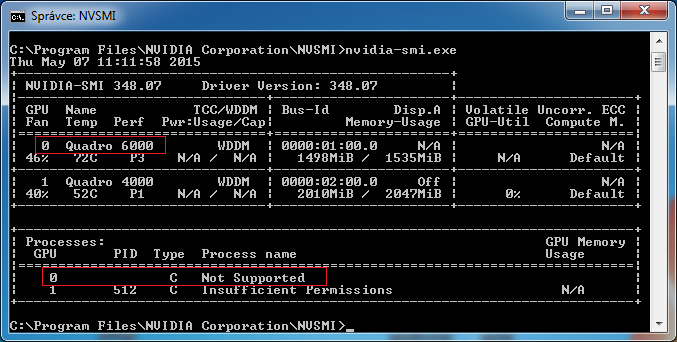
I was able to flash both of them to either Quadro 6000 or Tesla C2050/C2070, they show up in the system as they should, I see bidirectional async engine in CUDA-Z, but I cannot switch those cards into TCC mode by any means.

It looks like this:


I use this driver: Quadro Desktop/Quadro Notebook Driver Release 346 | R346 U4 (348.07) | Windows 7 64-bit, Windows 8.1 64-bit, Windows 8 64-bit, Windows Vista 64-bit | NVIDIA

PC - i7 4790, Win7 Pro x64, running from Intel integrated GPU (so no monitors attached to the nV cards)

I also tried Quadro 4000 (original) on the very same platform and switching it to TCC mode worked. Has nVidia implemented some kind of check into the drivers to detect a flashed card? Or am I doing something wrong?

UPDATE: I tried with an older driver from 2011 and same result, must be something different…

I also have a 580 lying around, I see that someone managed to flash it to M2090, but provided that the straps are stored in the same location as 480, they are kinda weird…

AND0: 0xFFFFFFFF
OR0: 0x00000000

AND1: 0x7FFFFFFF
OR1: 0x80000000

if I want to switch it to Tesla:

GF580 - 80:0 0000
M2090 - 91:1 0001

that means that I need to change OR0 mask to
0x10000400

so the command would be

nvflash --index=0 --straps 0xFFFFFFFF 0x10000400 0x7FFFFFFF 0x80000000

but it gives me “Straps out of range”…

Finally, I managed to turn 580 into Tesla M2090 and switching it to TCC works as well. The trick is that the highest bit in OR mask must be set to zero, the command is

nvflash --index=0 --straps 0x7FFFE7FF 0x10000400 0x7FFFFFFF 0x00000000

I didn’t edit BIOS at all, just softstrapped the card.

Hey guys anyone an idea at which offsets the mask are in new firmware eg on Maxwell TitanX or Quadro M6000??? tried to locate it but with not too much ljavascript:void();uck…

sorry have been kind of interrupted… second attempted…

This is what i figured out so far about the bios of TitanX and M6000:

PCI Device ID
9A0: 50 43 49 52 DE 10 F0 17 00 00 18 00 00 00 00 03
FC20: DE 10 F0 17 00 00 1C 00 03 00 00 03 94 00 00 00

Board Boot String
880: 00 78 00 00 00 00 A0 00 B0 00 B8 00 C0 00 21 47
890: 4D 32 30 30 20 50 47 36 30 30 20 53 4B 55 20 30
8A0: 35 30 30 20 56 47 41 20 42 49 4F 53 0D 0A 00 00

Version
8E0: 56 65 72 73 69 6F 6E 20 38 34 2E 30 30 2E 31 42
8F0: 2E 30 30 2E 30 31 20 0D 0A 00 43 6F 70 79 72 69

Board ID
920: 00 00 00 FF FF 00 00 00 00 FF FF 47 4D 32 30 30
930: 20 42 6F 61 72 64 00 00 00 00 00 00 00 00 00 00

Firmware Version
A60: 00 00 00 00 00 00 00 00 00 00 00 1B 00 84 01 00
B80: 00 1B 00 84 01 00 00 A3 E6 23 01 01 EA 00 00 31

Mask
850: E9 F4 27 00 DE 10 29 11 FF FF FF 7F 00 00 00 00
860: FF FF FF 7F 00 00 00 80 D6 53 A5 BA FF FF FF 7F

The data above is from an M6000…

not sure about the mask offset and not sure about the double
appearance of some of the other values…

well after I modify the firmware of the TitanX with the values
above i obviously get a checksum error …but loading and saving
the modified bios in Maxwell II BIOS Tweaker v1.36 does this job
an corrects it…

flashing the firmware and applying the -slash command is obviously
a different story here but…here comes the question…anyone out there who
worked the transition from a TitanX to a M6000?
Are the offsets correct?

and this would be my mask calculation…as the TitanX
seems to have exactly the same values…is this realistic…
i got my doubts…

AND MASK 0
M6000: 7F FF FF FF
TITANx: 7F FF FF FF
AND: 7F FF FF FF

OR MASK 0:
M6000: 00 00 00 00
TITANx: 00 00 00 00
OR: 00 00 00 00

AND MASK 1
M6000: 7F FF FF FF
TITANx: 7F FF FF FF
AND: 7F FF FF FF

OR MASK 1

M6000: 80 00 00 00
TITANx: 80 00 00 00
OR: 80 00 00 00

–straps 0x7FFFFFFF 0x00000000 0x7FFFFFFF 0x00000000

You can switch to the TCC driver for the Titan X (without any hack) via the NVSMI utility.
It does make a modest difference in memory performance.

Hey CudaaduC
nice peace of information indeed…have not been aware that TitanX was fully supported for TCC…
cool move thx nvidia…checked and works fine…but does not solve my little use case…I really need to get the IDs changed to run the tests i am trying to run. What i need to achieve is Windows detecting the device as Quadro…

Hey guys, I have the same problem as mrbee, but those 580 straps gave me “Straps out of range”. So I tried the m2090 straps from jofo and it worked, but I would prefer to change the device id back to 1080 and get my card running as a normal gtx 580. Can anyone help?

Has anyone looked into modding the GeForce RTX 2080’s?