An error on orin nano about cuda and pytorch: undefined symbol: cusolverDnXsyevBatched_bufferSize, version libcusolver.so.11

I am currently running my own model in a virtual environment on the Jetson Orin Nano Developer Kit with the following software stack: JetPack 6.2.1, CUDA 12.6, and PyTorch 2.8.

However, I keep encountering the following error when executing the model:

处理错误:Error in dlopen: /home/gm/miniforge3/envs/yolo/lib/python3.10/site-packages/torch/lib/libtorch_cuda_linalg.so: undefined symbol: cusolverDnXsyevBatched_bufferSize, version libcusolver.so.11

I have searched online but could not find a working solution.
Has anyone else experienced this issue, or does anyone know how to resolve it?

Below is a summary of my current environment:
I installed JetPack and CUDA using the NVIDIA SDK Manager.
For PyTorch and torchvision, I followed a recommendation from the forums and installed the packages from this repository:

jp6/cu126 index .

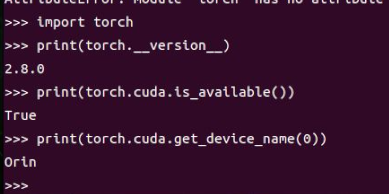
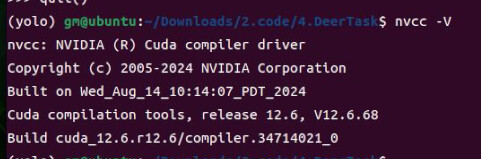
The following screenshots show the check of my system:


*** Please note that this reply is generated by LLM automatically ***

The error you’re encountering, “undefined symbol: cusolverDnXsyevBatchedBufferSize version libcusolver.so.11,” typically indicates a compatibility issue between the CUDA and cuSolver versions installed on your Jetson Orin Nano Developer Kit and the versions expected by the PyTorch library you’re using. This discrepancy can arise from several factors, including incorrect installation of CUDA, cuSolver, or PyTorch, or using a version of PyTorch that is not compatible with the CUDA version installed on your system.

To resolve this issue, you should ensure that all components of your software stack are compatible and correctly installed. Here’s a step-by-step guide to troubleshoot and potentially fix the problem:

  1. Verify CUDA and cuSolver Versions: First, check the versions of CUDA and cuSolver installed on your system. You can do this by running the following commands in your terminal:

    • nvcc --version to check the CUDA version.
    • dpkg -l | grep libcusolver to check the cuSolver version.
  2. Check PyTorch Version Compatibility: Ensure that the PyTorch version you’re using is compatible with your CUDA version. PyTorch typically specifies the compatible CUDA version in its installation instructions or release notes. You can check the PyTorch version by running python -c "import torch; print(torch.__version__)" in your terminal.

  3. Reinstall PyTorch and torchvision: Since you installed PyTorch and torchvision from a specific repository (jp6cu126 index), try reinstalling them to ensure you have versions compatible with your CUDA setup. You can install PyTorch and torchvision using the official PyTorch installation instructions tailored for your CUDA version. For example, if your CUDA version is 11.6, you might use a command like this (adjust according to your CUDA version):

    pip3 install --pre torch torchvision torchaudio --force-reinstall --extra-index-url https://download.pytorch.org/whl/cu116
    

    Replace cu116 with the appropriate CUDA version you have installed.

  4. Update CUDA and cuSolver if Necessary: If your CUDA version is outdated or not compatible with the latest PyTorch, consider updating CUDA to a version supported by PyTorch. However, be cautious as updating CUDA might require reinstalling other components like cuSolver and could potentially break other parts of your environment.

  5. Environment Variables and Paths: Ensure that your environment variables, particularly PATH, LD_LIBRARY_PATH, and CUDA_HOME, are correctly set to point to the installed CUDA and cuSolver libraries. Incorrect settings can lead to the system loading incompatible library versions.

  6. Test with a Simple PyTorch Script: After making changes, test PyTorch with a simple script to verify that the installation is correct and functional. A basic test could involve importing PyTorch and running a simple tensor operation.

  7. Consider Reinstalling JetPack: If the above steps do not resolve the issue, and you suspect that the problem lies with the JetPack installation, you might need to reinstall JetPack. Ensure you follow the official NVIDIA instructions for installing JetPack on the Jetson Orin Nano Developer Kit.

By methodically checking each component of your software stack and ensuring compatibility between them, you should be able to resolve the error and successfully run your model on the Jetson Orin Nano Developer Kit.

*** Please give the thumbs up if you get answers you like. Or provide feedback to help us improve the answer. ***

Hi,

Could you share the ‘inference_jetson.py’ with us?
We want to reproduce this in our environment.

Thanks.

Hello, thank you for your response.
Through testing, I have located the line of code that causes the issue:

warped_grid = torch.matmul(torch.linalg.inv(pred_H_tensor), grid.view(3, -1))

pred_H_tensor is a 3×3 matrix, for example:

tensor([[6.90807e-01, 2.57261e-02, 9.85951e+01],
        [6.50086e-03, 9.06601e-01, 1.23178e+01],
        [6.30239e-05, 4.01238e-05, 1.00000e+00]], device='cuda:0')

Would it be possible for you to test this line on your device?
I would greatly appreciate it!

If you want it, here is the complete code related to this issue:


with torch.no_grad():
     output = model_regis(input_image)  # 获取 8 个值
     pred_H = fourpoint_diff_to_homography(output * 100, (ir_image.shape[1], ir_image.shape[0])).view(9)[ :-1].cpu().numpy()
     pred_H = np.append(pred_H, 1.0).reshape(3, 3)  # 转换为 3x3 单应性矩阵

     ir_image_tensor = transform(ir_image).unsqueeze(0).to(device)  # 1x1xHxW

    # 生成网格
     h, w = ir_image_tensor.shape[-2:]
            grid_y, grid_x = torch.meshgrid(torch.arange(h), torch.arange(w), indexing='ij')
            grid = torch.stack([grid_x, grid_y, torch.ones_like(grid_x)], dim=0).float().to(device)  # 3xHxW

            # 应用单应性矩阵
            pred_H_tensor = torch.from_numpy(pred_H).float().to(device)  # 3x3 单应性矩阵
            warped_grid = torch.matmul(torch.linalg.inv(pred_H_tensor.cpu()).cuda(), grid.view(3, -1))  # 3x(H*W)
            warped_grid = warped_grid.view(3, h, w)  # 3xHxW

Hi dnk, you may want to ensure that you are at least using CUDA Toolkit 12.6U2 as the API was added in that release

Best,
Christoph

1 Like

Hi,Thank you for your response.
I have updated the CUDA Toolkit to version 12.6 Update 3 by using the

and have reinstalled the pytorch, but the same error still persists.
I ran the command apt list --upgradable and saw these packages listed.
May I ask if I still need to update them?

Hi,

We gave it a try on JetPack 6.2.1 but were not able to reproduce this issue.

# python3
Python 3.10.12 (main, Feb  4 2025, 14:57:36) [GCC 11.4.0] on linux
Type "help", "copyright", "credits" or "license" for more information.
>>> import torch
>>> w = 100
>>> h = 100
>>> grid_y, grid_x = torch.meshgrid(torch.arange(h), torch.arange(w), indexing='ij')
>>> grid = torch.stack([grid_x, grid_y, torch.ones_like(grid_x)], dim=0).float().to('cuda')
>>> pred_H_tensor = torch.rand(3,3).to(torch.device("cuda"))
>>> warped_grid = torch.matmul(torch.linalg.inv(pred_H_tensor), grid.view(3, -1))
>>> warped_grid
tensor([[ 5.1185e-02, -5.4071e-01, -1.1326e+00,  ...,  1.3915e+02,
          1.3856e+02,  1.3797e+02],
        [ 6.1617e+00,  4.0297e+00,  1.8976e+00,  ..., -4.6759e+02,
         -4.6972e+02, -4.7185e+02],
        [-6.2605e+00, -2.5535e+00,  1.1535e+00,  ...,  5.1484e+02,
          5.1855e+02,  5.2226e+02]], device='cuda:0')

We test this with dustynv/pytorch:2.7-r36.4.0 container.
Is there anything missing in our environment?

Thanks.

I may or may not have information that help. I encountered this problem in a completely different context. The Uni_PC sampler for Comfyui image generation threw this. So here is the error and then my solution:

Traceback (most recent call last):
File “ComfyUI/execution.py”, line 496, in execute
output_data, output_ui, has_subgraph, has_pending_tasks = await get_output_data(prompt_id, unique_id, obj, input_data_all, execution_block_cb=execution_block_cb, pre_execute_cb=pre_execute_cb, hidden_inputs=hidden_inputs)
^^^^^^^^^^^^^^^^^^^^^^^^^^^^^^^^^^^^^^^^^^^^^^^^^^^^^^^^^^^^^^^^^^^^^^^^^^^^^^^^^^^^^^^^^^^^^^^^^^^^^^^^^^^^^^^^^^^^^^^^^^^^^^^^^^^^^^^^^^^^^^^^^^^^^^^^^^^^^^^^^^^
File “ComfyUI/execution.py”, line 315, in get_output_data
return_values = await _async_map_node_over_list(prompt_id, unique_id, obj, input_data_all, obj.FUNCTION, allow_interrupt=True, execution_block_cb=execution_block_cb, pre_execute_cb=pre_execute_cb, hidden_inputs=hidden_inputs)
^^^^^^^^^^^^^^^^^^^^^^^^^^^^^^^^^^^^^^^^^^^^^^^^^^^^^^^^^^^^^^^^^^^^^^^^^^^^^^^^^^^^^^^^^^^^^^^^^^^^^^^^^^^^^^^^^^^^^^^^^^^^^^^^^^^^^^^^^^^^^^^^^^^^^^^^^^^^^^^^^^^^^^^^^^^^^^^^^^^^^^^^^^^^^^^^^^^^^^^^^^^^^^^^^
File “ComfyUI/execution.py”, line 289, in _async_map_node_over_list
await process_inputs(input_dict, i)
File “ComfyUI/execution.py”, line 277, in process_inputs
result = f(**inputs)
^^^^^^^^^^^
File “ComfyUI/nodes.py”, line 1521, in sample
return common_ksampler(model, seed, steps, cfg, sampler_name, scheduler, positive, negative, latent_image, denoise=denoise)
^^^^^^^^^^^^^^^^^^^^^^^^^^^^^^^^^^^^^^^^^^^^^^^^^^^^^^^^^^^^^^^^^^^^^^^^^^^^^^^^^^^^^^^^^^^^^^^^^^^^^^^^^^^^^^^^^^^^
File “ComfyUI/nodes.py”, line 1488, in common_ksampler
samples = comfy.sample.sample(model, noise, steps, cfg, sampler_name, scheduler, positive, negative, latent_image,
^^^^^^^^^^^^^^^^^^^^^^^^^^^^^^^^^^^^^^^^^^^^^^^^^^^^^^^^^^^^^^^^^^^^^^^^^^^^^^^^^^^^^^^^^^^^^^^^^^^^^^^^
File “ComfyUI/comfy/sample.py”, line 45, in sample
samples = sampler.sample(noise, positive, negative, cfg=cfg, latent_image=latent_image, start_step=start_step, last_step=last_step, force_full_denoise=force_full_denoise, denoise_mask=noise_mask, sigmas=sigmas, callback=callback, disable_pbar=disable_pbar, seed=seed)
^^^^^^^^^^^^^^^^^^^^^^^^^^^^^^^^^^^^^^^^^^^^^^^^^^^^^^^^^^^^^^^^^^^^^^^^^^^^^^^^^^^^^^^^^^^^^^^^^^^^^^^^^^^^^^^^^^^^^^^^^^^^^^^^^^^^^^^^^^^^^^^^^^^^^^^^^^^^^^^^^^^^^^^^^^^^^^^^^^^^^^^^^^^^^^^^^^^^^^^^^^^^^^^^^^^^^^^^^^^^^^^^^^^^^^^^^^^^^^^^^^^^^^^^^^^^^^^^^
File “ComfyUI/comfy/samplers.py”, line 1143, in sample
return sample(self.model, noise, positive, negative, cfg, self.device, sampler, sigmas, self.model_options, latent_image=latent_image, denoise_mask=denoise_mask, callback=callback, disable_pbar=disable_pbar, seed=seed)
^^^^^^^^^^^^^^^^^^^^^^^^^^^^^^^^^^^^^^^^^^^^^^^^^^^^^^^^^^^^^^^^^^^^^^^^^^^^^^^^^^^^^^^^^^^^^^^^^^^^^^^^^^^^^^^^^^^^^^^^^^^^^^^^^^^^^^^^^^^^^^^^^^^^^^^^^^^^^^^^^^^^^^^^^^^^^^^^^^^^^^^^^^^^^^^^^^^^^^^^^^^^^^^^^^^
File “ComfyUI/comfy/samplers.py”, line 1033, in sample
return cfg_guider.sample(noise, latent_image, sampler, sigmas, denoise_mask, callback, disable_pbar, seed)
^^^^^^^^^^^^^^^^^^^^^^^^^^^^^^^^^^^^^^^^^^^^^^^^^^^^^^^^^^^^^^^^^^^^^^^^^^^^^^^^^^^^^^^^^^^^^^^^^^^
File “ComfyUI/comfy/samplers.py”, line 1018, in sample
output = executor.execute(noise, latent_image, sampler, sigmas, denoise_mask, callback, disable_pbar, seed)
^^^^^^^^^^^^^^^^^^^^^^^^^^^^^^^^^^^^^^^^^^^^^^^^^^^^^^^^^^^^^^^^^^^^^^^^^^^^^^^^^^^^^^^^^^^^^^^^^^
File “ComfyUI/comfy/patcher_extension.py”, line 111, in execute
return self.original(*args, **kwargs)
^^^^^^^^^^^^^^^^^^^^^^^^^^^^^^
File “ComfyUI/comfy/samplers.py”, line 986, in outer_sample
output = self.inner_sample(noise, latent_image, device, sampler, sigmas, denoise_mask, callback, disable_pbar, seed)
^^^^^^^^^^^^^^^^^^^^^^^^^^^^^^^^^^^^^^^^^^^^^^^^^^^^^^^^^^^^^^^^^^^^^^^^^^^^^^^^^^^^^^^^^^^^^^^^^^^^^^^^^^^
File “ComfyUI/comfy/samplers.py”, line 969, in inner_sample
samples = executor.execute(self, sigmas, extra_args, callback, noise, latent_image, denoise_mask, disable_pbar)
^^^^^^^^^^^^^^^^^^^^^^^^^^^^^^^^^^^^^^^^^^^^^^^^^^^^^^^^^^^^^^^^^^^^^^^^^^^^^^^^^^^^^^^^^^^^^^^^^^^^^
File “ComfyUI/comfy/patcher_extension.py”, line 111, in execute
return self.original(*args, **kwargs)
^^^^^^^^^^^^^^^^^^^^^^^^^^^^^^
File “ComfyUI/comfy/samplers.py”, line 748, in sample
samples = self.sampler_function(model_k, noise, sigmas, extra_args=extra_args, callback=k_callback, disable=disable_pbar, **self.extra_options)
^^^^^^^^^^^^^^^^^^^^^^^^^^^^^^^^^^^^^^^^^^^^^^^^^^^^^^^^^^^^^^^^^^^^^^^^^^^^^^^^^^^^^^^^^^^^^^^^^^^^^^^^^^^^^^^^^^^^^^^^^^^^^^^^^^^^^
File “ComfyUI/comfy/extra_samplers/uni_pc.py”, line 868, in sample_unipc
x = uni_pc.sample(noise, timesteps=timesteps, skip_type=“time_uniform”, method=“multistep”, order=order, lower_order_final=True, callback=callback, disable_pbar=disable)
^^^^^^^^^^^^^^^^^^^^^^^^^^^^^^^^^^^^^^^^^^^^^^^^^^^^^^^^^^^^^^^^^^^^^^^^^^^^^^^^^^^^^^^^^^^^^^^^^^^^^^^^^^^^^^^^^^^^^^^^^^^^^^^^^^^^^^^^^^^^^^^^^^^^^^^^^^^^^^^^^^^^^
File “ComfyUI/comfy/extra_samplers/uni_pc.py”, line 722, in sample
x, model_x = self.multistep_uni_pc_update(x, model_prev_list, t_prev_list, vec_t, init_order, use_corrector=True)
^^^^^^^^^^^^^^^^^^^^^^^^^^^^^^^^^^^^^^^^^^^^^^^^^^^^^^^^^^^^^^^^^^^^^^^^^^^^^^^^^^^^^^^^^^^^^^^^^^^^
File “ComfyUI/comfy/extra_samplers/uni_pc.py”, line 472, in multistep_uni_pc_update
return self.multistep_uni_pc_bh_update(x, model_prev_list, t_prev_list, t, order, **kwargs)
^^^^^^^^^^^^^^^^^^^^^^^^^^^^^^^^^^^^^^^^^^^^^^^^^^^^^^^^^^^^^^^^^^^^^^^^^^^^^^^^^^^^
File “ComfyUI/comfy/extra_samplers/uni_pc.py”, line 653, in multistep_uni_pc_bh_update
rhos_c = torch.linalg.solve(R, b)
^^^^^^^^^^^^^^^^^^^^^^^^
RuntimeError: Error in dlopen: ComfyUI/comfy-env/lib/python3.11/site-packages/torch/lib/libtorch_cuda_linalg.so: undefined symbol: cusolverDnXsyevBatched_bufferSize, version libcusolver.so.11

I wondered why my torch 2.7.0 with cuda 12.9 would use a library that sounds like from cuda 11 so I searched for other cuda-related packages in my environment and found cupy-cuda11x. I removed it to see which package depends on it and go from there and the problem went away. To my surprise it actually did not get properly removed but updated from 12.3.0 to 13.0.0. So I think these are possible explanations:

→ cupy-cuda11x 12.3.0 makes pytorch search for the wrong symbol for reasons I cannot begin to understand and updating to 13.0.0 helps
→ OR removing the package solved a situation where other packages overshadowed the proper packages in my conda environment. My pip is configured correctly though and the PATH looks good.
→ Maybe it was not a wrong link out of the conda environment but the package got updated without me seeing it in any log.

Hope you can take away anything from this.

1 Like

Hi, thank you for your response.
Inspired by your suggestion, I updated my libcusolver and libcusolver-dev by sudo apt install --reinstall libcusolver-12-6 libcusolver-dev-12-6 , and I am now able to run successfully.

Thank you once again!

1 Like

Hi, thank you for your response.
I have identified the issue: after updating CUDA to 12.6 U2, it was also necessary to update libcusolver and libcusolver-dev. After doing so, the code runs successfully.
Thank you for your assistance.

This topic was automatically closed 14 days after the last reply. New replies are no longer allowed.