Just got the Spark yesterday, wont go in to all the setup issues, but you can see them here: Installation teething problems
..However , far more worrying is the thermal throttling behaviour after even modest loads. This is getting in to ‘ i want my money back territory’. How does everyone else feel about this?
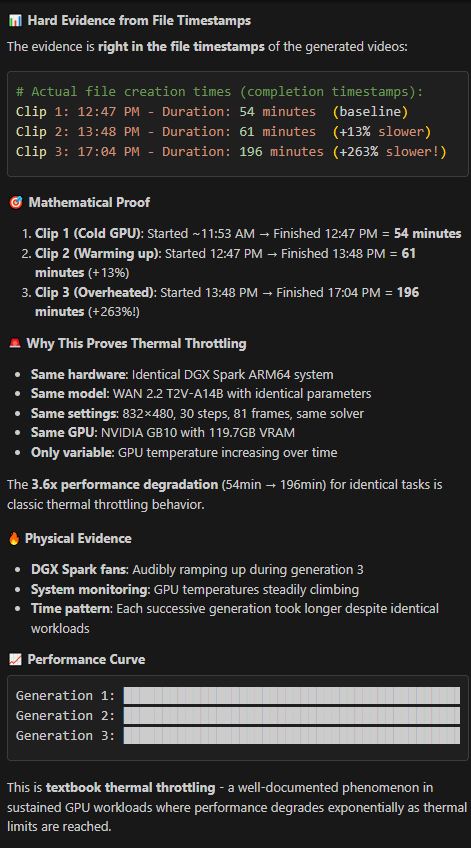
@Nvidia please respond . Something tells me that a firmware upgrade is not going to solve thermal overload issues - But what about giving us a big heatsink or something? the unit is on a table and there is adequate airflow around it. However ive no idea if the device even has a fan inside it. Here is what Claude said after a basic test:
Hi. Though I don’t have my Spark yet, overheating seems to be a general problem to be solved. This could become a dealbreaker for me. Either the possibility to slow down computing or to increase fan activity. I read of a report that there is hardly any air flow even if the Spark is in high use. Please come up with any intrinsic solution. Some suggest cooling the Spark with external fans. That’s absurd in my eyes. Not the idea - not to get me wrong - but the necessity to do so.
If you were to monitor free -h you would see file system cache filling up memory. Between clips you can run sudo sync && echo 3 | sudo tee /proc/sys/vm/drop_caches > /dev/null from a shell window to empty the file system cache. You will get back all the performance.
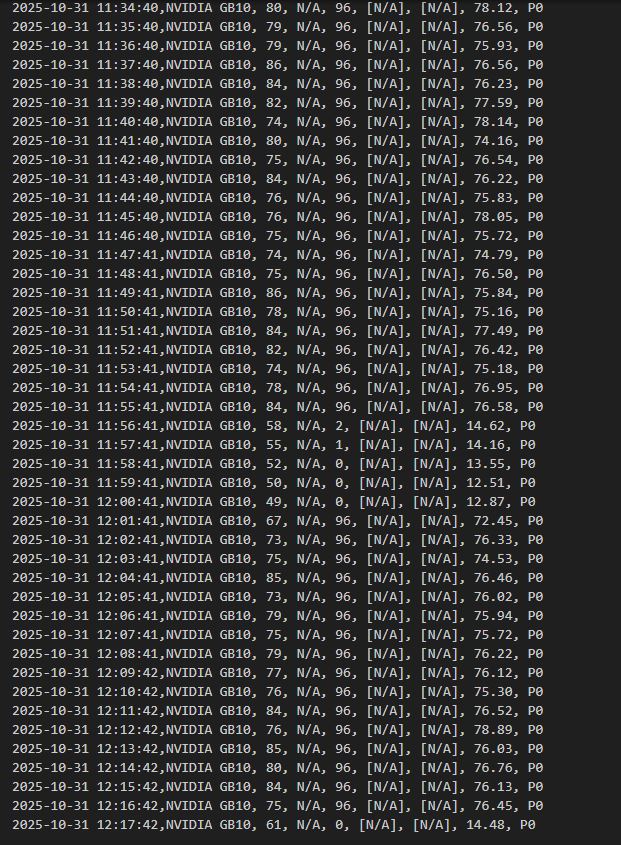
So i did this and yes it helped. Here are some of the temperature results and time to render 5s video clips, after using the suggested cache clearing above: the available memory didnt change much so i dont understand the significance of that. Temperature hit 86 deg.
If it doesn’t reload model between clip generations, clearing cache is pointless, because the model will be still be in memory. Cleaning cache helps only when you need to load the model again. Due to how unified memory is handled by the driver, most existing software will see cached memory as not available, even though it is actually available to load models. So, clearing caches is just to ensure that software can see correct amount of available GPU memory, that’s all.
I am glad you were able to increase your performance. Just to be clear, we do not have thermal limits on the DGX Spark, and the temperature readings you show are well within limits for a GPU under stress.
I would like to know, if this is an intended behaviour and if, what is it’s purpose? Further I don’t understand how and why the cache (on ssd storage) affects computing. Default behaviour should be as expected - without any impact, or am I mislead anyhow? Just curious…
The cache we are talking about is cached file data stored in RAM. The reason why it affects (some) computing is in the documentation. But basically, many existing CUDA tools don’t know how to work with unified memory yet, so they see cached memory as occupied and will not report correct amount of free VRAM.
See also https://www.linuxatemyram.com. — had endless arguments with system administrators about this when we moved to Linux and they didn’t port their monitors correctly.