Please provide the following info (tick the boxes after creating this topic): Software Version
DRIVE OS 6.0.10.0
DRIVE OS 6.0.8.1
DRIVE OS 6.0.6
DRIVE OS 6.0.5
DRIVE OS 6.0.4 (rev. 1)
DRIVE OS 6.0.4 SDK
other
Target Operating System
Linux
QNX
other
Hardware Platform
DRIVE AGX Orin Developer Kit (940-63710-0010-300)
DRIVE AGX Orin Developer Kit (940-63710-0010-200)
DRIVE AGX Orin Developer Kit (940-63710-0010-100)
DRIVE AGX Orin Developer Kit (940-63710-0010-D00)
DRIVE AGX Orin Developer Kit (940-63710-0010-C00)
DRIVE AGX Orin Developer Kit (not sure its number)
other
SDK Manager Version
2.1.0
other
Host Machine Version
native Ubuntu Linux 20.04 Host installed with SDK Manager
native Ubuntu Linux 20.04 Host installed with DRIVE OS Docker Containers
native Ubuntu Linux 18.04 Host installed with DRIVE OS Docker Containers
other
Issue Description
We recently flashed DRIVE OS 6.0.10 onto our DRIVE AGX Orin Developer Kit. We would like to run a browser-based GUI on the platform. It appears that Chromium is pre-installed which is great since that is the browser we have been using. Unfortunately, our GUI appears slow and choppy while using it.
We noticed that when “Use hardware acceleration when available” is enabled, several of the features found on the chrome://gpu page do not use hardware acceleration by default. By enabling several flags on the chrome://flags page, we could get many of those features on the chrome://gpu page to show as hardware accelerated. Despite this, there was no noticeable improvement. Also, closing the browser and opening it back up would often show many of the features on the chrome://gpu page as not using hardware acceleration even though the flags we set on the chrome://flags page were still set.
We thought that maybe upgrading to the latest Chromium would help, but it seems that it is now only distributed as a snap. Trying to install Chromium as a snap fails because a squashfs fails to be mounted onto a loop device.
Is there a recommended way to enable hardware acceleration in Chromium on this platform? Is there another recommended browser that supports hardware acceleration?
Video Encode: Software only. Hardware acceleration disabled
Vulkan: Disabled
WebGL: Hardware accelerated
WebGL2: Hardware accelerated
WebGPU: Disabled
One section seems to indicate there is no hardware acceleration and another indicates there is. When we run our GUI we see tegrastats output GR3D_FREQ values around a few percent. This value goes to 0 when we shutdown the GUI. When we enable Vulkan in chrome://flags, that “Graphics Features Status for Hardware GPU” section disappears from chrome://gpu. The “Graphics Features Status” section then looks like the “Graphics Features for Hardware GPU” section listed above except Vulkan is shown as enabled. There is no improvement in the performance of the GUI (laggy with low frame rates).
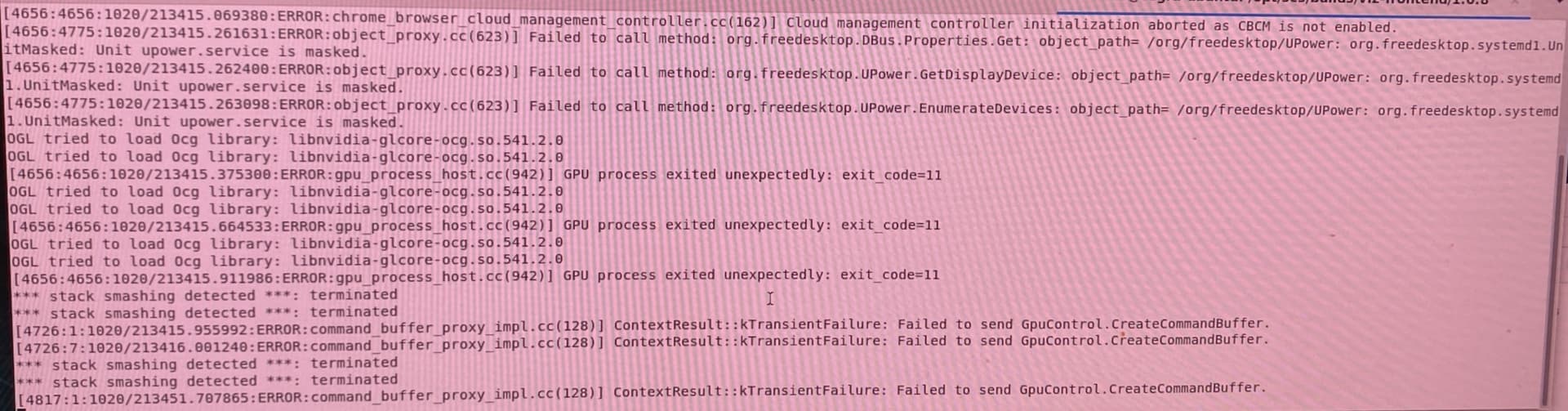
“In the Log Messages” section of chrome://gpu, we see the following errors when running the GUI:
GpuProcessHost: The GPU process crashed!
[2888:2888:1020/211508.609901:WARNING:sandbox_linux.cc(393)]: InitializeSandbox() called with multiple threads in process gpu-process.
We found that using the command line option –disable-gpu-sandbox for Chromium both enables hardware acceleration for most features and resolves all of the error messages logged on the chrome://gpu page.
Collecting more data using tegrastats, we can definitely see a difference in GPU usage when the chrome://gpu page shows mostly software only or mostly hardware accelerated. When software only is shown for most features, we see GPU usage at around a few percent. When hardware acceleration is shown for most features, we see GPU usage average at about 20%.
We are still confused as to why there is no noticeable improvement in the GUI performance. Frame rates can barely reach 20 FPS. We often run this GUI on a machine with less powerful hardware, and it can easily reach 60 FPS when hardware acceleration is enabled.
We used benchmark tools to get an idea of the web browser graphics performance. Using MotionMark on Chromium, The DRIVE AGX Orin scores ~353 while an N150 mini PC using onboard graphics scores ~1032. The scores are similar on Brave. We did not use MotionMark for Firefox, but our GUI performance looked similar to Chromium and Brave.
The trend is that the DRIVE AGX Orin seems to struggle rendering graphics on typical web browsers even when hardware acceleration is enabled. Our GUI is not doing anything too intensive. We are compositing 2D images and overlaying some simple animations. Any recommendations on how to improve web browser graphics performance?
Dear @paul.katarzis ,
If it is a CUDA application, you can profile using nsys to know bottleneck and improve the performance. Note that iGPU is meant to use more efficiently for inference tasks and we have not verified browser apps on target.