@linuxdev Thank you for taking the time to reply!
How do you mean “priority 49”? If you use the “nice ” or “renice ” to change a priority, then the range is -20 to +20 , and more positive is lower priority. What is your exact method of dealing with priority?
We use sched_setscheduler(0, SCHED_FIFO, ¶m) with a priority of 49, which appears at value -50 in the PRI column of htop. The behavior remains the same regardless of the priority value, even with the default priority.
Also, you should probably know a bit about routing of hardware interrupts versus CPU core. What is the isolated core you speak of? Is this one of the Jetson cores using affinity? If so, then this is likely not working the way you think it is.
We isolate core 3 and use sched_setaffinity() to tie the process to the core. htop reports that only this process is running on core 3.
On a desktop PC, if you were to set affinity for a hardware device which is serviced by a hardware interrupt request, then an actual wire would be set up to associate that interrupt with the core. I will emphasize, this is a physical wire. The programming on an Intel PC for IRQ changes is via the I/O APIC (Asynchronous Programmable Interrupt Controller). AMD has its own way of doing the equivalent. The Jetson has no such mechanism.
It’s not an interrupt caused by a physical wire.
Note: /proc/interrupts is not a real file, it is a living reflection in RAM from a driver in the kernel, and it will update as activity runs. When you use “cat” or “less” on that file you freeze a snapshot, but the file is still changing.
There are also software interrupt requests. You have either a hardware IRQ or a soft IRQ. In the case of software a uniform mechanism across architectures, the ksoftirqd daemon (which is part of the scheduler). The hard IRQ also talks to the scheduler, but on a Jetson, many of the hardware IRQs can only go to the first cpu core (CPU0). This is because there is no I/O APIC (or equivalent) on the Jetsons. Most hardware IRQs must go to CPU0. All of those hard IRQs compete with each other.
You can set affinity for something depending on a hardware IRQ to a different core, but what you’ll actually get is the scheduler reassigning that to CPU0. Take a look at “/proc/interrupts”. This file is for hardware IRQs. A few items have access on every core, for example, timers. I don’t know if a PCIe device would have access to different cores, but you will find various PCI interrupts listed in /proc/interrupts. Is that IRQ going strictly to the core you expect? It is possible that an IRQ will be pointed at a core, and then transferred back to CPU0. You might also look near the bottom of that file and examine the line item “Rescheduling interrupts”.
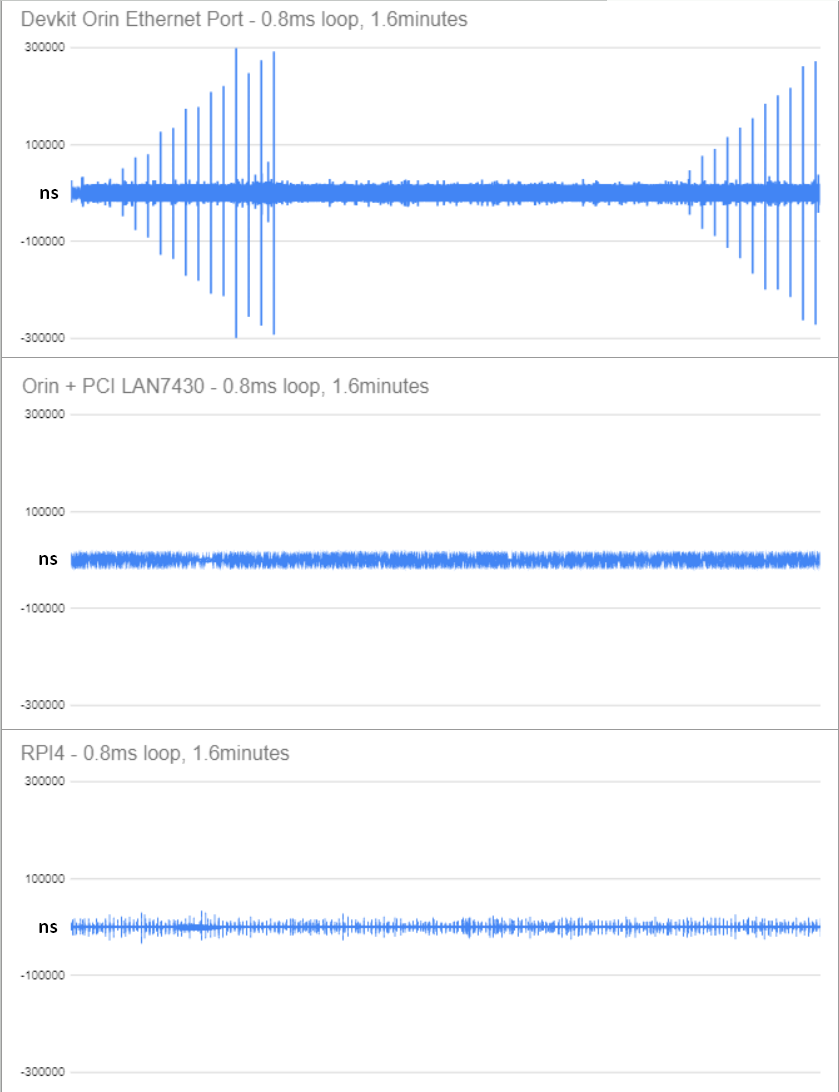
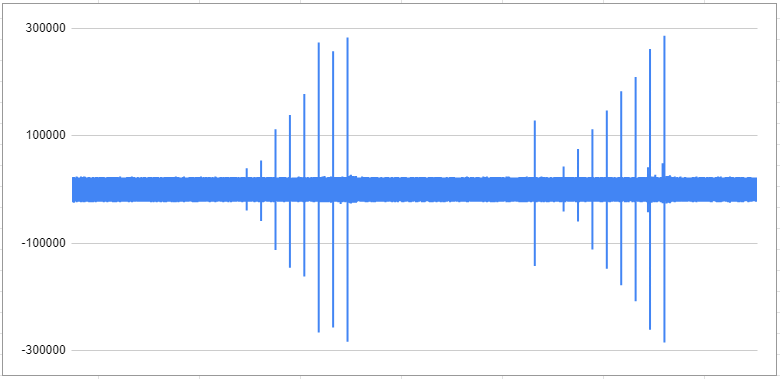
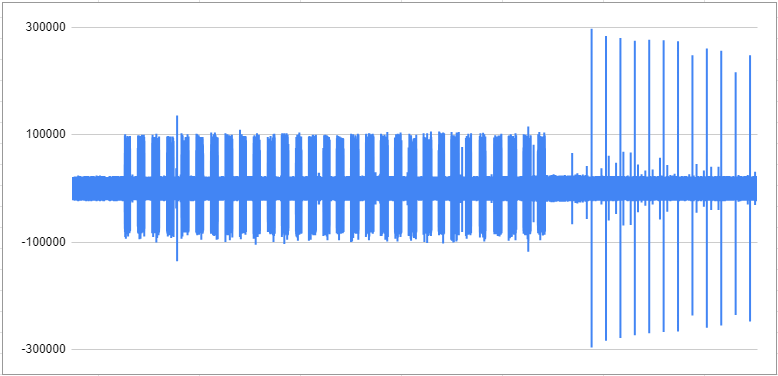
What we did to optimize performance was to set pci=nomsi in kernel command, so that we can set the smp_affinity of tegra-pcie-intr, PCIe PME, eth0 to core 3. We also disabled any other service that would use eth0. Looking at/proc/interrupts with watch -n 0.1 "cat /proc/interrupts | grep eth0", on the CPU columns, no interrupts are happening on any other core than 3. Also, no interrupt occurs when the ethercat service is not running. The problem occurs even if we don’t change the interrupt affinity, even without the pci=nomsi kernel command. But, it does not occur on the LAN7430 that is connected to the orin.
The normal case for writing a Linux hardware driver gives the advice that you want to perform the very minimal activity in the hardware driver, and then if more is required, to spin what remains off as a software IRQ to a different driver. For example, a network adapter might need a checksum, and if the checksum is not performed by the network adapter, then you would want to move that checksum routine out of the hardware driver and trigger a software driver. That software interrupt can run on any core, and would shorten the time of the original hardware IRQ locking a core. This wouldn’t matter so much on a system with an I/O APIC (or similar), but it would still break up core lock to a finer degree.
Maybe there’s something there.
I don’t know if the RPi has the ability to route hard IRQs to different cores (I don’t have an RPi, so I have never looked), but if you have some similar setup using the same NIC and/or other communications hardware, you could examine that platform’s “/proc/interrupts ”. Maybe they are no different regarding hard IRQ access to cores, but if they do differ, then you won’t be able to use affinity the same way on the Jetson. If it does turn out they are the same, then there is likely some other optimization (Jedi mind trick?) you can use to improve things.
I use the same smp_affinity technique on the RPI. However, the RPI eth0 is tied to 2 IRQs. I set those 2 IRQs to core 3. Changing the affinity is only to help with jitter.
I’ve tried to read a lot on the subject and bang my head on trying different combination of solutions, but after trying on other hardware and making it work, I am out of ideas on what to try. Maybe there’s a kernel option that could help, but I think the ethernet port is managed by nvethernet.ko and I would like to know what Nvidia thinks of this behavior.