Isaac Sim Version
- 5.0.0
Operating System
- Ubuntu 22.04
GPU Information
- Model: RTX 5080
- Driver Version: 580.82.07
Topic Description
I need to export some elements from the scene (along with the references) to a single USD file, so that I can import in the other app. So far I was successful with just right-clicking on the “World” prim in the “Stage” tab and choosing “Save Selected” (see below). This would allow me to save content of the “World” to a file I can load using isaaclab.sim_utils.UsdFileCfgUsdFile. This works perfectly fine, but I need this step to be automated.
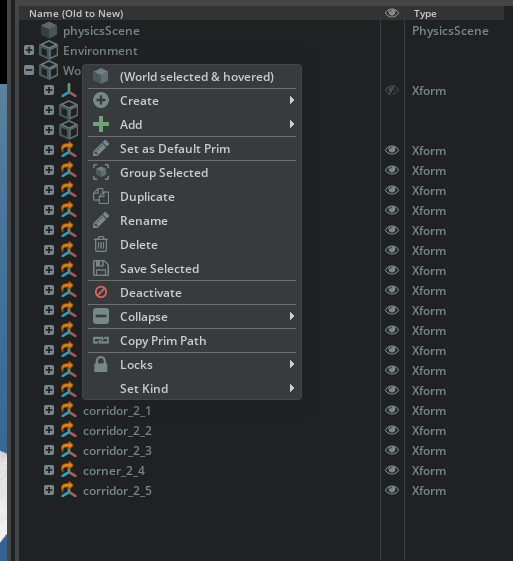
I have tried multiple different options by following something similar to isaac_sim/extsDeprecated/isaacsim.replicator.scene_blox/isaacsim/replicator/scene_blox/generation/scene_generator.py:97, but it does not work as intended. Files sizes are a way smaller (4kb vs 90 kb), so I assume that maybe the references are not collected into the file?
Another thing is that when importing this sort of file the Prim Path in the Property tab in Isaac Sim is in red, suggesting that maybe something is missing or just straight up wrong.

My intention is to load the asset from the USD file with the following snippet:
def load_maze() -> AssetBaseCfg:
    print(f"Loading maze from path = {args_cli.maze_path}")
    prim_utils.create_prim("/World/envs", "Xform")
    return AssetBaseCfg(
        prim_path="/World/envs/env_.*/Maze",
        spawn=sim_utils.UsdFileCfg(
            usd_path=str(args_cli.maze_path),
            scale=(args_cli.maze_scale, args_cli.maze_scale, args_cli.maze_scale),
        ),
    )
It works perfectly fine with the export from the GUI, but I cannot make it work with any way of saving it through the python API.
Any help would be very much appreciated, as I found the documentation not descriptive enough for me to understand how to achieve that (I am quite new to the Isaac Sim & Lab).