khushwant@OMEN-Transcend:~/omniverse$ docker run -it --rm --gpus all --network=host --name anim-graph-ms -v $(pwd)/default-avatar-scene_v1.0.0:/home/ace/asset nvcr.io/nvidia/ace/ia-animation-graph-microservice:1.0.2
- ldconfig -p
- grep libGLX_nvidia.so.0
- NOTFOUND=1
- [[ -v NOTFOUND ]]
- cat
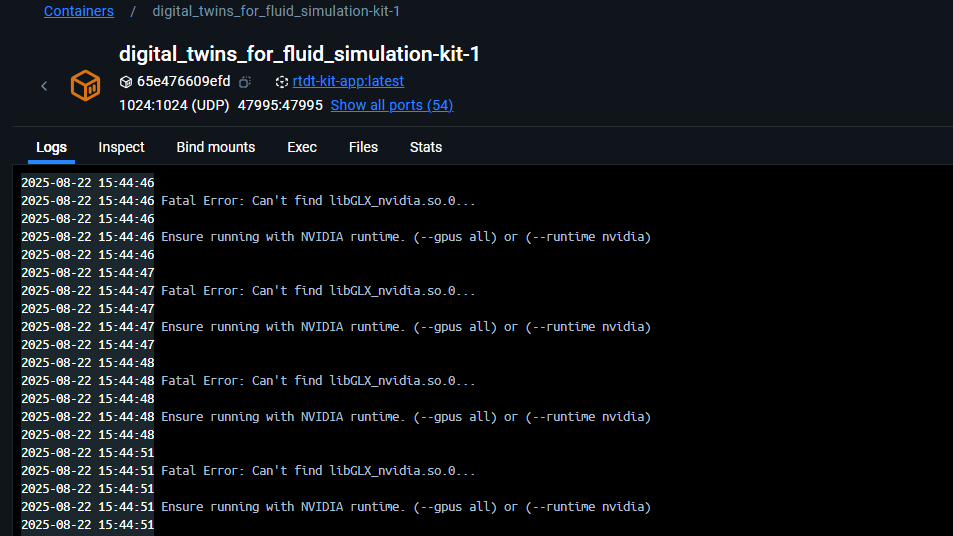
Fatal Error: Can’t find libGLX_nvidia.so.0…
Ensure running with NVIDIA runtime. (–gpus all) or (–runtime nvidia)
- exit 1
khushwant@OMEN-Transcend:~/omniverse$
Apologies for the delayed response.
We’re unable to reproduce this error on our end at the moment. Please can you check a couple things for us?
Let us know if the issue still persists or if this resolves it?
Best,
Sophie
I am also having the same issue when trying to run the following command using WSL:
docker run -it --rm --gpus all --network=host --name anim-graph -v ./default-avatar-scene_1.1.4:/home/interactive-avatar/asset nvcr.io/nvidia/ace/ia-animation-graph-microservice:1.1.0
Output:
+ ldconfig -p
+ grep libGLX_nvidia.so.0
+ NOTFOUND=1
+ [[ -v NOTFOUND ]]
+ cat

Fatal Error: Can't find libGLX_nvidia.so.0...

Ensure running with NVIDIA runtime. (--gpus all) or (--runtime nvidia)

+ exit 1
The container runtime is correctly installed:
sudo dpkg -l | grep nvidia-container-toolkit

ii  nvidia-container-toolkit        1.17.6-1                                amd64        NVIDIA Container toolkit
ii  nvidia-container-toolkit-base   1.17.6-1                                amd64        NVIDIA Container Toolkit Base
docker run --rm --gpus all nvidia/cuda:11.0.3-base-ubuntu20.04 nvidia-smi

Mon May 12 16:09:10 2025
+-----------------------------------------------------------------------------------------+
| NVIDIA-SMI 575.51.02              Driver Version: 576.02         CUDA Version: 12.9     |
|-----------------------------------------+------------------------+----------------------+
| GPU  Name                 Persistence-M | Bus-Id          Disp.A | Volatile Uncorr. ECC |
| Fan  Temp   Perf          Pwr:Usage/Cap |           Memory-Usage | GPU-Util  Compute M. |
|                                         |                        |               MIG M. |
|=========================================+========================+======================|
|   0  NVIDIA GeForce RTX 4090        On  |   00000000:01:00.0  On |                  Off |
| 32%   46C    P3             79W /  450W |    8401MiB /  24564MiB |     40%      Default |
|                                         |                        |                  N/A |
+-----------------------------------------+------------------------+----------------------+

+-----------------------------------------------------------------------------------------+
| Processes:                                                                              |
|  GPU   GI   CI              PID   Type   Process name                        GPU Memory |
|        ID   ID                                                               Usage      |
|=========================================================================================|
|  No running processes found                                                             |
+-----------------------------------------------------------------------------------------+
nvidia-ctk --version

NVIDIA Container Toolkit CLI version 1.17.6
commit: e627eb2e21e167988e04c0579a1c941c1e263ff6
However, despite correctly installing the container runtime, the libGLX_nvidia file seems to be missing in WSL since the following command returns an empty result:
ldconfig -p | grep libGLX_nvidia
@michael.dietz did you try and get this workflow running on WSL2 ?
yes, the problem from my initial message occured using WSL2. My workaround to getting it running at all was to replace the /startup_docker.sh file with a modified one where the following lines are commented out:
# Check for libGLX_nvidia.so.0 (needed for vulkan)
#ldconfig -p | grep libGLX_nvidia.so.0 || NOTFOUND=1
#if [[ -v NOTFOUND ]]; then
#    cat << EOF > /dev/stderr
#
#Fatal Error: Can't find libGLX_nvidia.so.0...
#
#Ensure running with NVIDIA runtime. (--gpus all) or (--runtime nvidia)
#
#EOF
#    exit 1
#fi

# Detect NVIDIA vulkan api version, and create ICD
#export VK_ICD_FILENAMES=/tmp/nvidia_icd.json

#export LD_LIBRARY_PATH=${LD_LIBRARY_PATH:+:$LD_LIBRARY_PATH}:"/opt/nvidia/omniverse/kit-sdk-launcher/plugins/carb_gfx"

# Create nvidia_icd.json
#/opt/nvidia/omniverse/vkapiversion/bin/vkapiversion "${VK_ICD_FILENAMES}"
@michael.dietz appreciate, many thanks for quick revert …
the application that i’m trying continually relays as below:-
i’ve posted the observations here in link below
Omniverse +DoMINO Automotive Aero NIM deployment Web Streaming issue - Core Platform / Extensions - NVIDIA Developer Forums
something is non-trivial within the settings..
so CUDA is able to run on WSL2 for your application… which is a good sign!