harry’s logs
systemd[1]: Stopping nvidia-powerd.service - nvidia-powerd service…
nvidia-powerd[2521]: Quit successfully
systemd[1]: nvidia-powerd.service: Deactivated successfully.
systemd[1]: Stopped nvidia-powerd.service - nvidia-powerd service.
systemd[1]: nvidia-powerd.service: Consumed 2.453s CPU time, 8.6M memory peak.
audit[1]: SERVICE_STOP pid=1 uid=0 auid=4294967295 ses=4294967295 subj=unconfined msg=‘unit=nvidia-powerd comm=“systemd” exe=“/usr/lib/systemd/systemd” hostname=? addr=? terminal=? res=success’
kernel: nvidia-nvlink: Nvlink Core is being initialized, major device number 509
kernel: NVRM: loading NVIDIA UNIX Open Kernel Module for x86_64 580.95.05 Release Build (dvs-builder@U22-I3-B17-02-5) Tue Sep 23 09:55:41 UTC 2025
kernel: nvidia-modeset: Loading NVIDIA UNIX Open Kernel Mode Setting Driver for x86_64 580.95.05 Release Build (dvs-builder@U22-I3-B17-02-5) Tue Sep 23 09:42:01 UTC 2025
kernel: [drm] [nvidia-drm] [GPU ID 0x00000100] Loading driver
kernel: NVRM: testIfDsmSubFunctionEnabled: GPS ACPI DSM called before _acpiDsmSupportedFuncCacheInit subfunction = 11.
kernel: NVRM: testIfDsmSubFunctionEnabled: GPS ACPI DSM called before _acpiDsmSupportedFuncCacheInit subfunction = 11.
kernel: [drm] Initialized nvidia-drm 0.0.0 for 0000:01:00.0 on minor 1
kernel: fbcon: nvidia-drmdrmfb (fb0) is primary device
kernel: nvidia 0000:01:00.0: [drm] fb0: nvidia-drmdrmfb frame buffer device
systemd[1]: Started nvidia-powerd.service - nvidia-powerd service.
audit[1]: SERVICE_START pid=1 uid=0 auid=4294967295 ses=4294967295 subj=unconfined msg=‘unit=nvidia-powerd comm=“systemd” exe=“/usr/lib/systemd/systemd” hostname=? addr=? terminal=? res=success’
nvidia-powerd[2431]: nvidia-powerd version:2.0 (build 1)
nvidia-powerd[2431]: DBus Connection is established
nvidia-powerd[2431]: ERROR! DC power limits table is not supported
nvidia-powerd[2431]: ERROR! Failed to get SysPwrLimitGetInfo!!
nvidia-powerd[2431]: ERROR! Client (presumably SBIOS) has requested to disable Dynamic Boost DC controller
dnf5daemon-server[4675]: 2025-10-19T12:13:02+0000 [4675] DEBUG Creating repo “nobara-nvidia-beta” from config file “/etc/yum.repos.d/nv-nvb.repo” section “nobara-nvidia-beta”
dnf5daemon-server[4675]: 2025-10-19T12:13:02+0000 [4675] DEBUG Creating repo “nobara-nvidia-new-feature” from config file “/etc/yum.repos.d/nv-nvnf.repo” section “nobara-nvidia-new-feature”
dnf5daemon-server[4675]: 2025-10-19T12:13:02+0000 [4675] DEBUG Creating repo “nobara-nvidia-production” from config file “/etc/yum.repos.d/nv-nvp.repo” section “nobara-nvidia-production”
dnf5daemon-server[4675]: 2025-10-19T12:13:02+0000 [4675] DEBUG Using cache for repo “nobara-nvidia-production”
dnf5daemon-server[4675]: 2025-10-19T12:13:02+0000 [4675] DEBUG Loading solv cache file: “/var/cache/dnf5daemon-server/nobara-nvidia-production-dcea01ca663c6478/solv/nobara-nvidia-production.solv”
dnf5daemon-server[4675]: 2025-10-19T12:13:02+0000 [4675] DEBUG No updateinfo metadata available for repo “nobara-nvidia-production”
dnf5daemon-server[4675]: 2025-10-19T12:13:02+0000 [4675] DEBUG No group metadata available for repo “nobara-nvidia-production”
dnf5daemon-server[4675]: 2025-10-19T12:13:02+0000 [4675] DEBUG No modules metadata available for repo nobara-nvidia-production
dnf5daemon-server[4675]: 2025-10-19T12:13:02+0000 [4675] DEBUG Rewriting repo “nobara-nvidia-production” with added file provides
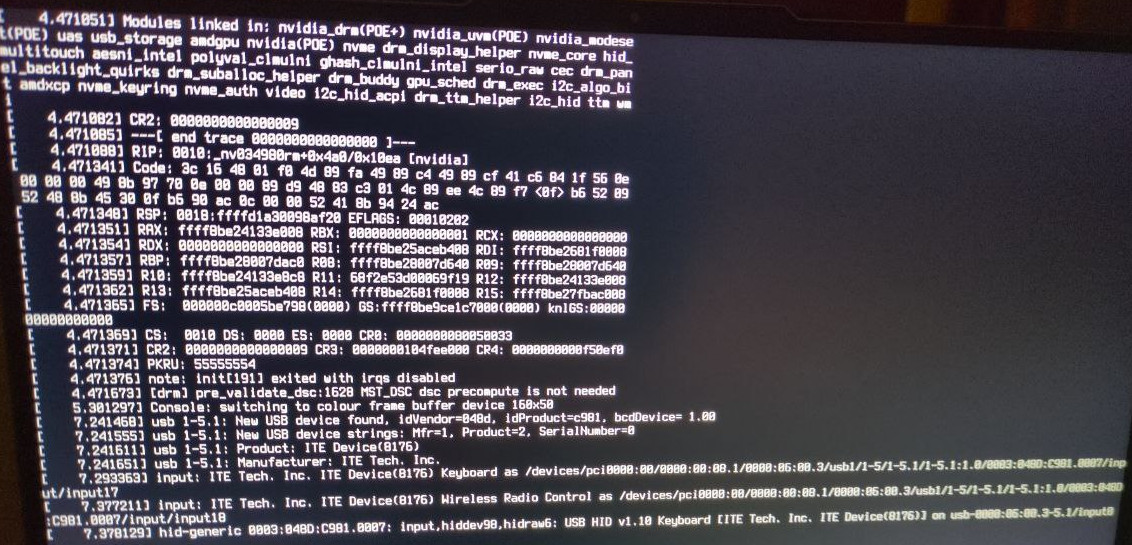
kernel: NVRM: kgspHealthCheck_TU102: ****************************** GSP-CrashCat Report *******************************
kernel: NVRM: GPU at PCI:0000:01:00: GPU-d755d0b6-e03a-ce6f-40cf-0603c6e1fcfc
kernel: NVRM: Xid (PCI:0000:01:00): 120, pid=3596, name=kwin_wayland, GSP task exception: load access page fault (cause:0xd) @ pc:0x12b017c, partition:2#0, task:3
kernel: NVRM: Reported by libos partition:2#4 kernel v3.1 [0] @ ts:1760876916
kernel: NVRM: RISC-V CSR State:
kernel: NVRM: sstatus:0x0000000200000020 sscratch:0xffffffffa30134d0 sie:0x0000000000000220 sip:0x0000000000000000
kernel: NVRM: sepc:0x00000000012b017c stval:0x0000000000000009 scause:0x000000000000000d
kernel: NVRM: RISC-V GPR State:
kernel: NVRM: ra:0x00000000012b011e sp:0x000000080060c4c0 gp:0x0000000000000000 tp:0x0000000000000000
kernel: NVRM: a0:0x0000000000000000 a1:0x0000000000000004 a2:0x000000080060c570 a3:0x0000000900000000
kernel: NVRM: a4:0x0000000000001000 a5:0x0000000000000000 a6:0x0000000029292929 a7:0x0000000000000006
kernel: NVRM: s0:0x000000080060c640 s1:0x00000007f9c1be90 s2:0x00000007f9da2380 s3:0x00000007f9d16d50
kernel: NVRM: s4:0x0000000004160fe0 s5:0x0000000000000000 s6:0x00000007f9da2370 s7:0x00000007f9c1be90
kernel: NVRM: s8:0x00000007f9c13dd0 s9:0x00000007f9c1b750 s10:0x00000007f9da3370 s11:0x00000007f9c1b590
kernel: NVRM: t0:0x0000000000000001 t1:0x0000000000000002 t2:0x000000000ba021c8 t3:0x0000000000000000
kernel: NVRM: t4:0x00000007f9c1ae90 t5:0x0000000020000000 t6:0x000000000419b570
kernel: NVRM: Stack Trace:
kernel: NVRM: 0x00000000012b017c
kernel: NVRM: 0x00000000012ad968
kernel: NVRM: 0x000000000121d89c
kernel: NVRM: 0x00000000018e3866
kernel: NVRM: 0x00000000011cc028
kernel: NVRM: 0x0000000001adc01c
kernel: NVRM: 0x00000000010554a4
kernel: NVRM: 0x0000000001055e12
kernel: NVRM: 0x0000000001a487a6
kernel: NVRM: 0x0000000001a56a5c
kernel: NVRM: 0x0000000001b8b9f2
kernel: NVRM: 0x0000000001a89c54
kernel: NVRM: 0x0000000001bed3b8
kernel: NVRM: 0x0000000001a85ee6
kernel: NVRM: PC Trace:
kernel: NVRM: 0x00000000012b017c 0x0000000001b20f76 0x00000000012b011a 0x00000000012a9c1c 0x0000000001a8640c
kernel: NVRM: 0xffffffff93000326 0x0000000001a86404 0x000000000010012e 0x0000000001a86402 0xffffffff93002e4c
kernel: NVRM: 0x0000000001a86430 0x00000000012a9bec 0x0000000001439ff0 0x0000000001b3ecf0 0xffffffff93002e4c
kernel: NVRM: 0x0000000001b3eca2 0x000000000143a028 0x000000000142e210 0xffffffff93002e4c 0x000000000142e1e6
kernel: NVRM: 0x0000000001439ff8 0xffffffff93002e4c 0x000000000143a00a 0x00000000012a9bc6 0x00000000017d1412
kernel: NVRM: 0x00000000017c5160 0x0000000001468252 0x00000000016fcdea 0x0000000001730254 0x00000000016fcda4
kernel: NVRM: 0x00000000014681c4 0x00000000017c5114 0x00000000017b9fbe 0x00000000017bff1c 0x00000000017b9fca
kernel: NVRM: 0x00000000017c5324 0x00000000018db628 0x00000000017c50e0 0x0000000001730254 0x00000000017c5720
kernel: NVRM: 0x00000000019ffcea 0x00000000017c5702 0x0000000001730254 0x00000000017c56f2 0x00000000019ffcea
kernel: NVRM: 0x00000000017c50be 0x0000000001b92132 0x00000000017c509c 0x0000000001730254 0x00000000017c56dc
kernel: NVRM: 0x00000000019ffcea 0x00000000017c5082 0x000000000181dfde
kernel: NVRM: Local I/O Register State:
kernel: NVRM: 0x01281500:0x00000000 0x01281504:0xbadf5620 0x01281508:0x00849970 0x01281510:0x00000000
kernel: NVRM: 0x01281528:0x01049042 0x0128152c:0x01000040 0x01281530:0x00000000 0x01280008:0x00000000
kernel: NVRM: ------------[ end crash report ]------------
kernel: NVRM: GPU0 GSP RPC buffer contains function 76 (GSP_RM_CONTROL) sequence 11519 and data 0x000000000073029a 0x0000000000000010.
kernel: NVRM: GPU0 RPC history (CPU → GSP):
kernel: NVRM: entry function sequence data0 data1 ts_start ts_end duration actively_polling
kernel: NVRM: 0 76 GSP_RM_CONTROL 11519 0x000000000073029a 0x0000000000000010 0x000641821b1fe5b6 0x0000000000000000 y
kernel: NVRM: -1 76 GSP_RM_CONTROL 11518 0x00000000007302a2 0x0000000000000008 0x000641821b1fe3c6 0x000641821b1fe5b1 491us
kernel: NVRM: -2 76 GSP_RM_CONTROL 11517 0x0000000000731152 0x0000000000000050 0x000641821b1fdf94 0x000641821b1fe3be 1066us
kernel: NVRM: -3 76 GSP_RM_CONTROL 11516 0x000000000073028a 0x0000000000000014 0x000641821b1fddf8 0x000641821b1fdf8e 406us
kernel: NVRM: -4 76 GSP_RM_CONTROL 11515 0x0000000000730293 0x000000000000000c 0x000641821b1fd7d8 0x000641821b1fddf3 1563us
kernel: NVRM: -5 76 GSP_RM_CONTROL 11514 0x00000000007302ae 0x0000000000000006 0x000641821b1fd57e 0x000641821b1fd7d3 597us
kernel: NVRM: -6 76 GSP_RM_CONTROL 11513 0x0000000000730245 0x0000000000000810 0x000641821b1f2385 0x000641821b1fd523 45470us
kernel: NVRM: -7 76 GSP_RM_CONTROL 11512 0x0000000000730246 0x000000000000080c 0x000641821b1f2221 0x000641821b1f2380 351us
kernel: NVRM: GPU0 RPC event history (CPU ← GSP):
kernel: NVRM: entry function sequence data0 data1 ts_start ts_end duration during_incomplete_rpc
kernel: NVRM: 0 4099 POST_EVENT 0 0x0000000000000001 0x0000000000000000 0x000641821b1e8dfa 0x000641821b1e8e0e 20us
kernel: NVRM: -1 4099 POST_EVENT 0 0x0000000000000021 0x0000000000000100 0x0006418219123e8c 0x0006418219123e92 6us
kernel: NVRM: -2 4099 POST_EVENT 0 0x0000000000000021 0x0000000000000020 0x0006418218f6da23 0x0006418218f6da31 14us
kernel: NVRM: -3 4099 POST_EVENT 0 0x0000000000000021 0x0000000000000100 0x0006418218a16127 0x0006418218a1613b 20us
kernel: NVRM: -4 4099 POST_EVENT 0 0x0000000000000021 0x0000000000000020 0x00064182188680ac 0x00064182188680b3 7us
kernel: NVRM: -5 4099 POST_EVENT 0 0x0000000000000021 0x0000000000000100 0x00064181edd5b808 0x00064181edd5b81d 21us
kernel: NVRM: -6 4099 POST_EVENT 0 0x0000000000000021 0x0000000000000020 0x00064181edb12828 0x00064181edb1283d 21us
kernel: NVRM: -7 4099 POST_EVENT 0 0x0000000000000021 0x0000000000000008 0x00064181ed8f94d5 0x00064181ed8f94dd 8us
kernel: NVRM: kgspRcAndNotifyAllChannels_IMPL: RC all user channels for critical error 120.
kernel: NVRM: kgspHealthCheck_TU102: **********************************************************************************
kernel: NVRM: _issueRpcAndWait: rpcRecvPoll failed with status 0x00000062 for fn 76 sequence 11519!
kernel: nvidia-modeset: ERROR: GPU:0: Failure reading DP dongle info for display device LG Electronics LG TV (HDMI-0).
kernel: NVRM: Xid (PCI:0000:01:00): 154, GPU recovery action changed from 0x0 (None) to 0x1 (GPU Reset Required)
kernel: nvidia-modeset: ERROR: GPU:0: Failed to query VR headset for LG Electronics LG TV (HDMI-0)
kernel: nvidia-modeset: WARNING: GPU:0: Failure processing EDID for display device BOE Technology Group Co., Ltd (DP-4).
kernel: nvidia-modeset: WARNING: GPU:0: Unable to read EDID for display device BOE Technology Group Co., Ltd (DP-4)
kernel: nvidia-modeset: ERROR: GPU:0: Failure reading maximum pixel clock value for display device DP-4.
mines
kernel: NVRM: No NVIDIA devices probed.
kernel: nvidia-nvlink: Unregistered Nvlink Core, major device number 510
kernel: nvidia-nvlink: Nvlink Core is being initialized, major device number 236
kernel: NVRM: loading NVIDIA UNIX Open Kernel Module for x86_64 580.95.05 Release Build (root@)
kernel: nvidia-modeset: Loading NVIDIA UNIX Open Kernel Mode Setting Driver for x86_64 580.95.05 Release Build (root@)
kernel: [drm] [nvidia-drm] [GPU ID 0x00000100] Loading driver
kernel: NVRM: testIfDsmSubFunctionEnabled: GPS ACPI DSM called before _acpiDsmSupportedFuncCacheInit subfunction = 11.
kernel: NVRM: _acpiDsmCallbackInit: SBIOS suggested GPS_2X supports function 517, but the call failed!
kernel: NVRM: testIfDsmSubFunctionEnabled: GPS ACPI DSM called before _acpiDsmSupportedFuncCacheInit subfunction = 13.
kernel: NVRM: testIfDsmSubFunctionEnabled: GPS ACPI DSM called before _acpiDsmSupportedFuncCacheInit subfunction = 11.
kernel: nvidia-modeset: nvidia-modeset: ACPI reported no NVIDIA native backlight available; attempting to use ACPI backlight.
kernel: nvidia-modeset: WARNING: GPU:0: Unable to read EDID for display device DP-2
kernel: nvidia-modeset: WARNING: GPU:0: Unable to read EDID for display device DP-2
kernel: [drm] Initialized nvidia-drm 0.0.0 for 0000:01:00.0 on minor 1
kernel: NVRM: kgspHealthCheck_TU102: ****************************** GSP-CrashCat Report *******************************
kernel: NVRM: GPU at PCI:0000:01:00: GPU-5df49af4-71c1-fb7e-46e6-188d380a1789
kernel: NVRM: Xid (PCI:0000:01:00): 120, pid=139, name=kworker/2:1, GSP task exception: load access page fault (cause:0xd) @ pc:0x12b017c, partition:2#0, task:3
kernel: NVRM: Reported by libos partition:2#4 kernel v3.1 [0] @ ts:1760936609
kernel: NVRM: RISC-V CSR State:
kernel: NVRM: sstatus:0x0000000200000020 sscratch:0xffffffffa30134d0 sie:0x0000000000000220 sip:0x0000000000000000
kernel: NVRM: sepc:0x00000000012b017c stval:0x0000000000000009 scause:0x000000000000000d
kernel: NVRM: RISC-V GPR State:
kernel: NVRM: ra:0x00000000012b011e sp:0x000000040020a4c0 gp:0x0000000000000000 tp:0x0000000000000000
kernel: NVRM: a0:0x0000000000000000 a1:0x0000000000000004 a2:0x000000040020a570 a3:0x0000000900000000
kernel: NVRM: a4:0x0000000000001000 a5:0x0000000000000000 a6:0x000000002e2e2e2e a7:0x0000000000000004
kernel: NVRM: s0:0x000000040020a640 s1:0x00000003f981bf90 s2:0x00000003f9a2a940 s3:0x00000003f991d9d0
kernel: NVRM: s4:0x0000000004160fe0 s5:0x0000000000000000 s6:0x00000003f9a2a930 s7:0x00000003f981bf90
kernel: NVRM: s8:0x00000003f9814690 s9:0x00000003f981b850 s10:0x00000003f9a2b930 s11:0x00000003f981b690
kernel: NVRM: t0:0x0000000000000001 t1:0x0000000000000002 t2:0x000000000ba05ed8 t3:0x0000000000000000
kernel: NVRM: t4:0x00000003f981af90 t5:0x0000000020000000 t6:0x000000000419b570
kernel: NVRM: Stack Trace:
kernel: NVRM: 0x00000000012b017c
kernel: NVRM: 0x00000000012ad968
kernel: NVRM: 0x000000000121d89c
kernel: NVRM: 0x00000000018e3866
kernel: NVRM: 0x00000000011cc028
kernel: NVRM: 0x0000000001adc01c
kernel: NVRM: 0x00000000010554a4
kernel: NVRM: 0x0000000001055e12
kernel: NVRM: 0x0000000001a487a6
kernel: NVRM: 0x0000000001a56a5c
kernel: NVRM: 0x0000000001b8b9f2
kernel: NVRM: 0x0000000001a89c54
kernel: NVRM: 0x0000000001bed3b8
kernel: NVRM: 0x0000000001a85ee6
kernel: NVRM: PC Trace:
kernel: NVRM: 0x00000000012b017c 0x0000000001b20f76 0x00000000012b011a 0x00000000012a9c1c 0x0000000001a8640c
kernel: NVRM: 0xffffffff93002e4c 0x0000000001a86430 0x00000000012a9bec 0x0000000001439ff0 0x0000000001b3ecf0
kernel: NVRM: 0xffffffff93002e4c 0x0000000001b3eca2 0x000000000143a028 0x000000000142e210 0xffffffff93002e4c
kernel: NVRM: 0x000000000142e1e6 0x0000000001439ff8 0xffffffff93002e4c 0x000000000143a00a 0x00000000012a9bc6
kernel: NVRM: 0x00000000017d1412 0x00000000017c5160 0x0000000001468252 0x00000000016fcdea 0x0000000001730254
kernel: NVRM: 0x00000000016fcda4 0x00000000014681c4 0x00000000017c5114 0x00000000017b9fbe 0x00000000017bff1c
kernel: NVRM: 0x00000000017b9fca 0x00000000017c5324 0x00000000018db628 0x00000000017c50e0 0x0000000001730254
kernel: NVRM: 0x00000000017c5720 0x00000000019ffcea
kernel: NVRM: Local I/O Register State:
kernel: NVRM: 0x01281500:0x00000000 0x01281504:0xbadf510c 0x01281508:0x00409a3c 0x01281510:0x00000000
kernel: NVRM: 0x01281528:0x01049042 0x0128152c:0x01000040 0x01281530:0x00000000 0x01280008:0x00000040
kernel: NVRM: ------------[ end crash report ]------------
kernel: NVRM: GPU0 GSP RPC buffer contains function 76 (GSP_RM_CONTROL) sequence 4633 and data 0x000000000073029a 0x0000000000000010.
kernel: NVRM: GPU0 RPC history (CPU → GSP):
kernel: NVRM: entry function sequence data0 data1 ts_start ts_end duration actively_polling
kernel: NVRM: 0 76 GSP_RM_CONTROL 4633 0x000000000073029a 0x0000000000000010 0x0006419001185ccb 0x0000000000000000 y
kernel: NVRM: -1 76 GSP_RM_CONTROL 4632 0x00000000007302a2 0x0000000000000008 0x0006419001185c1f 0x0006419001185cc4 165us
kernel: NVRM: -2 76 GSP_RM_CONTROL 4631 0x0000000000731152 0x0000000000000050 0x0006419001185ad9 0x0006419001185c14 315us
kernel: NVRM: -3 76 GSP_RM_CONTROL 4630 0x000000000073028a 0x0000000000000014 0x0006419001185a13 0x0006419001185ad1 190us
kernel: NVRM: -4 76 GSP_RM_CONTROL 4629 0x0000000000730293 0x000000000000000c 0x000641900118556d 0x0006419001185a0b 1182us
kernel: NVRM: -5 76 GSP_RM_CONTROL 4628 0x00000000007302ae 0x0000000000000006 0x000641900118537a 0x0006419001185564 490us
kernel: NVRM: -6 76 GSP_RM_CONTROL 4627 0x0000000000730245 0x0000000000000810 0x000641900117324e 0x000641900118530e 73920us
kernel: NVRM: -7 76 GSP_RM_CONTROL 4626 0x0000000000730246 0x000000000000080c 0x0006419001172fd2 0x0006419001173243 625us
kernel: NVRM: GPU0 RPC event history (CPU ← GSP):
kernel: NVRM: entry function sequence data0 data1 ts_start ts_end duration during_incomplete_rpc
kernel: NVRM: 0 4099 POST_EVENT 0 0x0000000000000021 0x0000000000000001 0x00064190011855a7 0x00064190011855ae 7us
kernel: NVRM: -1 4099 POST_EVENT 0 0x0000000000000001 0x0000000000000000 0x0006419001160093 0x000641900116009c 9us
kernel: NVRM: -2 4099 POST_EVENT 0 0x0000000000000021 0x0000000000000100 0x0006419000a0eb10 0x0006419000a0eb19 9us
kernel: NVRM: -3 4099 POST_EVENT 0 0x0000000000000021 0x0000000000000020 0x00064190008583a5 0x00064190008583ae 9us
kernel: NVRM: -4 4099 POST_EVENT 0 0x0000000000000021 0x0000000000000001 0x000641900079a80e 0x000641900079a816 8us
kernel: NVRM: -5 4099 POST_EVENT 0 0x0000000000000021 0x0000000000000008 0x00064190007054e7 0x00064190007054ef 8us
kernel: NVRM: -6 4099 POST_EVENT 0 0x0000000000000021 0x0000000000000001 0x00064190006a1297 0x00064190006a12a0 9us
kernel: NVRM: -7 4099 POST_EVENT 0 0x0000000000000021 0x0000000000000020 0x0006419000670350 0x000641900067035c 12us
kernel: NVRM: kgspRcAndNotifyAllChannels_IMPL: RC all user channels for critical error 120.
kernel: NVRM: kgspHealthCheck_TU102: **********************************************************************************
kernel: NVRM: _issueRpcAndWait: rpcRecvPoll failed with status 0x00000062 for fn 76 sequence 4633!
kernel: NVRM: Xid (PCI:0000:01:00): 154, GPU recovery action changed from 0x0 (None) to 0x1 (GPU Reset Required)
kernel: nvidia-modeset: ERROR: GPU:0: Failure reading DP dongle info for display device Tech Concepts Beyond TV (HDMI-0).
kernel: nvidia-modeset: ERROR: GPU:0: Failed to query VR headset for Tech Concepts Beyond TV (HDMI-0)
kernel: NVRM: nvAssertFailedNoLog: Assertion failed: (status == NV_OK) || (status == NV_ERR_GPU_IN_FULLCHIP_RESET) @ gpu_user_shared_data.c:373
kernel: nvidia-modeset: ERROR: GPU:0: Failed detecting connected display devices
kernel: nvidia-modeset: ERROR: GPU:0: Failed detecting connected display devices
kernel: nvidia-modeset: ERROR: GPU:0: Failure reading maximum pixel clock value for display device HDMI-0.
kernel: nvidia-modeset: ERROR: GPU:0: Failed detecting connected display devices
kernel: nvidia-modeset: ERROR: GPU:0: Failed detecting connected display devices
kernel: nvidia-modeset: ERROR: GPU:0: Failed detecting connected display devices
kernel: nvidia-modeset: ERROR: GPU:0: Failed detecting connected display devices
kernel: nvidia-modeset: ERROR: GPU:0: Failed detecting connected display devices
kernel: nvidia-modeset: ERROR: GPU:0: Failed detecting connected display devices
kernel: nvidia-modeset: ERROR: GPU:0: Failed detecting connected display devices
kernel: nvidia-modeset: ERROR: GPU:0: Failed detecting connected display devices
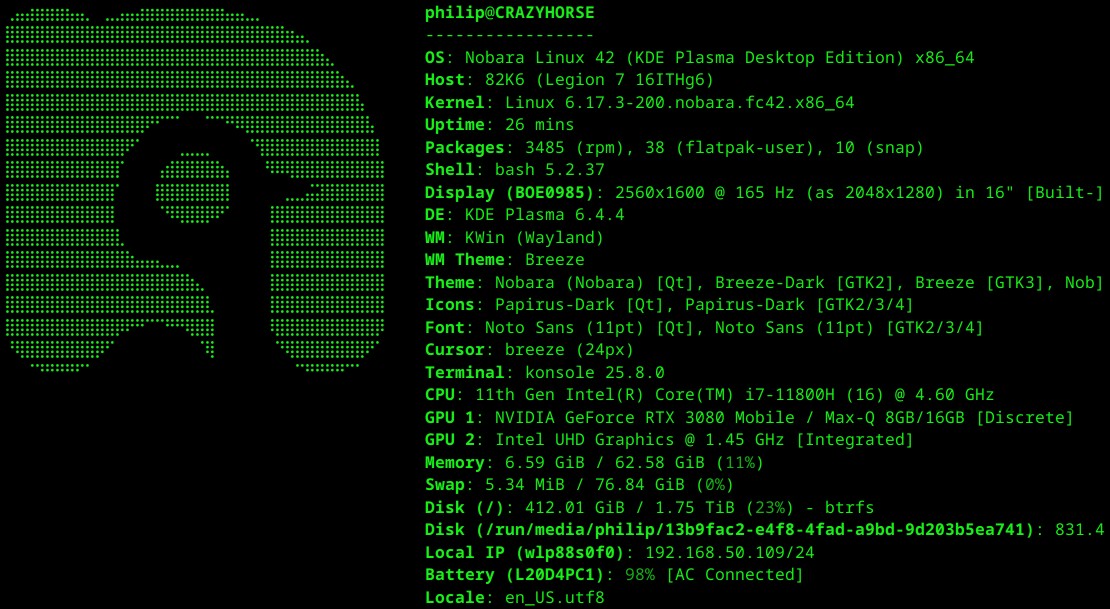
we face the same exact crash in the firmware. can u guys at least pretend you’re caring and post a “we’re tracking this as issue 25908250908279085729857”
edit: stack trace also identically matching Lenovo Legion laptop + NVIDIA drivers 580.95.05 = tv screen freezes the system - Kernel, boot, graphics & hardware - EndeavourOS