Dear NVIDIA,
I have Nvidia BlueField3 Console/SSH Login Password Issue after BF-Bundle Installation
The DOCA Host, RSHIM and BF-Bundle are installed and followed by NVIDIA website step.
- NVIDIA DOCA 2.9.2 LTS OVS-DOCA update Downloads
- DOCA-Host Installation and Upgrade
https://docs.nvidia.com/doca/sdk/doca-host+installation+and+upgrade/index.html
- BF-Bundle Installation and Upgrade
https://docs.nvidia.com/doca/sdk/bf-bundle+installation+and+upgrade/index.html
But after BF-Bundle Installation, I have Console/SSH Login Password Issue, it always says that my password is wrong.
Here is the methods I have tried.
- I chose the option 2 to set Pre-defined Password(lanner or lanner123) when installing BF-Bundle image.
After installation, the Host can connect to BF3 via BF3 console or SSH
But both SSH BF3 console can’t login because it shows password error
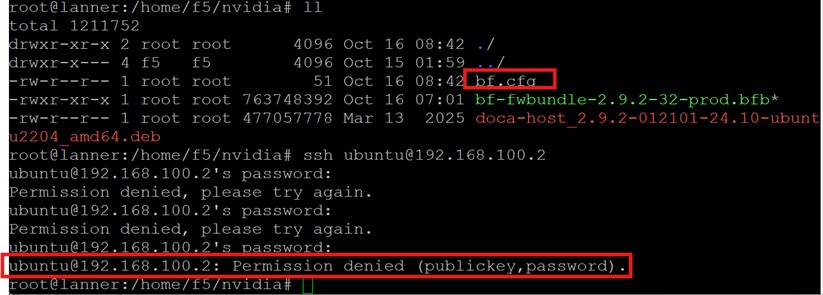
-
I also try to choose the option 1 to set No Pre-defined Password, but it still need password for SSH or Console Login
-
I tried these 3 default password for console login, but useless
ubuntu, nvidia, bluefield
- I re-install DOCA Host and BF-Bundle for these 2 versions, repeat step 1-3, all of them have login password issue.
NVIDIA DOCA 2.9.2
Host version: doca-host_2.9.2-012101-24.10-ubuntu2204_amd64.deb
BF-Bundle version: bf-fwbundle-2.9.2-32-prod.bfb
NVIDIA DOCA 3.1.0
Host version: doca-host_3.1.0-091000-25.07-ubuntu2204_amd64.deb
BF-Bundle version: bf-fwbundle-3.1.0-76_25.07-prod.bfb
- I check the ChatGPT, it says this issue happens after DOCA 2.8.
I have tried all the solutions that ChatGPT provided, but useless.
What you’re seeing — the DPU boots up but won’t accept the default login, and there’s no “set a new password” prompt — is a common Cloud-init auto-lock issue in recent BlueField OS releases (especially DOCA 2.9.2 and later).
Here’s a simple breakdown 👇
🧩 Why can’t you log in after reflashing the BFB?
1️⃣ Cloud-init locks the default account
Starting from DOCA 2.8, NVIDIA changed the BlueField initialization process.
During the first boot, cloud-init reads /etc/cloud/cloud.cfg.d/99_nvidia.cfg, which includes:
disable_root: true
lock_passwd: true
That means:
-
The default
ubuntuaccount gets locked (even if the password is correct). -
You won’t see the usual “please set a new password” prompt.
2️⃣ RShim installation triggers cloud-init automatically
When the BFB image is flashed from the host using RShim, the system runs cloud-init on first boot.
If there’s no external DHCP or metadata server, it may generate a random password — or skip creating the ubuntu account entirely.
That’s why your console never shows the normal login screen.
Can you help to check what happens in my case?

