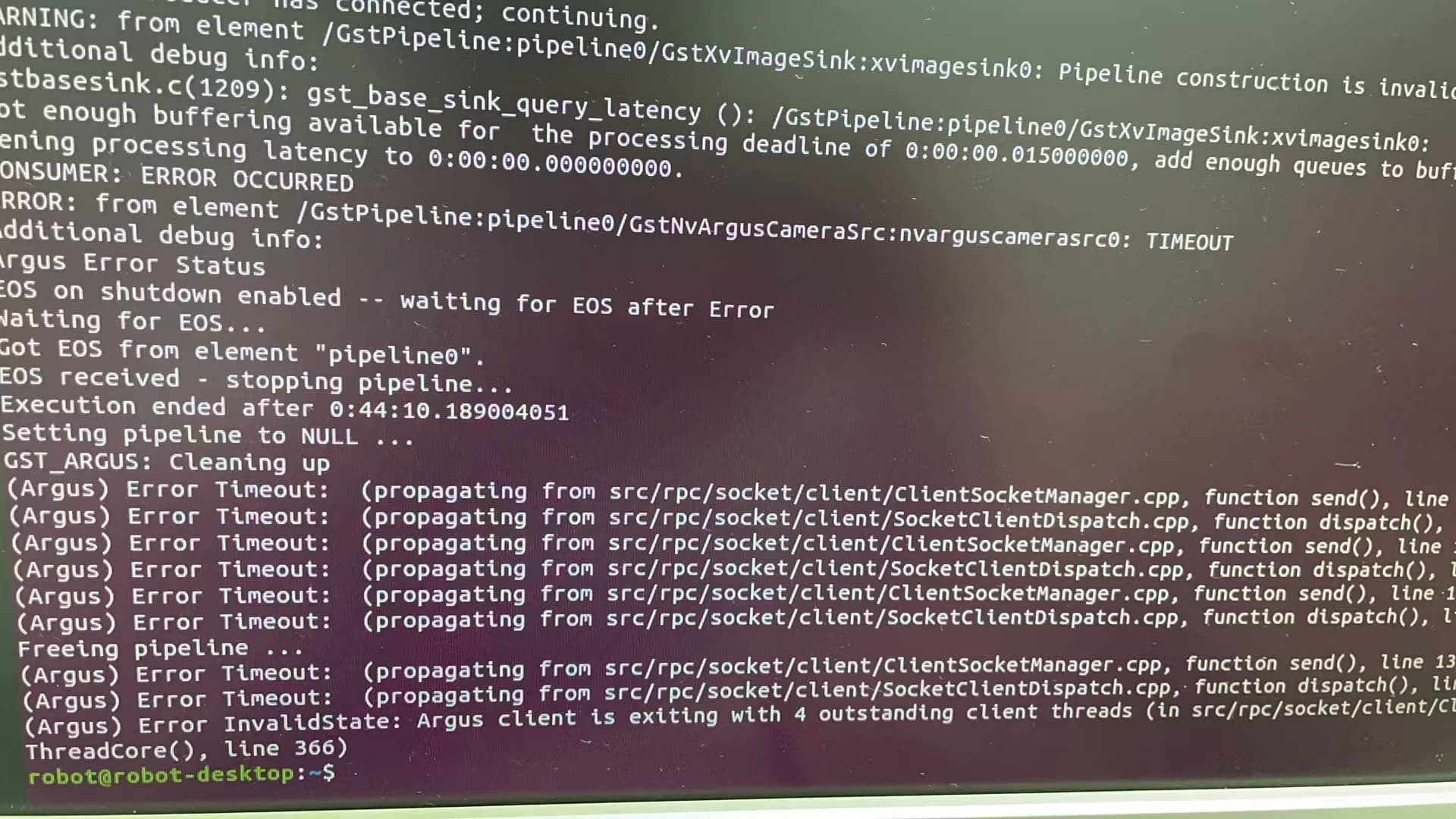
jetpack5.1.1
bsp3531
接一个摄像头能跑不到60分钟,接4个摄像头能跑不到20分钟,都是这个状态,请问怎么解决。
Could you try argus_camera of the MMAPI sample code to clarify it.
Thanks
Hello, can you provide this example? Here, I have never used it like this before
Get the source by below command. And follow the README to build it.
sudo apt list -a nvidia-l4t-jetson-multimedia-api
sudo apt install nvidia-l4t-jetson-multimedia-api=35.3.1-xxxxx
- cd /usr/src/jetson_multimedia_api/samples/unittest_samples/camera_unit_sample $ make
要运行
- 进入:
$ ./camera_sample [OPTIONS]
捕获的预览流可以通过 HDMI 显示。
例
$ ./camera_sample -r 1920 1080 -fps 30 1
我拿这个打开了相机但是他不能长时间运行,我想长时间运行他
Run the argus_camera sample.
Uploading: 0cd35e15d5d60c793e255da90f351bc.jpg…
他还是运行几秒就推出了我想一直让他输出图像跑一天甚至更长的时间,谢谢

You didn’t run the argus_camera.
The source should be this /usr/src/jetson_multimedia_api/argus/apps/camera/ui/

Follow the README.txt the than you should be able run argus_camera any where.
nvidia@tegra-ubuntu:/usr/src/jetson_multimedia_api/argus$ cat README.TXT
===============================================================================
Argus Camera API
===============================================================================

Included Components
-------------------

 - Argus API headers ('include/')
   These headers are required to compile applications against the Argus API.

 - Sample applications ('samples/')
   The included samples demonstrate many features of Argus.

 - Applications ('apps/')
   Includes more complex applications using Argus.

 - Documentation ('docs/')
     - Core Specification (LaTeX document, 'docs/spec')
     - Extensions Specifications ('docs/extensions')
     - Doxygen-generated documentation from the headers ('docs/doxygen')

Building Samples And Apps
=========================

Requirements
------------

- cmake
  sudo apt-get install cmake

- build-essential
  sudo apt-get install build-essential

- pkg-config
  sudo apt-get install pkg-config

- X11
  sudo apt-get install libx11-dev

- GTK3
  sudo apt-get install libgtk-3-dev

- expat
  sudo apt-get install libexpat1-dev

- JPEG
  sudo apt-get install libjpeg-dev

- gstreamer-1.0
  sudo apt-get install libgstreamer1.0-dev

- CUDA
  Samples requiring CUDA (ie. cudaHistogram and syncSensor) will be silently
  ignored during the build process if the CUDA toolkit is not installed.
  The CUDA toolkit is included with the JetPack for L4T development pack, which
  can be downloaded and installed by following the installation steps on the
  NVIDIA developer website:

      https://developer.nvidia.com/embedded/jetpack

  Note that starting CUDA 11.0 the minimum recommended GCC compiler is at least
  GCC 6 due to C++11 requirements in CUDA libraries so compiling samples that use
  CUDA will also require the installation of gcc-6 or newer.


Building and Installing
-----------------------

Start in the source directory (e.g. '~/ArgusSDK/').

  1) Create and go into a build directory:
       'mkdir build && cd build'

  1) Create the makefiles:
       'cmake ..'
     Additional options:
       - If CMake cannot find an include path for any dependencies, it may be
         required to provide them explicitly. Eg:
           'cmake -DOPENGLES_INCLUDE_DIR=/path/to/khronos/includes ..'
       - The DISABLE_MULTIPROCESS option may be provided to use the single-process
         Argus implementation (ie. does not require nvargus-daemon service):
           'cmake -DDISABLE_MULTIPROCESS=ON ..'

  2) Build all apps (optional flag -jN for parallel build where N is the job count):
       'make [-jN]'
     Alternatively, build individual executables:
       'make [-jN] argus_openglbox'

  3) Install:
       'sudo make install'
argusSDK 这个文件在什么地方?
It’s the source code directory. AKA /usr/src/jetson_multimedia_api/argus/
This topic was automatically closed 14 days after the last reply. New replies are no longer allowed.