Restore of NVMe AGX Xavier Industrial- few parition files missing

Hi,

I have a query where just wanted to know, will restore to external NVMe work on Jetson AGX Xavier industrial where I have few parition files missing. but the main NVMe parition file p1 nvme0n1p1.tar.gz and one more file - nvme0n1p3_bak.img is present( size around 38 GB).

does this restore for NVMe command work with these files present:

$ sudo ./tools/backup_restore/l4t_backup_restore.sh -e nvme0n1 -r jetson-agx-xavier-industrial

Kindly let us know.

below are the list of files existing in the image folder:

Thanks,
Nagesh R

Hi,

Please review similar topics to ensure that your script is updated to support backup and restore for external devices.​

Thanks

Yes. I know this already.
In Jetpack 5.1.2, there was issue in the restore script and we need to apply the patch for restore to work properly.
We have done all this in May 2024 and things worked fine at customer site for all 4 units.

Now one of the unit has NVMe got corrupted to I want to restore the image on to it. But the working setup having the complete NVMe image is at customer place HOST PC.

The host PC we have dont have all the complete NVMe partition data for restoring.
ie, we dont have all full set of partition files from Nvme0n1p1.. till Nvme0n1p14

But I have the main partition data file Nvme0n1p1.img( arnd 30+ GB) as shown in the snapshot in my first post.

My question is , is this one file enough to do successfull restore on the AGX Xavier Industrial unit?

I will trying out this today practically, before that wanted to get some information… thats why asking this question..

Thanks

Further to this issue:

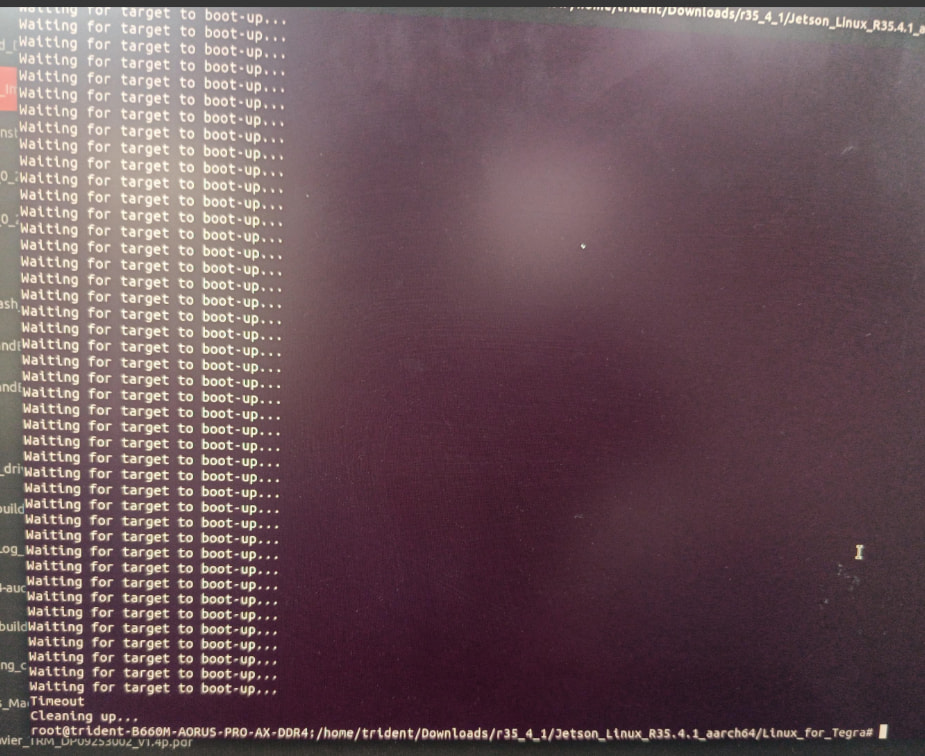
I tried performing restore operation on NVMe, but i am getting USB time out error.
pls find the log attached.

Reflash_Restore_Timeout_error_USB.txt (68.0 KB)

Kindly let us know the possibility for USB time out error.

Thanks,
Nagesh R

Hi

We still recommend restoring using the complete NVMe image.

Alternatively, you can try extracting nvme0n1p1.tar.gz to your r35_4_1 rootfs and flashing it using the standard commands such as l4t_initrd_flash.sh.

However, please note that this method has not been verified by us.

Thanks

Thanks for the inputs.

Mean while, please let us know what could be the reason for USB timeout error during restore operation. Logs I have attached in previous post.
Thanks.

Hi,

Are you using complete NVMe image or few NVMe partitions to restore?

Thanks

Only these files are present:

But I dont think USB time out error has some thing to do with this!

Hi,

It is an expected behavior.

please try mentioned methods instead

Thanks

Ok.

  1. I tried doing normal OS flash using the command below, but still the same USB time out error is coming. The log is attached fyi..

$ sudo ./tools/kernel_flash/l4t_initrd_flash.sh --external-device nvme0n1p1 -c ./tools/kernel_flash/flash_l4t_external.xml --showlogs --network usb0 jetson-agx-xavier-industrial internal

NVME_Flashing-USB-Timeout-Error-27-Nov.txt (206.5 KB)

I tried doing backup of eMMC( which had normal rootfs installed and was booting ), even this is throwing USB timeout error.

Have some more queries, it would be great if you have some answers for these:

  1. The flashing of both internal ( eMMC) and external ( NVMe) took nearly 3.5 hours. This is the first time I observed that it took so much time. Any idea/reason behind this?

  2. Is it because the HOST PC has become slow? or is it because some thing to do with the unit issue?

  3. Last time when we flashed in 2024 , it took around 1.5 hours i think.

Thanks,
Nagesh R

Hi,

Please capture the serial console log for further analysis.

The increased flashing time may be caused by a USB timeout error.

Thanks

For backup/restore operation which takes less time, we see same the USB time out error …

Any how, will get serial log during flashing and will update you..

Thanks

serial_log_flash_USB_timeoutErrfailure_1_Dec.txt (82.5 KB)

USB_time_out_err_Flash_log_1-Dec-2025.txt (203.3 KB)

Pls find the serial log and flashing log for your information.

Command I used to flash only the EXTERNAL NVMe is

sudo ./tools/kernel_flash/l4t_initrd_flash.sh --external-device nvme0n1p1 -c ./tools/kernel_flash/flash_l4t_external.xml --showlogs --network usb0 jetson-agx-xavier-industrial external

Few more observations:

  1. I observe that Backup / Restore and OS flashing works fine for internal eMMC ( mmcblk0) without time out errors.
  2. Full flash of NVMe which takes more than 1.45 hrs, fails with USB time out error ( I tried 2-3 times with diff USB ports still the same issue).
  3. I observe that during the waiting for unit to reboot time - the HDMI display turns ON and again OFF, later the USB times outs and quits.

Thanks,
Nagesh R

@DavidDDD
Could you please look in the log files and tell us the reason for USB time out error.

Thanks.

@DavidDDD

could you please look in to the log and let us know the reason for USB time out error.

Only once i was able to flash successfully on NVMe( after changing the power socket and removing USB hub connection from Jetson), but later during pytorch installation process the nvidia kernel and other drivers got removed and unit was not booting anymore, so i want to reflash again but now all the time, USB time out error is coming even for the same power socket and after removing USB hub also.

Please let us know possible root cause for such behaviour.

Thanks

In the serial log, I observe NVM0 - Device not ready error.

@DavidDDD Do you think its NVMe related HW issue?

Solution:

after changing the NVMe to a different PCIe lane which has switch , flashing was successfull.

Probably the PCIe RST signal coming from the SOM was early on the PCIe line straight from the SOM where NVMe was residing.

This topic was automatically closed 14 days after the last reply. New replies are no longer allowed.