Is any sample python code for running yolov9e with deepstream python bindings(like that of deepstream_python_apps/apps/deepstream-test1)
my env- cuda 12.2, deepstream 7.0
Refer to this reposity , just use yolov9 as the pgie of deepstream-test1
Same awesome work from the community
Hi thanks for the reply
I tried to run yolov9e using deepstream python bindings. Its run successfully but for multistream(6 video input) the FPS is very less as compared to the cpp method(i refered Ultralytics YOLO11 on NVIDIA Jetson using DeepStream SDK and TensorRT) which i got 23 FPS for each stream in multistream(6 input video) option and the model used is yolov9e fp32 for both cpp and python option. Is there any issue with the code and config. Also i attached my code,config and system details.

warnings-

system details: NVIDIA TITAN Xp, cuda-12.2, gpu_driver=535.183.06 , gpu_memory_size=12GB
test.zip (8.4 KB)
I refered the code from deepstream_python_apps/apps/deepstream-test3 at master · NVIDIA-AI-IOT/deepstream_python_apps · GitHub
- Make sure the pipelines of both are exactly the same.You can dump the pipeline as dot file to confirm it.
DeepStream SDK FAQ - #10 by mchi - From the code you provided, the python project uses fp16 instead of fp32
- Although Python programs are usually much slower, you can compare the GPU usage of Python and native programs.
Hi thanks for the quick reply
Sorry I mean the binay approach(reference: Ultralytics YOLO11 on NVIDIA Jetson using DeepStream SDK and TensorRT) iam able to get 23 FPS on each stream in multistream(6 video input)
But in the config i assigned ‘network-type=0’ which is fp32 and also commented the model engine path. So it will create the fp32 model on running the application.
I tried both both cpp and python approach with fp32 engine model and both are getting 5-6 FPS on each stream in multistream(6 video input). But for binary side getting around 23 fps for each stream..
The below image shows gpu usage of python bindings with yolov9e engine


The below image shows gpu usage of binary option(Ultralytics YOLO11 on NVIDIA Jetson using DeepStream SDK and TensorRT) with yolov9e engine

Why are there multiple python instances? This seems to result in different video memory usage.(742M vs 2894M)
Hi
1.Why are there multiple python instances? Sorry don’t know about that
Also i ran cpp sample application with yolov9e - deepstream-test3(multistream 6 video input) and FPS observed as same as using python bindings about 5-7 FPS.
Here below GPU usage of deepstream-test3(cpp) with multistream(6)

Here below GPU usage of binary(deepstream-app) with multistream(6) and FPS observed 23-24
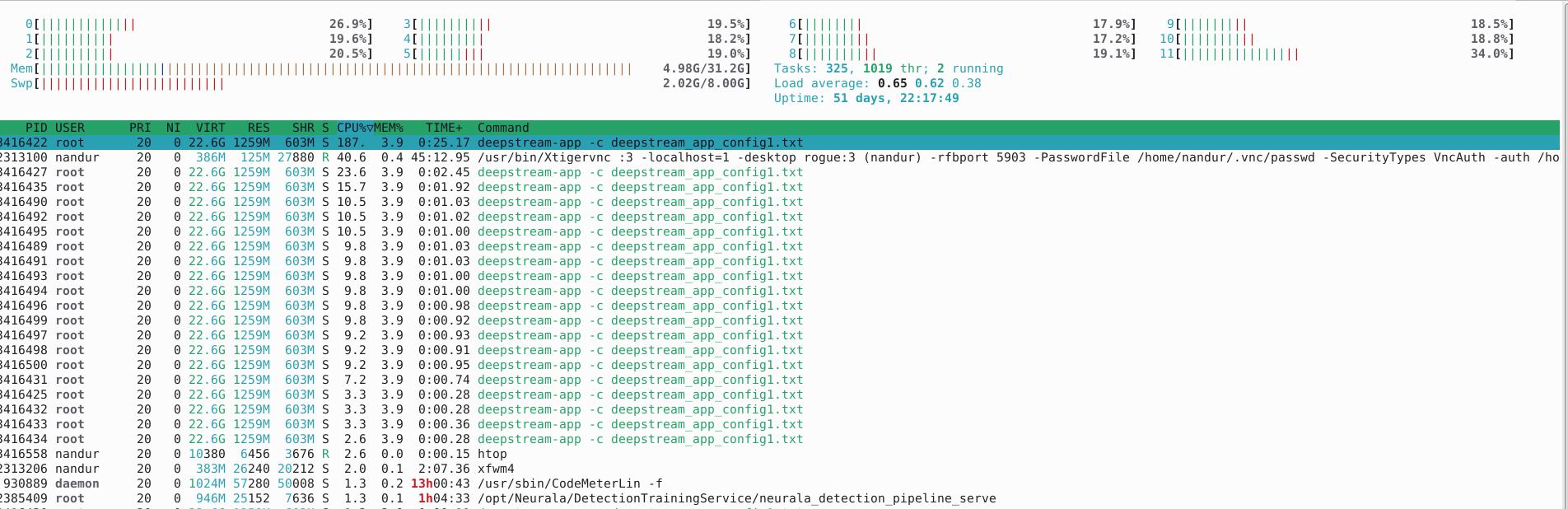
Could you please find a solution to resolve this issue of low FPS. Requirement is to run yolov9e multistream with decent FPS(above 21) using deepstream python binding or cpp application code.
Please make sure to compare fps under the same GPU loading.Otherwise it will be meaningless
1.For deepstream-app, just add multiple sources in the configuration file and start one process. There is no need to start multiple instances, which uses too much CPU/GPU.
2. Use fakesink to make the pipeline run as fast as possible to avoid the impact of clock synchronization
3. Can you share your yolov9e.onnx model?
Hi i tried to attach the onnx model but its exceed its allowded upload size(100MB)
steps to convert onnx below
- download the model using python script
from ultralytics import YOLO
model = YOLO(“yolov9e.pt”) - By refering this Ultralytics YOLO11 on NVIDIA Jetson using DeepStream SDK and TensorRT i convert to onnx
/ultralytics# python3 export_yoloV9.py -w yolov9e.pt --dynamic
I use A40 GPU and I can get the same result
diff --git a/config_infer_primary_yoloV9.txt b/config_infer_primary_yoloV9.txt
index 8db48a0..733f490 100644
--- a/config_infer_primary_yoloV9.txt
+++ b/config_infer_primary_yoloV9.txt
@@ -2,11 +2,11 @@
 gpu-id=0
 net-scale-factor=0.0039215697906911373
 model-color-format=0
-onnx-file=yolov9-c.onnx
-model-engine-file=model_b1_gpu0_fp32.engine
+onnx-file=/root/yolov9-s-converted.pt.onnx
+model-engine-file=/opt/nvidia/deepstream/deepstream/sources/deepstream_python_apps/apps/deepstream-test3/model_b6_gpu0_fp32.engine
 #int8-calib-file=calib.table
 labelfile-path=labels.txt
-batch-size=1
+batch-size=6
 network-mode=0
 num-detected-classes=80
 interval=0
diff --git a/deepstream_app_config.txt b/deepstream_app_config.txt
index 8c6822f..9e8878a 100644
--- a/deepstream_app_config.txt
+++ b/deepstream_app_config.txt
@@ -1,6 +1,6 @@
 [application]
 enable-perf-measurement=1
-perf-measurement-interval-sec=5
+perf-measurement-interval-sec=1

 [tiled-display]
 enable=1
@@ -11,17 +11,19 @@ height=720
 gpu-id=0
 nvbuf-memory-type=0

+
 [source0]
 enable=1
 type=3
 uri=file:///opt/nvidia/deepstream/deepstream/samples/streams/sample_1080p_h264.mp4
-num-sources=1
+num-sources=6
 gpu-id=0
 cudadec-memtype=0

 [sink0]
+#Type - 1=FakeSink 2=EglSink/nv3dsink (Jetson only) 3=File
 enable=1
-type=2
+type=1
 sync=0
 gpu-id=0
 nvbuf-memory-type=0
@@ -44,7 +46,7 @@ nvbuf-memory-type=0
 [streammux]
 gpu-id=0
 live-source=0
-batch-size=1
+batch-size=6
 batched-push-timeout=40000
 width=1920
 height=1080
@@ -56,7 +58,7 @@ enable=1
 gpu-id=0
 gie-unique-id=1
 nvbuf-memory-type=0
-config-file=config_infer_primary.txt
+config-file=config_infer_primary_yoloV9.txt

 [tests]
 file-loop=0
diff --git a/apps/deepstream-test3/deepstream_test_3.py b/apps/deepstream-test3/deepstream_test_3.py
index 1d04ebc..c3a05dc 100755
--- a/apps/deepstream-test3/deepstream_test_3.py
+++ b/apps/deepstream-test3/deepstream_test_3.py
@@ -109,7 +109,7 @@ def pgie_src_pad_buffer_probe(pad,info,u_data):
                 obj_meta=pyds.NvDsObjectMeta.cast(l_obj.data)
             except StopIteration:
                 break
-            obj_counter[obj_meta.class_id] += 1
+            # obj_counter[obj_meta.class_id] += 1
             try:
                 l_obj=l_obj.next
             except StopIteration:
@@ -345,7 +345,7 @@ def main(args, requested_pgie=None, config=None, disable_probe=False):
     elif requested_pgie == "nvinfer" and config != None:
         pgie.set_property('config-file-path', config)
     else:
-        pgie.set_property('config-file-path', "dstest3_pgie_config.txt")
+        pgie.set_property('config-file-path', "/root/DeepStream-Yolo/config_infer_primary_yoloV9.txt")
     pgie_batch_size=pgie.get_property("batch-size")
     if(pgie_batch_size != number_sources):
         print("WARNING: Overriding infer-config batch-size",pgie_batch_size," with number of sources ", number_sources," \n")
@@ -399,7 +399,7 @@ def main(args, requested_pgie=None, config=None, disable_probe=False):
         if not disable_probe:
             pgie_src_pad.add_probe(Gst.PadProbeType.BUFFER, pgie_src_pad_buffer_probe, 0)
             # perf callback function to print fps every 5 sec
-            GLib.timeout_add(5000, perf_data.perf_print_callback)
+            GLib.timeout_add(1000, perf_data.perf_print_callback)

     # Enable latency measurement via probe if environment variable NVDS_ENABLE_LATENCY_MEASUREMENT=1 is set.
     # To enable component level latency measurement, please set environment variable
python3 deepstream_test_3.py -i file:///opt/nvidia/deepstream/deepstream/samples/streams/sample_1080p_h264.mp4 file:///opt/nvidia/deepstream/deepstream/samples/streams/sample_1080p_h264.mp4 file:///opt/nvidia/deepstream/deepstream/samples/streams/sample_1080p_h264.mp4 file:///opt/nvidia/deepstream/deepstream/samples/streams/sample_1080p_h264.mp4 file:///opt/nvidia/deepstream/deepstream/samples/streams/sample_1080p_h264.mp4 file:///opt/nvidia/deepstream/deepstream/samples/streams/sample_1080p_h264.mp4 --no-display |grep PERF
**PERF:  {'stream0': 74.87, 'stream1': 79.19, 'stream2': 75.2, 'stream3': 74.87, 'stream4': 75.21, 'stream5': 79.2}
**PERF:  {'stream0': 78.95, 'stream1': 78.96, 'stream2': 78.96, 'stream3': 78.96, 'stream4': 78.96, 'stream5': 78.96}
**PERF:  {'stream0': 78.89, 'stream1': 78.89, 'stream2': 78.89, 'stream3': 78.89, 'stream4': 78.89, 'stream5': 78.89}
**PERF:  {'stream0': 77.95, 'stream1': 77.95, 'stream2': 77.95, 'stream3': 77.95, 'stream4': 77.95, 'stream5': 77.95}
**PERF:  {'stream0': 78.91, 'stream1': 78.91, 'stream2': 78.91, 'stream3': 78.91, 'stream4': 78.91, 'stream5': 78.91}
deepstream-app -c deepstream_app_config.txt
**PERF:  FPS 0 (Avg)	FPS 1 (Avg)	FPS 2 (Avg)	FPS 3 (Avg)	FPS 4 (Avg)	FPS 5 (Avg)
**PERF:  79.05 (75.87)	77.43 (74.10)	77.43 (74.10)	77.43 (74.10)	77.43 (74.10)	77.43 (74.10)
**PERF:  77.44 (77.46)	77.44 (77.09)	77.44 (77.09)	77.44 (77.09)	77.44 (77.09)	77.44 (77.09)
**PERF:  77.14 (77.22)	77.14 (77.02)	77.14 (77.02)	77.14 (77.02)	77.14 (77.02)	77.14 (77.02)
**PERF:  78.37 (77.74)	78.37 (77.60)	78.37 (77.60)	78.37 (77.60)	78.37 (77.60)	78.37 (77.60)
**PERF:  78.34 (77.78)	78.34 (77.67)	78.34 (77.67)	78.34 (77.67)	78.34 (77.67)	78.34 (77.67)
**PERF:  78.19 (77.81)	78.19 (77.72)	78.19 (77.72)	78.19 (77.72)	78.19 (77.72)	78.19 (77.72)
**PERF:  77.81 (77.84)	77.81 (77.76)	77.81 (77.76)	77.81 (77.76)	77.81 (77.76)	77.81 (77.76)
Hi thanks for the reply, is the same yolov9e.pt model is you have used that i mentioned in above chat or different?
I tested yolov9s/yolov9e, and there is no difference in fps between native and python. This problem should have nothing to do with the model. Please debug it yourself.
yolov9e
python
**PERF:  {'stream0': 14.27, 'stream1': 18.26, 'stream2': 14.38, 'stream3': 18.26, 'stream4': 14.27, 'stream5': 14.26}
**PERF:  {'stream0': 14.99, 'stream1': 13.99, 'stream2': 14.99, 'stream3': 14.99, 'stream4': 14.99, 'stream5': 14.99}
**PERF:  {'stream0': 14.99, 'stream1': 14.99, 'stream2': 14.99, 'stream3': 14.99, 'stream4': 14.99, 'stream5': 14.99}
**PERF:  {'stream0': 15.99, 'stream1': 15.99, 'stream2': 15.99, 'stream3': 15.99, 'stream4': 14.99, 'stream5': 15.99}
**PERF:  {'stream0': 14.98, 'stream1': 14.98, 'stream2': 14.98, 'stream3': 14.98, 'stream4': 14.98, 'stream5': 14.98}
**PERF:  {'stream0': 14.99, 'stream1': 14.99, 'stream2': 14.99, 'stream3': 14.99, 'stream4': 14.99, 'stream5': 14.99}

native
**PERF:  FPS 0 (Avg)	FPS 1 (Avg)	FPS 2 (Avg)	FPS 3 (Avg)	FPS 4 (Avg)	FPS 5 (Avg)
**PERF:  20.81 (14.78)	14.98 (7.96)	14.98 (7.96)	14.98 (7.96)	14.98 (7.96)	0.00 (0.00)
**PERF:  15.15 (15.79)	15.15 (15.10)	15.15 (15.10)	15.15 (15.10)	15.15 (15.10)	15.15 (15.10)
**PERF:  15.10 (15.42)	15.10 (15.04)	15.10 (15.04)	15.10 (15.04)	15.10 (15.04)	15.10 (15.05)
**PERF:  15.06 (15.29)	15.06 (15.03)	15.06 (15.03)	15.06 (15.03)	15.06 (15.03)	15.06 (15.03)
There is no update from you for a period, assuming this is not an issue anymore. Hence we are closing this topic. If need further support, please open a new one. Thanks