I know that running SDKM inside VM or Docker is not optimal, but this is for research purpose and I would be appreciated for any help
Hardware: NVIDIA Jetson Orin NX 16GB
Host VM: Ubuntu 20.04 (which I succeeded in flashing before)
Docker container: Ubuntu 20.04 running SDKM 2.3
I follow the guidance in Docker Images — SDK Manager to build my own Docker.
USB is passed through properly, SDKM running inside Docker container can detect the board and start the installation process.
All NFS-related and Docker-related warning shown in previous flashing attempt have been fixed (by mapping host VM’s rootfs & kernel images to the container). However the installation process is still halted without really showing what is the problem.
Screenshots from 2 consecutive attempts (I don’t think the line marked as “error” shows the reason):
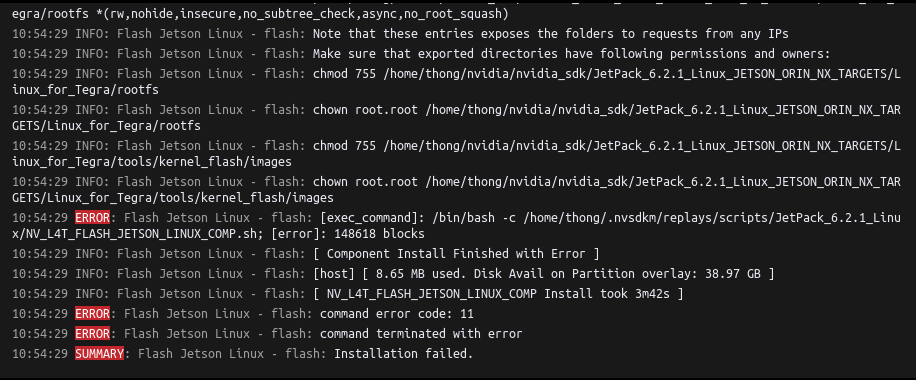
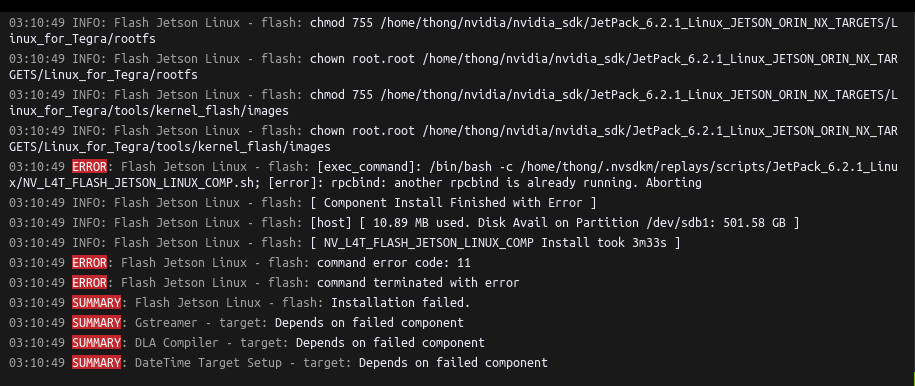
Hence I take a look into thr sdkm log and see many errors related to “component not found” and “error code 1011” but not able to figure out where to check
Here are the logs:
NV_L4T_FLASH_JETSON_LINUX_COMP (3).log (397.9 KB)
sdkm-2025-07-15-02-52-34.log (1.5 MB)
putty_Docker.txt (29.7 KB)
Thank you for your support.