kernel_tegra210-p3448-0000-p3449-0000-b00.dtsi (320.6 KB)
Could you please check whether the changes which are done are right or is there are mistake?
kernel_tegra210-p3448-0000-p3449-0000-b00.dtsi (320.6 KB)
Could you please check whether the changes which are done are right or is there are mistake?
Remove all of hdr40-pin* {} relative SPI and modify the nvidia,function = spi* directly.
			spi1_mosi_pc0 {
				nvidia,pins = "spi1_mosi_pc0";
				nvidia,function = "rsvd1";
				nvidia,pull = <0x1>;
				nvidia,tristate = <0x1>;
				nvidia,enable-input = <0x0>;
			};
Hello @ShaneCCC Thank you for assisting ,
tegra210-p3448-0002-p3449-0000-b00.dtsi (283.6 KB)
I have made the necessary changes could you please check whether is this correct?
Just check your dtb to confirm the context that would be good.
Yes I had checked with the dtb file and tried to perform loopback testing by shorting pins 19 & 21 still facing the similar issue as mentioned above of not receving the desired output
Did you confirm the pin REG?
Or dump the configure from /proc/device-tree/ like below
sudo cat /proc/device-tree/pinmux@700008d4/common/spi*/nvidia,function
nvidia@nvidia-desktop:~$ sudo cat /proc/device-tree/pinmux@700008d4/common/spi*/nvidia,function
spi1spi1spi1spi1spi1spi2spi2spi2spi2spi2nvidia@nvidia-desktop:
Hi shane thank you for your response I have got bit different output than yours, please tell me where all the necessary changes should i make in my dtsi file i have modified nvidia,function = spi* at different points .
cimcon@cimcon-desktop:~$ sudo cat /proc/device-tree/pinmux@700008d4/common/spi*/nvidia,function
spi1spi1spi0spi0spi1rsvd2rsvd1rsvd2rsvd2rsvd2cimcon@cimcon-desktop:
This is what the output i am receiving
Thank you
tegra210-p3448-0002-p3449-0000-b00.dtsi (283.6 KB)
Here is the dtsi file
From the dump only few PINs configure correct. But the dtsi looks fine. Maybe search all source to configure if any others place need to modify.
cimcon@cimcon-desktop:~$ sudo cat /proc/device-tree/pinmux@700008d4/common/spi*/nvidia,function
spi1spi1spi1spi1spi1rsvd2rsvd1rsvd2rsvd2rsvd2cimcon@cimcon-desktop:
This is how the latest spi* function look like, I have did all the necessary changes to modify still i get the rsvd2, rsvd1, etc… What modifications have to be done please if you could let me know then this might help me close the issue asap.
Whenever I perform loopback testing using spi by shorting pins 19 & 21 I don’t get the desired output, please if you could help in this one more step to close.
Thank you
The configure should be good for SPI1 aka spidev0.0 from your REG dump. Did you short pin19 &21 to run the spidev_test?
Have a check this attached on your device.
kernel_tegra210-p3448-0002-p3449-0000-b00-user-custom.dtb (233.6 KB)
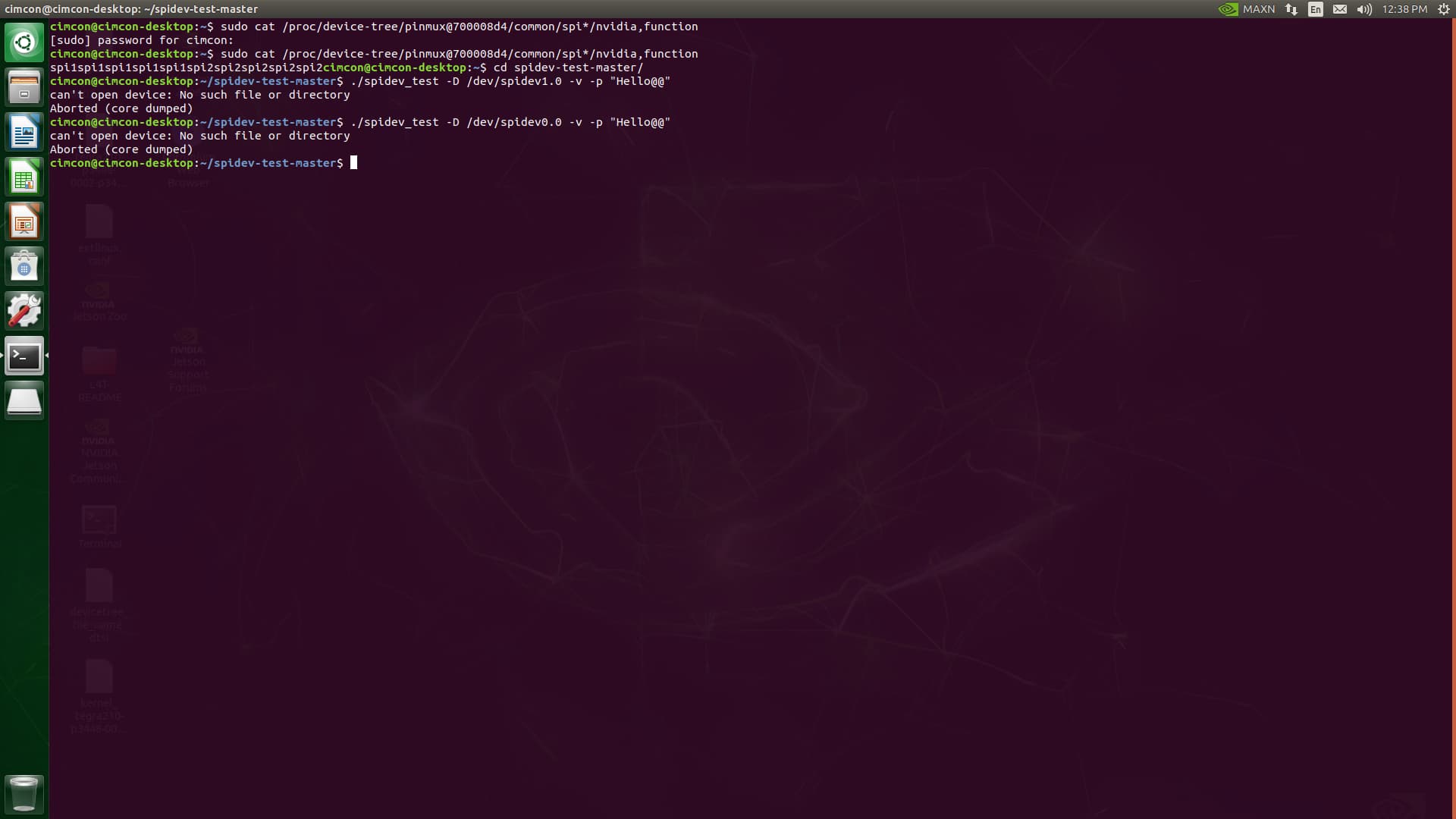
Hi shane, when I have used the above sent dtb file and made necessary changes in the extlinux.conf file and as well shorted the pin 19 & 21
kernel_tegra210-p3448-0002-p3449-0000-b00-user-custom.dtb (233.6 KB)
This is how the output looks like
Scenario2: Here the dtb file which I have modified and shared with you when I tried with this
kernel_tegra210-p3448-0002-p3449-0000-b00.dtb (209.6 KB)
and also updated the necessary changes in the extlinux.conf file and shorted the pins 19 & 21 this is how the output looks like
In the both the cases when I try to perform loopback testing i don’t receive any output
Please run with sudo also check if the /dev/spidev0.0 was created.
If the /dev/spidev0.0 didn’t present you need below command to create it first.
sudo modprobe spidev
nvidia@nvidia-desktop:~$ ./spidev_test -D /dev/spidev0.0 -g32 -s 11000000 -p0  -zzz
using device: /dev/spidev0.0
setting spi mode for read,write
setting spi bpw
setting max speed for rd/wr
spi mode: 0
bits per word: 8 bytes per word: 1
max speed: 11000000 Hz (11000 KHz)
no. runs: 1
Using seed:0x616aa4d5
loop count = 0
using sequential pattern ....
transfer bytes [32]
0000: 00 01 02 03 04 05 06 07 08 09 0A 0B 0C 0D 0E 0F
0010: 10 11 12 13 14 15 16 17 18 19 1A 1B 1C 1D 1E 1F
transfer: Return actual transfer length: 32
receive bytes [32]
0000: 00 01 02 03 04 05 06 07 08 09 0A 0B 0C 0D 0E 0F
0010: 10 11 12 13 14 15 16 17 18 19 1A 1B 1C 1D 1E 1F
transfer: received packet size:32 len:32 stat:0
/dev/spidev0.0: TEST PASSED
====== Transfer stats ====
Transmit:
       total: 32B (0KiB 0MiB)
       total: 1P
       ioerr: 0B (0KiB 0MiB)
       ioerr: 0P
 Rate:
  wire total: -1B/s (0KB/s)
       total: -1B/s (0KB/s)
  wire total: -1P/s
       total: -1P/s
Receive:
       total: 32B (0KiB 0MiB)
       total: 1P
        good: 32B (0KiB 0MiB)
        good: 1P
       ioerr: 0P
     dataerr: 0P
 Rate:
        good: -1B/s (0KB/s)
        good: -1P/s
 packet drop: -1/10000

  Total time: 0.000666s
Hi shane
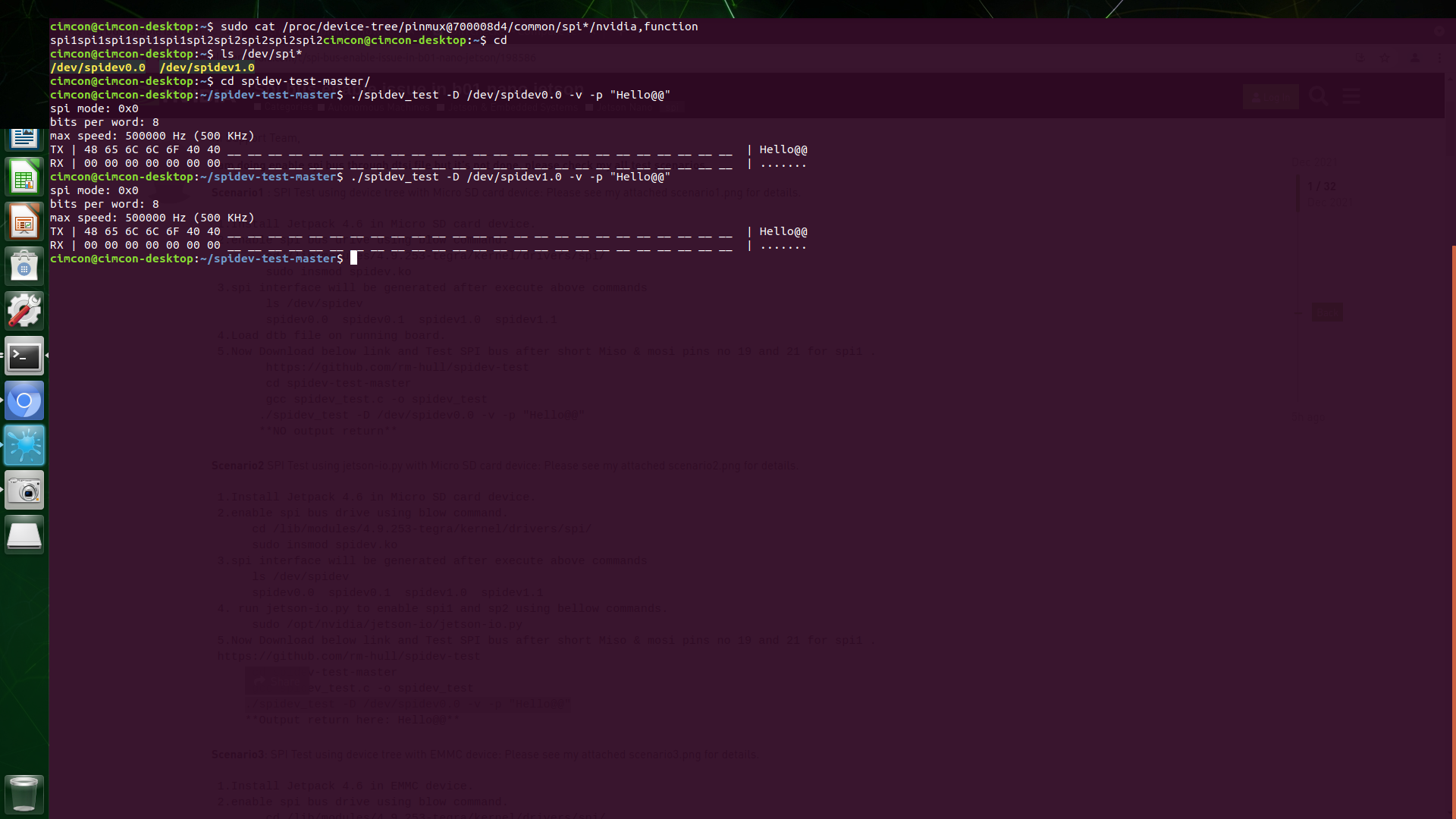
when I enter
$ ls /dev/spi* it shows all the spi present
later it fails to perform the loopback testing
cimcon@cimcon-desktop:~/spidev-test-master$ sudo modprobe spidev
cimcon@cimcon-desktop:~/spidev-test-master$ ls /dev/spi
ls: cannot access ‘/dev/spi’: No such file or directory
cimcon@cimcon-desktop:~/spidev-test-master$ ls /dev/spi*
/dev/spidev0.0 /dev/spidev0.1 /dev/spidev1.0 /dev/spidev1.1
cimcon@cimcon-desktop:~/spidev-test-master$ ls /dev/spidev0.0
/dev/spidev0.0
cimcon@cimcon-desktop:~/spidev-test-master$ ./spidev_test -D /dev/spidev0.0 -v -p “Hello@@”
spi mode: 0x0
bits per word: 8
max speed: 500000 Hz (500 KHz)
TX | 48 65 6C 6C 6F 40 40 __ __ __ __ __ __ __ __ __ __ __ __ __ __ __ __ __ __ __ __ __ __ __ __ __ | Hello@@
RX | 00 00 00 00 00 00 00 __ __ __ __ __ __ __ __ __ __ __ __ __ __ __ __ __ __ __ __ __ __ __ __ __ | …
cimcon@cimcon-desktop:~/spidev-test-master$
This is how it shows
Could you run the command the same as my. Maybe need get the spidev_test binary from here.
sudo pidev_test -D /dev/spidev0.0 -g32 -s 11000000 -p0 -zzz
This is the output I am receiving
cimcon@cimcon-desktop:~$ ./spidev_test -D /dev/spidev0.0 -g32 -s 11000000 -p0 -zzz
using device: /dev/spidev0.0
setting spi mode for read,write
setting spi bpw
setting max speed for rd/wr
spi mode: 0
bits per word: 8 bytes per word: 1
max speed: 11000000 Hz (11000 KHz)
no. runs: 1
Using seed:0x62399fd1
loop count = 0
using sequential pattern …
transfer bytes [32]
0000: 00 01 02 03 04 05 06 07 08 09 0A 0B 0C 0D 0E 0F
0010: 10 11 12 13 14 15 16 17 18 19 1A 1B 1C 1D 1E 1F
transfer: Return actual transfer length: 32
receive bytes [32]
0000: 00 00 00 00 00 00 00 00 00 00 00 00 00 00 00 00
0010: 00 00 00 00 00 00 00 00 00 00 00 00 00 00 00 00
mismatch index 1
^^^ 00 00 00 00 00 00 00 00 00 00 00 transfer: received packet size:32 len:32 stat:-6
/dev/spidev0.0: TEST FAILED !!! (status:-1)
====== Transfer stats ====
Transmit:
total: 32B (0KiB 0MiB)
total: 1P
ioerr: 0B (0KiB 0MiB)
ioerr: 0P
Rate:
wire total: -1B/s (0KB/s)
total: -1B/s (0KB/s)
wire total: -1P/s
total: -1P/s
Receive:
total: 32B (0KiB 0MiB)
total: 1P
good: 0B (0KiB 0MiB)
good: 0P
ioerr: 0P
dataerr: 1P
Rate:
good: -1B/s (0KB/s)
good: -1P/s
packet drop: -1/10000
Total time: 0.000466s
Could you try the modification instead of jetson-io in SD card device.
Also attached your dtb here to verify.
kernel_tegra210-p3448-0002-p3449-0000-b00-user-custom.dtb (233.6 KB)
Here is the dtb file. I will try the modification on sd card device.
I try your dtb without problem.
The attached file is generate from your system? I my host name in your attached dtb file. (/media/snchen/project/project/32.6/kernel/kernel-4.9/arch/arm64/boot/dts/…/…/.)
./spidev_test -D /dev/spidev0.0 -g32 -s 11000000 -p0  -zzz
using device: /dev/spidev0.0
setting spi mode for read,write
setting spi bpw
setting max speed for rd/wr
spi mode: 0
bits per word: 8 bytes per word: 1
max speed: 11000000 Hz (11000 KHz)
no. runs: 1
Using seed:0x616544a8
loop count = 0
using sequential pattern ....
transfer bytes [32]
0000: 00 01 02 03 04 05 06 07 08 09 0A 0B 0C 0D 0E 0F
0010: 10 11 12 13 14 15 16 17 18 19 1A 1B 1C 1D 1E 1F
transfer: Return actual transfer length: 32
receive bytes [32]
0000: 00 01 02 03 04 05 06 07 08 09 0A 0B 0C 0D 0E 0F
0010: 10 11 12 13 14 15 16 17 18 19 1A 1B 1C 1D 1E 1F
transfer: received packet size:32 len:32 stat:0
/dev/spidev0.0: TEST PASSED
====== Transfer stats ====
Transmit:
       total: 32B (0KiB 0MiB)
       total: 1P
       ioerr: 0B (0KiB 0MiB)
       ioerr: 0P
 Rate:
  wire total: -1B/s (0KB/s)
       total: -1B/s (0KB/s)
  wire total: -1P/s
       total: -1P/s
Receive:
       total: 32B (0KiB 0MiB)
       total: 1P
        good: 32B (0KiB 0MiB)
        good: 1P
       ioerr: 0P
     dataerr: 0P
 Rate:
        good: -1B/s (0KB/s)
        good: -1P/s
 packet drop: -1/10000

  Total time: 0.001467s