For completeness’ sake, here are some instructions that worked for me with JetPack 6.2 (L4T 36.4.3):
How to Patch the SPI Driver on JetPack 6.2 (L4T 36.4.3)
Kernel Build & Patch Process
# Set up the kernel source directory
mkdir custom-kernel
cd custom-kernel

# Download the L4T BSP
wget https://developer.nvidia.com/downloads/embedded/l4t/r36_release_v4.3/release/Jetson_Linux_r36.4.3_aarch64.tbz2
tar xfv Jetson_Linux_r36.4.3_aarch64.tbz2

cd Linux_for_Tegra

# Apply your patch to the SPI driver
vim source/kernel/kernel-jammy-src/drivers/spi/spi-tegra114.c

# Download and extract the root filesystem
wget https://developer.nvidia.com/downloads/embedded/l4t/r36_release_v4.3/release/Tegra_Linux_Sample-Root-Filesystem_r36.4.3_aarch64.tbz2
tar -xvf Tegra_Linux_Sample-Root-Filesystem_R36.4.3_aarch64.tbz2 -C rootfs/

# Download and extract Ubuntu Jammy sources
wget https://developer.nvidia.com/downloads/embedded/l4t/r36_release_v4.3/sources/ubuntu_jammy-l4t_aarch64_src.tbz2
tar -xvf ubuntu_jammy-l4t_aarch64_src.tbz2 -C rootfs/

# Compile the kernel
cd source
sudo make -C kernel

# Set module install path
export INSTALL_MOD_PATH=../rootfs/

# Install kernel and modules
sudo -E make install -C kernel

cd kernel/kernel-jammy-src/
sudo make modules
sudo make modules_prepare
sudo -E make modules_install

# Update initrd
sudo nv-update-initrd

# Copy the new kernel image
cp arch/arm64/boot/Image /boot/ImageSPIPatch

# Update extlinux.conf to use the new kernel
sudo vim /boot/extlinux/extlinux.conf

# Reboot into the new kernel
sudo reboot
Results
-
The SPI write times observed when using the new patched kernel image, are in line with what was already mentioned in my previous post regarding Jetpack 5.1 (~60 µs per write instead of ~300 µs), jitter spikes still occur as shown in this figure:
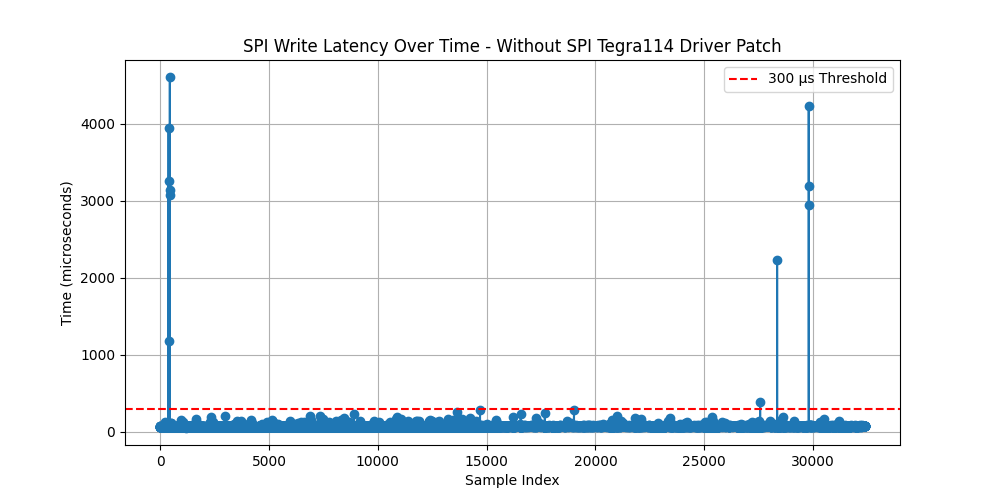
Average: 68.91 µs, Median: 68.00 µs, Std Dev: 57.47 µs
Alternate Method: Patch Without Rebuilding the Kernel (applies to JP5.1 and JP6.2):
-
At the end of previous section, a new kernel object file for the spi-tegra driver would have been created in
/lib/modules/$(uname -r)/kernel/drivers/spi/spi-tegra114.ko. It’s likely that not all steps above are required to create that file, I didn’t make a note of exactly which one does it. -
As far as I could understand, the SPI driver is compiled as a module (
m), and in that case you can simply replace the.kofile with the one created by the steps in the previous section (or download it below from theArtefactssection), without rebuilding the kernel. I confirmed that that was the case by running:zcat /proc/config.gz | grep CONFIG_SPI_TEGRA114 # Output should be: CONFIG_SPI_TEGRA114=m
Patch Steps (JetPack 5.1 & 6.2):
-
On the target device, replace the existing
.kofile:sudo cp spi-tegra114-with-patch.ko /lib/modules/$(uname -r)/kernel/drivers/spi/spi-tegra114.ko -
Regenerate module dependencies:
sudo depmod -a -
Reboot:
sudo reboot
Artefacts
-
Jetpack 5.1 SPI driver patch:
- See previous post.
-
Jetpack 6.2 SPI driver patch:
(.txt extension to allow upload)- Includes the patch KevinFFF suggested here: SPI TX Time Variability - #8 by KevinFFF
- Does not include the SPI CS patch described here: Jetson orin nano SPI Speed not changing - #9 by KevinFFF
spi-tegra114-patch-JP6.2-L4T36.4.3.c.txt (43.2 KB)
-
SPI Kernel Object Files:
(Zipped to allow upload)-
JetPack 5.1 (L4T 35.2.1):
spi-tegra114-JP5.1-L4T35.2.1.ko.zip (197.7 KB) -
JetPack 6.2 (L4T 36.4.3):
spi-tegra114-JP6.2-L4T36.4.3.ko.zip (45.6 KB)
-
Final Remarks:
- This solution was reached through a combination of interpreting NVIDIA documentation, trial and error, and informed experimentation. If there’s a better way to achieve the same result—or if this approach introduces issues I haven’t yet encountered—feedback is very welcome and encouraged.
Uploading: spi_latency_patch_JP6.2.png…