"unable to allocate CUDA0 buffer" after Updating Ubuntu Packages

After Ubuntu update it said, “Error: 500 Internal Server Error: llama runner process has terminated: error loading model: unable to allocate CUDA0 buffer
llama_model_load_from_file_impl: failed to load model”

I typically would run ollama from jetson-containers, and up until the recent update it worked fine.

I tried to keep separation with the host not having the base system including packages that were used for models, but this effort seemed not to help.

Since it was mentioned already that rebuilding the jetson from scratch nor rebuilding the containers from source was fruitful. I wonder if rolling back the updates would be of any use. Forbidding any updates perhaps was the best approach, and I cringed at the thought of updating anything every time I see an “Update is ready” or similar message!

Installing and running ollama natively does not help.

Share Post #18

I did also see that the firmware was updated.

Start-Date: 2025-10-09 18:07:03
Commandline: packagekit role=‘update-packages’
Upgrade: nvidia-l4t-weston:arm64 (36.4.4-20250616085344
36.4.7-20250918154033)
udev:arm64 (249.11-0ubuntu3.16, 249.11-0ubuntu3.17)
systemd-oomd:arm64 (249.11-0ubuntu3.16, 249.11-0ubuntu3.17)
nvidia-l4t-vulkan-sc-samples:arm64 (36.4.4-20250616085344, 36.4.7-20250918154033)
nvidia-l4t-vulkan-sc-sdk:arm64 (36.4.4-20250616085344, 36.4.7-20250918154033)
nvidia-l4t-firmware:arm64 (36.4.4-20250616085344, 36.4.7-20250918154033)
wpasupplicant:arm64 (2:2.10-6ubuntu2.2, 2:2.10-6ubuntu2.3)
nvidia-l4t-kernel-oot-headers:arm64 (5.15.148-tegra-36.4.4-20250616085344, 5.15.148-tegra-36.4.7-20250918154033)
systemd-timesyncd:arm64 (249.11-0ubuntu3.16, 249.11-0ubuntu3.17)
nvidia-l4t-oem-config:arm64 (36.4.4-20250616085344, 36.4.7-20250918154033)
nvidia-l4t-jetson-multimedia-api:arm64 (36.4.4-20250616085344, 36.4.7-20250918154033)
nvidia-l4t-libwayland-egl1:arm64 (36.4.4-20250616085344, 36.4.7-20250918154033)
libpam-systemd:arm64 (249.11-0ubuntu3.16, 249.11-0ubuntu3.17)
containerd:arm64 (1.7.27-0ubuntu1~22.04.1, 1.7.28-0ubuntu1~22.04.1)
nvidia-l4t-wayland:arm64 (36.4.4-20250616085344, 36.4.7-20250918154033)
nvidia-l4t-kernel-oot-modules:arm64 (5.15.148-tegra-36.4.4-20250616085344, 5.15.148-tegra-36.4.7-20250918154033)
nvidia-l4t-kernel:arm64 (5.15.148-tegra-36.4.4-20250616085344, 5.15.148-tegra-36.4.7-20250918154033)
nvidia-l4t-graphics-demos:arm64 (36.4.4-20250616085344, 36.4.7-20250918154033)
libsystemd0:arm64 (249.11-0ubuntu3.16, 249.11-0ubuntu3.17)
nvidia-l4t-3d-core:arm64 (36.4.4-20250616085344, 36.4.7-20250918154033)
nvidia-l4t-nvpmodel:arm64 (36.4.4-20250616085344, 36.4.7-20250918154033)
libnss-systemd:arm64 (249.11-0ubuntu3.16, 249.11-0ubuntu3.17)
nvidia-l4t-cuda-utils:arm64 (36.4.4-20250616085344, 36.4.7-20250918154033)
libwbclient0:arm64 (2:4.15.13+dfsg-0ubuntu1.8, 2:4.15.13+dfsg-0ubuntu1.9)
libudev-dev:arm64 (249.11-0ubuntu3.16, 249.11-0ubuntu3.17)
nvidia-l4t-tools:arm64 (36.4.4-20250616085344, 36.4.7-20250918154033)
libsmbclient:arm64 (2:4.15.13+dfsg-0ubuntu1.8, 2:4.15.13+dfsg-0ubuntu1.9)
nvidia-l4t-core:arm64 (36.4.4-20250616085344, 36.4.7-20250918154033)
nvidia-l4t-kernel-dtbs:arm64 (5.15.148-tegra-36.4.4-20250616085344, 5.15.148-tegra-36.4.7-20250918154033)
systemd:arm64 (249.11-0ubuntu3.16, 249.11-0ubuntu3.17)
libudev1:arm64 (249.11-0ubuntu3.16, 249.11-0ubuntu3.17)
nvidia-l4t-optee:arm64 (36.4.4-20250616085344, 36.4.7-20250918154033)
nvidia-l4t-cuda:arm64 (36.4.4-20250616085344, 36.4.7-20250918154033)
nvidia-l4t-dla-compiler:arm64 (36.4.4-20250616085344, 36.4.7-20250918154033)
nvidia-l4t-nvml:arm64 (36.4.4-20250616085344, 36.4.7-20250918154033)
nvidia-l4t-openwfd:arm64 (36.4.4-20250616085344, 36.4.7-20250918154033)
nvidia-l4t-nvfancontrol:arm64 (36.4.4-20250616085344, 36.4.7-20250918154033)
docker.io:arm64 (27.5.1-0ubuntu3~22.04.2, 28.2.2-0ubuntu1~22.04.1)
nvidia-l4t-libwayland-client0:arm64 (36.4.4-20250616085344, 36.4.7-20250918154033)
nvidia-l4t-nvsci:arm64 (36.4.4-20250616085344, 36.4.7-20250918154033)
nvidia-l4t-init:arm64 (36.4.4-20250616085344, 36.4.7-20250918154033)
nvidia-l4t-gbm:arm64 (36.4.4-20250616085344, 36.4.7-20250918154033)
nvidia-l4t-jetsonpower-gui-tools:arm64 (36.4.4-20250616085344, 36.4.7-20250918154033)
nvidia-l4t-vulkan-sc:arm64 (36.4.4-20250616085344, 36.4.7-20250918154033)
nvidia-l4t-display-kernel:arm64 (5.15.148-tegra-36.4.4-20250616085344, 5.15.148-tegra-36.4.7-20250918154033)
nvidia-l4t-configs:arm64 (36.4.4-20250616085344, 36.4.7-20250918154033)
nvidia-l4t-pva:arm64 (36.4.4-20250616085344, 36.4.7-20250918154033)
nvidia-l4t-multimedia:arm64 (36.4.4-20250616085344, 36.4.7-20250918154033)
nvidia-l4t-multimedia-utils:arm64 (36.4.4-20250616085344, 36.4.7-20250918154033)
nvidia-l4t-x11:arm64 (36.4.4-20250616085344, 36.4.7-20250918154033)
docker-ce-rootless-extras:arm64 (5:28.5.0-1~ubuntu.22.04~jammy, 5:28.5.1-1~ubuntu.22.04~jammy)
nvidia-l4t-apt-source:arm64 (36.4.4-20250616085344, 36.4.7-20250918154033)
runc:arm64 (1.2.5-0ubuntu1~22.04.1, 1.3.0-0ubuntu2~22.04.1)
nvidia-l4t-kernel-headers:arm64 (5.15.148-tegra-36.4.4-20250616085344, 5.15.148-tegra-36.4.7-20250918154033)
nvidia-l4t-bootloader:arm64 (36.4.4-20250616085344, 36.4.7-20250918154033)
snapd:arm64 (2.68.5+ubuntu22.04.1, 2.71+ubuntu22.04)
nvidia-l4t-gstreamer:arm64 (36.4.4-20250616085344, 36.4.7-20250918154033)
nvidia-l4t-camera:arm64 (36.4.4-20250616085344, 36.4.7-20250918154033)
nvidia-l4t-libwayland-cursor0:arm64 (36.4.4-20250616085344, 36.4.7-20250918154033)
nvidia-l4t-nvpmodel-gui-tools:arm64 (36.4.4-20250616085344, 36.4.7-20250918154033)
samba-libs:arm64 (2:4.15.13+dfsg-0ubuntu1.8, 2:4.15.13+dfsg-0ubuntu1.9)
nvidia-l4t-initrd:arm64 (36.4.4-20250616085344, 36.4.7-20250918154033)
systemd-sysv:arm64 (249.11-0ubuntu3.16, 249.11-0ubuntu3.17)
nvidia-l4t-libwayland-server0:arm64 (36.4.4-20250616085344, 36.4.7-20250918154033)
nvidia-l4t-xusb-firmware:arm64 (36.4.4-20250616085344, 36.4.7-20250918154033)
nvidia-l4t-jetson-io:arm64 (36.4.4-20250616085344, 36.4.7-20250918154033)
nvidia-l4t-vulkan-sc-dev:arm64 (36.4.4-20250616085344, 36.4.7-20250918154033)
End-Date: 2025-10-09 18:08:15

4 Likes

Hi,

Could you try to run a simple CUDA sample (ex, deviceQuery) to check the GPU functionality first?

Thanks.

I git clone the repo, but the cuda compiler is not installed on the host. I have been building inside the docker, so would try this method.

ollama

total used free shared buff/cache available

Mem: 7802584 2649992 234220 117504 4918372 4796784
Swap: 3901272 81920 3819352

Hi, may I ask if you have found a workaround? I had the same error pop up despite this model working for me when I had initially downloaded it. I’m not sure if I have the same error because I’m pretty new to this, but I think I have sufficient memory. I run this in docker and have also tried smaller models like the llama3.2:1b and while they work initially I get the same error message the next day. I had only flashed my device about a few days ago as well.

No, I do not have any solution at the moment, sorry.

I am planning on trying to run the sample CUDA to check the GPU functionality, but I have not had time to try that yet.

What version of Ollama are you using? I had the same issue. After I updated Ollama to 0.12.6, the issue seems to have been resolved.

Not the OP, but experiencing the same issue. I downloaded and ran that and this is what I get.

same problem, worked the day before then some kind of update occured upon booting up and now ollama run llama3.2:3b gives

Error: 500 Internal Server Error: llama runner process has terminated: error loading model: unable to allocate CUDA0 buffer
llama_model_load_from_file_impl: failed to load model

i also updated my ollama version to 0.12.6 and still gives the same error

1 Like

Hi,

CUDA compile is located at /usr/local/cuda-12.6/bin.
Please try to set up the environment parameter with the comments below and try it again.

$ export PATH=/usr/local/cuda-12.6/bin:$PATH
$ export LD_LIBRARY_PATH=/usr/local/cuda-12.6/lib64:$LD_LIBRARY_PATH

Just want to confirm that the ‘upgrade’ you mean here is from default r36.4.4 to r36.4.7?

Thanks.

Thanks for replying!

What happened:

  1. Before Oct 18: Ollama with llama3.2:3b worked fine on r36.4.3

  2. Oct 18: You ran Ubuntu software updates → upgraded to r36.4.7

  3. After update: Ollama broke with “unable to allocate CUDA0 buffer”

jacques@jacques-desktop:~$ export PATH=/usr/local/cuda-12.6/bin:$PATH
jacques@jacques-desktop:~$ export LD_LIBRARY_PATH=/usr/local/cuda-12.6/lib64:$LD_LIBRARY_PATH
jacques@jacques-desktop:~$ ollama
Usage:
ollama [flags]
ollama [command]

Available Commands:
serve Start ollama
create Create a model
show Show information for a model
run Run a model
stop Stop a running model
pull Pull a model from a registry
push Push a model to a registry
signin Sign in to ollama.com
signout Sign out from ollama.com
list List models
ps List running models
cp Copy a model
rm Remove a model
help Help about any command

Flags:
-h, --help help for ollama
-v, --version Show version information

Use “ollama [command] --help” for more information about a command.
jacques@jacques-desktop:~$ ollama run llama3.2:3b
Error: 500 Internal Server Error: llama runner process has terminated: error loading model: unable to allocate CUDA0 buffer
jacques@jacques-desktop:~$

I wonder if rollback the nvidia-l4t-firmware:arm64 package to version 36.4.4-20250616085344 from 36.4.7-20250918154033 would help?

I have not tried, but seems there are some folks that have explored this option.

Of course one runs the risk of an finding the jetson in unrecoverable state.

1 Like
jay@jetson-ai:~/Downloads/cuda-samples/cuda-samples-12.5/Samples/1_Utilities/deviceQuery

$ ./deviceQuery
./deviceQuery Starting…

CUDA Device Query (Runtime API) version (CUDART static linking)

Detected 1 CUDA Capable device(s)

Device 0: “Orin”
CUDA Driver Version / Runtime Version          12.6 / 12.6
CUDA Capability Major/Minor version number:    8.7
Total amount of global memory:                 7620 MBytes (7990005760 bytes)
(008) Multiprocessors, (128) CUDA Cores/MP:    1024 CUDA Cores
GPU Max Clock rate:                            1020 MHz (1.02 GHz)
Memory Clock rate:                             1020 Mhz
Memory Bus Width:                              128-bit
L2 Cache Size:                                 2097152 bytes
Maximum Texture Dimension Size (x,y,z)         1D=(131072), 2D=(131072, 65536), 3D=(16384, 16384, 16384)
Maximum Layered 1D Texture Size, (num) layers  1D=(32768), 2048 layers
Maximum Layered 2D Texture Size, (num) layers  2D=(32768, 32768), 2048 layers
Total amount of constant memory:               65536 bytes
Total amount of shared memory per block:       49152 bytes
Total shared memory per multiprocessor:        167936 bytes
Total number of registers available per block: 65536
Warp size:                                     32
Maximum number of threads per multiprocessor:  1536
Maximum number of threads per block:           1024
Max dimension size of a thread block (x,y,z): (1024, 1024, 64)
Max dimension size of a grid size    (x,y,z): (2147483647, 65535, 65535)
Maximum memory pitch:                          2147483647 bytes
Texture alignment:                             512 bytes
Concurrent copy and kernel execution:          Yes with 2 copy engine(s)
Run time limit on kernels:                     No
Integrated GPU sharing Host Memory:            Yes
Support host page-locked memory mapping:       Yes
Alignment requirement for Surfaces:            Yes
Device has ECC support:                        Disabled
Device supports Unified Addressing (UVA):      Yes
Device supports Managed Memory:                Yes
Device supports Compute Preemption:            Yes
Supports Cooperative Kernel Launch:            Yes
Supports MultiDevice Co-op Kernel Launch:      Yes
Device PCI Domain ID / Bus ID / location ID:   0 / 0 / 0
Compute Mode:
< Default (multiple host threads can use ::cudaSetDevice() with device simultaneously) >

deviceQuery, CUDA Driver = CUDART, CUDA Driver Version = 12.6, CUDA Runtime Version = 12.6, NumDevs = 1
Result = PASS
jay@jetson-ai:~/Downloads/cuda-samples/cuda-samples-12.5/Samples/1_Utilities/deviceQuery$

I’m pretty much just going to reflash my sd card to get back to L4T 36.4.3. Please to get back to me if a fix is found. Thank you everyone.

Hi, both

Thanks for the update.

It looks like the GPU is functional, but some issues when allocating a buffer with ollama.
We will try this internally and provide more info later.

Thanks

Hi,

We test this in our environment but fail to reproduce.

Original environment is r36.4.4

$ cat /etc/nv_tegra_release 
# R36 (release), REVISION: 4.4, GCID: 41062509, BOARD: generic, EABI: aarch64, DATE: Mon Jun 16 16:07:13 UTC 2025
# KERNEL_VARIANT: oot
TARGET_USERSPACE_LIB_DIR=nvidia
TARGET_USERSPACE_LIB_DIR_PATH=usr/lib/aarch64-linux-gnu/nvidia
$ docker run --runtime nvidia -it --rm --network=host -v ~/ollama:/ollama -e OLLAMA_MODELS=/ollama dustynv/ollama:r36.4.0
...
root@tegra-ubuntu:/# ollama run llama3.2:3b
pulling manifest 
...          
verifying sha256 digest 
writing manifest 
success 
>>> 

Upgrade to r36.4.7

$ sudo apt update
$ sudo apt dist-upgrade

Test

$ cat /etc/nv_tegra_release 
# R36 (release), REVISION: 4.7, GCID: 42132812, BOARD: generic, EABI: aarch64, DATE: Thu Sep 18 22:54:44 UTC 2025
# KERNEL_VARIANT: oot
TARGET_USERSPACE_LIB_DIR=nvidia
TARGET_USERSPACE_LIB_DIR_PATH=usr/lib/aarch64-linux-gnu/nvidia
$ docker run --runtime nvidia -it --rm --network=host -v ~/ollama:/ollama -e 
...
root@tegra-ubuntu:/# ollama run llama3.2:3b
>>> Send a message (/? for help)

Not sure if this issue only happens when upgrading from r36.4.3.
We will discuss this internally and share more information later.

Thanks.

I’m having this issue too, exact same symptoms, tried a fresh container just like was done above and still getting the CUDA0 buffer error.

I have found I can load some very small models 0.5b-1b variants but they also randomly fail now too.

root@deckard:/# ollama pull llama3.2:3b
pulling manifest

verifying sha256 digest
writing manifest
success
root@deckard:/# ollama run llama3.2:3b
Error: llama runner process has terminated: error loading model: unable to allocate CUDA0 buffer
llama_model_load_from_file_impl: failed to load model
root@deckard:/#

some experimenting later, it works fine in CPU mode, obviously this is much slower but operates fine even with 7b models that are much larger, so it proves its not really a memory space issue, it seems like its some kind of memory fragmentation issue.

Same issue here. I can load all the models in CPU mode without any issues, but in GPU mode, only the smaller ones load, and even then, sometimes they fail to load as well.

1 Like

Says “ollama version is 0.9.5”, how can I update in the jetson container?

I tried to download a new version from docker and then run it in the jetson container.

I also tried “curl -fsSL https://ollama.com/install.sh | sh” route, but same result.

jay@jetson-ai:~$ jetson-containers run  $(autotag ollama) bash                                                                                                         
Namespace(packages=['ollama'], prefer=['local', 'registry', 'build'], disable=[''], user='dustynv', output='/tmp/autotag', quiet=False, verbose=False)
-- L4T_VERSION=36.4.7  JETPACK_VERSION=5.1  CUDA_VERSION=12.6
-- Finding compatible container image for ['ollama']
dustynv/ollama:r36.4-cu129-24.04
V4L2_DEVICES: 
### DISPLAY environmental variable is already set: ":0"
localuser:root being added to access control list
+ docker run --runtime nvidia -it --rm --network host --shm-size=8g --volume /tmp/argus_socket:/tmp/argus_socket --volume /etc/enctune.conf:/etc/enctune.conf --volume /etc/nv_tegra_release:/etc/nv_tegra_release --volume /tmp/nv_jetson_model:/tmp/nv_jetson_model --volume /var/run/dbus:/var/run/dbus --volume /var/run/avahi-daemon/socket:/var/run/avahi-daemon/socket --volume /var/run/docker.sock:/var/run/docker.sock --volume /home/jay/Desktop/jetson-containers/data:/data -v /etc/localtime:/etc/localtime:ro -v /etc/timezone:/etc/timezone:ro --device /dev/snd -e PULSE_SERVER=unix:/run/user/1000/pulse/native -v /run/user/1000/pulse:/run/user/1000/pulse --device /dev/bus/usb -e DISPLAY=:0 -v /tmp/.X11-unix/:/tmp/.X11-unix -v /tmp/.docker.xauth:/tmp/.docker.xauth -e XAUTHORITY=/tmp/.docker.xauth --device /dev/i2c-0 --device /dev/i2c-1 --device /dev/i2c-2 --device /dev/i2c-4 --device /dev/i2c-5 --device /dev/i2c-7 --device /dev/i2c-9 -v /run/jtop.sock:/run/jtop.sock --name jetson_container_20251021_093332 dustynv/ollama:r36.4-cu129-24.04 bash
root@jetson-ai:/# which ollama
/usr/local/bin/ollama
root@jetson-ai:/# ollama --version
ollama version is 0.9.5
root@jetson-ai:/#

I tried to run those commands, but same result as before.

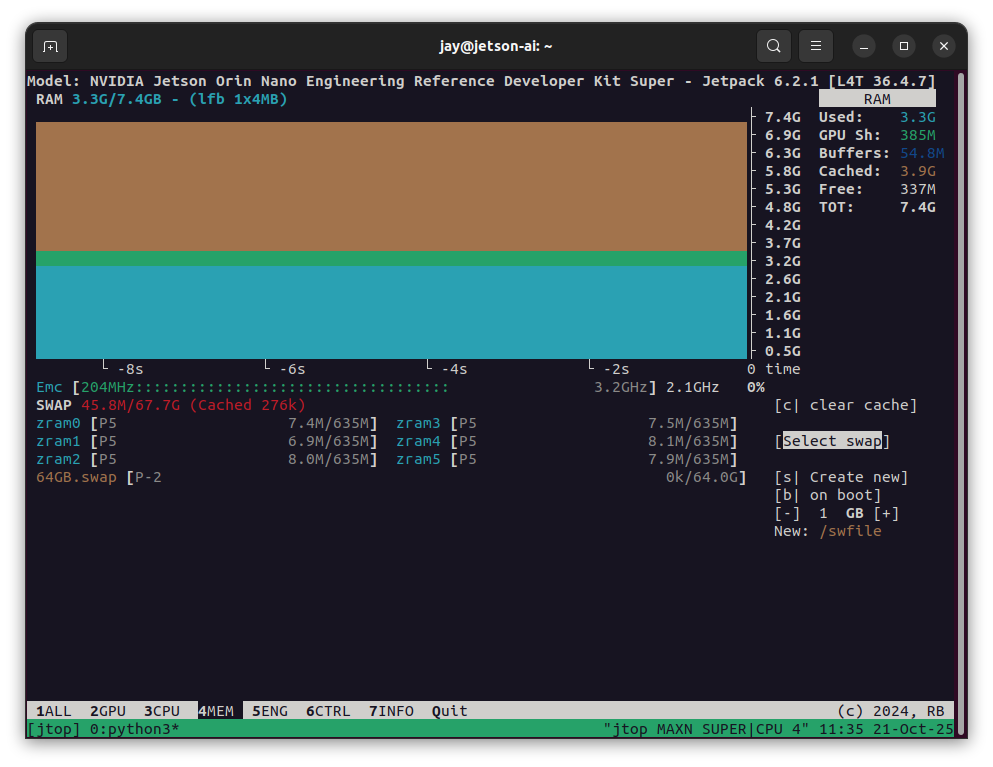
Also here is the jtop memory status image.

Thanks

jay@jetson-ai:~$ docker run --runtime nvidia -it --rm --network=host -v ~/.ollama dustynv/ollama:r36.4-cu129-24.04 bash
root@jetson-ai:/# chmod a+x start_ollama 
root@jetson-ai:/# ./start_ollama 

Starting ollama server


OLLAMA_HOST   0.0.0.0
OLLAMA_LOGS   /data/logs/ollama.log
OLLAMA_MODELS /data/models/ollama/models


ollama server is now started, and you can run commands here like 'ollama run gemma3'

root@jetson-ai:/# ollama run llama3.2:3b
pulling manifest 
pulling manifest                                                                                           pulling manifest            pulling pulling manifest      pullpulling mapulling pulling manifest 
pulling dde5aa3fc5ff: 100% ▕█████████████████████████████████████████████████████████████████████████████████████████████████████████████████████████████▏ 2.0 GB                         
pulling 966de95ca8a6: 100% ▕█████████████████████████████████████████████████████████████████████████████████████████████████████████████████████████████▏ 1.4 KB                         
pulling fcc5a6bec9da: 100% ▕█████████████████████████████████████████████████████████████████████████████████████████████████████████████████████████████▏ 7.7 KB                         
pulling a70ff7e570d9: 100% ▕█████████████████████████████████████████████████████████████████████████████████████████████████████████████████████████████▏ 6.0 KB                         
pulling 56bb8bd477a5: 100% ▕█████████████████████████████████████████████████████████████████████████████████████████████████████████████████████████████▏   96 B                         
pulling 34bb5ab01051: 100% ▕█████████████████████████████████████████████████████████████████████████████████████████████████████████████████████████████▏  561 B                         
verifying sha256 digest 
writing manifest 
success 
Error: llama runner process has terminated: error loading model: unable to allocate CUDA0 buffer
root@jetson-ai:/#