Hello,
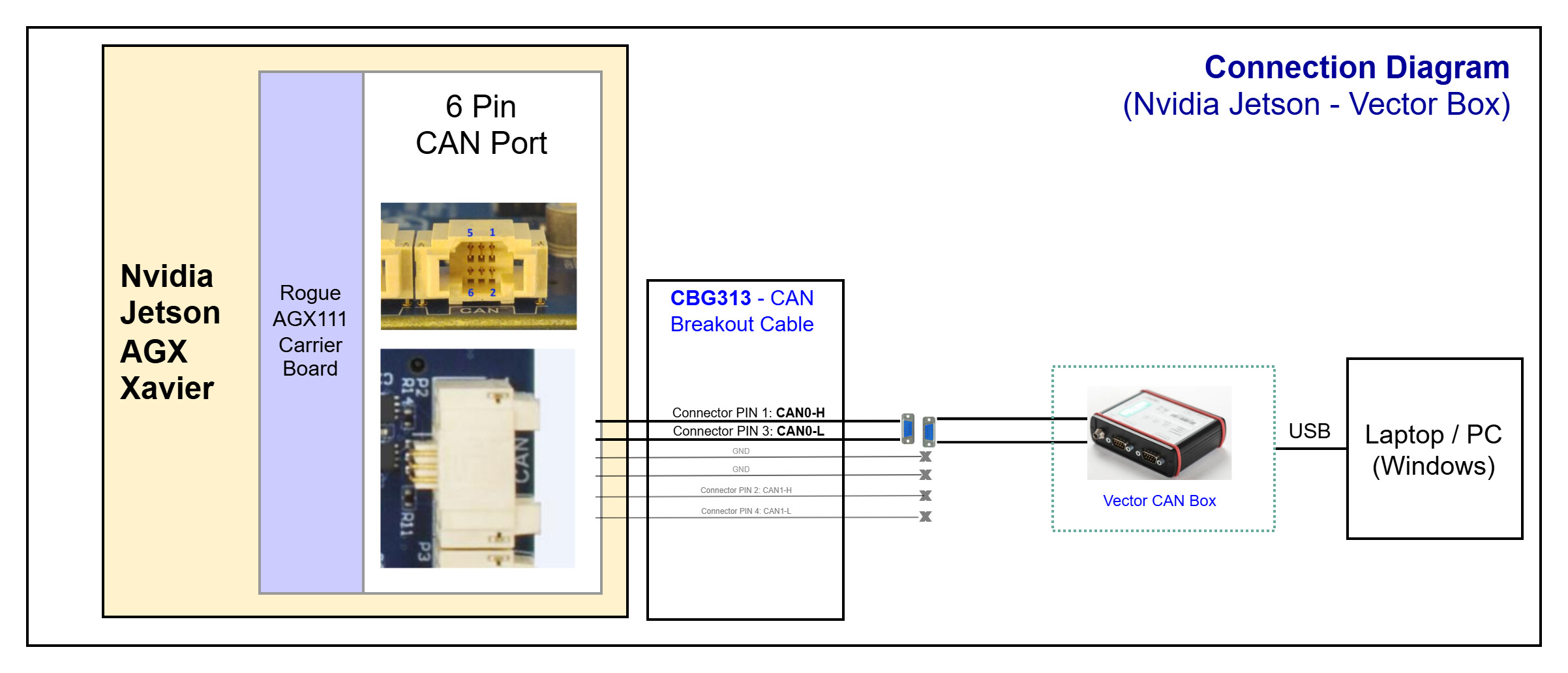
I am right now working on an Nvidia Xavier Board with ConnectTech’s Rogue Carrier Board (Rogue Carrier for NVIDIA® Jetson AGX Xavier™ ).
I want to increase the CAN data bitrate from 2 mbps to 5 mbps, but facing difficulty in setting up the TDCR.
I am relatively new in this topic and require some support for setting up the CAN. So, I followed the instructions available in the CAN Developer Guide and was able to receive the CAN messages at 5 mbps speed. But I am failing to send out any data from the board.
I tried changing the tdcr using the command provided in the docs:
$ echo 0x600 > /sys/devices/c320000.mttcan/net/can1/tdcr
but this is not available in the devices. Instead, I was able to see the following files:
If I try to change these values, I am getting error in the dmesg as following:
[290000.610623] net can0: mttcan device registered (regs=ffffff800d97e000, irq=68)
[290000.614951] net can1: mttcan device registered (regs=ffffff800dc01000, irq=69)
[290000.650464] can: isotp protocol (rev 20161031 alpha)
[290001.182774] mttcan c310000.mttcan can0: Bitrate set
[290001.712411] mttcan_controller_config: ctrlmode 30
[290001.712455] mttcan c310000.mttcan can0: Bitrate set
[290001.712610] IPv6: ADDRCONF(NETDEV_UP): can0: link is not ready
[290001.712676] IPv6: ADDRCONF(NETDEV_CHANGE): can0: link becomes ready
[291352.289058] net can1: wrong tdc_offset
[291361.143081] net can1: wrong tdc_offset
[291442.540587] net can1: wrong tdc_offset
[291530.577281] net can1: wrong tdc_offset
[291610.723635] net can1: wrong tdc_offset
[291614.145424] net can1: wrong tdc_offset
Additional Details:
$ sudo ip link set can0 type can bitrate 1000000 sample-point 0.75 dbitrate 5000000 dsample-point 0.70 restart-ms 100 berr-reporting on fd on
Hi hiiapoorvsahu,
What’s the Jetpack verison in use?cat /etc/nv_tegra_release on your board.
I would also like to know the block diagram of your connection how do you verify this. (can0 to can1?)
You can also provide the following information for your CAN configurations.
$ sudo ip -d -s link show can0
Hi KevinFFF,
admin@platform12:/home/platform$ cat /etc/nv_tegra_release
# R32 (release), REVISION: 6.1, GCID: 27863751, BOARD: t186ref, EABI: aarch64, DATE: Mon Jul 26 19:36:31 UTC 2021
I am sending CAN data from a different controller but for development using Vector CAN box. Also, I was using a different CAN configuration (0.5 kbps nominal bitrate and 2 mbps data bitrate) previously, and it is working fine.
As for verification, I am able to receive the CAN signals with this configuration. (candump can0)
admin@platform12:/home/platform/Apoorv$ candump can0
  can0  235  [16]  10 00 00 01 64 00 00 00 00 33 03 00 00 00 00 00
  can0  235  [16]  10 00 00 01 64 00 00 00 00 33 03 00 00 00 00 00
  can0  235  [16]  10 00 00 01 64 00 00 00 00 33 03 00 00 00 00 00
  can0  235  [16]  00 10 00 01 00 00 32 00 00 00 00 00 00 00 00 00
  can0  235  [16]  00 10 00 01 00 00 32 00 00 00 00 00 00 00 00 00
  can0  235  [16]  00 10 00 01 00 00 32 00 00 00 00 00 00 00 00 00
  can0  567  [16]  00 0B 31 01 FF 00 07 FF 2A 00 88 11 0D 00 00 00
  can0  0C0  [64]  00 01 02 03 04 05 06 07 08 09 0A 0B 0C 0D 0E 0F 10 11 12 13 14 15 16 17 18 19 1A 1B 1C 1D 1E 1F 20 21 22 23 24 25 26 27 28 29 2A 2B 2C 2D 2E 2F 30 31 32 33 34 35 36 37 38 39 3A 3B 3C 3D 3E 3F
  can0  0C0  [64]  00 01 02 03 04 05 06 07 08 09 0A 0B 0C 0D 0E 0F 10 11 12 13 14 15 16 17 18 19 1A 1B 1C 1D 1E 1F 20 21 22 23 24 25 26 27 28 29 2A 2B 2C 2D 2E 2F 30 31 32 33 34 35 36 37 38 39 3A 3B 3C 3D 3E 3F
  can0  0C0  [64]  00 01 02 03 04 05 06 07 08 09 0A 0B 0C 0D 0E 0F 10 11 12 13 14 15 16 17 18 19 1A 1B 1C 1D 1E 1F 20 21 22 23 24 25 26 27 28 29 2A 2B 2C 2D 2E 2F 30 31 32 33 34 35 36 37 38 39 3A 3B 3C 3D 3E 3F
  can0  567  [64]  10 89 31 01 FF 00 85 FF 43 04 4D 53 54 52 03 00 00 00 37 00 00 00 52 11 F0 FA 41 CF 90 E5 00 1B 0D 00 01 00 00 00 00 00 51 35 80 00 00 00 FB DF AC 2B 2C 0D 66 37 50 BC 01 00 00 00 00 00 00 00
  can0  567  [64]  10 89 31 01 FF 00 85 FF 43 04 4D 53 54 52 03 00 00 00 37 00 00 00 52 11 F0 FA 41 CF 90 E5 00 1B 0D 00 01 00 00 00 00 00 51 35 80 00 00 00 FB DF AC 2B 2C 0D 66 37 50 BC 01 00 00 00 00 00 00 00
The messages are sent out from the Vector Box with the following configuration:
Mode: ISO CAN FD
Clock Frequency [kHz]: 80000
Arbitration Phase
Baud Rate [kBaud]: 1000.0
Sample Point [%]: 75.0 (TSEG1: 14, TSEG2 5, Prescalar: 4, SJW: 5)
Data Phase
Baud Rate [kBaud]: 5000.0
Sample Point [%]: 75.0 (TSEG1: 5, TSEG2 2, Prescalar: 2, SJW: 2)
Below is the output of “ip -d -s link show can0”
admin@platform12:/home/platform/Apoorv$ sudo ip -d -s link show can0
71: can0: <NOARP,UP,LOWER_UP,ECHO> mtu 72 qdisc pfifo_fast state UP mode DEFAULT group default qlen 10
    link/can  promiscuity 0
    can <BERR-REPORTING,FD> state ERROR-ACTIVE (berr-counter tx 0 rx 0) restart-ms 100
          bitrate 1000000 sample-point 0.740
          tq 20 prop-seg 18 phase-seg1 18 phase-seg2 13 sjw 1
          mttcan: tseg1 2..255 tseg2 0..127 sjw 1..127 brp 1..511 brp-inc 1
          dbitrate 5000000 dsample-point 0.700
          dtq 20 dprop-seg 3 dphase-seg1 3 dphase-seg2 3 dsjw 1
          mttcan: dtseg1 1..31 dtseg2 0..15 dsjw 1..15 dbrp 1..15 dbrp-inc 1
          clock 50000000
          re-started bus-errors arbit-lost error-warn error-pass bus-off
          0          0          0          0          0          0         numtxqueues 1 numrxqueues 1 gso_max_size 65536 gso_max_segs 65535
    RX: bytes  packets  errors  dropped overrun mcast
    0          0        0       0       0       0
    TX: bytes  packets  errors  dropped carrier collsns
    0          0        0       0       0       0
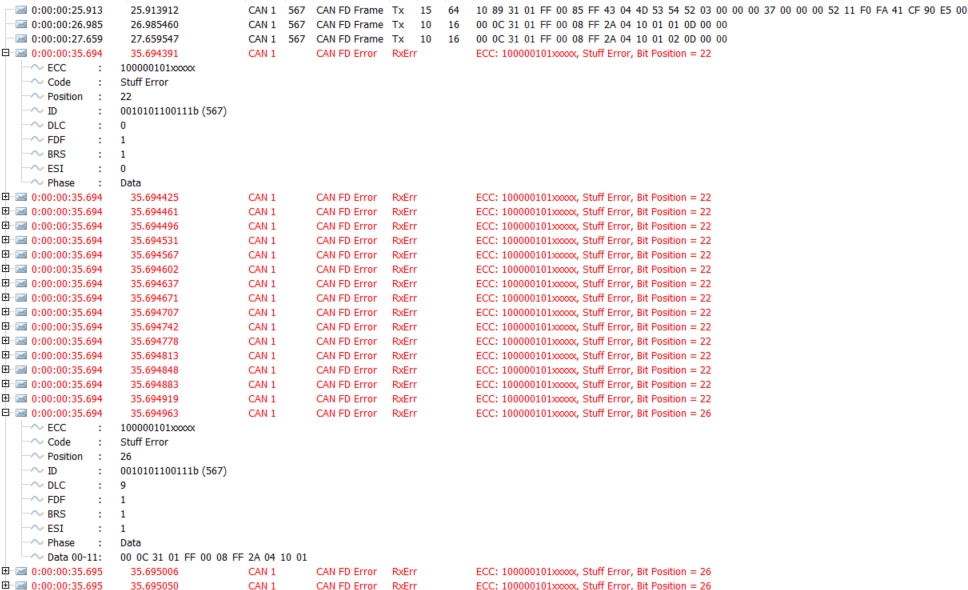
If I try to send the CAN messages using cansend command, I am getting the following error in the Vector SW.
admin@platform12:~$ candump can0
  can0  567  [64]  10 89 31 01 FF 00 85 FF 43 04 4D 53 54 52 03 00 00 00 37 00 00 00 52 11 F0 FA 41 CF 90 E5 00 1B 0D 00 01 00 00 00 00 00 51 35 80 00 00 00 FB DF AC 2B 2C 0D 66 37 50 BC 01 00 00 00 00 00 00 00
  can0  567  [16]  00 0C 31 01 FF 00 08 FF 2A 04 10 01 01 0D 00 00
  can0  567  [16]  00 0C 31 01 FF 00 08 FF 2A 04 10 01 02 0D 00 00
^C
admin@platform12:~$
admin@platform12:~$ cansend can0 567##1000C3101FF0008FF2A041001020D
admin@platform12:~$
admin@platform12:~$ dmesg | grep can
...
[  135.606192] can: controller area network core (rev 20120528 abi 9)
[  135.607673] NET: Registered protocol family 29
[  135.640501] can: raw protocol (rev 20120528)
[  135.673651] CAN device driver interface
[  135.696493]   Message RAM Configuration
                | base addr   |0x0c312000|
                | sidfc_flssa |0x00000000|
                | xidfc_flesa |0x00000040|
                | rxf0c_f0sa  |0x000000c0|
                | rxf1c_f1sa  |0x000009c0|
                | rxbc_rbsa   |0x000009c0|
                | txefc_efsa  |0x000009c0|
                | txbc_tbsa   |0x00000a40|
                | tmc_tmsa    |0x00000ec0|
[  135.696624] Release 3.2.0 from 19.12.2014
[  135.697800] net can0: mttcan device registered (regs=ffffff800d97e000, irq=68)
[  135.701681]   Message RAM Configuration
                | base addr   |0x0c322000|
                | sidfc_flssa |0x00000000|
                | xidfc_flesa |0x00000040|
                | rxf0c_f0sa  |0x000000c0|
                | rxf1c_f1sa  |0x000009c0|
                | rxbc_rbsa   |0x000009c0|
                | txefc_efsa  |0x000009c0|
                | txbc_tbsa   |0x00000a40|
                | tmc_tmsa    |0x00000ec0|
[  135.701811] Release 3.2.0 from 19.12.2014
[  135.702946] net can1: mttcan device registered (regs=ffffff800dc03000, irq=69)
[  135.739439] can: isotp protocol (rev 20161031 alpha)
[  136.272273] mttcan c310000.mttcan can0: Bitrate set
[  136.802569] mttcan_controller_config: ctrlmode 30
[  136.802615] mttcan c310000.mttcan can0: Bitrate set
[  136.802756] IPv6: ADDRCONF(NETDEV_UP): can0: link is not ready
[  136.802802] IPv6: ADDRCONF(NETDEV_CHANGE): can0: link becomes ready
[  152.568887] mttcan c310000.mttcan can0: Bit0 Error Detected
[  152.569111] mttcan c310000.mttcan can0: IR 0x10010000 PSR 0x50f
[  152.569271] mttcan c310000.mttcan can0: entered error warning state
[  152.569397] mttcan c310000.mttcan can0: Bit0 Error Detected
[  152.569516] mttcan c310000.mttcan can0: IR 0x11000000 PSR 0x55f
[  152.569659] mttcan c310000.mttcan can0: entered error passive state
[  152.569784] mttcan c310000.mttcan can0: Bit0 Error Detected
[  152.569895] mttcan c310000.mttcan can0: IR 0x10800000 PSR 0x57f
[  152.570024] mttcan c310000.mttcan can0: Bit0 Error Detected
[  152.570140] mttcan c310000.mttcan can0: IR 0x10000000 PSR 0x57f
[  152.570310] mttcan c310000.mttcan can0: entered bus off state
[  152.570424] mttcan c310000.mttcan can0: Bit0 Error Detected
[  152.570538] mttcan c310000.mttcan can0: IR 0x12000000 PSR 0x5e7
[  152.671331] mttcan c310000.mttcan can0: wait for bus off seq
[  152.683391] mttcan c310000.mttcan can0: entered error warning state
[  152.683546] mttcan c310000.mttcan can0: entered error passive state
[  152.683677] mttcan c310000.mttcan can0: entered bus off state
[  152.683830] mttcan c310000.mttcan can0: Bit0 Error Detected
[  152.683941] mttcan c310000.mttcan can0: IR 0x1b800000 PSR 0x5e5
[  152.684088] IPv6: ADDRCONF(NETDEV_CHANGE): can0: link becomes ready
[  152.787334] mttcan c310000.mttcan can0: wait for bus off seq
[  152.799390] mttcan c310000.mttcan can0: entered error warning state
[  152.799550] mttcan c310000.mttcan can0: entered error passive state
[  152.799683] mttcan c310000.mttcan can0: entered bus off state
[  152.799792] mttcan c310000.mttcan can0: Bit0 Error Detected
[  152.799901] mttcan c310000.mttcan can0: IR 0x1b800000 PSR 0x5e5
[  152.903338] mttcan c310000.mttcan can0: wait for bus off seq
[  152.915424] mttcan c310000.mttcan can0: entered error warning state
[  152.915603] mttcan c310000.mttcan can0: entered error passive state
[  152.915734] mttcan c310000.mttcan can0: entered bus off state
[  152.915845] mttcan c310000.mttcan can0: Bit0 Error Detected
[  152.916010] mttcan c310000.mttcan can0: IR 0x1b800000 PSR 0x5e5
[  153.019392] mttcan c310000.mttcan can0: wait for bus off seq
[  153.032423] mttcan c310000.mttcan can0: entered error warning state
[  153.032571] mttcan c310000.mttcan can0: entered error passive state
[  153.032733] mttcan c310000.mttcan can0: entered bus off state
[  153.032839] mttcan c310000.mttcan can0: Bit0 Error Detected
...
hiiapoorvsahu:
# R32 (release), REVISION: 6.1, GCID: 27863751, BOARD: t186ref, EABI: aarch64, DATE: Mon Jul 26 19:36:31 UTC 2021
It’s a quite old release, could you also verify with the latest r32.7.6 or r35.6.2 for AGX Xavier?
Please try writing to c310000.mttcan if you are using can0.
Do you mean that you can receive data from Vector CAN Box but cannot send data from mttcan?
Please share the exact command you run to send CAN FD data from mttcan.
It’s a quite old release, could you also verify with the latest r32.7.6 or r35.6.2 for AGX Xavier?
I am not able to verify with latest r35.6.2 Jetpack version.
Please try writing to c310000.mttcan if you are using can0 .
There is no file with name tdcr. I tried creating it, but it didn’t work.
Do you mean that you can receive data from Vector CAN Box but cannot send data from mttcan?
Yes. with the configuration mentioned above, I can receive the CAN data. But there is problem while sending the data.
I am using the below command to send the CAN data.cansend can0 567##1000C3101FF0008FF2A041001020D
Please configure tdc_offset instead as following.
# echo "0x600" > /sys/devices/c310000.mttcan/net/can0/tdc_offset
# echo "0x600" > /sys/devices/c320000.mttcan/net/can1/tdc_offset
Is there any error showing in dmesg when you run this command?
Hi Kevin,
I was able to configure as per the command shared.
But I am still not able to send the CAN message.cansend command.
[ 1504.889869] can: controller area network core (rev 20120528 abi 9)
[ 1504.891480] NET: Registered protocol family 29
[ 1504.922180] can: raw protocol (rev 20120528)
[ 1504.964507]   Message RAM Configuration
                | base addr   |0x0c312000|
                | sidfc_flssa |0x00000000|
                | xidfc_flesa |0x00000040|
                | rxf0c_f0sa  |0x000000c0|
                | rxf1c_f1sa  |0x000009c0|
                | rxbc_rbsa   |0x000009c0|
                | txefc_efsa  |0x000009c0|
                | txbc_tbsa   |0x00000a40|
                | tmc_tmsa    |0x00000ec0|
[ 1504.964637] Release 3.2.0 from 19.12.2014
[ 1504.965382] net can0: mttcan device registered (regs=ffffff800d9fe000, irq=68)
[ 1504.967924]   Message RAM Configuration
                | base addr   |0x0c322000|
                | sidfc_flssa |0x00000000|
                | xidfc_flesa |0x00000040|
                | rxf0c_f0sa  |0x000000c0|
                | rxf1c_f1sa  |0x000009c0|
                | rxbc_rbsa   |0x000009c0|
                | txefc_efsa  |0x000009c0|
                | txbc_tbsa   |0x00000a40|
                | tmc_tmsa    |0x00000ec0|
[ 1504.968069] Release 3.2.0 from 19.12.2014
[ 1504.968865] net can1: mttcan device registered (regs=ffffff800db23000, irq=69)
[ 1505.003494] can: isotp protocol (rev 20161031 alpha)
[ 1505.536804] mttcan c310000.mttcan can0: Bitrate set
[ 1506.067332] mttcan_controller_config: ctrlmode 30
[ 1506.067375] mttcan c310000.mttcan can0: Bitrate set
[ 1506.067531] IPv6: ADDRCONF(NETDEV_UP): can0: link is not ready
[ 1506.067574] IPv6: ADDRCONF(NETDEV_CHANGE): can0: link becomes ready
[ 1577.059469] mttcan c310000.mttcan can0: Bit0 Error Detected
[ 1577.059680] mttcan_poll_ir: 21 callbacks suppressed
[ 1577.059800] mttcan c310000.mttcan can0: IR 0x10010000 PSR 0x51f
[ 1577.059982] mttcan c310000.mttcan can0: entered error warning state
[ 1577.060132] mttcan c310000.mttcan can0: entered error passive state
[ 1577.060250] mttcan c310000.mttcan can0: Bit0 Error Detected
[ 1577.060366] mttcan c310000.mttcan can0: IR 0x11800000 PSR 0x57f
[ 1577.060526] mttcan c310000.mttcan can0: Bit0 Error Detected
[ 1577.060643] mttcan c310000.mttcan can0: IR 0x10000000 PSR 0x57f
[ 1577.060801] mttcan c310000.mttcan can0: entered bus off state
[ 1577.060915] mttcan c310000.mttcan can0: Bit0 Error Detected
[ 1577.061028] mttcan c310000.mttcan can0: IR 0x12000000 PSR 0x5e7
and the bus goes off
19: can0: <NO-CARRIER,NOARP,UP,ECHO> mtu 72 qdisc pfifo_fast state DOWN mode DEFAULT group default qlen 10
    link/can  promiscuity 0
    can <BERR-REPORTING,FD> state BUS-OFF (berr-counter tx 248 rx 0) restart-ms 0
          bitrate 1000000 sample-point 0.740
          tq 20 prop-seg 18 phase-seg1 18 phase-seg2 13 sjw 1
          mttcan: tseg1 2..255 tseg2 0..127 sjw 1..127 brp 1..511 brp-inc 1
          dbitrate 5000000 dsample-point 0.700
          dtq 20 dprop-seg 3 dphase-seg1 3 dphase-seg2 3 dsjw 1
          mttcan: dtseg1 1..31 dtseg2 0..15 dsjw 1..15 dbrp 1..15 dbrp-inc 1
          clock 50000000
          re-started bus-errors arbit-lost error-warn error-pass bus-off
          0          4          0          1          1          1         numtxqueues 1 numrxqueues 1 gso_max_size 65536 gso_max_segs 65535
    RX: bytes  packets  errors  dropped overrun mcast
    56         7        4       0       0       0
    TX: bytes  packets  errors  dropped carrier collsns
    0          0        0       0       0       0
Have you also checked the frequency of parent clock and try using another parent clock for 5Mbps?
hiiapoorvsahu:
restart-ms 100
This option should help you recovering from bus-off state, not sure why it does not help for your case.