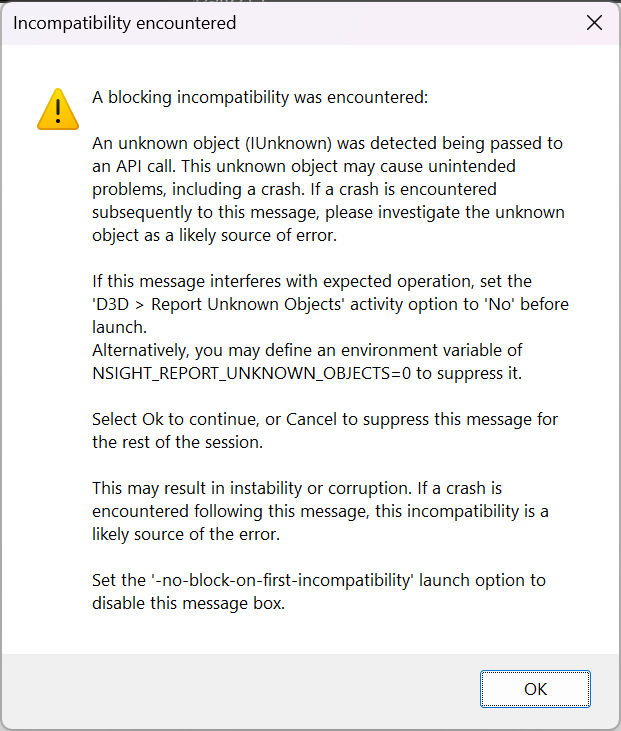
I have set the environment variable to 0 like it suggests, and there’s no change. I looked for the option under D3D > Report Unknown Objects, except that under the new Graphics Capture system, there is no such option. I tried setting the value to No under the Frame Debugger system, but it had no effect.
I suspect it has something to do with the call to D3D12CreateDevice which takes an IUnknown* parameter because it can be a number of types (I have no choice in this, this is Microsoft’s API design).
This seems like a bug to me, I am definitely not using IUnknown beyond that function call and my application does nothing more than clear a swap chain and present it, so it’s very very very simple.
Thank you for using Nsight Graphics and providing your feedback. Does that also happen on Graphics Capture activity? What about launching some other public D3D12 samples?
This happened while using the Graphics Capture activity. It does not happen when I use the old Frame Debugger.
Regardless, there’s a miscommunication here. What I’m trying to point out is that there’s no way to suppress this message popup from the Graphics Capture activity, while there most certainly is in the old Frame Debugger activity. The instructions on the pop up are incorrect.
As per your request, I tried this with another application. This application comes from TerraFX and was written in C# (my application is written in C#), and it too shows the pop up under the Graphics Capture activity.
I then tried this with a D3D sample from their Github, written in C++, but the pop up does not show for that application. There could be a myriad of reasons for this, but I do not have the time to rewrite everything in C++ just to test.
With that said, the language used should not matter as I am calling the functionality directly via COM.
I also found that the pop up only triggered on a 2nd call to D3D12CreateDevice. The first call passed through successfully. This is extremely strange, and should not have happened, so I suspect there’s a bug in NSight here. This is something you might want to pass on to the developer team.
there’s no way to suppress this message popup from the Graphics Capture activity, while there most certainly is in the old Frame Debugger activity. The instructions on the pop up are incorrect.
The info in the dialog looks confuse, could you please try Troubleshooting → Block on First Incompatibility and set it to No.
I will create an internal case to track the confuse dialog issue.
I then tried this with a D3D sample from their Github, written in C++, but the pop up does not show for that application. There could be a myriad of reasons for this, but I do not have the time to rewrite everything in C++ just to test.
With that said, the language used should not matter as I am calling the functionality directly via COM.
I also found that the pop up only triggered on a 2nd call to D3D12CreateDevice. The first call passed through successfully. This is extremely strange, and should not have happened, so I suspect there’s a bug in NSight here. This is something you might want to pass on to the developer team.
I don’t think your issue is due to C++ or .Net. I tried another .Net wrappers for D3D (SharpDX), and it works fine with Nsight Graphics. I tend to think the issue is due to TerraFX but not Nsight Graphics.
Yeah, I didn’t think so either. I’m assuming the SharpDX example you ran was for Direct3D 12? Because Direct3D 11 doesn’t show this issue. Regardless, I’ll pass this on to Tanner.
Yeah, I didn’t think so either. I’m assuming the SharpDX example you ran was for Direct3D 12? Because Direct3D 11 doesn’t show this issue. Regardless, I’ll pass this on to Tanner.
Yes, I run SharpDX D3D12 sample with Graphics Capture since it only supports Vulkan and D3D12. WRT D3D11, I am sure it also works fine on Frame Debugger activity.
I can reproduce the issue on my ASUS ZenBook if I pass in the “Intel(R) UHD Graphics” adapter but it all succeeds if I pass in the “NVIDIA GeForce RTX 3080 Laptop GPU” adapter.
My expectation is that this is the root issue here as well, but am waiting on Tape_Worm to confirm on the TerraFX GitHub thread.
TerraFX is ultimately just 1-to-1 bindings with C++ and is well used in production scenarios by several large/well-known apps. The same general issue described above also reproduces with a pure C++ app if the wrong adapter is passed in.
It would likely be beneficial if NVIDIA NSight surfaced a more descriptive error message for this scenario. It could, for example, validate that the adapter is actually some IDXGIAdapter and in that scenario then surface the name of the adapter and that it is not a recognized NVIDIA GPU. It could optionally enumerate the other adapters in the system and list ones that are compatible or give the users a way to select/override the selected adapter.
If you open the saved file of Graphics Capture activity (*.ngfx-capture), you should see the GPU info on the up right panel. For example, here is my screen shot.
What I was getting at however wasn’t that it should be visible somewhere in the tool, but rather that the current warning dialog given in the top post is misleading and confusing to users.
It makes a statement “An unknown object (IUnknown)” which is problematic since all COM objects are IUnknown. It then only discusses is being “unknown” and provides a suggestion on how to disable it if it causes problems, but does not actually attempt to indicate what the actual problem is or provide any context as to what failed validation.
The tooling could have validated that it was in fact some IDXGIAdapter (as the underlying D3D12CreateDevice call expected) in the first place and simply stated “An unknown adapter” instead. Even better it could have explicitly stated that the adapter, printing the adapter name returned from IDXGIAdapter::GetDesc, is not recognized as an NVIDIA device and so may not work with the NSight tool, which is the actual problem and the reason for the failure.
This would provide a significantly better and more actionable user experience, leading developers into a pit of success rather than a pit of failure. Particularly since handling this scenario and printing an actionable diagnostic is a handful of lines of code instead.