ZED Camera is Fully Operational on Host: The ZED camera and its SDK are fully functional when run directly on the main Jetson OS, outside of any container. ZED_Explorer works perfectly.
Successful Build Inside Container: We then followed the official “Isaac ROS ZED Setup” guide precisely. This included starting the Docker container with run_dev.sh, installing the ZED SDK inside the container with the provided script, and running rosdep and colcon build. The colcon build of the ZED ROS 2 driver completed successfully with no errors.
ZED Explorer Works Inside Container: As a verification step, we confirmed that the non-ROS /usr/local/zed/tools/ZED_Explorer tool works correctly inside the container, proving that the ZED SDK installation and hardware access within the Docker environment are functional.
ROS 2 Launch Fails with ffmpeg Error: However, when we attempt to launch the ROS 2 driver that we just built, it fails.
• Launch Command:
• Specific Error: The launch fails with multiple instances of this error:
Final Issue to be Resolved:
The ZED driver builds successfully but fails to run because a core ROS 2 component, image_transport, cannot find the libx264 video codec. Further diagnostics confirmed that the ffmpeg library provided in the base Isaac ROS Docker image was not compiled with libx264 support, making it impossible to run any ROS 2 camera node that uses standard compressed video transport. The ffmpeg package in the official Docker image needs to be fixed.
Can you help me to understand why NVIDIA has not looked at my reported issue? When I select my profile, I don’t see this issue listed but I can see it listed in my posts.
I’ve checked using the same command you provided to launch the ZED camera. I can confirm the unknown encoder: libx264 error in the log.
However, the image topics appear to still be published despite this error.
Have you checked if you can still visualize the image topics at the same time?
You can have the quick check using the following steps:
Launch rqt.
Go to Plugins → Visualization → Image View.
Select the desired image topic from the drop-down menu.
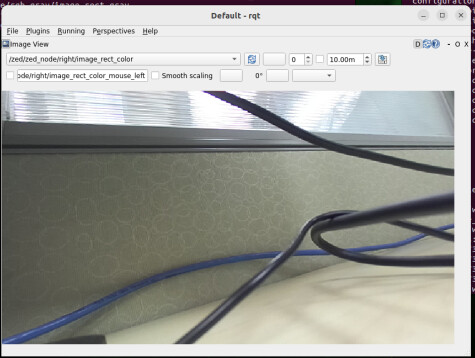
Then you should be able to see the image in below window.
Since the image is visible, I assume other ROS nodes will be able to subscribe to those image topics without issue if you’re planning to use these images for other test.
Separately, when I ran ffmpeg -encoders | grep x264, I received this output: ffmpeg version 4.4.2-0ubuntu0.22.04.1 Copyright (c) 2000-2021 the FFmpeg developers….
This confirms that the FFmpeg package is installed on my system.
Thank you for confirming the unknown encoder: libx264 error and for the detailed suggestion to test with rqt_image_view.
Following your advice, I performed a complete software reset (purged all ROS 2 packages, uninstalled the ZED SDK, deleted all workspaces, cleaned .bashrc, and rebooted) to ensure a perfectly clean baseline. I then meticulously followed the official “Isaac ROS ZED Setup” guide from NVIDIA which resulted in a successful colcon build.
I then ran the test you suggested:
In Terminal 1: I launched the ZED driver. It started successfully in “degraded mode,” showing the same red libx264 errors you confirmed.
In Terminal 2: I ran ros2 topic list and confirmed that all ZED topics, including the uncompressed image topics, were being published correctly.
In the same Terminal 2: I then launched rqt_image_view as you instructed.
Result: Unlike in your successful test, on my system the rqt_image_view application opens and I’m able to select topics but no video is displayed (main menu line File Plugins Running Perspectives Help is missing) RViz menus were all available but could not diplay an image. I was told by StereoLabs that the ORIN could not run both the ZED 2i and RViz due to insufficient GPU resources.
***ffmpeg Diagnostic
Your test and our test produced different results.
The command ffmpeg -encoders | grep x264 prints the ffmpeg version header and then searches the list of available encoders for x264.
On your working system: The command found and listed the libx264 encoder (which is why your visualization worked).
On our system: The command finds nothing. We see the version header, but the list of available encoders does not contain libx264.
The ffmpeg library in our Docker container is broken. It reports that it was configured to include the libx2-64 encoder, but the final compiled library is missing it.
I appreciate your continued support. I really want to try out the various NVIDIA apt installs using my ZED 2i.
If your issue is the missing “libx264”, please follow the steps below to check your package and environment:
Verify FFmpeg Configuration:
Use ffmpeg -buildconf to ensure that FFmpeg was configured with --enable-libx264 during the build process.
Install Required Dependencies:
You mentioned that you’ve manually installed the necessary libraries and dependencies for x264 already, but you might want to verify it again:
apt-get update
apt-get install -y libx264-dev
Obtain FFmpeg with x264 Support:
If the dependencies are in place, you could either rebuild FFmpeg with proper configuration or use a pre-built version of FFmpeg that includes x264 support.
You can find such pre-builds package at:
Thank you for the detailed troubleshooting steps. I have followed them precisely inside a clean container. Here are the results for each of your points:
1. Regarding “Verify FFmpeg Configuration”: I ran ffmpeg -buildconf and confirmed the configuration does include the --enable-libx264 flag, as you suggested.
However, the key issue remains: when I check for the available encoders with the command ffmpeg -encoders | grep x264, the command finds no matching lines. This contradiction (the library was configured to include the encoder, but the final program doesn’t have it) seems to be the core of the bug.
2. Regarding “Install Required Dependencies”: I ran sudo apt-get install -y libx264-dev, and the system confirmed that libx264-dev is already the newest version. The dependency is correctly installed.
3. Regarding “Obtain FFmpeg”: I ran sudo apt-get install --reinstall -y ffmpeg. The command completed successfully but did not change the outcome of the ffmpeg -encoders test; it still finds no matching lines.
Conclusion: This seems to confirm that the ffmpeg package in the base Docker image is faulty. All dependencies are present, but the final compiled library is missing the libx264 encoder at runtime.
Although the ZED ROS 2 driver successfully launches and advertises all of its topics (confirmed via ros2 topic list), it fails to produce a usable video stream, as visualization tools like RViz and rqt_image_view are unable to render the image.
Hello @vchuang (or any other relevant NVIDIA moderator names you know),
Just wanted to gently follow up on this issue. We’ve confirmed the ffmpeg library in the official Docker image is missing the libx264 encoder at runtime, and that ROS 2 GUI tools fail to render video even when topics are correctly published.
This is currently blocking our ability to use the ZED camera with Isaac ROS. Is there any update on a potential fix or workaround?
Hello @dennis.darrow1
Thank you for your patience. We’ve reported this issue to our development team for testing, and we’ll keep you updated if there are any new findings or progress.