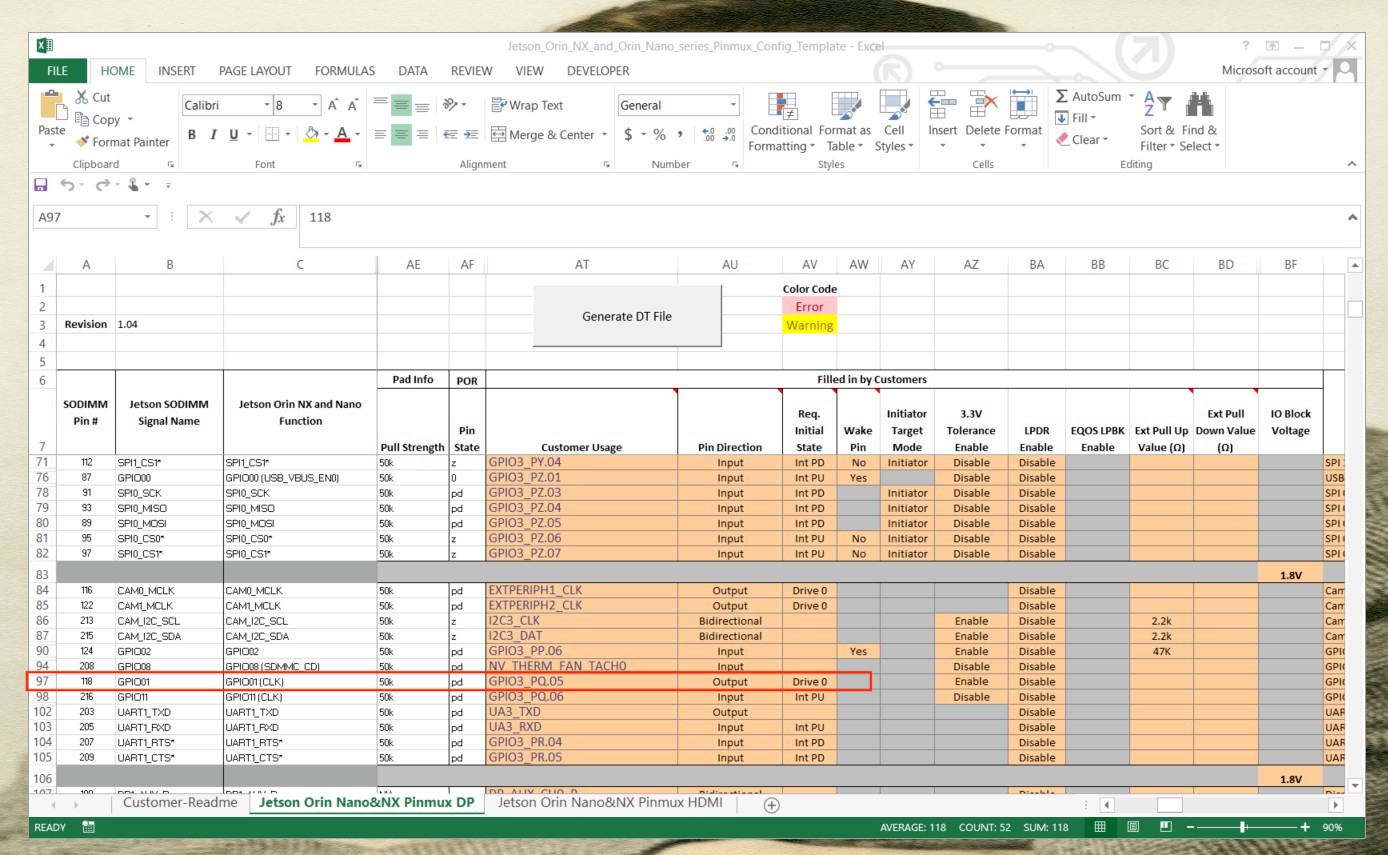
get the following error
BASIC syntax error.
Symbol expected.
i just downloaded the spreadsheet and clicked the Generate DT button. no changes were made.
get the following error
BASIC syntax error.
Symbol expected.
i just downloaded the spreadsheet and clicked the Generate DT button. no changes were made.
I’m using LibreOffice on Ubuntu
Please use Excel on Windows.
All i want is for one of the GPIO pins to toggle between 3.3V and 0V using the Jetson.GPIO python library. The spreadsheet is confusing.
windows excel worked in generation of the 3 .dtsi files.
But now stuck :
Copy the padvoltage.dtsi and pinmux.dtsi files to the <l4t_top>/bootloader/t186ref/BCT/ directory and copy the gpio.dtsi file to the <l4t_top>/bootloader/ directory.
how do i find the path for the place holder <l4t_top>?
It means your Linux_for_Tegra folder.
ok. I really need your help and following instructions at
so if have a dedicated ubuntu 22 box with sdkmanager
i successfully generated the 3 files, padvoltage.dtsi, pinmux.dtsi and gpio.dtsi from the spreadsheet in excel on a windows box.
copied gpio.dtsi into ~/nvidia/nvidia_sdk/JetPack_6.0_DP_Linux_DP_JETSON_ORIN_NANO_TARGETS/Linux_for_Tegra/bootloader/ folder
copied padvoltage.dtsi and pinmux.dtsi to ~/nvidia/nvidia_sdk/JetPack_6.0_DP_Linux_DP_JETSON_ORIN_NANO_TARGETS/Linux_for_Tegra/bootloader/generic/BCT/ folder
modified lines 99 and 100 in jetson-orin-nano-devkit.conf
PINMUX_CONFIG=“tegra234-mb1-bct-pinmux-p3767-dp-a03.dtsi”;
PMC_CONFIG=“tegra234-mb1-bct-padvoltage-p3767-dp-a03.dtsi”;
to be
PINMUX_CONFIG=“pinmux.dtsi”;
PMC_CONFIG=“padvoltage.dtsi”;
put my orin nano in recovery mode and hooked it up thru usbc into my ubuntu box.
ran sdkmanager and get an error to install.
what steps am i missing and/or got wrong?
Then tell me the error.
when i remove the .dtsi files install is successful.
What changes did you make in the pinmux?
If multiple pins are modified, try modifying them one-by-one and see which one makes the error.
Are you using the latest version of pinmux spreadsheet?
hello. anyone.
also tried
GitHub - jetsonhacks/bootFromExternalStorage: Shell scripts to setup a NVIDIA Jetson AGX Xavier, Xavier NX, AGX Orin, or Orin Nano Developer Kit to boot from external storage. but get error that /dev/nvme0n1 could not be stat
this is ridiculous
I can correctly configure PQ.05 and PQ.06 as output, so this workflow is correect:
	line 105:      "PQ.05"       unused  output  active-high
	line 106:      "PQ.06"       unused  output  active-high
Maybe delete the whole BSP and try again to see if that helps.
I don’t really know what you want to do here, but this is not related to the original issue, and this script is also not made by us.
alright so from excel the following 3 files were generated.
Orin-jetson_orin_nano-padvoltage-default.dtsi
Orin-jetson_orin_nano-gpio-default.dtsi
Orin-jetson_orin_nano-pinmux.dtsi
You just make sure there file names are specified in the board config file.
YES. As specified in the document.
YES.
Is the name of the board config file: flash_parameters.txt ?
Here.
i did all that and the flash fails everytime. i’ve double checked that the files are there and are referenced correctly in jetson-orin-nano-devkit.conf. when i revert to the original *.conf it installs successfully
error logs attached
SDKM_logs_JetPack_6.0_DP_Linux_for_Jetson_Orin_Nano_modules_2024-04-16_20-36-39.zip (246.5 KB)