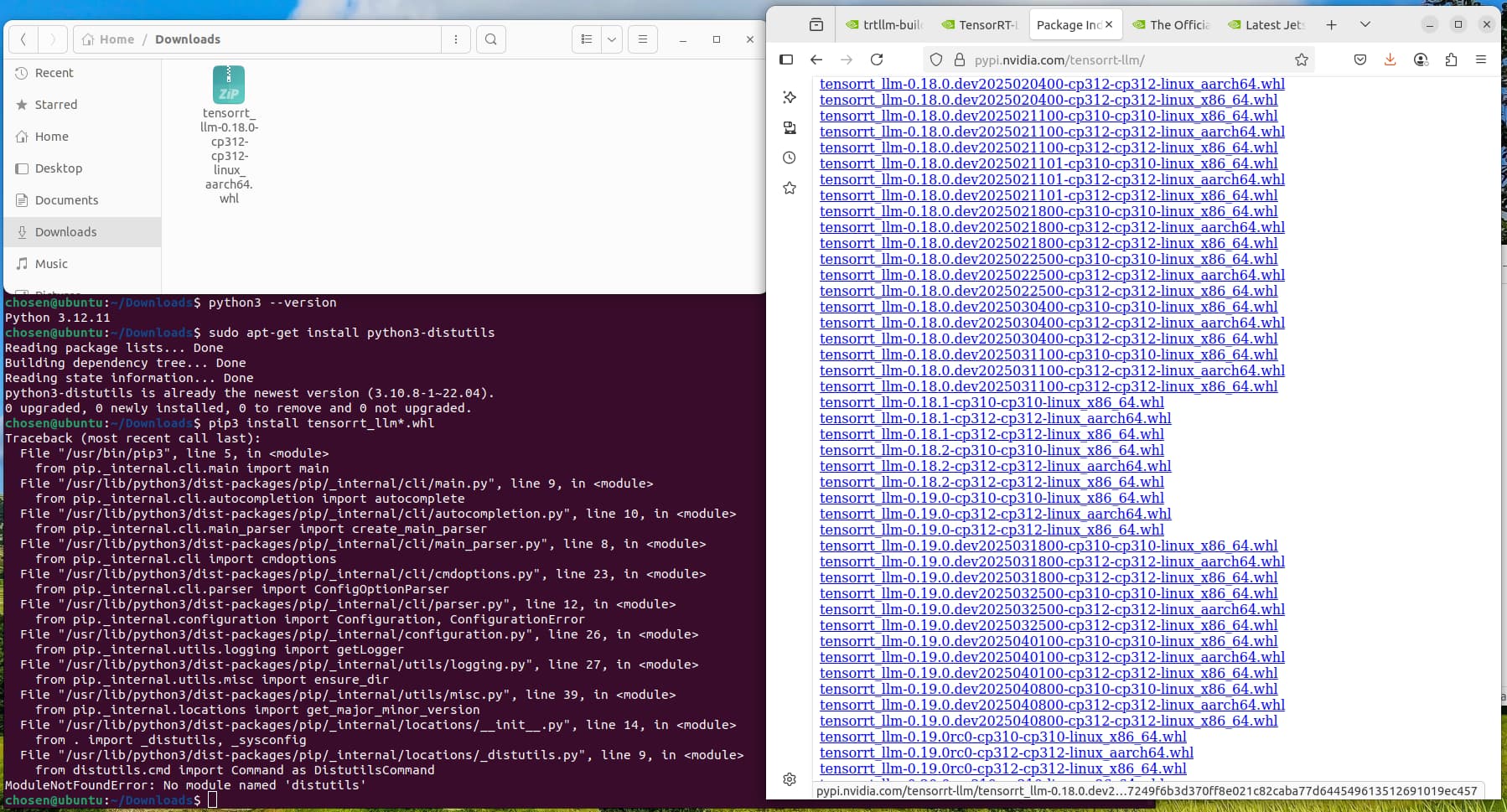
As you seen, the file required python 3.12, and I install it using python 3.12.11, but it reported the error “No module named ‘distutils’”.
The “distutils” package is not available in 3.12, and it is available in 3.10. If I used python 3.10 to install the whl file, it would report the file is not supported by this platform.
There should be a Jetson wheel trt-llm_v0.12.-jetson available here pypi.jetson-ai-lab.dev when it comes back online, or you can compile it. Here’s how I compiled it months ago.
git clone https://github.com/NVIDIA/TensorRT-LLM.git
cd TensorRT-LLM
git checkout v0.12.0-jetson

https://github.com/NVIDIA/TensorRT-LLM/blob/v0.12.0-jetson/README4Jetson.md omits the following line which may be needed.

git submodule update --init --recursive
git lfs pull

Installed requirements manually as I am not in a Python virtual environment and my first run of build_wheel.py that invokes setup.py errored on requirements install.
pip install -r requirements-dev-jetson.txt --user

python3 scripts/build_wheel.py --clean --cuda_architectures 87 -DENABLE_MULTI_DEVICE=0 --build_type Release --benchmarks --use_ccache

pip install build/tensorrt_llm-*.whl
Following needed only if running the examples.
huggingface-cli download --repo-type model MaziyarPanahi/Meta-Llama-3-8B-Instruct-GPTQ

This huggingface.co repo has a requirments so:
git clone https://github.com/AutoGPTQ/AutoGPTQ.git

If you aren't using conda, edit setup.py modify this line to this  conda_cuda_include_dir = "/usr/local/cuda/include"
export BUILD_CUDA_EXT=1
export TORCH_CUDA_ARCH_LIST="8.7"
export COMPILE_MARLIN=1
export MAX_JOBS=10
python -m pip wheel . --no-build-isolation -w dist --no-clean
pip install dist/auto_gptq-0.8.0.dev0+cu126-cp310-cp310-linux_aarch64.whl --user


python convert_checkpoint.py --model_dir Meta-Llama-3-8B-Instruct-GPTQ --output_dir tllm_checkpoint_1gpu_gptq --dtype float16 --use_weight_only --weight_only_precision int4_g>

export PATH=$HOME/.local/bin:$PATH

trtllm-build --checkpoint_dir tllm_checkpoint_1gpu_gptq --output_dir engine_1gpu_gptq --gemm_plugin float16

python3 ../run.py --max_output_len=50 --tokenizer_dir Meta-Llama-3-8B-Instruct --engine_dir=engine_1gpu_gptq --use_mmap
Thanks, even I install nvidia-cutlass, when I run the code to generate the whl file, it reports error
ERROR: file:///media/chosen/AEEC9ED8EC9E9A63/jetson/jetson-containers/TensorRT-LLM/3rdparty/cutlass/python does not appear to be a Python project: neither 'setup.py' nor 'pyproject.toml' found.
After that, I start the container with the server using the code
jetson-containers run \
  dustynv/tensorrt_llm:0.12-r36.4.0 \
  python3 /opt/TensorRT-LLM/examples/apps/openai_server.py \
    /data/models/tensorrt_llm/Llama-2-7b-chat-hf-gptq
At the beginning, everything looks good, here is the output.
[TensorRT-LLM] TensorRT-LLM version: 0.12.0
Loading Model: [1/2]	Loading TRT checkpoints to memory
Time: 3.422s
Loading Model: [2/2]	Build TRT-LLM engine
Time: 281.236s
Loading model done.
Total latency: 284.659s
But later, it reports error:
[07/14/2025-09:06:39] [TRT-LLM] [E] Failed to load tokenizer from /tmp/tmprsowp_eillm-workspace/tmp.engine: Unrecognized model in /tmp/tmprsowp_eillm-workspace/tmp.engine. Should have a model_type key in its config.json, or contain one of the following strings in its name:…
I completely don’t know what i can do now. Please advise. Thanks
find this directory /data/models/tensorrt_llm/Llama-2-7b-chat-hf-gptq
edit the config.json or create it and make sure it has the following line or lines.
{
    "model_type": "llama"
}
If that doesn’t fix it please post the entire error.
Thanks, after edit the config.json. Here is the error:
chosen@ubuntu:/media/chosen/AEEC9ED8EC9E9A63/jetson/jetson-containers$ jetson-containers run
dustynv/tensorrt_llm:0.12-r36.4.0
python3 /opt/TensorRT-LLM/examples/apps/openai_server.py
/data/models/tensorrt_llm/Llama-2-7b-chat-hf-gptq
V4L2_DEVICES:
DISPLAY environmental variable is already set: “:1”
localuser:root being added to access control list
ARM64 architecture detected
Jetson Detected
SYSTEM_ARCH=tegra-aarch64
docker run --runtime nvidia --env NVIDIA_DRIVER_CAPABILITIES=compute,utility,graphics -it --rm --network host --shm-size=8g --volume /tmp/argus_socket:/tmp/argus_socket --volume /etc/enctune.conf:/etc/enctune.conf --volume /etc/nv_tegra_release:/etc/nv_tegra_release --volume /tmp/nv_jetson_model:/tmp/nv_jetson_model --volume /var/run/dbus:/var/run/dbus --volume /var/run/avahi-daemon/socket:/var/run/avahi-daemon/socket --volume /var/run/docker.sock:/var/run/docker.sock --volume /media/chosen/AEEC9ED8EC9E9A63/jetson/jetson-containers/data:/data -v /etc/localtime:/etc/localtime:ro -v /etc/timezone:/etc/timezone:ro --device /dev/snd -e PULSE_SERVER=unix:/run/user/1000/pulse/native -v /run/user/1000/pulse:/run/user/1000/pulse --device /dev/bus/usb -e DISPLAY=:1 -v /tmp/.X11-unix/:/tmp/.X11-unix -v /tmp/.docker.xauth:/tmp/.docker.xauth -e XAUTHORITY=/tmp/.docker.xauth --device /dev/i2c-0 --device /dev/i2c-1 --device /dev/i2c-2 --device /dev/i2c-3 --device /dev/i2c-4 --device /dev/i2c-5 --device /dev/i2c-6 --device /dev/i2c-7 --device /dev/i2c-8 --device /dev/i2c-9 --name jetson_container_20250715_080557 dustynv/tensorrt_llm:0.12-r36.4.0 python3 /opt/TensorRT-LLM/examples/apps/openai_server.py /data/models/tensorrt_llm/Llama-2-7b-chat-hf-gptq
/usr/local/lib/python3.10/dist-packages/transformers/utils/hub.py:128: FutureWarning: Using TRANSFORMERS_CACHE is deprecated and will be removed in v5 of Transformers. Use HF_HOME instead.
warnings.warn(
[TensorRT-LLM] TensorRT-LLM version: 0.12.0
Loading Model: [1/2] Loading TRT checkpoints to memory
Time: 3.290s
Loading Model: [2/2] Build TRT-LLM engine
Time: 262.181s
Loading model done.
Total latency: 265.472s
[TensorRT-LLM][INFO] Engine version 0.12.0 found in the config file, assuming engine(s) built by new builder API.
[TensorRT-LLM][INFO] Rank 0 is using GPU 0
[TensorRT-LLM][INFO] TRTGptModel maxNumSequences: 10
[TensorRT-LLM][INFO] TRTGptModel maxBatchSize: 10
[TensorRT-LLM][INFO] TRTGptModel maxBeamWidth: 1
[TensorRT-LLM][INFO] TRTGptModel maxSequenceLen: 512
[TensorRT-LLM][INFO] TRTGptModel maxDraftLen: 0
[TensorRT-LLM][INFO] TRTGptModel mMaxAttentionWindowSize: 512
[TensorRT-LLM][INFO] TRTGptModel enableTrtOverlap: 0
[TensorRT-LLM][INFO] TRTGptModel normalizeLogProbs: 0
[TensorRT-LLM][INFO] TRTGptModel maxNumTokens: 5120
[TensorRT-LLM][INFO] TRTGptModel maxInputLen: 511 = min(maxSequenceLen - 1, maxNumTokens) since context FMHA and usePackedInput are enabled
[TensorRT-LLM][INFO] TRTGptModel If model type is encoder, maxInputLen would be reset in trtEncoderModel to maxInputLen: min(maxSequenceLen, maxNumTokens).
[TensorRT-LLM][INFO] Capacity Scheduler Policy: GUARANTEED_NO_EVICT
[TensorRT-LLM][INFO] Context Chunking Scheduler Policy: None
[TensorRT-LLM][INFO] Loaded engine size: 3693 MiB
[TensorRT-LLM][INFO] [MemUsageChange] Allocated 415.00 MiB for execution context memory.
[TensorRT-LLM][INFO] [MemUsageChange] TensorRT-managed allocation in IExecutionContext creation: CPU +0, GPU +0, now: CPU 0, GPU 3688 (MiB)
[TensorRT-LLM][INFO] [MemUsageChange] Allocated 1.36 MB GPU memory for runtime buffers.
[TensorRT-LLM][INFO] [MemUsageChange] Allocated 6.81 MB GPU memory for decoder.
[TensorRT-LLM][INFO] Memory usage when calculating max tokens in paged kv cache: total: 61.37 GiB, available: 42.69 GiB
[TensorRT-LLM][INFO] Number of blocks in KV cache primary pool: 1230
[TensorRT-LLM][INFO] Number of blocks in KV cache secondary pool: 0, onboard blocks to primary memory before reuse: true
[TensorRT-LLM][INFO] Max KV cache pages per sequence: 8
[TensorRT-LLM][INFO] Number of tokens per block: 64.
[TensorRT-LLM][INFO] [MemUsageChange] Allocated 38.44 GiB for max tokens in paged KV cache (78720).
[07/15/2025-08:11:05] [TRT-LLM] [E] Failed to load tokenizer from /tmp/tmpz09dp39allm-workspace/tmp.engine: Unrecognized model in /tmp/tmpz09dp39allm-workspace/tmp.engine. Should have a model_type key in its config.json, or contain one of the following strings in its name: albert, align, altclip, audio-spectrogram-transformer, autoformer, bark, bart, beit, bert, bert-generation, big_bird, bigbird_pegasus, biogpt, bit, blenderbot, blenderbot-small, blip, blip-2, bloom, bridgetower, bros, camembert, canine, chameleon, chinese_clip, chinese_clip_vision_model, clap, clip, clip_text_model, clip_vision_model, clipseg, clvp, code_llama, codegen, cohere, conditional_detr, convbert, convnext, convnextv2, cpmant, ctrl, cvt, dac, data2vec-audio, data2vec-text, data2vec-vision, dbrx, deberta, deberta-v2, decision_transformer, deformable_detr, deit, depth_anything, deta, detr, dinat, dinov2, distilbert, donut-swin, dpr, dpt, efficientformer, efficientnet, electra, encodec, encoder-decoder, ernie, ernie_m, esm, falcon, falcon_mamba, fastspeech2_conformer, flaubert, flava, fnet, focalnet, fsmt, funnel, fuyu, gemma, gemma2, git, glm, glpn, gpt-sw3, gpt2, gpt_bigcode, gpt_neo, gpt_neox, gpt_neox_japanese, gptj, gptsan-japanese, granite, granitemoe, graphormer, grounding-dino, groupvit, hiera, hubert, ibert, idefics, idefics2, idefics3, imagegpt, informer, instructblip, instructblipvideo, jamba, jetmoe, jukebox, kosmos-2, layoutlm, layoutlmv2, layoutlmv3, led, levit, lilt, llama, llava, llava_next, llava_next_video, llava_onevision, longformer, longt5, luke, lxmert, m2m_100, mamba, mamba2, marian, markuplm, mask2former, maskformer, maskformer-swin, mbart, mctct, mega, megatron-bert, mgp-str, mimi, mistral, mixtral, mllama, mobilebert, mobilenet_v1, mobilenet_v2, mobilevit, mobilevitv2, moshi, mpnet, mpt, mra, mt5, musicgen, musicgen_melody, mvp, nat, nemotron, nezha, nllb-moe, nougat, nystromformer, olmo, olmoe, omdet-turbo, oneformer, open-llama, openai-gpt, opt, owlv2, owlvit, paligemma, patchtsmixer, patchtst, pegasus, pegasus_x, perceiver, persimmon, phi, phi3, phimoe, pix2struct, pixtral, plbart, poolformer, pop2piano, prophetnet, pvt, pvt_v2, qdqbert, qwen2, qwen2_audio, qwen2_audio_encoder, qwen2_moe, qwen2_vl, rag, realm, recurrent_gemma, reformer, regnet, rembert, resnet, retribert, roberta, roberta-prelayernorm, roc_bert, roformer, rt_detr, rt_detr_resnet, rwkv, sam, seamless_m4t, seamless_m4t_v2, segformer, seggpt, sew, sew-d, siglip, siglip_vision_model, speech-encoder-decoder, speech_to_text, speech_to_text_2, speecht5, splinter, squeezebert, stablelm, starcoder2, superpoint, swiftformer, swin, swin2sr, swinv2, switch_transformers, t5, table-transformer, tapas, time_series_transformer, timesformer, timm_backbone, trajectory_transformer, transfo-xl, trocr, tvlt, tvp, udop, umt5, unispeech, unispeech-sat, univnet, upernet, van, video_llava, videomae, vilt, vipllava, vision-encoder-decoder, vision-text-dual-encoder, visual_bert, vit, vit_hybrid, vit_mae, vit_msn, vitdet, vitmatte, vits, vivit, wav2vec2, wav2vec2-bert, wav2vec2-conformer, wavlm, whisper, xclip, xglm, xlm, xlm-prophetnet, xlm-roberta, xlm-roberta-xl, xlnet, xmod, yolos, yoso, zamba, zoedepth
Traceback (most recent call last):
File “/opt/TensorRT-LLM/examples/apps/openai_server.py”, line 451, in
entrypoint()
File “/usr/local/lib/python3.10/dist-packages/click/core.py”, line 1157, in call
return self.main(*args, **kwargs)
File “/usr/local/lib/python3.10/dist-packages/click/core.py”, line 1078, in main
rv = self.invoke(ctx)
File “/usr/local/lib/python3.10/dist-packages/click/core.py”, line 1434, in invoke
return ctx.invoke(self.callback, **ctx.params)
File “/usr/local/lib/python3.10/dist-packages/click/core.py”, line 783, in invoke
return __callback(*args, **kwargs)
File “/opt/TensorRT-LLM/examples/apps/openai_server.py”, line 441, in entrypoint
hf_tokenizer = AutoTokenizer.from_pretrained(tokenizer or model_dir)
File “/usr/local/lib/python3.10/dist-packages/transformers/models/auto/tokenization_auto.py”, line 939, in from_pretrained
return tokenizer_class_fast.from_pretrained(pretrained_model_name_or_path, *inputs, **kwargs)
File “/usr/local/lib/python3.10/dist-packages/transformers/tokenization_utils_base.py”, line 2197, in from_pretrained
raise EnvironmentError(
OSError: Can’t load tokenizer for ‘/data/models/tensorrt_llm/Llama-2-7b-chat-hf-gptq’. If you were trying to load it from ‘Models – Hugging Face’, make sure you don’t have a local directory with the same name. Otherwise, make sure ‘/data/models/tensorrt_llm/Llama-2-7b-chat-hf-gptq’ is the correct path to a directory containing all relevant files for a LlamaTokenizerFast tokenizer.
Error in sys.excepthook:
Traceback (most recent call last):
File “/usr/local/lib/python3.10/dist-packages/tensorrt_llm/hlapi/utils.py”, line 319, in call
obj.shutdown()
AttributeError: ‘LLM’ object has no attribute ‘shutdown’. Did you mean: ‘_shutdown’?
Original exception was:
Traceback (most recent call last):
File “/opt/TensorRT-LLM/examples/apps/openai_server.py”, line 451, in
entrypoint()
File “/usr/local/lib/python3.10/dist-packages/click/core.py”, line 1157, in call
return self.main(*args, **kwargs)
File “/usr/local/lib/python3.10/dist-packages/click/core.py”, line 1078, in main
rv = self.invoke(ctx)
File “/usr/local/lib/python3.10/dist-packages/click/core.py”, line 1434, in invoke
return ctx.invoke(self.callback, **ctx.params)
File “/usr/local/lib/python3.10/dist-packages/click/core.py”, line 783, in invoke
return __callback(*args, **kwargs)
File “/opt/TensorRT-LLM/examples/apps/openai_server.py”, line 441, in entrypoint
hf_tokenizer = AutoTokenizer.from_pretrained(tokenizer or model_dir)
File “/usr/local/lib/python3.10/dist-packages/transformers/models/auto/tokenization_auto.py”, line 939, in from_pretrained
return tokenizer_class_fast.from_pretrained(pretrained_model_name_or_path, *inputs, **kwargs)
File “/usr/local/lib/python3.10/dist-packages/transformers/tokenization_utils_base.py”, line 2197, in from_pretrained
raise EnvironmentError(
OSError: Can’t load tokenizer for ‘/data/models/tensorrt_llm/Llama-2-7b-chat-hf-gptq’. If you were trying to load it from ‘Models – Hugging Face’, make sure you don’t have a local directory with the same name. Otherwise, make sure ‘/data/models/tensorrt_llm/Llama-2-7b-chat-hf-gptq’ is the correct path to a directory containing all relevant files for a LlamaTokenizerFast tokenizer.