I have a doubt. Each port of GB10 are 200Gbit/s or each one is 100Gbit/s.
So if each one of the 100Gbit/s ports are connected to a single 200Gbit QSFP56 cable to a 400Gbit switcher does the switcher reads 200Gbit or just 100Gbit?
What is the real limit of each port? can they be used in parallel?
i want to connect several GB10 to a 400Gbit switcher. i look up the video on youtube where alex connects all of them, but he makes on my amateur view some mistakes like not fully implementing a proper fine tune of the fabric signal. Also he never uses 4bit quantization with GB10.
has anyone here connected more the 3 GB10 and use the CRS804 DDQ ?
Each port is indeed 200GbE. Only one cable necessary except for odd daisy chain setups.
That specific switch has 400GbE bandwidth and each port can be split to serve two Sparks - but you have to be very cautious and order exactly the right splitter cables. There are no official recommendations for this… and it will probably cost hundreds per split cable, and require some management on the switch to pull off. Research deeply before buying. It is possible though.
While I haven’t seen an in depth report with that exact config here, there’s a YouTube channel which basically shows the entire process with that switch, successfully connecting 8x Sparks and doing some inference tests.
You want QSFP56-DD to 2x QSFP56 cables. The -DD is double density and it is a deeper physical connector used on the CRS804/ CRS812 (and lots of other switches.) Here is Rohit’s post on that if you want to learn more: QSFP Versus QSFP-DD Here Are the Key Differences - ServeTheHome - The short answer is that you are just splitting out the double density.
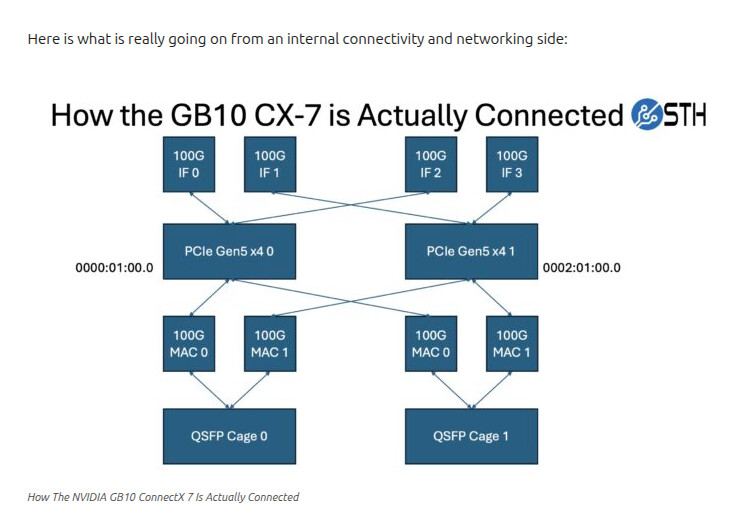
You also have to manually set each port to 200Gbps. The actual PCIe Gen5 x4 throughput you get is closer to 109Gbps IIRC but I might be a bit off there so you lose a small bit of bandwidth by doing both of the PCIe Gen5 x4 links into a single connector. For the GB10, it is well worth it to get higher density on the switch.
Just as a FYI - we have eight of them on a CRS804 and it works no problem. If you want, you can even put storage on the 10Gbps ports and feed storage in that way.
We are doing our video on the 8-node cluster today, so it should be out in two weeks or so (albeit likely when I am filming in Taiwan.)
If splitting the switch port will result in an actual PCIe Gen5 x4 throughput you get is closer to 109Gbps that’s unfortunate. Using a QSFP56 back-to-back connection the throughput is close to the 200Gpbs line rate.
@Patrick-ServeTheHome thanks for pointing that out. I was planning to order a CSR804 switch but now I have to look for alternatives. Something enterprise ready!
So the GB10 has two PCIe Gen5 x4 interfaces and two physical interfaces. So if you used both ports with 200GbE connections on each port you can actually drive like 109Gbps over one of the PCIe Gen5 x4 links, but you then are provisioning 200Gbps ports for 109Gbps(-ish) of maximum utilization. With the breakout you put both PCIe Gen5 x4 links from the SoC to the CX-7 through one physical port, and then can saturate 200Gbps.
Other than for throughput benchmarking, you are unlikely to notice the difference, so the CRS804 DDQ is a better option since you can do 8x 200Gbps since it is a 1.6T switch. The gotchas are setting things like the MTUs, using the right interface pairs, and then you have to manually set the port speed to 200Gbps on all eight ports.
Let us put it this way, we have everything up to the SN5610 51.2T Spectrum-4 switch in the lab, and we bought a second CRS804 DDQ for the GB10’s to start the second cluster. Even something like the Dell Z9332F-ON is very useful, but it is super loud and the maximum power consumption in that 1U is around 900W IIRC.
We just filmed the main part of the video for this whole setup, and will have a written version as well when the video goes live. We are using the CRS804 DDQ because it is the best option for this type of cluster.
I just got my Sparks up and I’m seeing 2 x 100Gb connections per Spark when I look at the connections. I have one cable for each Spark, so using all 4 ports with 4 Sparks. That’s the “200Gb” I should be seeing, correct, and not each one of those at 200Gb? Just want to make sure I have this all set up correct. The switch is the Mikrotik CRS804-4DDQ-hRM.
Given the Spark’s port-to-PCIe lane allocation, assuming an 804DDQ, would it make sense to connect 1x link NS (Spark-Switch) and 1 link EW (Spark-Spark)?
The idea would be mapping IF0/IF1 to the NS link, IF2/IF3 to the EW.
So each link type (NS switched vs EW P2P) gets access to PCIe 5.0 x8 lanes and a potential 200GbE assuming the other link type (switched vs P2P) isn’t being utilized simultaneously, plus there’s no switch latency overhead on EW/P2P traffic.
My setup is: pair of DGXs linked EW (P2P); picked up a CRS804DDQ; building a flash storage array (2x200GbE); considering adding 2 more DGXs. End goal is to be able to use a mix of tp=1, tp=2 and tp=4 with all the models stored just once on the flash. And with tp=2 pushing the traffic EW over the P2P link helps a little bit wrt throughput but more importantly less latency, thus the interest in having EW as well as the NS into the switch for storage + tp=4 traffic.
I keep seeing people referencing QSFP-56 but at least for the native interconnects the official cables are QSFP-112 am I missing something. Why wouldn’t I use a single port QSFP-112 to the QSFP-DD?
They are all part of the SSF-8665 standard, but QSFP-56 supports up to 200Gbps while QSFP-112 supports the 400Gbps. Since the later is backwards compatible (QSFP+, QSFP28, QSFP56) it’s safe to use the cable but won’t give you more than the 200Gbps.
Because you are paying extra for something that will NEVER be optimally used. Kind of like buying Cat7 cable but in reality, you are only using it for 100Mbps . So if you prefer to standardize on QSFP-112 and are willing to pay for it, then nothing wrong.
Here is the fun part. QSFP-112 is 400G as many has already mentioned. But your DGX Spark physical port is only QSFP-56, (200G) and the DGX Spark’s PCIe and Ethernet Interfaces is only 100G (to be generous). So to summarize
QSFP-112 Cable - 400G each
Physical Port - 200G = 200G x 2
Logical Interface - 100G each = 4x100G
PCIE Bus - Total 100G (Practical) / 128G (Theory)
I’ve read through this thread and the helpful links above, but for extra certainty, could some of you more knowledgeable folks confirm that my cable selection is correct?
I am building a 4 x Spark cluster using the Mikrotik CRS804 DDQ switch. As I understand, two of these “400G QSFP-DD to 2 x 200G QSFP56 DAC Breakout” cables would suffice to connect all four Sparks to the switch. So I think I only need to connect two of the 400G ports on the switch to one of the ports on each of the four Sparks to achieve the full data transfer rate.
The vendor markets the cable specifically for Spark clusters, but their diagram (below) implies that four cables are needed to connect four Sparks such that both ports on the Spark are connected.
Questions:
Is that cable model the correct breakout cable to use for a 4 x Spark cluster?
Will two cables suffice to connect all four Sparks at full speed?
I cant be authoritative, but for 4 Sparks you need two of those cables, giving you 4 ends, one for each Spark. I dont believe there is any benefit except resilience and redundancy by connecting 4 cables (no performance increase possible).
There are other threads about this.
Fs.com are very (overly) friendly once you place your first order, at least these type of products, feel free to engage with them.