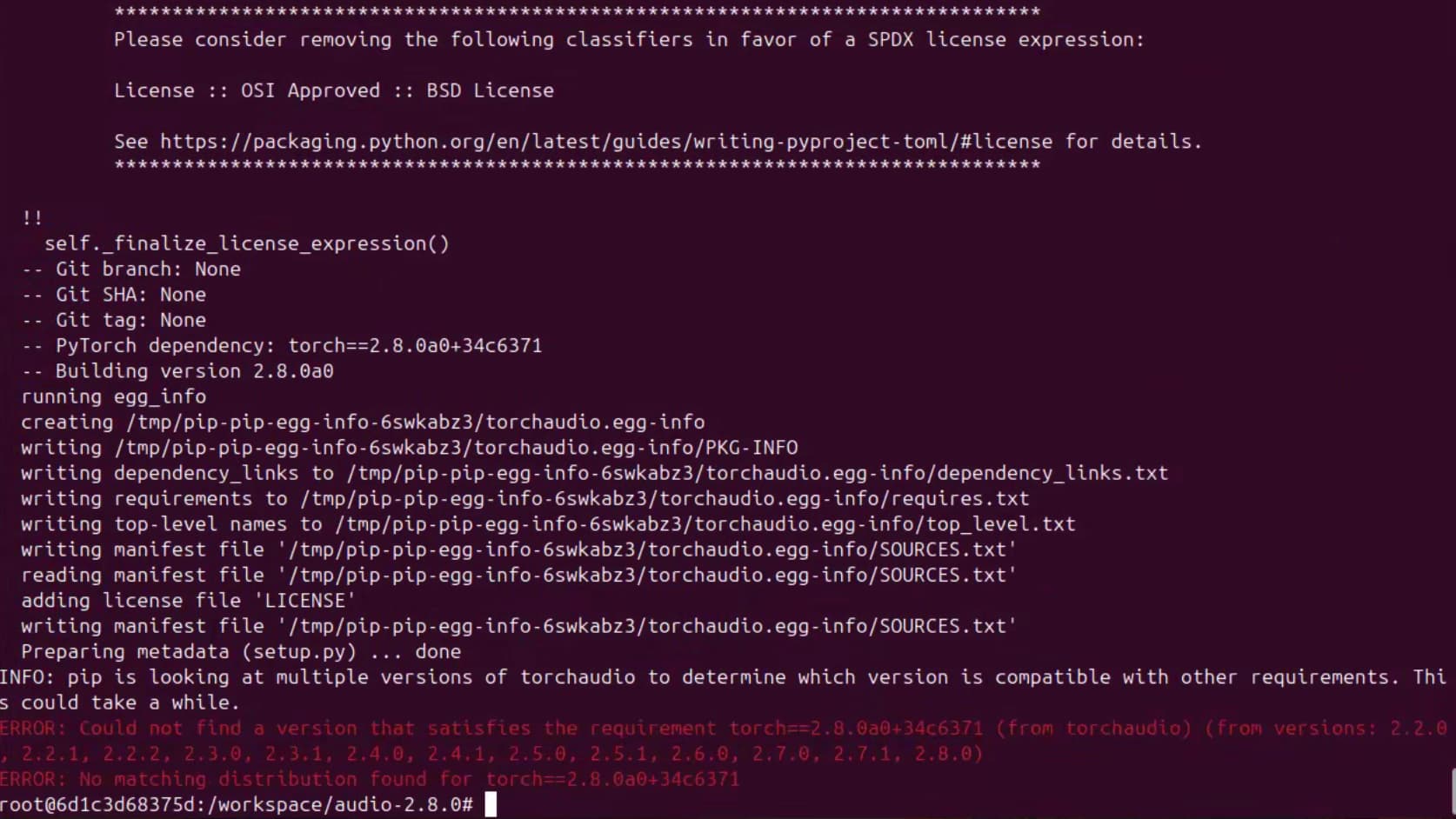
I got into trouble that I can’t install torchaudio in this image.Is there any way or whl file that can help? I’ve tried to build it from source code in branch v2.8.0 but it doesn’t work.
/usr/local/lib/python3.12/dist-packages/torch/include/ATen/core/TensorBody.h:256:1: note: declared here
  256 |   GenericPackedTensorAccessor<T,N,PtrTraits,index_t> packed_accessor() const & {
      | ^ ~~~~~~~~~~~~~
/workspace/audio/src/libtorchaudio/iir_cuda.cu:67:240: warning: ‘at::GenericPackedTensorAccessor<T, N, PtrTraits, index_t> at::Tensor::packed_accessor() const & [with T = float; long unsigned int N = 2; PtrTraits = at::RestrictPtrTraits; index_t = long unsigned int]’ is deprecated: packed_accessor is deprecated, use packed_accessor32 or packed_accessor64 instead [-Wdeprecated-declarations]
   67 |   AT_DISPATCH_FLOATING_TYPES(
      |                                                                                                                                                                                                                                                ^
/usr/local/lib/python3.12/dist-packages/torch/include/ATen/core/TensorBody.h:256:1: note: declared here
  256 |   GenericPackedTensorAccessor<T,N,PtrTraits,index_t> packed_accessor() const & {
      | ^ ~~~~~~~~~~~~~
/workspace/audio/src/libtorchaudio/iir_cuda.cu:67:324: warning: ‘at::GenericPackedTensorAccessor<T, N, PtrTraits, index_t> at::Tensor::packed_accessor() const & [with T = float; long unsigned int N = 3; PtrTraits = at::RestrictPtrTraits; index_t = long unsigned int]’ is deprecated: packed_accessor is deprecated, use packed_accessor32 or packed_accessor64 instead [-Wdeprecated-declarations]
   67 |   AT_DISPATCH_FLOATING_TYPES(
      |                                                                                                                                                                                                                                                                                                                                    ^
/usr/local/lib/python3.12/dist-packages/torch/include/ATen/core/TensorBody.h:256:1: note: declared here
  256 |   GenericPackedTensorAccessor<T,N,PtrTraits,index_t> packed_accessor() const & {
      | ^ ~~~~~~~~~~~~~
ninja: build stopped: subcommand failed.
And the whl file I’ve found is in version2.9.0:sbsa/cu130 index
Here’s a way to compile torchaudio in the container:
wget https://github.com/pytorch/audio/archive/refs/tags/v2.8.0.tar.gz and tar xfz it.

apt update
apt install libavformat-dev libavcodec-dev libavutil-dev libavdevice-dev libavfilter-dev

cd audio #or whatever it un-tars as.
USE_CUDA=1 python3 -m pip install -v . --no-use-pep517

#When it is done from another terminal
docker ps
#Copy the containerid

docker commit -m "Installed torchaudio" -a "Your Name" replace_containerid pytorch28-audio:1.0  #or whatever name you'd like but include a :tag

#Then exit the running container. And run your new image

docker run -it --net=host --runtime nvidia --privileged --ipc=host --ulimit memlock=-1 \
 --ulimit stack=67108864 -v $(pwd):/workspace pytorch28-audio:1.0 bash
Thanks.I’ve tried your method before.However,the version of torch in this container is torch==2.8.0a0+34c6371.So I got the error below.
So I export my torch package name == 2.8.0.And I got the error as I mentioned in my first commit.
download the cu130 torch2.9 and torchaudio from the same website. put them where your -v points do pip install -U torch*.whl torchaudio*.whl and see if container is functional. If so docker commit it ?
Here’s some github.com/pytorch/pytorch issues what seem to be about the python version 2.8.0a0+34c6371d24 in that specific image. So the other thing you could do if above isn’t practicable would be to compile torch and torchaudio with git clone -b releases/tag/v2.8.0
Yes.Actually it is feasible if I just install the torch/torchvision/torchaudio packages from sbsa/cu130 index.But I think the torch package in this image may have some optimization for thor?So I’d like to know that if anyone built the torchaudio successfully in this image that can share some experience on it.Btw,thank you so much for your advice.
Following compiles in this container:
docker run -it --net=host --runtime nvidia --privileged --ipc=host --ulimit memlock=-1 \
 --ulimit stack=67108864 -v $(pwd):/workspace nvcr.io/nvidia/pytorch:25.08-py3 bash
Create cuda13.0_packages.txt and apply it “pip install -r cuda13.0_packages.txt”
# this may be overboard for a container but it's my requirements.txt for file for my Thor. cupy-cuda13x holds cub which is required.

--extra-index-url https://pypi.nvidia.com

cuda-bindings
cuda-core
cuda-pathfinder
cuda-python
cupy-cuda13x
nvidia-cublas
nvidia-cuda-crt
nvidia-cuda-cupti
nvidia-cuda-nvcc
nvidia-cuda-nvrtc
nvidia-cuda-nvrtc
nvidia-cuda-runtime
nvidia-cuda-runtime
nvidia-cudnn-cu13
nvidia-cufile
nvidia-cusparselt-cu13
nvidia-nccl-cu13
nvidia-nvimgcodec-tegra-cu13
nvidia-nvjitlink
nvidia-nvjpeg2k-tegra-cu13
nvidia-nvtx
nvidia-nvvm
nvmath-python
nvtx
pip install -U ninja cmake setuptools
wget https://github.com/pytorch/audio/archive/refs/tags/v2.8.0.tar.gz
tar xfz v2.8.0.tar.gz
cd audio-2.8.0

nano src/libtorchaudio/forced_align/gpu/compute.cu
// add after last #include
#include <cuda/functional>          // for cuda::maximum / cuda::minimum
#include <cuda/std/functional>      // for cuda::std::plus / minus / etc.
    # Change this line:
scalar_t maxResult = BlockReduce(tempStorage).Reduce(threadMax, cub::Max());
    # To:
scalar_t maxResult = BlockReduce(tempStorage).Reduce(threadMax, cuda::maximum<scalar_t>{});
Create fix_cccl_fplimits.sh
#!/usr/bin/env bash
# fix_cccl_fplimits.sh
# Usage: bash fix_cccl_fplimits.sh /workspace/.git/audio-2.8.0/src/libtorchaudio/cuctc/src/ctc_prefix_decoder_kernel_v2.cu

set -euo pipefail
FILE="${1:?pass path to .cu file to patch}"

[[ -f "$FILE" ]] || { echo "ERROR: $FILE not found"; exit 1; }

cp -a "$FILE" "$FILE.bak"

# Replace cub::FpLimits<T>::Lowest() -> cuda::std::numeric_limits<T>::lowest()
# (and a few siblings while we're here)
sed -E -i '
  s/cub::[[:space:]]*FpLimits[[:space:]]*<([^>]+)>::[[:space:]]*Lowest[[:space:]]*\(\)/cuda::std::numeric_limits<\1>::lowest()/g;
  s/cub::[[:space:]]*FpLimits[[:space:]]*<([^>]+)>::[[:space:]]*Max[[:space:]]*\(\)/cuda::std::numeric_limits<\1>::max()/g;
  s/cub::[[:space:]]*FpLimits[[:space:]]*<([^>]+)>::[[:space:]]*Min[[:space:]]*\(\)/cuda::std::numeric_limits<\1>::min()/g;
  s/cub::[[:space:]]*FpLimits[[:space:]]*<([^>]+)>::[[:space:]]*Infinity[[:space:]]*\(\)/cuda::std::numeric_limits<\1>::infinity()/g;
' "$FILE"

# Ensure we have the limits header
if ! grep -q '<cuda/std/limits>' "$FILE"; then
  # Insert right before the first #include
  sed -i "0,/#include/s//#include <placeholder>\n&/" "$FILE"
  sed -i "s|#include <placeholder>|#include <cuda/std/limits>|" "$FILE"
fi

echo "Patched $FILE (backup at $FILE.bak)"

# And apply it
./fix_cccl_fplimits.sh src/libtorchaudio/cuctc/src/ctc_prefix_decoder_kernel_v2.cu
Finally compile torchaudio
export TORCH_CUDA_ARCH_LIST="8.7 9.0 10.0 11.0+PTX"
export CUDA_ARCH_LIST="8.7 9.0 10.0 11.0"
export USE_CUDNN=1
export USE_CUSPARSELT=1
PYBIND11_INC="$(python3 -c 'import pybind11, sys; print(pybind11.get_include())')"
export CPATH="$PYBIND11_INC${CPATH:+:$CPATH}"
export CXXFLAGS="-I$PYBIND11_INC ${CXXFLAGS:-}"
export CPLUS_INCLUDE_PATH=/usr/local/cuda-13.0/targets/sbsa-linux/include/cccl:${CPLUS_INCLUDE_PATH}
export CPATH=/usr/local/cuda-13.0/targets/sbsa-linux/include/cccl:${CPATH}

BUILD_SOX=1 \
TORCH_CUDA_ARCH_LIST=11.0 MAX_JOBS=8 USE_CUDA=1 python3 -m pip install -v . --no-use-pep517 --no-build-isolation --no-deps

# build the whl.
BUILD_SOX=1 TORCH_CUDA_ARCH_LIST=11.0 MAX_JOBS=8 USE_CUDA=1 python3 -m pip wheel -v . --no-use-pep517 --no-build-isolation --no-deps -w dist
save for any future need “dist/torchaudio-2.8.0a0-cp312-cp312-linux_aarch64.whl”
edit: to install the torchaudio*.whl in a new container run:
pip install torchaudio-2.8.0a0-cp312-cp312-linux_aarch64.whl —no-deps
Thank you so much!It works now.
Hi,
Have you tried the recent nvcr.io/nvidia/pytorch:25.09-py3 container?
The container has PyTorch 2.9.0 inside, although it is not compatible with the torchaudio shared on the jetson-ai-lab.io.
But please try to build it from the source to see if it can work.
Thanks.
pytorch/audio release v2.9 has been updated for Cuda-13 and obviates the need for the above patches. Edit: presumed ffmpeg was installed on pytorch:25.09-py3 since it is on pytorch:25.08-py3. Just added items to install ffmpeg and a couple of related libraries.
If you have ngc installed pull the image.
ngc registry image pull nvcr.io/nvidia/pytorch:25.09-py3
Then in either case, start the container
docker run -it --net=host --runtime nvidia --privileged --ipc=host --ulimit memlock=-1 \
 --ulimit stack=67108864 -v $(pwd):/workspace nvcr.io/nvidia/pytorch:25.09-py3 bash
apt update
apt install libsox-dev libavformat-dev libavcodec-dev libavutil-dev libavdevice-dev \
    ffmpeg libavfilter-dev libswresample-dev libswscale-dev

pip install -U sentencepiece soundfile cmake ninja cupy-cuda13x \
    cuda-python nvidia-ml-py pybind11 torchcodec

pip uninstall pynvml #if you don't you will get an error with every import torch and import torchaudio

git clone https://github.com/pytorch/audio.git torchaudio
cd torchaudio
git fetch origin
git fetch --all --tags
git switch -c 2.9 --track remotes/origin/release/2.9
export USE_CUDA=1
export USE_FFMPEG=1
export BUILD_SOX=1
export TORIO_USE_FFMPEG_VERSION=6
export TORCH_CUDA_ARCH_LIST="8.7 9.0 10.0 11.0+PTX"
export CUDA_ARCH_LIST="8.7 9.0 10.0 11.0"
export USE_CUDNN=1
export USE_CUSPARSELT=1
PYBIND11_INC="$(python3 -c 'import pybind11, sys; print(pybind11.get_include())')"
export CPATH="$PYBIND11_INC${CPATH:+:$CPATH}"
export CXXFLAGS="-I$PYBIND11_INC ${CXXFLAGS:-}"
export CPLUS_INCLUDE_PATH=/usr/local/cuda-13.0/targets/sbsa-linux/include/cccl:${CPLUS_INCLUDE_PATH}
export CPATH=/usr/local/cuda-13.0/targets/sbsa-linux/include/cccl:${CPATH}
export MAX_JOBS=8

BUILD_SOX=1 TORCH_CUDA_ARCH_LIST=11.0 USE_CUDA=1 python3 -m pip install -v . --no-use-pep517 --no-build-isolation --no-deps

# build the whl.
BUILD_SOX=1 TORCH_CUDA_ARCH_LIST=11.0 USE_CUDA=1 python3 -m pip wheel -v . --no-use-pep517 --no-build-isolation --no-deps -w dist
Save if desired "dist/torchaudio-2.9.0-cp312-cp312-linux_aarch64.whl"
#Once torchaudio is installed in the container; from another terminal:
docker ps
#Copy the containerid

docker commit -m "Installed torchaudio" -a "Your Name" replace_containerid pytorch29-audio:2.9  #or whatever name you'd like but include a :tag

#Then exit the running container. And run your new image

docker run -it --net=host --runtime nvidia --privileged --ipc=host --ulimit memlock=-1 \
 --ulimit stack=67108864 -v $(pwd):/workspace pytorch29-audio:2.9 bash