OptiX 6.0.0 is broken on driver 591.44

Hi there. I’m the developer/maintainer of Bakery, a GPU lightmapper. It’s powered by OptiX 6.0.0, which is pretty old by now, but it worked great until the latest driver release.

Using game-ready driver 591.44, I’m (and everybody else are) getting “Failed to load OptiX library” (rtContextGetErrorString).

I couldn’t find any mentions of OptiX 6 being deprecated… is it a driver bug or was it planned?

1 Like

Hi @Mr_F,

I’m so sorry this has caught you by surprise! We have been trying to make sure everybody knew this was coming. OptiX 6 support has indeed been removed from the 590 branch driver. I mentioned this in the OptiX 9.0 forum announcement (OptiX 9.0 Release), and we mentioned it in the OptiX 9.0 release notes (Log in | NVIDIA Developer). We have also been open and vocal about OptiX 6 and earlier being deprecated and unsupported for at least 4 or 5 years now, and trying to nudge people to consider the OptiX 7+ upgrade.

There are several LTS drivers with long term support that will continue to run OptiX 6 and will remain available for quite some time. We recommend that any of your users who depend on Bakery try to lock to one of the LTS drivers for the time being.

I doubt any of that makes you feel better. Is moving Bakery to OptiX 7 or newer feasible in the near to medium term? We are here and happy to help with any technical issues you might have upgrading. There are some online resources for helping with this upgrade, as well as projects like OWL that may ease the transition. OWL was meant to make OptiX 7 look like OptiX 6, so anyone who is short on development time might be interested. There are lots of new features OWL doesn’t support though, so if you do have the time, I would recommend investing in learning and using the latest OptiX version, as it usually provides more control and higher performance than OptiX 6 did; most people are pretty happy with their return on that investment.


David.

Yeah, it’s quite disastrous… there are thousands of people using it every day, and there are thousands of lines of OptiX6 code inside. And many users and myself are used to just getting the latest Game-Ready driver.

For the last 2 days I’m trying to move it to OptiX9. It seems more or less doable, but the amount of changes is quite massive, the whole architecture has to be restructured. Right now, for example, I’m figuring out if it’s a good idea to replace the old intersection programs (which were still called for hardware RTX triangles after the intersection and could read/interpolate attributes, which was greatly useful for decoupling geometry decoding from shading; basically like vertex/pixel shaders) with callable programs executed at the start of closesthit/anyhit - at least this way I could preserve this decoupling instead of compiling 100 kernels… and hopefully the overhead of having a direct call in hit programs isn’t bad… this way I’m also apparently going to replace “attributes” with a structure returned by that direct callable, while the only “real” attributes will remain built-in barycentrics.

What was the value of deprecating OptiX6 though? Did it take a big chunk of driver’s size? Was it cumbersome to support for newer GPUs? Technically it’s still younger than DX12, and Nvidia GPUs still run even DX8…

I understand the old API was quite limiting, but on the other hand, I’m not sure if it would have such an impact (influencing DXR and everything) if it wasn’t so elegantly simple. New API looks noticeably messier mixing raw CUDA and OptiX calls together.

I still don’t know how much time it’ll take me to finish the OptiX9 port so if, for some happy reason, you’d decide to revert this deprecation for at least a few months, I’ll be forever grateful :D

Hopefully there’s a way to let people know they can lock on the pre-590 driver? That should buy you some time to consider the refactor carefully and get tips from us along the way if you need.

I was worried this might happen to someone, I know not everyone is following the release notes or version announcements. Again, apologies, we are aware what the shock of suddenly losing an important dependency feels like, and we very much hoped to avoid this exact situation.

The driver size wasn’t a big issue, though it was an issue. It was getting cumbersome to support with newer GPUs, and it was using a lot of scarce testing resources to keep OptiX 6 coverage alive. Having OptiX 6 around has also been blocking some major plumbing work that we’ve needed to start for a long time. But the main reason for this happening now is that we thought all active OptiX customers had already migrated to OptiX 7, all contractual support had expired, and we weren’t aware of anyone still using O6 actively.

I can understand the API might look more complicated, it’s now lower level than OptiX 6, and much closer to DX, but we believe that leveraging CUDA directly is a big advantage compared to OptiX 6. You can now control all of your memory allocations and updates directly, and this alone has given many OptiX users major performance boosts. OptiX 6 was trying to hide that complexity from users with heuristics and we eventually realized that our users have more information about what they need and can do that part better than we can.

Unfortunately the OptiX 6 change can’t be easily reverted at this point even if we tried (plus the earliest it could happen would be one of the next major driver versions and not 590). I wish we’d made contact sooner.

We’re happy to talk through the intersection and callable tradeoffs if you’d like. There are some overheads to using direct callables, of course. Maybe there are other options with preferable tradeoffs. Yeah, attributes are often geometry-specific. The issue you’re describing sounds familiar, a lot of people using OptiX like to decouple intersection from shading, so that materials aren’t geometry-specific, but work on any geometry type.

While you ponder your design, do take a look at the Shader Execution Reordering part of the API. Specifically, note that you have the option to separate your trace/traversal of a ray (optixTraverse) from the invocation of shader programs (via optixInvoke). You can also use various OptiX intrinsics to query geometry attributes (via the “hit object”) directly in raygen, rather than having to put it in your intersection program. The benefit of this is that any extra compute you put into an intersection shader in order to support geometry decoding might be run more often than is necessary, since intersection programs tend to report misses the majority of the time they’re invoked. If your attribute interface in between intersect and shade comes in raygen, in between trace and invoke, then you can run it strictly on hits, only when you need it. That kind of thing is likely to benefit your register usage as well, plus obviously it gives you the opportunity to sort (optixReorder) and gain additional warp coherence & performance. Because of the flexibility of this new part of the OptiX API, some people are embedding their shading system into raygen and foregoing the use of closest hit.


David.

It will take me some time to get used to the new OptiX ways… I’d rather build the first version relatively similar to how it worked before (so at least it runs) and then carefully try deeper changes/optimizations/reorders.

Meanwhile my attempt at separating previous intersection programs to direct callables failed at… nvcc stripping them from ptx. Callables need a return value, while kernels must be _global_ and _global_ function must not have a return value; if I don’t mark it as _global_, nvcc doesn’t compile anything because there are no meaningful kernels; I found the wildest hack in the internet suggesting to create a dummy kernel, referencing your actual function with asm volatile (“” :: “l”(&__direct_callable__main)); While absolutely insane, it works… except the referenced function does not have “.visible” directive in ptx, thus OptiX can’t find it. Literally adding “.visible” to the ptx works! Now I’m wondering if there’s a normal way to force a single function to be .visible/not stripped (which is not writing a build postprocessor that patches the ptx)…

There is a trick for this! Use the -rdc / --relocatable-device-code option to nvcc. This will avoid the need to make a dummy kernel, and the need to reference your callable from the entry point function.

FWIW, the setup for this when using cmake is demonstrated in the optixCallablePrograms SDK sample, and there the magic line is “OPTIONS -rdc true” inside the CMakeLists.txt file.


David.

1 Like

Thanks! I didn’t see that option.

How did OptiX6 implement 2D RT_FORMAT_FLOAT3 buffers under the hood? I see I can’t cudaMallocArray with cudaCreateChannelDesc<float3> (makes sense since I never saw a “real” float3 texture format in any other GAPI) so I should either pad it with empty W or cudaMalloc a raw float pointer… but then, perhaps the caching behaviour won’t be optimized for 2D when accessing it? Did OptiX6 rtBuffer use option B?

…I see even CUDAOutputBuffer.h is using a simple cudaMalloc, so I guess that’s it.

I’ll check, but I’m pretty sure the float3 buffer was just a packed float buffer under the hood. We tend to recommend that people at least consider trying to use float4 instead, by padding with an empty W as you suggest, in order to get 128 bit alignment which allows using 128 bit load instructions. The float3 buffer is going to limit you to 32 bit alignment & 32 bit loads & the occasional vector that straddles 2 cache lines. It’s not a certainty that the float4 buffer will be faster, but sometimes it can be faster with the tradeoff that your buffer size is 4/3 larger.


David.

1 Like

so you suggest something like this?

float4 vertices[] = {
  make_float4(-0.5f, -0.5f, 0.5f, 0.f),
 …
};
build_input.triangleArray.vertexFormat = OPTIX_VERTEX_FORMAT_FLOAT3;
build_input.triangleArray.numVertices = 24;
build_input.triangleArray.vertexBuffers = &d_vertices;
build_input.triangleArray.vertexStrideInBytes = sizeof(float4);

Float3 vertex buffers still work OK without padding (just traced some rays with such a buffer yesterday). I was asking about 2D texture-access-like buffers specifically and in their case it applies.

(though maybe in the case of vertex buffers it’ll be also faster to fetch float4s??)

Bonus question: what was the effect of old OptiX’ RT_BUFFER_INPUT / OUTPUT flags on the underlying CUDA buffers?

Yes that’s an example of what I’m suggesting. This idea might not help with GAS build inputs. I would expect this kind of trick to be more likely to help when you have a multiple + random access pattern, for buffers used during shading, for example.

Worth maybe noting for clarity that the stride parameter to GAS built inputs is not primarily there for this specific trick. Strides in the OptiX API are intended for broader flexibility, for example to help avoid the need for making temporary buffer copies, rather than for instruction-level read performance. With the stride, you can potentially interleave other data you might have in your buffer besides just vertex positions. Like if you stored per-vertex colors and normals and other things, you can use the stride parameter in the GAS build input to use the vertex positions in place and ignore your other data. You can more easily use a single buffer allocation for all your vertex data, and don’t need to rearrange or do anything special to pass the vertices to OptiX when using an array of structures style buffer.

Interleaving data and doing alignment with padding are independent ideas, you can mix & match to suit your needs. Just make sure to profile and find out what helps and what hurts. ;)


David.

Bonus question: what was the effect of old OptiX’ RT_BUFFER_INPUT / OUTPUT flags on the underlying CUDA buffers?

Those are hints about when OptiX 6 should synchronize the buffer. This relates to what I was referring to earlier - OptiX 7’s design fundamentally moved the responsibility of synchronization to you, the user, so that you have more choice and control about every byte you transfer between the host and the GPU, which is important since synchronization is a very common bottleneck. We no longer have those buffer input/output hints because you now do all transfers explicitly.

Side note that might be getting into the weeds, so you can totally ignore this if it’s not relevant. A loosely related concept that we did add after the OptiX 7 API change is payload semantics, where you tag payload values with INPUT & OUTPUT hints. In this case, the hints tell the compiler about the payload value lifetimes, and the compiler can sometimes use those hints to organize and reuse registers, which can reduce the total number of registers you need, and in doing so, possibly increase your occupancy and overall performance. This feature is optional, and not necessary when porting from OptiX 6 to 7+, so no need to learn more about it until you’re ready.


David.

1 Like

Assuming the buffer itself was still just a pointer to an allocation… did the flags affect the behaviour of Map/Unmap (e.g. do you actually need a device→host copy when mapping or it’s write only)?

I’m actually starting to enjoy replacing all these maps/unmaps with bare cudaMemcpys now… e.g. I had a case when I needed to initialize a bunch of buffers with the same data - in OptiX6 I used map→RAM copy→unmap multiple times, and now I can just copy from one src to multiple dsts, no extra copies/allocations…

Also not sure if it’s related to these copy simplifications or the fact I got rid of declareVariable and just write the constant buffer / launch params struct directly, or the optimizations of OptiX9 itself, but I’m seeing consistent performance improvements on my test scenes.

2 Likes

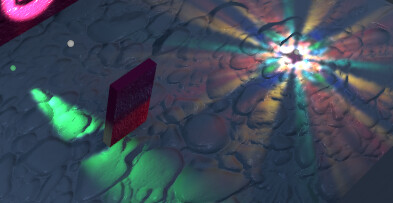
I’m now having some extremely weird bug where my lights receive wrong shadows from other lights… it’s random, seemingly dependent on shader/geometry complexity and the number of samples, though it looks the same as long as the input data doesn’t change. I triple-checked my structures, payload usage, etc, but I can’t figure it out. The code worked fine in OptiX 6. Main part of raygen looks roughly like this:

for (uint i = 0; i < num_lights; i++)
{
	LocalLight lightData = localLights[i];
	ColorData localColorData;
	InitColorData(localColorData);
	if (LightPoint(lightData, pos, normal, inputData, localColorData)) // compute unshadowed lighting
	{
		// Generate shadows
		float shadow = 0;
		bool shadowmaskFalloff = false;
		float lightRadius = lightData.rangeParams.x;
		float3 lightPos = lightData.position;
		int lightSamples = lightData.lightSamples;
		for (int j = 0; j < lightSamples; ++j)
		{

			float3 randomPos = GenRandomPos() * lightRadius + lightPos;

			float3 nndir = normalize(randomPos - worldPos);
			Ray occRay = make_Ray(rayOrigin, nndir, 1, epsilonFloatT(rayOrigin, nndir), length(randomPos - worldPos));
			RayData occData;
			occData.result = 1.0f;

			unsigned int _payloadX = __float_as_uint(occData.result);

			optixTrace( (OptixPayloadTypeID)0, // there is only 1
						root,
						occRay.origin,
						occRay.direction,
						occRay.tmin,
						occRay.tmax,
						0.0f,
						(OptixVisibilityMask)1,
						OPTIX_RAY_FLAG_NONE,
						occRay.ray_type,
						2, // there are 2 ray types total
						occRay.ray_type,
						_payloadX);

			occData.result = __uint_as_float(_payloadX);

			shadow += occData.result;
		}
		shadow /= lightSamples;

		AddColorData(colorData, localColorData, shadow);
	}
}

And the anyhit function is basically:

if (triAlpha == 0.0f)
{
	optixIgnoreIntersection();
	return;
}

optixSetPayload_0( __float_as_uint(0.0f) );
optixTerminateRay();

What happens is that suddenly light 2 may start using shadow from light 1 and so on - if I create another light, it shuffles differently again:

(The green spotlight is wrongly using the colored point light’s shadow)

It feels as if the optixTrace / hit programs are not synchronous (??) and I’m not getting the correct payload…

The payloads are configured like this:

// Only one float4 payload type for now
const int numPayloadValues = 4;
unsigned int basePayloadFlags = OPTIX_PAYLOAD_SEMANTICS_TRACE_CALLER_READ_WRITE | 
								OPTIX_PAYLOAD_SEMANTICS_CH_READ_WRITE | 
								OPTIX_PAYLOAD_SEMANTICS_AH_READ_WRITE | 
								OPTIX_PAYLOAD_SEMANTICS_MS_WRITE | 
								OPTIX_PAYLOAD_SEMANTICS_IS_NONE;
const unsigned int payloadSemantics[numPayloadValues] =
{
	basePayloadFlags,
	basePayloadFlags,
	basePayloadFlags,
	basePayloadFlags
};
OptixPayloadType payloadType = {};
payloadType.numPayloadValues = numPayloadValues;
payloadType.payloadSemantics = payloadSemantics;
OptixModuleCompileOptions moduleCompileOptions = {};
moduleCompileOptions.numPayloadTypes = 1;
moduleCompileOptions.payloadTypes    = &payloadType;

(Basically everything is read-write for now except for IS which I don’t have and MS which never reads)

…I’m only using 1 value out of the declared 4 here. Just in case, I tried forcing numPayloadValues to 1 and it didn’t help.

…unrolling the samples look actually makes it work, but I don’t want to unroll it…
That’s great to hear! That lines up with other experiences we’ve heard about, namely perf going up and explicit buffer copy control being quite convenient.

To your question, if I understand correctly, I believe the answer is yes, INPUT/OUTPUT flags do affect the behavior of map & unmap. For example, if your buffer is OUTPUT, then you presumably need a device->host copy on unmap().


David.

1 Like

Yeah that indeed seems strange based on the code you included. You’re still on the 590 driver I assume? Are you currently testing a Debug build? We’d had some reports of compiler issues with Debug in 590, and if you can manually unroll the samples loop and it starts working, that seems to suggest a compiler bug. If that’s the issue, you could potentially try using an earlier driver, or try switching between PTX and OptiX-IR, or try a Release build, and see if any of those things affect the outcome.

I don’t immediately see any issues with the code. To me it looks like the only thing that could go wrong here and cause the symptoms you see is if the call to LightPoint() filled out a position and color from two different light sources, but I don’t suspect that’s the case, and your unrolling data point seems to rule out that possibility.

This app is a Unity plugin, right? Do debug prints work in your environment? If so, you might be interested in wiring up debug pixel coordinates and a debug output flag, so that you can print out values for a single thread based on a specific pixel you want to check. Might be worth checking the loop indices and light pos & color for each loop iter and see if they match what you expect. If this is a compiler issue, there’s a chance doing this might change the behavior.


David.

1 Like

I’m currently on 576.52, so I can test both 6 and 9 and make sure they match. The build is Release.

So I was banging my head against the wall with this bug for half a day and then my friend who has some compiler development background came to bang his head against the wall with me until he suggested replacing this:

randomPos = GetRandomPos() * lightRadius + lightPos;

with this:

randomPos = GetRandomPos() * localLights[i].rangeParams.x + localLights[i].position;

…and it worked! Our combined theory is that the compiler put lightRadius/lightPos into some registers that were SOMEHOW overwritten down the optixTrace. But luckily it did reload the constants properly if we ask it to explicitly. OptiX6 didn’t have this issue, I can see that the old rtTrace call used less arguments or perhaps the payload registers were implemented differently…

Unrolling the loop also worked (but I couldn’t use it because it needs to be dynamic).

In the CUDA code lightPos/lightRadius are never overwritten anywhere else. LightPoint() only writes localColorData. Just in case I even declared other arguments as const, but it didn’t make a difference.

I’m also still using a pretty ancient CUDA 9.1 haha… just to check if the newer one is smarter, I installed VS 2022 and CUDA 12 on a different machine and tried to rebuild the project there but it looks like the CUDA API has changed a bit and it’s not gonna just compile right away, will need some more time to check it there…

The app is indeed mainly a Unity plugin, although it’s engine-agnostic and I helped a few devs/companies integrate it into their own custom engines. I’m testing it in Unity because of convenience. Somehow I never tried these GPU debug prints, mainly just debugging the same way as any shader… changing stuff and seeing changes or outputting intermediate values and looking at them.


UPDATE: recompiling the kernels using CUDA 12 fixes the bug!

Release notes said “This release has been tested with OptiX IR and PTX generated from CUDA Toolkit 12.0, 12.7 and 12.8. Older toolkit versions should also work, but 12 is recommended.” so I thought it’s OK… now we know that “should” didn’t mean “must”.

2 Likes

Ah excellent, and very good triaging, thank you for the update. I’m glad you are unblocked. Okay so there’s a compiler issue that got fixed along the way somewhere between CUDA 9.1 and CUDA 12 when using OptiX. We are indeed no longer testing CUDA 9, but we can check and see if this is something we can fix. Your theory sounds plausible to me, it’s possible that the issue is a register stomp somewhere.

So yeah debug prints based on clicking a pixel can be really handy, I think it’s worth spending a half hour to wire it up so you have it when you need it. You also might have some success connecting the Nsight Visual Studio Edition debugger. That’s still a bit fragile, so if you have trouble, don’t bang your head on it too long. We are working on it and hope soon to be able to announce and demonstrate improved symbolic debugging in OptiX.


David.

1 Like

Hey @Mr_F, did you happen to check if your mis-compiling raygen gets fixed with a 580 driver? We’re slightly worried that using CUDA 12 could have hid the error without fixing it. Is a repro of the failing state code shareable, publicly or privately?


David.

Hmm, I only tested it with 576 and 591… both worked with the CUDA 12 version.

I’ll try to build a public example this week.

1 Like