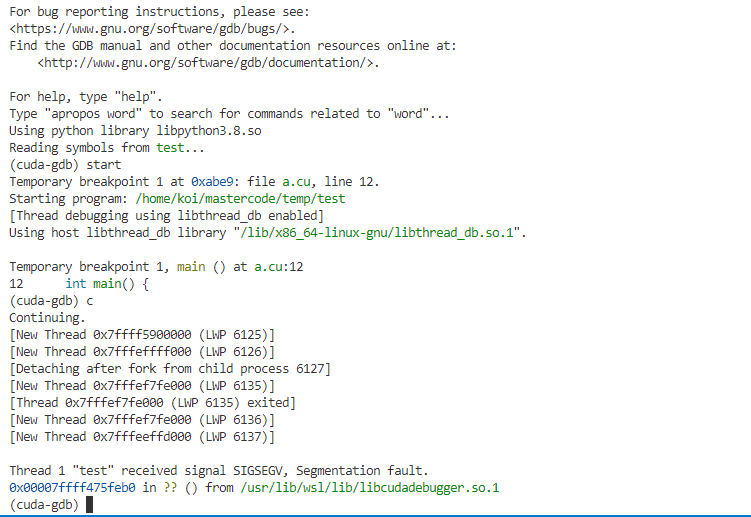
hello everyone, i have some trouble with cuda-gdb, here is my environment:
win 10
Ubuntu 20.04 on wsl2
RTX4080
nvidia driver 527.37 on windows
CUDA Version: CUDA Version: 12.0
cudatoolkit 12.0 on wsl2
I wang to debug cuda file in vscode, here is my launch.json:
{
    // Use IntelliSense to learn about possible attributes.
    // Hover to view descriptions of existing attributes.
    // For more information, visit: https://go.microsoft.com/fwlink/?linkid=830387
    "version": "0.2.0",
    "configurations": [
        {
            "name": "CUDA C++: Launch",
            "type": "cuda-gdb",
            "request": "launch",
            "program": "${workspaceFolder}/test",
            // "debuggerPath":"/usr/local/cuda-12/bin/cuda-gdb",
        },
        {
            "name": "CUDA C++: Attach",
            "type": "cuda-gdb",
            "request": "attach"
        }
    ]
}
I use this command to compile my code :
nvcc -arch=compute_89 -code=sm_89 -g -G -o test a.cu
when cuda-gdb debugging is executed to the kernel function, the following error will be reported
#include <stdio.h>
// nvcc -arch=compute_89 -code=sm_89 -g -G -o test a.cu
__global__ void hello_world(void) {
    int x = threadIdx.x;
    int y = threadIdx.y;
    int z = threadIdx.z;
    printf("GPU: Hello world at %d %d %d\n", x, y, z);
}

int main() {
    dim3 grid(1, 1, 1), block(3, 4, 1);
    hello_world<<<grid, block>>>();
    cudaDeviceReset();
    return 0;
}
Thanks @koi20000 . I tried your code and can debug without issue. From the screenshot, you didn’t set any breakpoint, just press “continue”, the sample should run to end, but you met error.
Can the sample run successfully without cuda-gdb ?
I also tried to run the other code and the same error is still there, running it directly can get the correct result, but using cuda-gdb will report the error
Hi @koi20000
Could you please check that you have enabled the debugging in the registry? (CUDA-GDB )
Make sure this capability is enabled via the registry key >HKEY_LOCAL_MACHINE\SOFTWARE\NVIDIA Corporation\GPUDebugger\EnableInterface set to (DWORD) 1.
Hi @koi20000
Could you also try re-installing the GPU driver (after setting the register key)? If this doesn’t help - would you be able to share your application with us, so we can reproduce this locally?
I updated the cuda driver on windows to 546.29 and still have the error in the previous screenshot.
My code is in the previous REPLY.
Currently I migrated the code to a linux server and it works fine, thanks for your time!