Hello,
facing below error when try to changes the u-boot environment.
pls help me for overcome this issue…

Not asking you to change bootargs… Just the boot_targets…
Boot args has nothing to do with your issue…

Please share the full uart log.
i got the access of the u-boot bootloader environment and run below command
setenv boot_targets
uart_logs.txt (18.3 KB)
pls find the uart logs.
What is the result of printenv after this? I mean if you don’t care about the error log. Does the variable get changed?
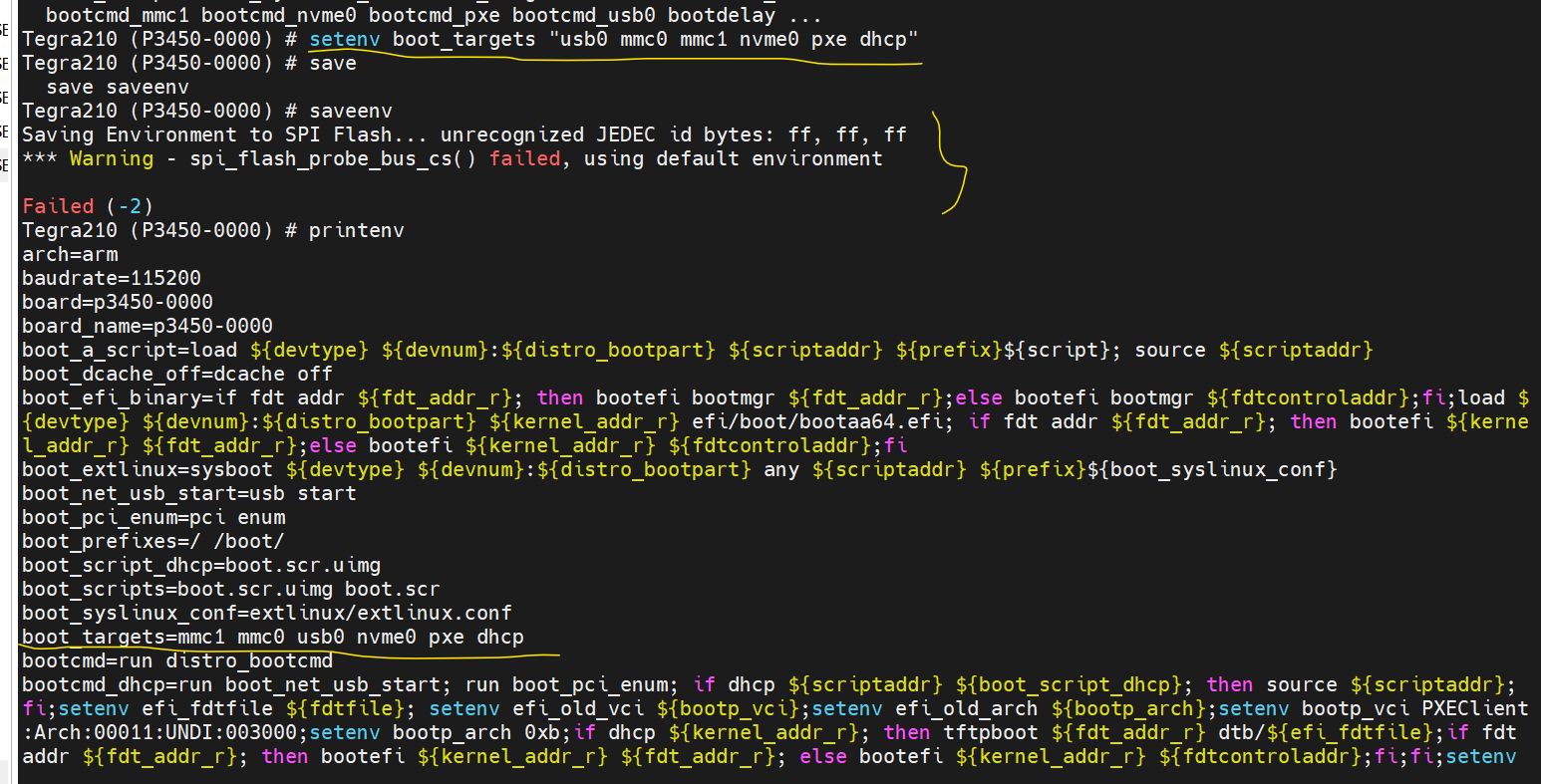
This sounds separate issue. We will take a look.
hi wayneWWW, any updates regarding this
issue
If you didn’t update anything but only run saveenv, will you see Failed(-2)?
ya but i am checking for SPI flash connection but

i am getting this
means is it any need of updation of u-boot?
hi @WayneWWW i need solution for my issue
please help me out here
Hi,
Looks like your uboot version is too old.
There is no QSPI flash on Jetson Nano emmc module. Thus it is wrong the uboot tries to save variables to QSPI.
I tried same command on my Jetson Nano but it didn’t happen the error and env is saved to emmc.
Tegra210 (P3450-0000) # saveenv
Saving Environment to MMC... Writing to MMC(0)... OK
Tegra210 (P3450-0000) #
Thus, please reflash your board with new jetpack release.

hi @WayneWWW ,
now is there any alternative way to this issue, because we already implemented using old version only .
please let us know asap
No, please upgrade the uboot version.
1 Like
hi @WayneWWW ,
I am writing to seek assistance and guidance regarding an issue I encountered after installing the latest JetPack available in the market on my Jetson Nano, After successfully flashing the new JetPack, I noticed that when I run the lsblk command, the mmcblk1 device is not showing up.
[--------------------------------------------------------------------------------------------]
NAME MAJ:MIN RM SIZE RO TYPE MOUNTPOINT
loop0 7:0 0 16M 1 loop
mtdblock0 31:0 0 4M 0 disk
mmcblk0 179:0 0 14.9G 0 disk
├─mmcblk0p1 179:1 0 14.8G 0 part /
├─mmcblk0p2 179:2 0 128K 0 part
├─mmcblk0p3 179:3 0 448K 0 part
├─mmcblk0p4 179:4 0 576K 0 part
├─mmcblk0p5 179:5 0 64K 0 part
├─mmcblk0p6 179:6 0 192K 0 part
├─mmcblk0p7 179:7 0 384K 0 part
├─mmcblk0p8 179:8 0 64K 0 part
├─mmcblk0p9 179:9 0 448K 0 part
├─mmcblk0p10 179:10 0 448K 0 part
├─mmcblk0p11 179:11 0 768K 0 part
├─mmcblk0p12 179:12 0 64K 0 part
├─mmcblk0p13 179:13 0 192K 0 part
└─mmcblk0p14 179:14 0 128K 0 part
zram0 252:0 0 495.4M 0 disk [SWAP]
zram1 252:1 0 495.4M 0 disk [SWAP]
zram2 252:2 0 495.4M 0 disk [SWAP]
zram3 252:3 0 495.4M 0 disk [SWAP]
[--------------------------------------------------------------------------------------------]
I have double-checked the installation process, ensured the correct flashing procedure, and verified that the SD card is properly inserted into the Jetson Nano.
Please file a new topic and I will explain on new post.
1 Like
This topic was automatically closed 14 days after the last reply. New replies are no longer allowed.