as the topic, could some one explain that for me, a little bit confused, there is a limit about the recursion depth and the value is 31. is there any limit for maximum ray trace depth? thank you very much!
Hi @1006740126,
The terms “maximum trace depth” and “recursion depth” mean the same thing in the OptiX Programming Guide. This depth is referring to the depth of recursive calls made from optixTrace() in one of your shader programs. The trace depth controls how much stack space is allocated for ray tracing, since you need one stack frame per recursive call, and so allowing for a high recursion limit might use a lot of stack space. Note that trace depth does not refer to the maximum length of a ray path when path tracing, because you can optionally use an iterative path tracing algorithm, rather than a recursive one. Iterative is recommended when possible because you can have a trace depth of 1 regardless of your path depth, which minimizes your stack usage. An iterative algorithm will call optixTrace() from the raygen program rather than from closest-hit or any-hit. You can find an example of an iterative path tracer in our SDK sample called optixPathTracer.
For completeness, there is a separate “maximum traversal depth” concept in OptiX as well. This refers to the depth of your scene hierarchy, for example if you have instances of instances, your traversal depth might be 3. This is independent of the trace depth, but certainly sounds somewhat similar and might be easy to mix up.
Apologies for the delayed reply, I only just saw your message. If you have more OptiX questions, I invite you to post in the OptiX forum.
–
David.
Hello, I encountered a similar problem. This is my transparent object USD file. I use vscode for development. I imported this USD file and simulated the data, but I encountered a problem. The generated image has shadows. If it is as shown, what should I do? In other forums, I tried rep.settings.set_render_pathtraced() and rep.settings.set_render_rtx_realtime() in the code, but they didn’t work. What should I do? I look forward to your reply. Thank you.


In another forum, someone told me this solution:Yes that is certainly a low “trace depth” number, meaning you are not allowing the light to bounce in and out of the glass enough times before final termination (going black). So you need to increase your trace depth. I am not sure of the command for that.
But I don’t know how to operate it, and I’m eager to get your help and support
Yes, this looks like a problem where the ray tracer stopped following the path through transmissions too early to pick up radiance from behind the glass.
This is a general problem and unrelated to what raytracing API you’re using.
If this is a thick glass model it looks like this when shooting rays along a path through all surfaces:
camera  air   glass    air   glass  air  background
O ----------->|-->|--------->|-->|----------->
Each arrow is one ray segment along a path, so you need at least a path length of 5 rays to pick up radiance from the background (miss shader implementing some environment).
If there is actually some non-emissive geometry behind the glass, like the floor the glasses are placed on, you need one ray segment more.
An iterative path tracer can follow paths with as many ray segments as it likes, there is no recursion involved!
Only when implementing a recursive algorithm (means calling optixTrace not only inside the ray generation program), the mentioned limit of 31 recursive optixTrace calls would come into play.
Since you’re using Omniverse in that bottom screenshot, is the top one also using an Omniverse RTX renderer?
If not and that is an OptiX based renderer, the way to do such iterative path tracers and limiting the path length to some maximum value is shown in many examples. It’s as simple as this while loop inside the integrator:
https://github.com/NVIDIA/OptiX_Apps/blob/master/apps/MDL_renderer/shaders/raygeneration.cu#L129
If both images are using Omniverse, please have a look at the Omniverse render settings for the individual renderers.
There should be settings inside the GUI for the maximum number of bounces for different events (reflections, transmissions, volumes, etc.)
You need to set the maximum number for any bounces (the path length) and the maximum number for transmissions to at least 5 to get through one of your glasses.
When you want to look through multiple glasses standing behind each other, increase the number of bounces accordingly.
https://docs.omniverse.nvidia.com/materials-and-rendering/latest/rtx-renderer_pt.html#path-tracing
Looks like the default maxBounces value is 4 there, which would explain your result perfectly.
For more Omniverse related questions please visit the respective Omniverse developer forums.
For the RTX renderers this one: https://forums.developer.nvidia.com/c/omniverse/platform/rtx-renderer/403

Since you’re using Omniverse in that bottom screenshot, is the top one also using an Omniverse RTX renderer?
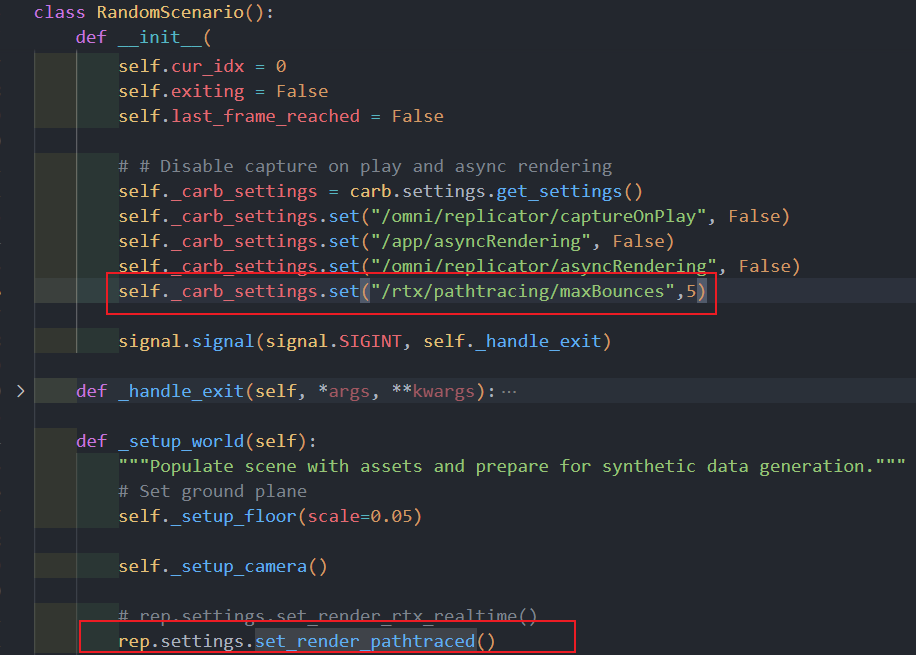
I’m happy to answer you. Yes, the screenshot below is Omniverse isaac sim and the data in the screenshot above is generated using omniverse isaac replicator, and I set up a groundplane in the replicator, as shown in the picture. Because I used vscode to develop directly using scripts, I didn’t use gui to simulate the data. Should I set it like this?
self._carb_settings.set(“/rtx/pathtracing/maxBounces”,5)
But after I tried it, I found that this didn’t work. Do you need to know any other specific information?
I’m not using Omniverse. Please ask these question inside the dedicated Omniverse developer forums.