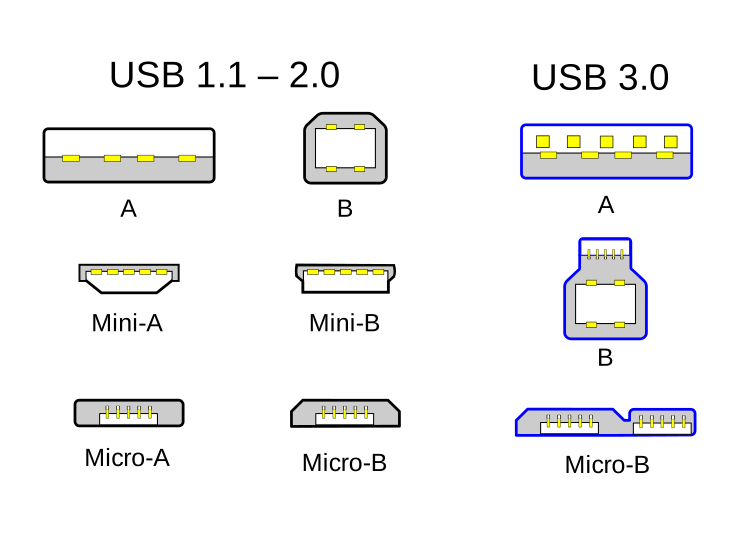
Here is an image of some USB2 and USB3 connectors. Can I verify this is the “Micro-B” for USB3 in the lower right hand corner of the image?
https://upload.wikimedia.org/wikipedia/commons/8/82/USB_2.0_and_3.0_connectors.svg
A recap of an excerpt of one point before going in further, from the “lsusb -tv”:
|__ Port 2: Dev 3, If 0, Class=Vendor Specific Class, Driver=, 5000M
Do look carefully at this:
Class=Vendor Specific Class, Driver=,
What this says is that there are a chain of drivers, and not just USB drivers; USB drivers are for the data pipe, and indeed that pipe can cause the issues you are working on. However, there is also the driver for the device, and not just the USB drivers. This is the “Vendor Specific Class”. So we are trying to confirm or eliminate the USB part of this, and we can look for obvious issues, but if we can’t, then we might also need to look at the vendor specific driver. Perhaps this driver is in the form of a module and might (if a module) show up in “lsmod”. Maybe (or maybe not) this is an issue of that driver in the particular kernel.
We do see that USB is operating at USB 3 speeds (USB3.1 gen. 1, 5000 Mb/s). I kind of wish I knew the source code of the vendor specific driver.
Later we see this in the verbose USB comparison of working and failing cases:
# Working:
USB3.1 Hub
Manufacturer: VIA Labs, Inc.
Speed: 10Gb/s (super+)

# Failing:
4-Port USB 3.0 Hub
Manufacturer: Generic
Speed: 10Gb/s (super+)
Both see the same USB information, but this is for the HUB, not the devices themselves (the HUB shows USB3.1 gen. 2 speeds of 10 Gb/s, with two devices at USB3.1 gen. 1 speed, 5 Gb/s; this is how it should be, USB so far is functioning correctly).
Just a note about vendor specific classes: There are a few “standardized” devices which USB always has drivers for, e.g, certain human interface devices (keyboards, mice). A vendor specific class implies the driver itself is something custom talking through USB. Those “standardized” device drivers, although they ship with USB drivers, are not technically part of USB itself. For example, although a keyboard is a standard device and USB has a driver for it, there is still a device driver which talks through the USB pipe, and this is just convenience that it is present since it is so widely used. Your vendor specific class can in fact be an ordinary FTDI driver (this is still vendor specific), but not show up as using the more common FTDI driver for the device simply because of customized information in the board itself; the driver could be nothing more than a udev rule renaming it such that the standard FTDI driver could then be used. The way this board works I’m thinking it is not just a renamed FTDI driver, but the vendor specific driver might contain that code in some hidden way. The reason I’m telling all of this is that we really need to know more about the vendor specific driver if we cannot find the fault in the USB driver (which is not the end device driver).
If the udev rules from earlier do nothing more than change file permissions, then we don’t have to worry about a simple rebranding, and this probably is not using the FTDI UART driver even if it has a lot in common with it.
The AI description is good, it tells me it isn’t the usual serial device driver IOCTL() calls for configuring. It also verifies the vendor specific class driver is not a rebranded FTDI UART driver. It also gives me an idea for loopback testing. If this doesn’t show anything, then it might be necessary to look at the source code of the D3XX driver. In this regard, do you see what is probably the driver for this device under either of these two commands (it’ll show more drivers than just this one, you’ll need to find yours) on the working and failing cases (if the config.gz feature is not on for the other system ignore this; not all Linux systems export config.gz)?
zcat /proc/config.gz | grep 'D3'zcat /proc/config.gz | grep 'FTDI'
This file shows all driver symbols, and not just modules. Also, if this is a module, then you might find the driver module under “lsmod”. Let me know if you can identify (A) the symbol for the driver, or (B) the module name. Then, let me know where the driver came from such that I can maybe download it as source code, or at least the documentation if not the source code.
Regarding loopback, if you have some dummy data, and assuming this has more than one “channel”, is it possible to directly wire one channel to the other such that one sends to the other and you can send data from the Jetson and compare the output to what the other channel sees? If you can do this it removes behavior from any cabling beyond the USB cable, and might isolate by showing loopback also loses data, or that loopback does not and thus the issue is at the other end of the data source/sync.
Also, have you been able to look with a logic analyzer (not always available) to see if the data being sent is reaching the FTDI device? I’m assuming it probably is, but it is worth asking. Loopback itself removes the FPGA from the test. Behavior suggests that loopback will also fail the same way as the FPGA, but we don’t really know unless we can run loopback.