Thanks for your help.
But It doesn’t seem to work.
By the way, my capture card is YUAN SC710N1.
Then I use HDMI to connect my PC as input of the capture card. And I use V4L2 to capture my PC screen on Orin NX screen. Before I modified the RDMA configuration, the monitor can display from Orin NX.
The display drivers and nvidia_p2p module have been loaded.
Is RDMA enabled?
Because the image transmission delay has not improved, I’m confused.
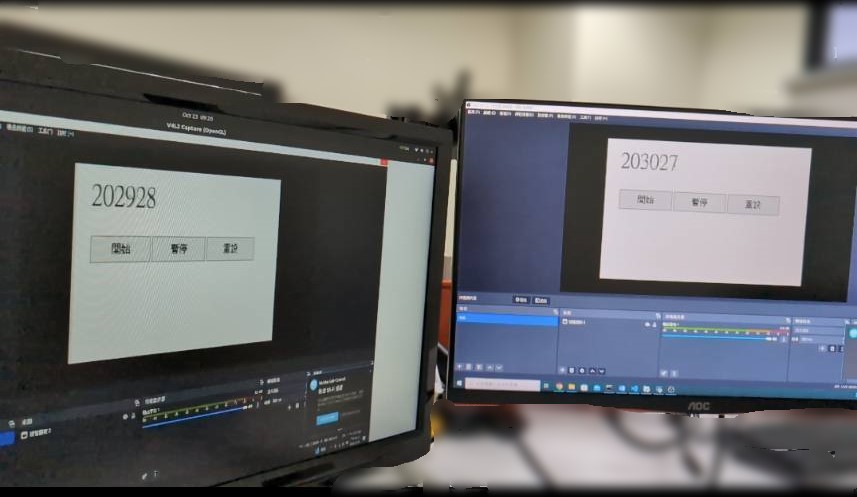
Here is my testing method :
I use V4L2 to capture my PC HDMI output on Orin NX.
PC ----> HDMI ----> capture card ----> PCIe ----> Orin NX ----> HDMI ----> monitor 1
PC ----> Displayport ----> monitor 2
Then my PC run 1ms timer and I take photos to compare the time difference between two monitor. I fond that the time difference almost unchanged when RDMA is enabled.
Is there a better way to test the transmission delay?
I use my PC as HDMI input to connect capture card.
Then use V4L2 to capture image from PC on ORIN. So I can display my PC screen on ORIN.
Left monitor : Orin NX
Right monitor : x86 PC
But We are trying to use the API that supports RDMA provided by YUAN.
Then I will test this use case again. And We will confirm whether we are not using YUAN’s API for optimization.