- Overview and Goal
Using Isaac Sim 5.0.0, I am aiming to implement an object that mimics a seal or sticker, possessing both the properties of flexible deformation (paper-like behavior) and adhesion to other objects.
Currently, I have successfully achieved the flexible deformation property, but I am facing a challenge in effectively simulating the adhesion/stickiness property (Adhesion) when the object comes into contact with other surfaces. - Environment Information
Simulator: NVIDIA Isaac Sim 5.0.0
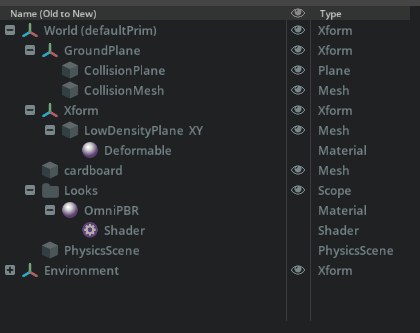
Object Setup: Please refer to the attached image. (Configured as a Soft Body/Deformable Body)
OS: Windows 11 - Problem Details and Attempts Made
Problem:
The object is set up as a deformable soft body. However, when it is brought into contact with another surface (e.g., a flat plate), the expected adhesion/stickiness does not occur, and the object easily slides off or separates.
Attempts Made:
Adjustment of Adhesion Parameters:
I have widely adjusted parameters related to Adhesion (e.g., Static Friction, Dynamic Friction, or specific Adhesion properties) within the (e.g., Rigid Body Component/PhysX Material) settings. However, these adjustments have had little to no noticeable effect on creating sustained stickiness. - Questions
To successfully replicate the persistent adhesion required for a sticker-like Deformable Body, what approaches or parameter adjustments are recommended within Isaac Sim and PhysX settings?
I would be grateful for guidance on the following specific points:
The recommended settings for applying a persistent adhesive property to a Deformable Body.
Any specific parameters for adhesion/stickiness beyond standard friction coefficients, and how to configure them.
Whether the combination of “deformation” and “adhesion” is technically feasible with the current PhysX engine, or if there are any known limitations.
Thank you for your time and assistance.


Hi @kazushi-uchida, thank you for posting your question. The materials property should be able to get the object to be more sticky. I will try to reproduce this and give you a solution. In the meantime, can you try to increase the make the physics timestep smaller? It helps with making simulation fidelity higher for thin deformable objects.
You can do that by changing the Timesteps Per Second in physics scene to 120 or 240.
Thank you for the suggestion.
I’ve tried increasing the Timesteps Per Second to 240 as you suggested, but unfortunately, I haven’t quite achieved the desired stickiness yet.
Based on the settings in the attached image, I suspect the parameters for Adhesion (10000.0) and Cohesion (10000.0) are directly related to the sticking property.
Therefore, I adjusted these values, but I was unable to reproduce the adhesion.
I look forward to hearing about the solution once you have been able to reproduce and resolve the issue.

@kazushi-uchida based on some experiments, it seems like the best solution is to use ClothPrim rather than deformables. Here is a video of what I got to work with ClothPrim + setting the Particle Material.
The script to create this is:
# Copyright (c) 2022-2024, NVIDIA CORPORATION. All rights reserved.
#
# NVIDIA CORPORATION and its licensors retain all intellectual property
# and proprietary rights in and to this software, related documentation
# and any modifications thereto. Any use, reproduction, disclosure or
# distribution of this software and related documentation without an express
# license agreement from NVIDIA CORPORATION is strictly prohibited.
#

from isaacsim import SimulationApp

# Create simulation app (not headless so we can see the cloth)
simulation_app = SimulationApp({"headless": False})

from isaacsim.core.api import World
from isaacsim.core.api.materials.particle_material import ParticleMaterial
from isaacsim.core.prims import SingleClothPrim, SingleParticleSystem
from isaacsim.core.api.objects import DynamicCuboid
from pxr import Gf, UsdGeom, UsdPhysics
from omni.physx.scripts import deformableUtils, physicsUtils
import numpy as np

# Create world with GPU dynamics enabled
my_world = World(stage_units_in_meters=1.0, backend="torch", device="cuda")
print("Creating 1cm x 1cm cloth sheet with GPU dynamics enabled")

# Add default ground plane
my_world.scene.add_default_ground_plane()

# Add a cube under the cloth
cube = my_world.scene.add(
    DynamicCuboid(
        prim_path="/World/Cube",
        name="cube",
        position=np.array([0.0, 0.0, 0.5]),  # Position under the cloth
        size=0.5,  # 5mm cube
        color=np.array([0.8, 0.3, 0.3]),  # Red color
    )
)

# Get the stage
stage = simulation_app.context.get_stage()

# Create revolute joint between World and Cube
joint_path = "/World/CubeJoint"
joint_prim = UsdPhysics.RevoluteJoint.Define(stage, joint_path)

# Set the bodies for the joint (World is body0, Cube is body1)
joint_prim.CreateBody0Rel().SetTargets(["/World"])
joint_prim.CreateBody1Rel().SetTargets(["/World/Cube"])

# Set the joint axis (Z axis for vertical rotation)
joint_prim.CreateAxisAttr().Set("X")

# Set the joint anchor point at the cube's center
joint_prim.CreateLocalPos0Attr().Set((0.0, 0.0, 0.6))
joint_prim.CreateLocalPos1Attr().Set((0.0, 0.0, 0.0))

# Add angular drive with damping and target velocity
drive = UsdPhysics.DriveAPI.Apply(joint_prim.GetPrim(), "angular")
drive.CreateTargetVelocityAttr().Set(10.0)  # Target velocity: 30 rad/s
drive.CreateDampingAttr().Set(100.0)  # Damping: 100

print("Revolute joint created with angular drive (damping=100, target_velocity=30)")

# Create environment
env_path = "/World/Env"
env = UsdGeom.Xform.Define(stage, env_path)

# Create cloth mesh geometry
# For a 1cm x 1cm cloth (0.01m x 0.01m in meters)
cloth_path = env.GetPrim().GetPath().AppendChild("cloth")
plane_mesh = UsdGeom.Mesh.Define(stage, cloth_path)

# Create triangle mesh - using 20x20 resolution for 1cm cloth
plane_resolution = 20
plane_width = 0.1  # 1 cm in meters
tri_points, tri_indices = deformableUtils.create_triangle_mesh_square(
    dimx=plane_resolution,
    dimy=plane_resolution,
    scale=plane_width
)

# Set mesh geometry
plane_mesh.GetPointsAttr().Set(tri_points)
plane_mesh.GetFaceVertexIndicesAttr().Set(tri_indices)
plane_mesh.GetFaceVertexCountsAttr().Set([3] * (len(tri_indices) // 3))

# Configure the cloth mesh transform
physicsUtils.setup_transform_as_scale_orient_translate(plane_mesh)
# Position the cloth at (0, 0.05, 0.05) - slightly above ground
physicsUtils.set_or_add_translate_op(plane_mesh, Gf.Vec3f(0.0, 0.0, 0.75))
# Add a slight rotation for visual interest
physicsUtils.set_or_add_orient_op(plane_mesh, Gf.Quatf(0.965925826, Gf.Vec3f(0.0, 0.0, 0.2588190451)))

# Create particle system
particle_system_path = env.GetPrim().GetPath().AppendChild("particleSystem")
particle_material_path = env.GetPrim().GetPath().AppendChild("particleMaterial")

# Create particle material with drag, lift, and friction for aerodynamic effects
particle_material = ParticleMaterial(
    prim_path=str(particle_material_path),
    drag=0.1,
    lift=0.3,
    friction=2.0,
    adhesion=100.,
    particle_adhesion_scale=1,
    adhesion_offset_scale=0.001, # non-zero values needed to set the surface offset from which adhesion forces take effect
    gravity_scale=0.1,
)

# Calculate particle offsets based on resolution
radius = 0.5 * (plane_width / plane_resolution)
restOffset = radius
contactOffset = restOffset * 1.5

# Create particle system
particle_system = SingleParticleSystem(
    prim_path=str(particle_system_path),
    simulation_owner=my_world.get_physics_context().prim_path,
    rest_offset=restOffset,
    contact_offset=contactOffset,
    solid_rest_offset=restOffset,
    fluid_rest_offset=restOffset,
    particle_contact_offset=contactOffset,
)

# Create cloth using SingleClothPrim API
cloth = SingleClothPrim(
    name="cloth_1cm",
    prim_path=str(cloth_path),
    particle_system=particle_system,
    particle_material=particle_material,
    particle_mass=0.00001,  # Very light for 1cm cloth
    stretch_stiffness=10000.0,
    bend_stiffness=200.0,
    shear_stiffness=100.0,
    spring_damping=0.2,
    self_collision=True,
    self_collision_filter=True,
)

# Add cloth to the scene
my_world.scene.add(cloth)


print(f"Cloth created with SingleClothPrim API")
print(f"Particle radius: {radius} m, contact offset: {contactOffset} m")

# Reset the world to initialize physics
my_world.reset()

# Main simulation loop
print("Starting simulation - cloth should fall and interact with physics")
while simulation_app.is_running():
    # Step the simulation
    my_world.step(render=True)

# Cleanup
simulation_app.close()
I was able to successfully verify the functionality, thanks to your assistance. I really appreciate your advice.
1 Like