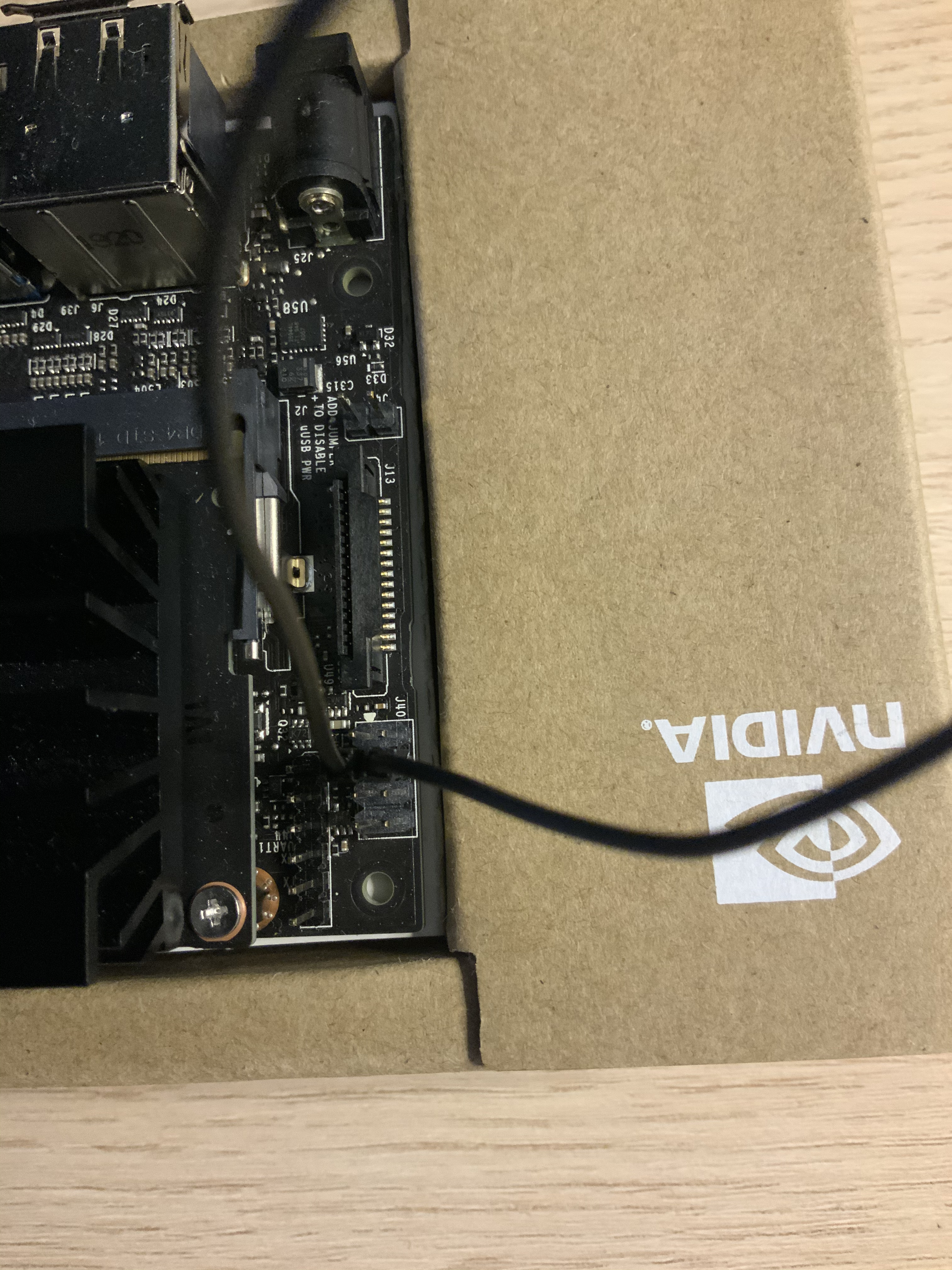
Hi,
I still get the same issue. Just double checking that I’m supposed to be jumpering FRC pins?
Hi,
I still get the same issue. Just double checking that I’m supposed to be jumpering FRC pins?
You can use ‘lsusb’ command to check on your host machine.
The Jetson module is in Force Recovery mode if you see the message:
Bus <bbb> Device <ddd>: ID 0955: 7f21 Nvidia Corp.
Hi, I’ve just checked that and it appears fine. What should I do then?
Then you can start flash image by manually:
$ sudo ./ flash.sh jetson-nano-qspi-sd mmcblk0p1
Or run sdkmanager to flash image and install sdk components.
I don’t think you understand… I’ve already tried those things.
Using that command tells me that there is no command called that.
Running sdkmanager to flash the image gets stuck at 99.9% during the flash stage.
You check your “Linux_for_Tegra” folder have “flash.sh” script, right?
Then you can use “flash.sh” command to flash by manually.
Are you still get command not found when you use “flash.sh” command?
I have already checked that, the flash.sh file is there and I still get that issue.
Hi,
Please do not use sdkmanager at this moment. SDKmanager also uses the flash.sh tool to flash your board.
Just use the command $ sudo ./ flash.sh jetson-nano-qspi-sd mmcblk0p1
You missed the “.sh” in your previous command so it gives out error. Please use the correct command and share the log here.
We are not asking whether flash.sh exists or not. We are asking you to use it.
Also, Your previous log is only a partial one. We need the full log.
If you don’t know whether flash.sh works fine or not, please also paste the log.
Thanks.
Hi, I think the issue of using that command solved when I quit sdkmanager. I’ve got these errors from my console though:
###############################################################################
###############################################################################
Error: probing the target board failed.
Make sure the target board is connected through
USB port and is in recovery mode.
Would you like me to connect my computer to device by USB to USB and power the device by micro-USB?
Yes, when you are flashing the board, you need to connect the micro usb cable from host to your jetson nano and put nano into recovery mode.
I’m lost. I’m already connecting the USB (host) to device (micro-USB). Those are the only two connections. I’m using FRC pins and I get the same error message as per my previous post.
So back to comment #22, what is your result of command “lsusb” on your host after you put device into recovery mode?
Your host needs to see ID 0955: 7f21 Nvidia Corp to make flash start.
I get ID 0955: 7f21 when I use that command.
Are you using a VM on your host? I mean is your ubuntu host a VM environment?
I have Ubuntu 18.04 dual booted as my host
I just read the whole thread again and found lots of mismatch.
First, if your module has a sdcard slot on it you need to use the first command to flash. Otherwise, you need to use the emmc one.
sudo ./ flash.sh jetson-nano-qspi-sd mmcblk0p1 → this is for sdcard module.
sudo ./ flash.sh jetson-nano-emmc mmcblk0p1 → this command is for emmc module.
Back to your comment in #14, you chose the emmc module to flash and the flash process starts w/o your latest error. It is weird to use that command if the board has sdcard slot.
This makes me wondering what happened in your previous setup that the host is able to flash.
Could you take a picture of your board and how you connect your board now?
BTW, comment #15 from you is the most important one but it seems being cut so we cannot tell why it didn’t flash successfully either.
It looks no problem. Not sure why it failed to start the flash process.
Your board was able to start the flash process yesterday. Did you remember what was the hardware setup at then?
Also, just a weird test …
Are you able to start the flash process if you use the command to flash emmc board?